audio service not working, dependency service does not exist...

cybermum

New member
Local time
2:49 PM
Messages
16
hi
can anyone help?
i have a medion akoya laptop running windows 7 64 bit
i have no audio. if i click troubleshoot problems it says the audio service is not running
it says the windows audio and endpoint builder arent working
if i go into services, windows audio is set to automatic but its not on, when i click start it says "error:1075 the dependency service does not exist or has been marked for deletion"
ive been going round in circles for ages!
also, i cant seem to play videos from youtube, but ones from other sites play (without audio)
any ideas please?
any help is appreciated, i havent had volume for months!
 

My Computer My Computer

At a glance

windows 7 x64 sp1
Computer type
PC/Desktop
OS
windows 7 x64 sp1
Hiya pal ... filling in your system specs in full would help immensely. There are many models in the medion akoya range Medion Akoya Drivers so It seems that you maybe don't have the latest drivers installed, but we cant steer you in the right direction without giving us the correct information ;)
 

My Computer My Computer

At a glance

Windows 7 Ultimate 64bitAMD Phenom Quad core 9950 black edition16Gb2x XFX Radeon 5850
Computer type
PC/Desktop
Computer Manufacturer/Model Number
Self Built
OS
Windows 7 Ultimate 64bit
CPU
AMD Phenom Quad core 9950 black edition
Motherboard
Gigabyte
Memory
16Gb
Graphics Card(s)
2x XFX Radeon 5850
Sound Card
PCI Express X-Fi Titanium / Logitech G35
Monitor(s) Displays
2x HP 2410i
Screen Resolution
1920x1080
Hard Drives
2x 500Gb Seagate
1x 300Gb Seagate
1x 1Tb Seagate
2x 1Tb Hitatchi
PSU
Jean Tech Storm 700W
Case
Cooler Master COSMOS S
Cooling
Akasa Evo Blue Pro
Keyboard
Logitech G15
Mouse
Mad Catz M.M.O. 7
Internet Speed
12mb
thanks for responding its a:
medion akoya e6214 notebook
windows 7 64 bit sp1 home premium edition
intel core i3cpu [email protected]
4gb memory
2 ram i think
im not very computer savvy!

i hadnt installed anything new when the audio went
i had had a bsod issue previously (happened in the night) but it was that long ago i cant remember what we did to fix it.
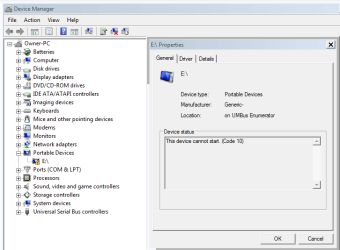
also, just discovered in device manager under portable devices theres an e drive showing a yellow triangle and when i click properties it says "This device cannot start. (Code 10)" device type : portable devices manufacturer: generic location:on UMBus Enumerator

also, i have n system restore points, the windows repair disc doesnt work and i have no windows 7 install disc and cant burn one as my disc drive wont burn dvds either lol :(
 

My Computer My Computer

At a glance

windows 7 x64 sp1
Computer type
PC/Desktop
OS
windows 7 x64 sp1

My Computer My Computer

At a glance

Windows 7 Ultimate 64bitAMD Phenom Quad core 9950 black edition16Gb2x XFX Radeon 5850
Computer type
PC/Desktop
Computer Manufacturer/Model Number
Self Built
OS
Windows 7 Ultimate 64bit
CPU
AMD Phenom Quad core 9950 black edition
Motherboard
Gigabyte
Memory
16Gb
Graphics Card(s)
2x XFX Radeon 5850
Sound Card
PCI Express X-Fi Titanium / Logitech G35
Monitor(s) Displays
2x HP 2410i
Screen Resolution
1920x1080
Hard Drives
2x 500Gb Seagate
1x 300Gb Seagate
1x 1Tb Seagate
2x 1Tb Hitatchi
PSU
Jean Tech Storm 700W
Case
Cooler Master COSMOS S
Cooling
Akasa Evo Blue Pro
Keyboard
Logitech G15
Mouse
Mad Catz M.M.O. 7
Internet Speed
12mb
ive installed it but nothing has changed.
 

Attachments

  • Capture.PNG
    Capture.PNG
    9.2 KB · Views: 7

My Computer My Computer

At a glance

windows 7 x64 sp1
Computer type
PC/Desktop
OS
windows 7 x64 sp1
any ideas or suggestions?
im not even sure what the E drive is/where its come from?
 

Attachments

  • Capture2.PNG
    Capture2.PNG
    16.5 KB · Views: 0
Last edited:

My Computer My Computer

At a glance

windows 7 x64 sp1
Computer type
PC/Desktop
OS
windows 7 x64 sp1
Back
Top