audio stoped working

Blindkilla

New member
Local time
7:53 PM
Messages
10
For some reason my audio stopped working all of a sudden. I have the right drivers installed yet it's not working.

I've googled, ran troubler shooters and I've got no clue as to what is wrong :S
 

My Computer

OS
Windows 7 Ultimate x64
Check in services,maybe Windows Audio service stoped working.Start it,if it's stoped
 

My Computer

Computer type
PC/Desktop
Computer Manufacturer/Model Number
Custom Build
OS
Windows 10 Pro x64
CPU
Intel Core i5 4440 @Stock
Motherboard
Gigabyte Z97 D3H
Memory
4 x 4GB HyperX Fury DDR3
Graphics Card(s)
Gigabyte GTX 1050Ti O4G
Sound Card
Integrated
Monitor(s) Displays
Dell P2417H
Screen Resolution
1920 x 1080
Hard Drives
Samsung EVO 850 120GB / Toshiba DT01ACA050 1TB 7200prm 32MB
PSU
Riotoro Onyx 750W
Case
NZXT H500 Black-Red
Cooling
Stock CPU + NZXT 120mm + 2x120mm red fans
Keyboard
Modecom Volcano Lanparty
Mouse
Asus ROG Gladius / DeepCool E-Pad Plus
Internet Speed
DOCSIS 50/3 Mbit
Browser
Google Chrome
Other Info
Asus K55VJ(i5 3210M, GT635M / 2GB, 8GB DDR3, 500GB HDD)
Just checked and it is started.

So still no audio :(
 

My Computer

OS
Windows 7 Ultimate x64
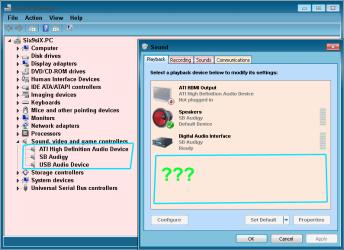
Did U installed lately some software that uses audio?
Happened to me when installed some video converter it messed up audio and installed its own audio driver as default driver.
Resulting in no sound.
Check in pic if Ur default s.driver is default.
 

Attachments

  • Audio.png
    Audio.png
    18 KB · Views: 4

My Computer

Computer type
PC/Desktop
Computer Manufacturer/Model Number
696
OS
7 Ultimate x64 sp1
CPU
Intel i5-4690K
Motherboard
GA Z97X Gaming 5
Memory
16Gb HyperX fury
Graphics Card(s)
R9-270x 2Gb
Sound Card
On Board
Monitor(s) Displays
2443NW
Screen Resolution
1920x1200
Hard Drives
WD5000 -
WD5001 -
WD1002
PSU
Cft-650-14cs
Case
Very Big Case
Cooling
stock
Keyboard
G11
Mouse
Logitech
Internet Speed
Adsl
Browser
FF
Other Info
RWD
Back
Top