Audio too loud on earphones

MokonaBuny

New member
Local time
1:08 AM
Messages
4
I upgraded to windows 7 but every time I use my earphones I need to keep my volume at level 1. If I go even higher then level 10 the audio is really loud.
I'm using Realtek HD.
 

My Computer My Computer

At a glance

Windows 71GB
Computer Manufacturer/Model Number
Dell Vostro 200
OS
Windows 7
Memory
1GB
Sound Card
Realtek HD
I upgraded to windows 7 but every time I use my earphones I need to keep my volume at level 1. If I go even higher then level 10 the audio is really loud.
I'm using Realtek HD.

MokonaBuny

We really could use some more information abt your system. Please fill in the system specs (lower left corner). Also is your OS 32bit or 64? Clean install of upgrade?

It might be as somple as a setting like room eq, etc in sound cpanel but without info im in the dark

Ken
 

My Computer My Computer

At a glance

Win 8 Release candidate 8400[email protected]4 gigsNvidia 9600M
Computer Manufacturer/Model Number
HP Pavillion dv-7 1005 Tx
OS
Win 8 Release candidate 8400
CPU
[email protected]
Memory
4 gigs
Graphics Card(s)
Nvidia 9600M
Sound Card
HD built-in
Monitor(s) Displays
17" Wxga
Screen Resolution
1440x900
Cooling
none
Internet Speed
45Mb down 5Mb up
Processor: Intel (R) Core (TM)2 CPU 4300 @ 1.80GHz 1.80 GHz
Installed memory (RAM) 1.00 GB
System Type: 32-but Operating System
Im using a Dell Vostro 200
I upgraded to Windows 7 from Windows XP.
 

My Computer My Computer

At a glance

Windows 71GB
Computer Manufacturer/Model Number
Dell Vostro 200
OS
Windows 7
Memory
1GB
Sound Card
Realtek HD
Processor: Intel (R) Core (TM)2 CPU 4300 @ 1.80GHz 1.80 GHz
Installed memory (RAM) 1.00 GB
System Type: 32-but Operating System
Im using a Dell Vostro 200
I upgraded to Windows 7 from Windows XP.

MB

Thanks for filling in some of your sys specs. what sound card? try going to control panel>sound>properties> uncheck anythng that raises or changes volume. If you told us what card or gave us a snapshot we would be able to help more

Ken
 
Last edited:

My Computer My Computer

At a glance

Win 8 Release candidate 8400[email protected]4 gigsNvidia 9600M
Computer Manufacturer/Model Number
HP Pavillion dv-7 1005 Tx
OS
Win 8 Release candidate 8400
CPU
[email protected]
Memory
4 gigs
Graphics Card(s)
Nvidia 9600M
Sound Card
HD built-in
Monitor(s) Displays
17" Wxga
Screen Resolution
1440x900
Cooling
none
Internet Speed
45Mb down 5Mb up
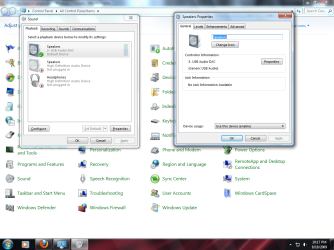
Here is a screen shot
 

Attachments

  • Sound Card.png
    Sound Card.png
    96.4 KB · Views: 848

My Computer My Computer

At a glance

Windows 71GB
Computer Manufacturer/Model Number
Dell Vostro 200
OS
Windows 7
Memory
1GB
Sound Card
Realtek HD

My Computer My Computer

At a glance

Win 8 Release candidate 8400[email protected]4 gigsNvidia 9600M
Computer Manufacturer/Model Number
HP Pavillion dv-7 1005 Tx
OS
Win 8 Release candidate 8400
CPU
[email protected]
Memory
4 gigs
Graphics Card(s)
Nvidia 9600M
Sound Card
HD built-in
Monitor(s) Displays
17" Wxga
Screen Resolution
1440x900
Cooling
none
Internet Speed
45Mb down 5Mb up
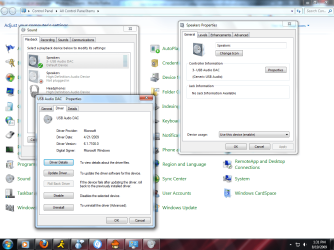
Like this?
 

Attachments

  • Sound.png
    Sound.png
    103.6 KB · Views: 439
  • Sound2.png
    Sound2.png
    109.9 KB · Views: 375

My Computer My Computer

At a glance

Windows 71GB
Computer Manufacturer/Model Number
Dell Vostro 200
OS
Windows 7
Memory
1GB
Sound Card
Realtek HD
I also have the same problem. I found a registry tweak for Win XP for this issue, but the same keys do not exist in Windows 7. I just bought some 5.1 "Mentor" headphones which has made it a little worse, since they are a bit louder and there is no volume adjustment on the cord like my old ones. If I put the volume any higher than 4, my ears would probably bleed and the neighbor's dog would start barking. At level 10 I might blow the speakers or the windows. :(
 

My Computer My Computer

At a glance

Windows 7 UltimateIntel Core 2 Duo E8400 - Wolfdale4GB PC2-6400
Computer Manufacturer/Model Number
Home built :)
OS
Windows 7 Ultimate
CPU
Intel Core 2 Duo E8400 - Wolfdale
Motherboard
Gigabyte EP45-UD3P
Memory
4GB PC2-6400
Monitor(s) Displays
ASUS VH242H - 24" with HDMI
Screen Resolution
1920x1080
Internet Speed
Time Warner - 12Mb down, 375 up
Same problem

I run windows 7 64 bit pro on both my desktop and laptop. I have the exact same problem. I am still looking for a solution that is not "user error."
 

My Computer My Computer

At a glance

Windows 7
OS
Windows 7
Did you try reinstalling the drivers?
 

My Computer My Computer

At a glance

Windows 7 Ultimate x64AMD Phenom II x6 1100T @ 4.0 GHZ4GB Corsair XMS DDR3 1600MHzMSI Twin Frozr GTX 560 Ti
Computer Manufacturer/Model Number
Custom Build
OS
Windows 7 Ultimate x64
CPU
AMD Phenom II x6 1100T @ 4.0 GHZ
Motherboard
MSI 890FX-GD65
Memory
4GB Corsair XMS DDR3 1600MHz
Graphics Card(s)
MSI Twin Frozr GTX 560 Ti
Sound Card
Asus Xonar Essense STX
Monitor(s) Displays
23" 1080p LG LCD Flatscreen Panel
Screen Resolution
1920x1080 @ 60Hz
Hard Drives
1 x 120 GB OCZ Agility 2 SSD
1 x 500 GB WD Caviar Black 7200 RPM HDD
1 x 250 GB Maxtor OneTouch external USB Flash HDD
PSU
Corsair TX850W
Case
Antec 900
Cooling
4 case fans, 1xZalman 9500 CPU Heatsink
Keyboard
Logitech G110 Gaming Keyboard
Mouse
Razer Deathadder 3500DPI Infrared Gaming Mouse
Other Info
Sennheiser HD555 Headphones with Zalman Mic
You never did say what earphones you have. That may provide a clue as to the problem.
 

My Computer My Computer

At a glance

Vista 64 bit and 32 bit (SP2)Intel(R) Core(TM)2 Duo Processor T9400 (2.53 GHz4GB DDR2 System Memory (2 Dimm)512 MB NVIDIA GeForce 9600M GT
Computer Manufacturer/Model Number
HP Pavillion dv5t (generation 1)
OS
Vista 64 bit and 32 bit (SP2)
CPU
Intel(R) Core(TM)2 Duo Processor T9400 (2.53 GHz
Memory
4GB DDR2 System Memory (2 Dimm)
Graphics Card(s)
512 MB NVIDIA GeForce 9600M GT
Monitor(s) Displays
15.4" diagonal WSXGA+ High-Definition HP BrightView Widescre
Screen Resolution
1680 x 1050
Hard Drives
320GB 5400RPM SATA Hard Drive with HP ProtectSmart Hard Drive Protection
Keyboard
Built-in HP
Mouse
Built in - Synaptics TouchPad V6.5 on PS/2 Port
Internet Speed
Max
Other Info
~ Intel Next-Gen Wireless-N Mini-card w/Bluetooth ~ Blu-Ray ROM DVD+/-R/RW ~ Integ. HDTV Hybrid Tuner ~ 12 Cell Battery ~ MS Office (Home Premium) 2007 ~
Trust me, it is not the earphones. I have tried using Logitech USB earphones and old fashioned plug it into the jack earphone. I also have the same problem my my dell laptop, as I do on my PC. All sound drivers have been uninstalled and reinstalled multiple times to try to fix this problem. It is very frustrating.
 

My Computer My Computer

At a glance

Windows 7
OS
Windows 7
All sound drivers have been uninstalled and reinstalled multiple times to try to fix this problem. It is very frustrating.
 

My Computer My Computer

At a glance

Windows 7
OS
Windows 7
Forgive my narrow perspective, but I fail to see the problem. Every headset that I have owned has it's own volume control, which is capable of reducing volume to any degree desired. If the problem is global, then you can reduce the volume of the OS itself (not to mention that most apps with sound have their own volume controls also). My sound card also has it's own volume control, and between all of these, it is only necessary to find a balance between them that fits all conditions. Actually, I like my headset to have extra volume available, so that I can lay them on the bed beside me when watching a movie, rather than being forced to always wear them.

All of this aside, you need to be more specific about your hardware and issue than you have been, to be given info more relevant to your problem.

 

My Computer My Computer

At a glance

W7x64 Pro, SuSe 12.1/** W7 x64 Pro, XP MCEPhenom II 1090T w/Noctua NH-D14 /**4400+ X2 w...2 x 2GB Patriot PGS34g1600LLKA/**4x1GB Corsai...EVGA GTX460 SC/**EVGA 8800GTS
Computer Manufacturer/Model Number
DIY
OS
W7x64 Pro, SuSe 12.1/** W7 x64 Pro, XP MCE
CPU
Phenom II 1090T w/Noctua NH-D14 /**4400+ X2 w/CM Hyper TX 3
Motherboard
ASRock 890FX Deluxe 4/**A8N-SLI
Memory
2 x 2GB Patriot PGS34g1600LLKA/**4x1GB Corsair VS
Graphics Card(s)
EVGA GTX460 SC/**EVGA 8800GTS
Sound Card
Asus Xonar D2X/**Xonar D1
Monitor(s) Displays
Acer X233H, Dell E152FPc /**LG M237-WD
Screen Resolution
1920x1080 & 1024x768/**1980x1080
Hard Drives
WDC 2TB, 1.5TB, 1TB, 500GB,Seagate 500GB , Maxtor 80GB /**500GB Seagate & WDC 1TB Black
PSU
CM RS600 w/ APC BX1000G/**Antec 500 TP w/ APC BX1000
Case
HAF922/**Antec 1040IIB
Cooling
3x200mm, 1x140 and 1x120mm/**5x80mm fans
Keyboard
Logitech Media USB/**Saitek Eclipse
Mouse
Cordless Trackman Wheel/**Ditto
Internet Speed
3.3Mbps
Other Info
SB 560 5.1 w/ Sennheiser RS140/**Creative T20 speakers, Dvico FusionHDTV7 Gold RT, Cisco E3000, HP 5510V AIO, Linksys E3000, Belkin F5U237 hub and **F5D8055 adapter
(** = 2nd rig)
I had this after purchasing some new Sennheiser headphones.
The problem is headphone type output is given extra power.
The solution is to set the front panel jack to standard speakers.

Here is a picture guide: http://i.imgur.com/bkD6x.png

For Realtek drivers, you do this by opening the 'Realtek HD Audio Manager'.
( Double click the little red speaker icon down in the System Tray )

On the right, you will see images of the audio jacks that you have available.
Double click the green audio jack under the Front Panel section.

This will open up a window with tickboxes allowing you to set the device type.
Tick the 'Front Speaker Out' box instead of 'Headphone'.

This also solved for me issues of hearing 'chirping' and other static like noises.
Remember to do the reverse if you plug something in and the volume is too low.
 

My Computer My Computer

At a glance

Windows 7 Enterprise x64
OS
Windows 7 Enterprise x64
@whoisrich

Wow, thanks.
Works like a charm.
 

My Computer My Computer

At a glance

Ontario
OS
Ontario
Back
Top