audio video out of sync

salbast

New member
Local time
7:04 AM
Messages
3
Hi everybody. I've been having trouble with both media player and center having the audio and video out of sync. I just updated my video driver (nvidia 8.15.11.8171) and audio (realtek 6.0.1.5832). I'm still having this problem. Is it a codec issue? Can somebody help me out with this? Any advice would be appreciated. Thanks in advance.
 

My Computer My Computer

At a glance

windows 7
OS
windows 7
Hi everybody. I've been having trouble with both media player and center having the audio and video out of sync. I just updated my video driver (nvidia 8.15.11.8171) and audio (realtek 6.0.1.5832). I'm still having this problem. Is it a codec issue? Can somebody help me out with this? Any advice would be appreciated. Thanks in advance.

You've loaded some codec pack? Well don't. Uninstall it 'cause you probably don't need it to start with. First tell me exactly what this video is -- container format, video stream and audio stream. You might just have a bad video.
 

My Computer My Computer

At a glance

El Capitan / Windows 10i7-4980HQ16GBIris 5200
Computer type
Laptop
Computer Manufacturer/Model Number
Apple
OS
El Capitan / Windows 10
CPU
i7-4980HQ
Memory
16GB
Graphics Card(s)
Iris 5200
Nope. No codec packs loaded. I was just wondering if there was a codec pack that I needed. These videos that I'm referring to had no problems in XP. I'm not sure how to check the things you're asking me for. I checked properties by of the file and that's nowhere to be found.
 

My Computer My Computer

At a glance

windows 7
OS
windows 7
Im having the same issues, I thought by updating the drivers i had it fixed. However i noticed that the sound is a bit choppy and when in full screen the video and the sound dont sync up. Im playing mp3,avi,divx, and mp4. Whats weird is even in Itunes the sound is a bit choppy (sounds like a disk that has a scratch on it). Now for the screwed up part, playing videos streamed from online, it works fine. Could this be due to the fact that my computer just has very low specs? (768 mb ram/64mb video card)
Any help would be greatly apreciated.
 

My Computer My Computer

At a glance

windows 7
OS
windows 7
I have a problem like that also some days the live TV works perfectly others it is stuttering and the sound stops but if I move the buffer backwards it will be good for a while and then start the stuttering all over again, but recorded HD or regular TV shows play perfectly. I have had this issue with all build of Windows 7. Using the native drivers that are installed with 7. I have tried moving recorded media to different drives etc. My music play perfectly. Idea's anyone. I was going to try more memory I have 3 gig now or a different video card to see if that is what is causing this problem with Windows 7 and by the way this HVR1800 card worked perfectly with Vista.
 

My Computer My Computer

At a glance

Window's 7 Ultimate 64bitE8400 LappedKingston 4 gig2=ATI 5670Video Crossfire / HVR2250 TV Tuner ...
Computer Manufacturer/Model Number
Custom Build
OS
Window's 7 Ultimate 64bit
CPU
E8400 Lapped
Motherboard
P5Q Pro Turbo Asus
Memory
Kingston 4 gig
Graphics Card(s)
2=ATI 5670Video Crossfire / HVR2250 TV Tuner Card
Sound Card
HDMI sound
Monitor(s) Displays
Sony 46"
Screen Resolution
1280x720
Hard Drives
1 WD 160gig YS, 1 Black Edition 320gig and one 250gig WD YS Model plus external Caviar Black 640gig Drives
PSU
Antec 550 Modular
Case
Antec Custom 180B
Cooling
X-1283 Lapped Artic Silver 5
Keyboard
Wave Combo Logitech
Mouse
Logitech LX-8
Internet Speed
5mb down 768 up
Other Info
Custom side fan in case, plus moved middle lower fan to the front of hard drives , also installed a second intake fan in lower two optical drive slots. Rear fans are controlled by Fan mate controllers. temps inside case are monitored by probe and temps coming out the top exhaust are also monitored, temps as of right now 20c inside and 22.7 out the exhaust. Front intake fans are controlled by Asu
Well it looks like this only happens to some of my avi files, but I know that it didn't happen in XP. I'll check it out again to make sure.
 

My Computer My Computer

At a glance

windows 7
OS
windows 7
hey sandman, i'm having the same issues as you. i used to use my tv tuner (leadtek DTV2000H) on an xp os and it worked fine. however, i was using the software that came with the card, but there are no drivers currently supported by the manufacturer for windows 7. so i found a work around and set it up with windows media center. which to be honest works far better than the orginial software, but does not allow me to use the remote, as the IR sensor is connected directly into the card. but yeah ever since I installed windows 7, whether media center or not i donno, but the audio keeps falling out of sync.. and yeah all other video / audio playback work perfect through media center, or other software.. be good to not have to keep moving the buffer back. hope someone posts a solution...
 

My Computer My Computer

At a glance

windows 7 professional (64bit)i7 920Corsair 6GBSappire Radeon HD4890 1GB
OS
windows 7 professional (64bit)
CPU
i7 920
Motherboard
Asus P6T
Memory
Corsair 6GB
Graphics Card(s)
Sappire Radeon HD4890 1GB
Monitor(s) Displays
24" Samsung 2494HS
Hard Drives
500GB Seagate
PSU
Antec 850W
I'm running 7 64bit and I have constant trouble with video and audio syncing, regardless or what programs I use, what file is running, or what codecs I try. I never had this problem prior to the upgrade from Vista. It happens regardless of whether video is full-screen or not. And internet videos are fine. Help?
 

My Computer My Computer

At a glance

Windows 7 64bit
OS
Windows 7 64bit
Similar issues here too. .avi file sync is off, even after a fresh reboot. I have no codecs installed either. 64-bit Win7 retail, Nvidia 8600GT, E6300. All drivers up to date too. I wonder if the onboard sound is the issue?
 

My Computer My Computer

At a glance

Windows 7 Home Premium, 64bitCore 2 Duo E63004GBNvidia 8600GT
Computer Manufacturer/Model Number
Home built
OS
Windows 7 Home Premium, 64bit
CPU
Core 2 Duo E6300
Motherboard
Gigabyte GA-965P-DS3
Memory
4GB
Graphics Card(s)
Nvidia 8600GT
Sound Card
mobo sound
Drivers are all up to date. Got the Nvidia drivers from Nvidia and the mobo drivers from Gigabyte. Changing the power scheme to performance seemed to have helped. I need to do some more testing. It's odd, since CPU usage is low, with occasional spikes up to 20%. I didn't think it was a CPU issue, but maybe it was.

Thanks for the advice!
 

My Computer My Computer

At a glance

Windows 7 Home Premium, 64bitCore 2 Duo E63004GBNvidia 8600GT
Computer Manufacturer/Model Number
Home built
OS
Windows 7 Home Premium, 64bit
CPU
Core 2 Duo E6300
Motherboard
Gigabyte GA-965P-DS3
Memory
4GB
Graphics Card(s)
Nvidia 8600GT
Sound Card
mobo sound
Verify

Let's verify by reporting some information here.

Click on the start orb, type 'system' in the text box, then click on 'system information'.

Next, click on '+Hardware Resources'. Click on 'Display' from the expanded list. You will see lines of text in the area on the right. Cut and paste that information, all of it, and info requsted below also, in your next post. To do so click on the first item, hold down 'ctl' and then the last item. With all fields highlighted, use 'ctl + c' to copy and then 'ctl + p' to paste into the reply here.

Also include 'sound device', using same method as just noted.

Additionally, click on "+Multimedia", and then each one of the sub-items.

Last include the first item, 'System Summary'.

It may help to actually see this information.

Review any data to be posted first and remove any lines that have specific computer information like user name paths or computer name.

An example from my PC:

OS Name Microsoft Windows 7 Home Premium
Version 6.1.7600 Build 7600
Other OS Description Not Available
OS Manufacturer Microsoft Corporation
System Name xxxxxxxxx
System Manufacturer Gigabyte Technology Co., Ltd.
System Model P35-DS3L
System Type x64-based PC
Processor Intel(R) Pentium(R) Dual CPU E2180 @ 2.00GHz, 2 Core(s), 2 Logical Processor(s) (note this field modified, my system is overclocked)
BIOS Version/Date Award Software International, Inc. F9, 6/19/2009
SMBIOS Version 2.4
Windows Directory C:\Windows
System Directory C:\Windows\system32
Boot Device \Device\HarddiskVolume1
Locale United States
Hardware Abstraction Layer Version = "6.1.7600.16385"
User Name xxxxxxxxx
Time Zone Eastern Standard Time
Installed Physical Memory (RAM) 4.00 GB
Total Physical Memory 4.00 GB
Available Physical Memory 2.35 GB
Total Virtual Memory 8.00 GB
Available Virtual Memory 6.37 GB
Page File Space 4.00 GB
Page File C:\pagefile.sys

I will review and see if anything jumps out at me.
 
Last edited:
OS Name Microsoft Windows 7 Home Premium
Version 6.1.7600 Build 7600
Other OS Description Not Available
OS Manufacturer Microsoft Corporation
System Name HTPC
System Manufacturer Gigabyte Technology Co., Ltd.
System Model 965P-DS3
System Type x64-based PC
Processor Intel(R) Core(TM)2 CPU 6300 @ 1.86GHz, 2100 Mhz, 2 Core(s), 2 Logical Processor(s)
BIOS Version/Date Award Software International, Inc. F13X, 3/26/2008
SMBIOS Version 2.4
Windows Directory C:\Windows
System Directory C:\Windows\system32
Boot Device \Device\HarddiskVolume1
Locale United States
Hardware Abstraction Layer Version = "6.1.7600.16385"
User Name HTPC\
Time Zone Eastern Standard Time
Installed Physical Memory (RAM) 4.00 GB
Total Physical Memory 4.00 GB
Available Physical Memory 3.01 GB
Total Virtual Memory 8.00 GB
Available Virtual Memory 6.86 GB
Page File Space 4.00 GB
Page File C:\pagefile.sys

Name NVIDIA GeForce 8600 GT
PNP Device ID PCI\VEN_10DE&DEV_0402&SUBSYS_34521458&REV_A1\4&72ACCB3&0&0008
Adapter Type GeForce 8600 GT, NVIDIA compatible
Adapter Description NVIDIA GeForce 8600 GT
Adapter RAM 256.00 MB (268,435,456 bytes)
Installed Drivers nvd3dumx.dll,nvwgf2umx.dll,nvwgf2umx.dll,nvd3dum,nvwgf2um,nvwgf2um
Driver Version 8.16.11.9107
INF File oem5.inf (Section003 section)
Color Planes Not Available
Color Table Entries 4294967296
Resolution 1712 x 940 x 59 hertz
Bits/Pixel 32
Memory Address 0xF2000000-0xF2FFFFFF
Memory Address 0xE0000000-0xEFFFFFFF
Memory Address 0xF0000000-0xF1FFFFFF
I/O Port 0x00008000-0x0000807F
IRQ Channel IRQ 16
I/O Port 0x000003B0-0x000003BB
I/O Port 0x000003C0-0x000003DF
Memory Address 0xA0000-0xBFFFF
Driver c:\windows\system32\drivers\nvlddmkm.sys (8.16.11.9107, 10.77 MB (11,293,928 bytes), 9/27/2009 4:12 PM)

Name Realtek High Definition Audio
Manufacturer Realtek
Status OK
PNP Device ID HDAUDIO\FUNC_01&VEN_10EC&DEV_0883&SUBSYS_1458E601&REV_1000\4&348770F&0&0201
Driver c:\windows\system32\drivers\rtkvhd64.sys (6.0.1.5943, 1.91 MB (2,002,080 bytes), 10/31/2009 3:41 PM)

c:\windows\system32\imaadp32.acm Microsoft Corporation OK C:\Windows\system32\IMAADP32.ACM 6.1.7600.16385 21.50 KB (22,016 bytes) 7/13/2009 8:18 PM
c:\windows\system32\l3codeca.acm Fraunhofer Institut Integrierte Schaltungen IIS Fraunhofer IIS MPEG Layer-3 Codec OK C:\Windows\system32\L3CODECA.ACM 1.9.0.401 79.50 KB (81,408 bytes) 7/13/2009 8:22 PM
c:\windows\system32\msadp32.acm Microsoft Corporation OK C:\Windows\system32\MSADP32.ACM 6.1.7600.16385 23.50 KB (24,064 bytes) 7/13/2009 8:18 PM
c:\windows\system32\msg711.acm Microsoft Corporation OK C:\Windows\system32\MSG711.ACM 6.1.7600.16385 14.50 KB (14,848 bytes) 7/13/2009 8:18 PM
c:\windows\system32\msgsm32.acm Microsoft Corporation OK C:\Windows\system32\MSGSM32.ACM 6.1.7600.16385 28.50 KB (29,184 bytes) 7/13/2009 8:18 PM
c:\windows\system32\iyuv_32.dll Microsoft Corporation OK C:\Windows\system32\IYUV_32.DLL 6.1.7600.16385 52.50 KB (53,760 bytes) 7/13/2009 8:06 PM
c:\windows\system32\msrle32.dll Microsoft Corporation OK C:\Windows\system32\MSRLE32.DLL 6.1.7600.16385 15.50 KB (15,872 bytes) 7/13/2009 8:18 PM
c:\windows\system32\msvidc32.dll Microsoft Corporation OK C:\Windows\system32\MSVIDC32.DLL 6.1.7600.16385 37.50 KB (38,400 bytes) 7/13/2009 8:18 PM
c:\windows\system32\msyuv.dll Microsoft Corporation OK C:\Windows\system32\MSYUV.DLL 6.1.7600.16385 24.00 KB (24,576 bytes) 7/13/2009 8:06 PM
c:\windows\system32\tsbyuv.dll Microsoft Corporation OK C:\Windows\system32\TSBYUV.DLL 6.1.7600.16385 14.00 KB (14,336 bytes) 7/13/2009 8:06 PM
 

My Computer My Computer

At a glance

Windows 7 Home Premium, 64bitCore 2 Duo E63004GBNvidia 8600GT
Computer Manufacturer/Model Number
Home built
OS
Windows 7 Home Premium, 64bit
CPU
Core 2 Duo E6300
Motherboard
Gigabyte GA-965P-DS3
Memory
4GB
Graphics Card(s)
Nvidia 8600GT
Sound Card
mobo sound
Are you overclocked properly? BIOS version?

Can you please report which revision of the 965P-DS3 you have? There appears to be more than one. It will be marked on the mobo in a corner.

Did you make or buy the HTPC?

The audio/video drivers and codecs seem correct.

256MB of ram on your video card is minimal for quality video playback and gaming.

I also suggest that a 1.86GHz CPU is minimal for video processing, even at 2.1GHz.
A Quad Core or even a Duo Core at higher frequency would certainly be a better choice:

GIGABYTE - Support&Download - Motherboard - CPU Support List - GA-965P-DS3 (rev. 3.3)

My system has an E2180, which overclocks quite well to 2.66GHz and I keep there as it greatly improves the performance in WMC and other apps. At 2.0GHZ HD video gets choppy.

That being said, let's take a closer look:

Two things jump out at me:

1) The E6300 @2.1GHz, which means your system is overclocked.
2) The F13X, 3/26/2008 BIOS

Before I can proceed, I would like you to run two Utilities, I originally found them at Tom's Hardware and at CPU3D. I use them as they provide system data that can be helpful in troubleshooting performance issues.

A) CPU-Z
CPUID

B) CoreTemp
Core Temp (32-bit) - Free software downloads and software reviews - CNET Download.com

Both of these utilities do more than noted by their names.

Use CPU-Z to report back here the frequency your RAM is currently running at. Of particular interest are the memory and SPD tabs. Attaching screenshots would be great! The specificatiosn page for your mobo notes support for DDR2 800.

I am also interested if your FSB is clocking down at any point, which can be found with CPU-Z...leave it open while you run heavy tasks and also when idle. Attaching screenshots would be great!

Core Temp will list FSB, stepping, and of course temps - test under heavy continued load. Attaching screenshots would be great!

Intel's Core 2 Duo and Extreme processors - The Tech Report - Page 16

It is interesting to note that Intel's E series of processors are Energy Efficient processors Exxxx, vary widely in their performance, but have similar cost structures.

Guide to Intel Desktop Processors

 
Last edited:
I built it myself, mostly from parts I upgraded on my main PC. It's slightly overclocked as I have been fooling with it to see if the CPU performance is affecting the sound/video sync.

I'm running an E8400 on my main PC.

I have core temp, real temp as well as CPU-z and GPU-z on my HTPC now.

I believe my mobo is Rev1 which has a different audio chip. I'll crack the case and take a look.
 

My Computer My Computer

At a glance

Windows 7 Home Premium, 64bitCore 2 Duo E63004GBNvidia 8600GT
Computer Manufacturer/Model Number
Home built
OS
Windows 7 Home Premium, 64bit
CPU
Core 2 Duo E6300
Motherboard
Gigabyte GA-965P-DS3
Memory
4GB
Graphics Card(s)
Nvidia 8600GT
Sound Card
mobo sound
I have two sticks of G.Skil PC2 6400 and two sticks of Corsair PC2 6400
I did notice I'm running 325x7 multiplier, so will change it to 400x6 and see. Can't get my screen shots of CPU-Z to show up for some reason.
 

Attachments

  • CoreTemp-Scr.png
    CoreTemp-Scr.png
    10 KB · Views: 39

My Computer My Computer

At a glance

Windows 7 Home Premium, 64bitCore 2 Duo E63004GBNvidia 8600GT
Computer Manufacturer/Model Number
Home built
OS
Windows 7 Home Premium, 64bit
CPU
Core 2 Duo E6300
Motherboard
Gigabyte GA-965P-DS3
Memory
4GB
Graphics Card(s)
Nvidia 8600GT
Sound Card
mobo sound
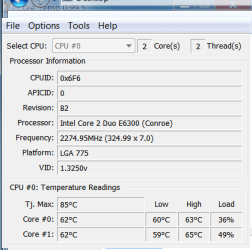
you are SMOKING Hot!

62C is a temp your cores should only reach when under 100% load for an extended time AND the cooling system is dirty/clogged/insufficient. Clean the CPU Heatsink, fan, all air intakes, screens, the front grill of all foreign matter, dust, etc. Is your HTPC inside a cabinet next to other electronics where the AIR it intakes is at an extended temperature? For a system to cool properly, it should intake air at ROOM temperature (which is 20C) and should idle at no more than 40C and MAYBE reach 50C under typical loads. Increased Core Temps can and will lead to system instability, greatly reduce the life of your electronics, and can even be a hazard.

If temps still stay that HIGH, which will reduce voltage and clock speed in order to preserve your cores (depending on your CPU, Chipset/BIOS/Settings), you likely have a poor or improperly set heatsink or additional conditions, such as RAM that is smoking hot (another reason for poor system performance).

Carefully watch both CoreTemp and CPU-Z as you gradually increase frequencies when over-clocking, or simply to see where your system temps and speeds are at, can help safeguard your electronics. I use them to make sure each system is cooling properly, and note the temps after a few days of normal use on a warm day, and find the system usually just needs a good cleaning when the temps begin to edge up after months of use (that amount of time between cleanings depends on how clean or unclean the air is). Rooms with upholstered furniture and carpeting, as many households have, tend to be more dusty. That dusty air, being pulled through your HTPC regularly, adds up quicker than most people realize and is major cause of system slowdown and even failure over time.

Are you using Intel’s infamous stock cooler? If so, and you want to maintain a lower core temp, I strongly suggest the use of a high end CPU cooler.

Also, please review in your BIOS your fan speeds and make sure your CPU fan speed is not set to quite or low. Force the fans to high, reboot, and watch the temps to see if this makes a difference. If it does, look for a bigger/better CPU cooler…a quality one will provide reliable system cooling and will generate little noise.

Please let me know if you are successful in reducing your core temps.

(note:Using Snipping Tool is good for creating a screenshot, however, the best way to capture just your forward window is to click on it's upper tile, hit ctl + PrtScn on your keyboard, open Paint, set the attributes to something small like 25 x 25, then paste the clipboard, save the file, and then upload it.)

To test where your temps will be normally at idle, set your clocks to stock, your fans to high (and watch the system temps come way down).

Good Luck! (Although it’s really not luck at all, it is systematic approach to testing and verifying that will prove best in the long run, and, of course, a clean HTPC).

Thanks for re-posting, bim…
 
Last edited:
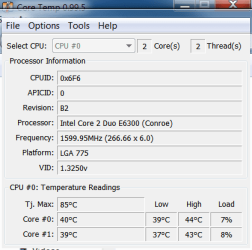
BIOS reports my temps at 40C, so I think there is an issue with how the Gigabyte Mobo works with realtemp/coretemp. Even with the case open, fans on high and system stock and idle, temps are 60C. Under full load they get to 68C. BIOS temps are 20C cooler than reported.

Even when I had my artic cooling freezer pro on it it would idle at 60. I think its really 40C, but not sure how to figure out if BIOS or real temp is right.

I am running the stock Intel fan. All settings in BIOS are set for fan at 100%. Inside is very clean, everything is unclogged and airflow is good. It is a mid-tower, with good airflow and fans. It is not in a cabinet.

I flashed the bios from 13 to 14 and boot speeds increased dramatically.
 

My Computer My Computer

At a glance

Windows 7 Home Premium, 64bitCore 2 Duo E63004GBNvidia 8600GT
Computer Manufacturer/Model Number
Home built
OS
Windows 7 Home Premium, 64bit
CPU
Core 2 Duo E6300
Motherboard
Gigabyte GA-965P-DS3
Memory
4GB
Graphics Card(s)
Nvidia 8600GT
Sound Card
mobo sound
Temps

The Temp shown in the BIOS is exactly what the utility is reading, if the CPU was under load at that time (which it is not), you would see the temp associated with that load. You are seeing, in CoreTemp, the Temp associated with a load of 36%-49% at the particular instant you took the screen shot. It would likely not take much additional load to peek or spike this Temp.

In the BIOS, there is a section for Throttle Temperature, go ahead and review that in the latest manual, and perhaps it may shed some light on what I am attempting to point out, which is that your CPU is throttling down under heavy load (due to high Temp) as this will certainly cause performance issues.

You appear satisfied that you do not have a hardware issue, so should I ask for this thread to be marked answered?
 
Well, I set BIOS to fan max, and enabled speed step and all other heat saving things and tems were at 40C. My stock Intel fan may be the culprit.

Not sure if its worth upgrading the fan without upgrading the CPU. I saw a newer version of the E6300 with a nice cooler for just over $100.

Whats the CPU sweet spot for price/performance now a day?

I appreciate the help. I have many years of PC experience, but little HTPC and Media Center experience.
 

Attachments

  • CoreTemp-Scr.png
    CoreTemp-Scr.png
    11.1 KB · Views: 19

My Computer My Computer

At a glance

Windows 7 Home Premium, 64bitCore 2 Duo E63004GBNvidia 8600GT
Computer Manufacturer/Model Number
Home built
OS
Windows 7 Home Premium, 64bit
CPU
Core 2 Duo E6300
Motherboard
Gigabyte GA-965P-DS3
Memory
4GB
Graphics Card(s)
Nvidia 8600GT
Sound Card
mobo sound
Back
Top