Auto install in compatibility mode.

melodies5

New member
Local time
7:21 PM
Messages
4
Hello,

I made a different thread, but felt I explained myself wrong so ill try again. That thread can be deleted please.

My problem is this:
When I plug my midi keyboard in it tries to install the drivers automatically, but it fails. I go into the devices section and I can see it there but has the error icon next to it. I right click and go through all the options like properties and troubleshoot, but there is no option to install in compatibility mode. There are no seperate drivers to download to run in compatibilty mode, only the auto install ones from the keyboard.

Is there a way I can change my windows 7 settings to 'automatically install new devices in the compatibility mode of Vista or XP'? So that when I plug my keyboard in, it will install like usual but will install in compatibility mode, rather than the standard windows 7.

Or is my only option to aquire a copy on windows xp, install the keyboard on there and then see if it works in windows 7? Is this even possible?

I keep thinking surely there is a way around this, but i am losing hope. sorry to bother you all but there must be a way.

Thanks in advance.
 

My Computer

OS
Windows 7 Home Premium 64bit
Hello melodies5, Welcome to the forum

Is this a USB device ?
When you say it tries to install the drivers automatically you mean that you have no drivers for this device?
Can you post details of this keyboard, name of manufacturer, or any identifying numbers/letters that are written on it?
Can you post a snip of the error in Device Manager? http://www.vistax64.com/tutorials/148532-how-use-snipping-tool-vista.html
 
Last edited:

My Computer

Computer Manufacturer/Model Number
Something I threw together
OS
Windows 7 Ultimate x64
CPU
Intel Core i7-2600K
Motherboard
Asus P8P67
Memory
16 GB G Skill F3-10666 CL9D-4GBRL
Graphics Card(s)
ATI Radeon HD 6870
Sound Card
ATI Radeon HDMI / Realtek ALC892
Monitor(s) Displays
2 x 22" standard monitors / LG32LC56v TV to watch films
Screen Resolution
1920 x1080
Hard Drives
2 x OCZ Vertex2 111.79GB
3 x Samsung103SJ
1 x Samsung103UJ
1 x WD3200BEVT
1 x Hitachi5K320-160
PSU
Thermaltake Toughpower Cable Management 750W
Case
Antec 300
Cooling
Noctua NH-U12P SE2 and 5 120mm Case fans
Keyboard
Microsoft Comfort Curve Keyboard 2000
Mouse
Hama M3110 / Logitech M305
Internet Speed
16000
Other Info
I have also used Fedora, Suse, Ubuntu Linux
And all other Windows from 95 to date except ME
hey mate, appreciate your response. I'll try to be as clear as possible.

Yes it is a usb device, powered by usb.
There have never been drivers released for this device, the drivers automatically install when you plug it in. There is no driver you can download for it (that is the problem, if there was I could install it with the compatibility way)

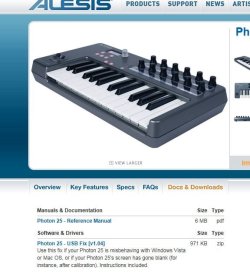
The keyboard is an Alesis Photon 25 and the website is Photon 25. I know this keyboard is not compatible with windows 7, but I have used other similar keyboards that arent aswell, but because they had a .exe driver I could download they would work. Thats why I was hoping I could set windows 7 to auto install with a compatibilty of vista/xp, as I am unable to do it manually.

Device manager pic: ImageShack® - Online Photo and Video Hosting

If i right click on the photon icon, there are options like troubleshoot/properties but there is no way to install with compatibility mode. I can try to reinstall the drivers, but they fail because of windows 7. I guess as it's not a .exe file I cant choose the compatibilty option. Like I said, if there was a way for W7 to auto do it in compatibilty mode, it may work.

Thanks, any ideas? Hope I made sense.
Snippit tool rules btw.
 

My Computer

OS
Windows 7 Home Premium 64bit

My Computer

Computer Manufacturer/Model Number
Something I threw together
OS
Windows 7 Ultimate x64
CPU
Intel Core i7-2600K
Motherboard
Asus P8P67
Memory
16 GB G Skill F3-10666 CL9D-4GBRL
Graphics Card(s)
ATI Radeon HD 6870
Sound Card
ATI Radeon HDMI / Realtek ALC892
Monitor(s) Displays
2 x 22" standard monitors / LG32LC56v TV to watch films
Screen Resolution
1920 x1080
Hard Drives
2 x OCZ Vertex2 111.79GB
3 x Samsung103SJ
1 x Samsung103UJ
1 x WD3200BEVT
1 x Hitachi5K320-160
PSU
Thermaltake Toughpower Cable Management 750W
Case
Antec 300
Cooling
Noctua NH-U12P SE2 and 5 120mm Case fans
Keyboard
Microsoft Comfort Curve Keyboard 2000
Mouse
Hama M3110 / Logitech M305
Internet Speed
16000
Other Info
I have also used Fedora, Suse, Ubuntu Linux
And all other Windows from 95 to date except ME
Did you see these downloads from here.. Photon 25
 

Attachments

My Computer

Computer type
PC/Desktop
Computer Manufacturer/Model Number
Self Built
OS
Win 10 Pro x64
CPU
Intel I5-2500K @3.3GHz
Motherboard
Asrock P67 Extreme4
Memory
16GB G.Skill Ripjaws X (4x4GB)
Graphics Card(s)
EVGA GeForce 750 Ti SC 2GB
Sound Card
ASUS Xonar DG 5.1 Channels 24-bit 96KHz PCI Interface Sound
Monitor(s) Displays
auria eq2367
Screen Resolution
1920 x 1080
Hard Drives
250GB Samsung 850 EVO SSD
1TB WD Blue
1TB Hitachi
PSU
SeaSonic X 650W 80 Plus Gold
Case
Corsair Obsidian 750D
Cooling
Corsair H60, Three 140mm case fans
Keyboard
Logitech Wireless Keyboard K520
Mouse
Logitech Wireless Mouse M310
Internet Speed
Wave Broadband ~ 100 dn 5 up
Antivirus
Windows Defender, Malwarebytes Premium
Browser
Edge, IE11, Chrome
Other Info
Laptop specs: HP g7-1365dx /
CPU: AMD A6-3420M APU with Radeon(tm) HD Graphics /
RAM: Crucial 8Gb (2x4Gb) /
SSD: Crucial M4-CT128M4SSD2 ATA Device/ FW 000F /
GFX: AMD Radeon HD 6520G /
OS: Windows 10 Pro x64
Thanks for the help guys. So it seems this isn't possible, i'm really surprised about that. So really the only option is to install windows xp, install the keyboard drivers, then it should work in windows 7 yea?

thanks again, any more ideas let me know
 

My Computer

OS
Windows 7 Home Premium 64bit
Not really. You set up windows XP to run along side 7 as dual boot, or you set up XP to run inside of 7 as a virtual system. Either way it will be working in XP and not Windows 7 but it will then work on your PC.
 

My Computer

Computer Manufacturer/Model Number
Something I threw together
OS
Windows 7 Ultimate x64
CPU
Intel Core i7-2600K
Motherboard
Asus P8P67
Memory
16 GB G Skill F3-10666 CL9D-4GBRL
Graphics Card(s)
ATI Radeon HD 6870
Sound Card
ATI Radeon HDMI / Realtek ALC892
Monitor(s) Displays
2 x 22" standard monitors / LG32LC56v TV to watch films
Screen Resolution
1920 x1080
Hard Drives
2 x OCZ Vertex2 111.79GB
3 x Samsung103SJ
1 x Samsung103UJ
1 x WD3200BEVT
1 x Hitachi5K320-160
PSU
Thermaltake Toughpower Cable Management 750W
Case
Antec 300
Cooling
Noctua NH-U12P SE2 and 5 120mm Case fans
Keyboard
Microsoft Comfort Curve Keyboard 2000
Mouse
Hama M3110 / Logitech M305
Internet Speed
16000
Other Info
I have also used Fedora, Suse, Ubuntu Linux
And all other Windows from 95 to date except ME
Ah I understand now. thankyou pooch.

Decided the easiest and probably cheapest option is to sell the keyboard and aquire a new one. Now I know not to assume things will automatically work, I shall not make the same mistake again.

Thanks.
 

My Computer

OS
Windows 7 Home Premium 64bit
You are welcome :D Its still a shame that we cannot get it to work but that is unfortunately the quickly changing world of the pC
 

My Computer

Computer Manufacturer/Model Number
Something I threw together
OS
Windows 7 Ultimate x64
CPU
Intel Core i7-2600K
Motherboard
Asus P8P67
Memory
16 GB G Skill F3-10666 CL9D-4GBRL
Graphics Card(s)
ATI Radeon HD 6870
Sound Card
ATI Radeon HDMI / Realtek ALC892
Monitor(s) Displays
2 x 22" standard monitors / LG32LC56v TV to watch films
Screen Resolution
1920 x1080
Hard Drives
2 x OCZ Vertex2 111.79GB
3 x Samsung103SJ
1 x Samsung103UJ
1 x WD3200BEVT
1 x Hitachi5K320-160
PSU
Thermaltake Toughpower Cable Management 750W
Case
Antec 300
Cooling
Noctua NH-U12P SE2 and 5 120mm Case fans
Keyboard
Microsoft Comfort Curve Keyboard 2000
Mouse
Hama M3110 / Logitech M305
Internet Speed
16000
Other Info
I have also used Fedora, Suse, Ubuntu Linux
And all other Windows from 95 to date except ME
Back
Top