Auto Resize Images

DaveTheRealtor

New member
Local time
11:00 PM
Messages
13
Location
Philadelphia, PA
A realtor in my office just got a new laptop with Windows 7. This is a huge upgrade for her as her old laptop had a 3.5" drive... Anyway, using the Scanner and Camera import wizard on Windows XP she was able to select and import her photos from her digital camera, and it would automaticly resize them (Files need to be smaller than 2MB to post on our real estate website).

I cannot for the life of me figure out how to set this up on her new Laptop. After looking at her XP macine, there didn't seem to be any 3rd party software running... Any help would be HUGELY appreciated!
 

My Computer

Computer Manufacturer/Model Number
HP Pavilion dv6-2155dx
OS
Windows 7 Home Premium
CPU
2.13 GHz Intel Core i3
Memory
4 GB
Graphics Card(s)
Intel Graphics Media Accelerator HD
Sound Card
Intel HD Audio
Hard Drives
500 GB
Other Info
Just got back into the PC game, I left for a few years and was a Mac guy. Due to my new carrer as a Realtor (where everything is PC and IE based) I had to switch back.
Hi, Try in the Windows Live folder and open Windows live photo Gallery, You should be able to resize images in there.
 

My Computer

Computer Manufacturer/Model Number
Self Build 64bit
OS
Vista Ult64, Win7600
CPU
Intel Core 2 Quad Q6600 @ 2400 MHz 64bit OS
Motherboard
Asus P5E3 Deluxe WiFi @p 64 bit OS
Memory
4096 MB DDR3-SDRAM
Graphics Card(s)
ATI Radeon HD 3870 Series x2 Crossfired
Sound Card
Realtek on board
Monitor(s) Displays
Samsung SyncMaster - 23 inches
Screen Resolution
1680x1050 pixels at 60 Hz in True Colors
Hard Drives
Hitachi (250 GB)/Samsung 750 GB. /Barracuda 160 GB.
My Book 1 TB external..
PSU
Cooler Master 1000w
Case
Cooler Master Cosmos 1000.
Cooling
Fans and fresh air,
Keyboard
Wireless
Mouse
Wireless
Internet Speed
Never fast enough
Other Info
I use a Magnum.
Yeah, there is that, but she isn't very computer savvy. On XP it was set to automatically do it for her as part of the import process.
 

My Computer

Computer Manufacturer/Model Number
HP Pavilion dv6-2155dx
OS
Windows 7 Home Premium
CPU
2.13 GHz Intel Core i3
Memory
4 GB
Graphics Card(s)
Intel Graphics Media Accelerator HD
Sound Card
Intel HD Audio
Hard Drives
500 GB
Other Info
Just got back into the PC game, I left for a few years and was a Mac guy. Due to my new carrer as a Realtor (where everything is PC and IE based) I had to switch back.
Last edited:

My Computer

Computer Manufacturer/Model Number
Self Build 64bit
OS
Vista Ult64, Win7600
CPU
Intel Core 2 Quad Q6600 @ 2400 MHz 64bit OS
Motherboard
Asus P5E3 Deluxe WiFi @p 64 bit OS
Memory
4096 MB DDR3-SDRAM
Graphics Card(s)
ATI Radeon HD 3870 Series x2 Crossfired
Sound Card
Realtek on board
Monitor(s) Displays
Samsung SyncMaster - 23 inches
Screen Resolution
1680x1050 pixels at 60 Hz in True Colors
Hard Drives
Hitachi (250 GB)/Samsung 750 GB. /Barracuda 160 GB.
My Book 1 TB external..
PSU
Cooler Master 1000w
Case
Cooler Master Cosmos 1000.
Cooling
Fans and fresh air,
Keyboard
Wireless
Mouse
Wireless
Internet Speed
Never fast enough
Other Info
I use a Magnum.

My Computer

Computer Manufacturer/Model Number
HP, Dell, Gateway, Toshiba - 4 laptops and 2 desktops
OS
Vista, Windows7, Mint Mate, Zorin, Windows 8
CPU
from 1.6GHz Duo to i7
Monitor(s) Displays
2x HP w2207
Hard Drives
5x HDD, 7x SSD, 12x Externals
Keyboard
with trackball - no mices
Mouse
Trackball mice
Internet Speed
DSL 6000
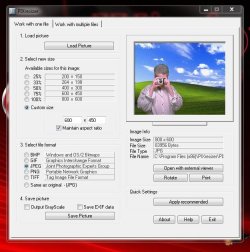
I use a Freeware program called PixResizer :)


" Doc "
 

Attachments

  • PIXresizer.zip
    PIXresizer.zip
    3.3 MB · Views: 497
  • PIXresizer_snip.JPG
    PIXresizer_snip.JPG
    67 KB · Views: 141

My Computer

Computer type
PC/Desktop
Computer Manufacturer/Model Number
Built them myself, Science Experiments !
OS
Win7 Enterprise, Win7 x86 (Ult 7600), Win7 x64 Ult 7600, TechNet RTM on AMD x64 (2.8Ghz)
CPU
AMD fx8350 4ghz, AMD-32 2400mhz, AMD-64 3200mhz, AMDx64 2.8G
Motherboard
SIS 755, ECS-K8M890M-M (Ult 7600), GigaByte & others
Memory
2gb, 4gb on the Ult 7600, 4gb on Technet RTM, 32gb on FX8350
Graphics Card(s)
Draw my own Graphics, several nVidia cards
Sound Card
on motherboard
Monitor(s) Displays
19" flat scr, 28" I-Inc widescr,22" Emprex Widescr, 23" Acer
Screen Resolution
1280 x 1024, 1440 x 900, 1920 x 1080
Hard Drives
6 pata Ide HD's & 2 Sata HD's
added 80gb external on Ult 7600 computer,
numerous extra 1tb, 2TB, 3Tb SATA HD's
A collection of ext HD Docks w/ HDs
PSU
430w, 550w, 600w, 700, 800, etc
Case
All Generic Full Towers
Cooling
Open Air & a few fans, some w/ colored LEDs
Keyboard
Compaq & Dell recycled from GoodWill
Mouse
Made in China Optical Wired Mouse
Internet Speed
Fast Cable InterNet
Antivirus
AVG Free on 24 different Desktops, NO Problems!
Browser
IE 8 is preferred, but use FireFox sometimes
Other Info
Linksys Routers, switches, & Hubs
Too Many USB Flash Drives to count, Biggest is 64GB !
Eight computers in my home network.
Sixteen computers at my business network.
Linked via TeamViewer !
Lots of old used spare computer parts everywhere!
Those are all great suggestions, however like I said, when you import them using the Camera and Scanner Wizard its is somehow done as part of the import process and there doesn't seem to be any kind of 3rd party software use.
 

My Computer

Computer Manufacturer/Model Number
HP Pavilion dv6-2155dx
OS
Windows 7 Home Premium
CPU
2.13 GHz Intel Core i3
Memory
4 GB
Graphics Card(s)
Intel Graphics Media Accelerator HD
Sound Card
Intel HD Audio
Hard Drives
500 GB
Other Info
Just got back into the PC game, I left for a few years and was a Mac guy. Due to my new carrer as a Realtor (where everything is PC and IE based) I had to switch back.
While we're stating 3rd party apps (in case you decide to go that route), I've always used the MS PowerToys option if ImageResizer. It integrates into the shell so all you have to do is highlight all the files, right click, and resize.

http://www.microsoft.com/windowsxp/Downloads/powertoys/Xppowertoys.mspx

The RAW Image Thumbnailer and Viewer is also quite excellent for those who import a ton of RAW pics (like I do) and don't want to open PhotoShop or a 3rd party viewer just to see what is there.
 

My Computer

OS
XP / Win7 x64 Pro
CPU
Intel Quad-Core Q9450 @ 3.2GHz
Motherboard
Asus P5-E
Memory
2x2GB GSkill DDR2
Graphics Card(s)
NVIDIA GeForce 8600 GTS (EVGA)
Monitor(s) Displays
Dell 2408WFP
Screen Resolution
1920x1200
Those are all great suggestions, however like I said, when you import them using the Camera and Scanner Wizard its is somehow done as part of the import process and there doesn't seem to be any kind of 3rd party software use.
Can you change the default size of the picture being taken on the camera? I think that windows live photo gallery will put a command on the wizard to open the program when importing the files from your camera. Good luck to you with your problem.
 

My Computer

Computer Manufacturer/Model Number
Gateway GT5692
OS
Windows 7 Ulti. x64
CPU
AMD Phenom 8450 triple-core 2.10 ghz
Memory
4GB
Graphics Card(s)
ATI Radion HD 3200
Monitor(s) Displays
Gateway FPD1775W
Screen Resolution
1280x720
Hard Drives
465.6613 Gibibytes
Just another thought. if you used Paint (from All Programs > Accessories) to import "from camera or scanner", you could use the Paint resize options.

This is what the Paint help page says:


On the Home tab, in the Image group, click Resize.
  1. In the Resize and Skew dialog box, select the Maintain aspect ratio check box so that the resized picture will have the same aspect ratio as the original.
  2. In the Resize area, click Pixels, and then enter a new width in the Horizontal box or new height in the Vertical box. Click OK.
    If the Maintain aspect ratio check box is selected, you only need to enter the horizontal value (width) or vertical value (height). The other box in the Resize area is updated automatically.
    For example, if a picture is 320 x 240 pixels and you want to make it half that size with the same aspect ratio, in the Resize area, with the Maintain aspect ratio check box selected, enter 160 in the Horizontal box. The new picture size will be half the original size at 160 x 120 pixels.
You could make a permanent setting for that so the lady would only have to press the button.
 

My Computer

Computer Manufacturer/Model Number
HP, Dell, Gateway, Toshiba - 4 laptops and 2 desktops
OS
Vista, Windows7, Mint Mate, Zorin, Windows 8
CPU
from 1.6GHz Duo to i7
Monitor(s) Displays
2x HP w2207
Hard Drives
5x HDD, 7x SSD, 12x Externals
Keyboard
with trackball - no mices
Mouse
Trackball mice
Internet Speed
DSL 6000
Can you change the default size of the picture being taken on the camera? I think that windows live photo gallery will put a command on the wizard to open the program when importing the files from your camera. Good luck to you with your problem.

I am thinking/hoping that its a setting in the camera. I hooked it up to her old PC and new pictures I had just taken were the bigger size, I am thinking she may have done some kind of reset with her camera. If that isn't it, I'm just going to use the Power Toys port and be done with it!
 

My Computer

Computer Manufacturer/Model Number
HP Pavilion dv6-2155dx
OS
Windows 7 Home Premium
CPU
2.13 GHz Intel Core i3
Memory
4 GB
Graphics Card(s)
Intel Graphics Media Accelerator HD
Sound Card
Intel HD Audio
Hard Drives
500 GB
Other Info
Just got back into the PC game, I left for a few years and was a Mac guy. Due to my new carrer as a Realtor (where everything is PC and IE based) I had to switch back.
Back
Top