Auto selecting an option from recovery menu?

tassan

New member
Member
Local time
7:55 PM
Messages
52
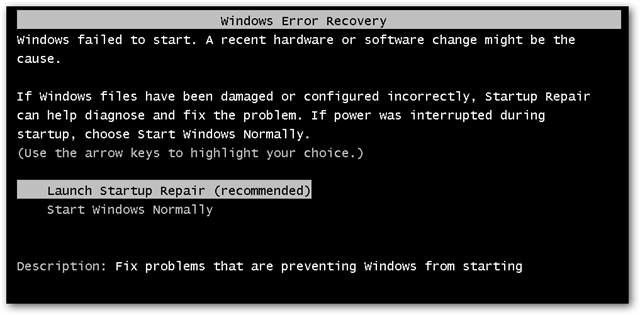
Well, I have to keep my computer on for various reasons at times, and I have a electricity problem, due to which I get recovery options most often. Now what I want, is I wish every time I got recovery options, windows would choose Start Normaly everytime. Even though the "startup repair(recommended)" option is there. I dun want to repair cuz its just the power outtage.


And I want it to be automatic because I'm afk most of the time.
 

My Computer My Computer

At a glance

Windows 7 Ultimate 64bit1.80Ghz Core 2 Duo2048mb128mb
Computer Manufacturer/Model Number
Intel
OS
Windows 7 Ultimate 64bit
CPU
1.80Ghz Core 2 Duo
Motherboard
p5l-mx Asus
Memory
2048mb
Graphics Card(s)
128mb
Internet Speed
100kbps
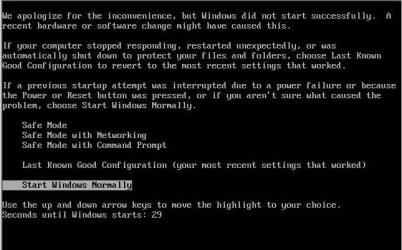
Is this the XP screen that you are talking about?

norm.JPG
 

My Computer My Computer

At a glance

W7 Pro SP1 64biti78GBIntel HD Graphics
Computer type
Laptop
Computer Manufacturer/Model Number
Employer provided Dell Latitude
OS
W7 Pro SP1 64bit
CPU
i7
Memory
8GB
Graphics Card(s)
Intel HD Graphics
Hard Drives
crappy SSD
Antivirus
Employer mandated Symantec Endpoint Protection
Browser
Pale Moon 64bit, IE11 64bit & Chrome 64bit
EDIT: I think you got lost by the os i had setup ages ago when I had created this account.


I am talking about Seven. not xp.
 

My Computer My Computer

At a glance

Windows 7 Ultimate 64bit1.80Ghz Core 2 Duo2048mb128mb
Computer Manufacturer/Model Number
Intel
OS
Windows 7 Ultimate 64bit
CPU
1.80Ghz Core 2 Duo
Motherboard
p5l-mx Asus
Memory
2048mb
Graphics Card(s)
128mb
Internet Speed
100kbps
EDIT: I think you got lost by the os i had setup ages ago when I had created this account.


I am talking about Seven. not xp.
Yep - that is what I looked at.

So, you are seeing this?
norm.JPG

And you don't want to see that - correct?
 

My Computer My Computer

At a glance

W7 Pro SP1 64biti78GBIntel HD Graphics
Computer type
Laptop
Computer Manufacturer/Model Number
Employer provided Dell Latitude
OS
W7 Pro SP1 64bit
CPU
i7
Memory
8GB
Graphics Card(s)
Intel HD Graphics
Hard Drives
crappy SSD
Antivirus
Employer mandated Symantec Endpoint Protection
Browser
Pale Moon 64bit, IE11 64bit & Chrome 64bit
sshot20091217020232.png


That is my problem. I just want to make the second option default.


God i tried posting three times with detailed info and it failed to post. -.-
 

My Computer My Computer

At a glance

Windows 7 Ultimate 64bit1.80Ghz Core 2 Duo2048mb128mb
Computer Manufacturer/Model Number
Intel
OS
Windows 7 Ultimate 64bit
CPU
1.80Ghz Core 2 Duo
Motherboard
p5l-mx Asus
Memory
2048mb
Graphics Card(s)
128mb
Internet Speed
100kbps
I don't think you can, and with very good reason. That screen should only ever appear if your system was incorrectly shutdown for some reason or other (including power failure) as it could mean that one (or more) of your system file(s) could be damaged/corrupted.

In your case, you would be better off investing in a UPS (Uninterruptable Power Supply). This does not mean that in the event of power failure that your computer can be run on a UPS, rather these devices allow you time to safely shutdown your computer should a power outage situation occur. Some can even do this automatically if configured to do so.
 

My Computer My Computer

At a glance

Windows 8.1 Pro RTM x64Intel Core-i5-3570K 4-core @ 3.4GHz (Ivy Brid...4 x 4GB DDR3-1600 Corsair Vengeance CMZ8GX3M2...MSI GeForce GTX770 Gaming OC 2GB
Computer type
PC/Desktop
Computer Manufacturer/Model Number
Dwarf Dwf/11/2012 r09/2013
OS
Windows 8.1 Pro RTM x64
CPU
Intel Core-i5-3570K 4-core @ 3.4GHz (Ivy Bridge) (OC 4.4GHz)
Motherboard
ASRock Z77 Extreme4-M
Memory
4 x 4GB DDR3-1600 Corsair Vengeance CMZ8GX3M2A1600C9B (16GB)
Graphics Card(s)
MSI GeForce GTX770 Gaming OC 2GB
Sound Card
Realtek High Definition on board solution (ALC 898)
Monitor(s) Displays
ViewSonic VA1912w Widescreen (VGA)
Screen Resolution
1440x900
Hard Drives
OCZ Agility 3 SSD 120GB SATA III x2 (RAID 0)
Samsung HD501LJ 500GB SATA II x2
Hitachi HDS721010CLA332 1TB SATA II
Iomega 1.5TB Ext USB 2.0
WD 2.0TB Ext USB 3.0
PSU
XFX Pro Series 850W Semi-Modular
Case
Gigabyte IF233
Cooling
1 x 120mm Front Inlet 1 x 120mm Rear Exhaust
Keyboard
Microsoft Comfort Curve Keyboard 3000 (USB)
Mouse
Microsoft Comfort Mouse 3000 for Business (USB)
Internet Speed
NetGear DG834Gv3 ADSL Modem/Router (Ethernet) ~4.0 Mb/s (O2)
Antivirus
Avast! 8.0.1497
Browser
IE 11
Other Info
Optical Drive: HL-DT-ST BD-RE BH10LS30 SATA Bluray
Lexmark S305 Printer/Scanner/Copier (USB)
WEI Score: 8.1/8.1/8.5/8.5/8.25
Asus Eee PC 1011PX Netbook (Windows 7 x86 Starter)
+1 For Dwarfie!

If your system has shut down like this maybe once, you may or may not have got away with it. Repeated shutdowns like that, will definitely cause corruption and damge of your files. Invest in a UPS my friend. We get occasional power outages here in rural Lincolnshire (thank you, Wind Farms!) so I fitted really good, effective Surge Protection.

If and when it blows the Surge Protect part, (it is visible if it does) I will buy new. If the outages get worse, I will buy a UPS.

You don't give your location, but here in the UK I am talking about something like this:
APC Back-UPS ES 700 UPS - AC 230V / 405W / 700VA / 8.. | Ebuyer.com

There are others, from other outlets, this is just an example, if you have a large Network, but this is one of the lowest-priced, does a good enough job for a small network, or just one or two machines.
 

My Computer My Computer

At a glance

Windows 7/64 HPremium.AMD FX-6300.Corsair (2x4) GB DDR3 CMXGX3M2A1337CL9.NVidia/Gigabyte GT730 (2GB) GDDR5.
Computer type
PC/Desktop
Computer Manufacturer/Model Number
bertison
OS
Windows 7/64 HPremium.
CPU
AMD FX-6300.
Motherboard
Asus M5A78L-M LE/USB3.
Memory
Corsair (2x4) GB DDR3 CMXGX3M2A1337CL9.
Graphics Card(s)
NVidia/Gigabyte GT730 (2GB) GDDR5.
Sound Card
Onboard.
Monitor(s) Displays
Iiyama PLE2407HDS.
Screen Resolution
1920 x 1280
Hard Drives
Desktop: 1TB. WD10EZEX-00BN5A0.
Zyxel nsa310 NAS: 2TB Seagate Barracuda 7200.14.
Cache Drive: Sandisk SDSSDRC032G.
Laptop Lenovo B50/80 128 GB SSD.
PSU
Corsair 750M.
Case
Coolermaster N300.
Cooling
FRONT: (2X) 140mm. TOP: (1x) 120mm. REAR: (1x) 120mm.
Keyboard
Logitech K290
Mouse
Trust Optical Wired
Internet Speed
15 Mb Down, 0.55 Up.
Antivirus
Kaspersky Total Security 2017, Hitman Pro.
Browser
Firefox.
Other Info
NETWORK:
Sky "Q box" and router.
Desktop & NAS - 30 Metres Cat6 Ethernet wired, via TP-Link 4-port switch.
Lenovo B50/80 Laptop, 2x Wileyfox phones, Lenovo TAB3-8 tablet - all wireless.
Grandchildren, their parents and friends as bandwidth 'parasites' at various times!
sshot20091217020232.png


That is my problem. I just want to make the second option default.


God i tried posting three times with detailed info and it failed to post. -.-
Thanks for the screen shot. You should only see that if you happened to lose power while the OS is loading. If you lose power while the OS is running, then you should see the screen that I posted - which already had "Start Windows normally" selected.

If you have the desktop set to turn itself on when power is restored, I would turn that feature off - given your power failure issues.

If you decide to get a UPS, pay attention to PFC:
http://www.apcmedia.com/salestools/RMUZ-7DTKRC_R1_EN.pdf
 

My Computer My Computer

At a glance

W7 Pro SP1 64biti78GBIntel HD Graphics
Computer type
Laptop
Computer Manufacturer/Model Number
Employer provided Dell Latitude
OS
W7 Pro SP1 64bit
CPU
i7
Memory
8GB
Graphics Card(s)
Intel HD Graphics
Hard Drives
crappy SSD
Antivirus
Employer mandated Symantec Endpoint Protection
Browser
Pale Moon 64bit, IE11 64bit & Chrome 64bit
Back
Top