Hi all, I have just upgraded from a Dell Lattitude 610 WinXP Pro Bios A06 to a Dell Studio 1558 Win7 pro Bios A11.
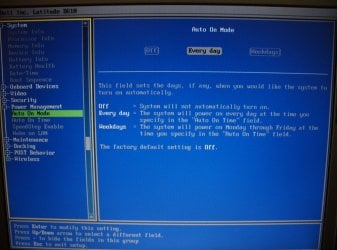
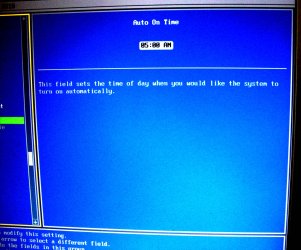
My question is this. Using my old setup I was able to start my computer at a predetermined time from a complete shutdown using setting in the power management that was in the Bios A06. This feature is not avaliable in the Bios A11.
Does anyone know how to accomplish this in my new setup? I have searched high and low for an answer to no avail. The best I can tell is that no such feature exists in Bios A11.
I tried the hibernate feature but that requires physical interaction to actually start up the computer from a complete shut down. The previous way was a set it and forget it with my computer up and running, loaded and ready to go every morning without touching it.
Any Bios A11 upgrade that would fix this or is this feature gone forever?
If anyone has experienced the same situation and found away to go back to the A06 startup feature I would really appriciate to learn how you did it.
Thanks, TRoof
My question is this. Using my old setup I was able to start my computer at a predetermined time from a complete shutdown using setting in the power management that was in the Bios A06. This feature is not avaliable in the Bios A11.
Does anyone know how to accomplish this in my new setup? I have searched high and low for an answer to no avail. The best I can tell is that no such feature exists in Bios A11.
I tried the hibernate feature but that requires physical interaction to actually start up the computer from a complete shut down. The previous way was a set it and forget it with my computer up and running, loaded and ready to go every morning without touching it.
Any Bios A11 upgrade that would fix this or is this feature gone forever?
If anyone has experienced the same situation and found away to go back to the A06 startup feature I would really appriciate to learn how you did it.
Thanks, TRoof
My Computer
- Computer Manufacturer/Model Number
- Dell Studio 1558
- OS
- Windows 7 Professional 64 bit
- CPU
- Intel