
hello
I don't know where to post this but I think it most probably belongs here...
I use RivaTuner to overclock my Graphics Card but to apply these settings at startup it has to Autostart as an administrator.
I always have to click on "Yes" to allow it which is quite annoying...
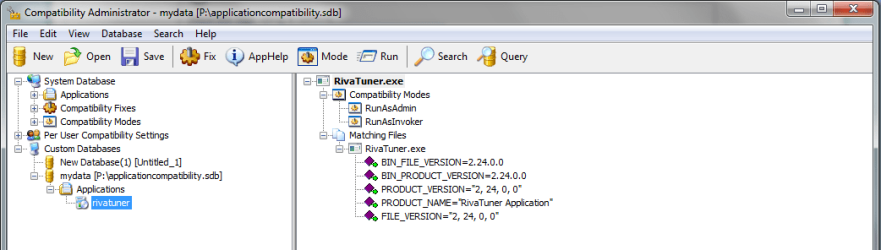
I know there is the "application compatiblity toolkit 5.5" where I can make an application fix with the option "runasinvoker" and also "runasAdmin" (or something similar, to run it as admin) and it won't prompt me to grant permission, but RivaTuner gives the error: "Cannot load RivaTuner64.sys driver. Please ensure that this file exists in RivaTuner's folder and your user account has administrative rights"
I do have administrative rights but...
and if I (with the application fix installed) rightclick on rivatuner and select "Run as Administrator" it prompts me for elevation and it works....
But I want it to work without me giving permission ...
any ideas?
attached screens from error, useraccount overview and the application fix.
I don't know where to post this but I think it most probably belongs here...
I use RivaTuner to overclock my Graphics Card but to apply these settings at startup it has to Autostart as an administrator.
I always have to click on "Yes" to allow it which is quite annoying...
I know there is the "application compatiblity toolkit 5.5" where I can make an application fix with the option "runasinvoker" and also "runasAdmin" (or something similar, to run it as admin) and it won't prompt me to grant permission, but RivaTuner gives the error: "Cannot load RivaTuner64.sys driver. Please ensure that this file exists in RivaTuner's folder and your user account has administrative rights"
I do have administrative rights but...
and if I (with the application fix installed) rightclick on rivatuner and select "Run as Administrator" it prompts me for elevation and it works....
But I want it to work without me giving permission ...
any ideas?
attached screens from error, useraccount overview and the application fix.
Attachments

My Computer
- OS
- Windows 7 Professional x64
- CPU
- Intel i7 930 2.8 Ghz
- Motherboard
- Gigabyte GA-EX58-UD5
- Memory
- Mushkin Redline 3x2GB, DDR3-1600 CL6-8-6-24
- Graphics Card(s)
- Sapphire HD 5770 1G
- Sound Card
- Creative X-Fi XtremeGamer Fatal1ty Pro Series
- Monitor(s) Displays
- Samsung SyncMaster 226BW
- Hard Drives
- 1x 500 GB System
2x 1TB
1x 1.5 TB
2x 2TB
- PSU
- be quiet! DARK POWER PRO, P8 900W
- Case
- Lian Li PCB-70 Black
- Cooling
- stock
- Keyboard
- Logitech G15 Blue Backlight
- Mouse
- Logitech G5 Laser Mouse
- Internet Speed
- 100 mbit
