
Auto start problem and device manager issue

thefollower

New member
Local time
2:47 PM
Messages
48
Hello

I'm having two weird issues when i login to my PC.

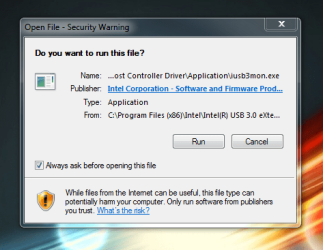
The first one, is a window box saying to install an intel iusb3mon every time. I have installed it by clicking run but next time i boot the PC it happens again. I don;t know how to stop it doing this, i want it to stay installed and not keep asking me every time i login.

I have attached image of what i see the moment i login.


the second issue is of my device manager for the device AMDA00 interface. I have tried to update via online but it says i have the most recent drivers.. so i don't know why it has an alert icon on it, any suggestions ?

I have also attatched an image of that too.
 

Attachments
  • Capture2.PNG
    Capture2.PNG
    102.4 KB · Views: 9
  • Capture.PNG
    Capture.PNG
    5.9 KB · Views: 9

My Computer

Computer type
PC/Desktop
Computer Manufacturer/Model Number
custom build
OS
Windows 7 Ultimate 64Bit
CPU
Intel Core i7 4770k 3.5Ghz
Motherboard
ASUS Maximus Hero Vi
Memory
16GB
Graphics Card(s)
Nvidia 770 GTX
Monitor(s) Displays
Asus ProArt
Screen Resolution
1920 by 1200
Internet Speed
100MB/s
Where did you find the driver for the AMD interface device in error? Can we see a link? Do you know for sure what the driver is for? You can trace it to be sure using Hardware Identification.

As to the Startup issue, turn off the device at Startup as no Intel needs to start with Windows except background drivers. Uncheck everything except your AV and synch in msconfig>Startup and >Services after Hiding All MS Services.

Let us know what you find.
 
Where did you find the driver for the AMD interface device in error?

What do you mean by that? I've no idea what the device is or what is does but i can't seem to fix it. I just went to "update driver software" using the internet and its apparently up to date. Yet it still has that icon on it. Its bugging me =/
 

My Computer

Computer type
PC/Desktop
Computer Manufacturer/Model Number
custom build
OS
Windows 7 Ultimate 64Bit
CPU
Intel Core i7 4770k 3.5Ghz
Motherboard
ASUS Maximus Hero Vi
Memory
16GB
Graphics Card(s)
Nvidia 770 GTX
Monitor(s) Displays
Asus ProArt
Screen Resolution
1920 by 1200
Internet Speed
100MB/s
This thread suggests how to find the driver on the Motherboard driver disk. Asus Z87-Pro AMDA00 Interface driver...

If you don't have that then try the Motherboard's Support Downloads webpage for your exact mobo model.

This thread suggests that the device can cause problems and is best disabled in Device Manager, so that may be an option if you don't find a stable driver: AMDA00 INTERFACE

Have you Checked for Updates and installed all Important and Optional Windows Updates, as there may be a better driver provided first by Windows Update along with patches needed to make the hardware work correctly. I'd do that first.
 
This thread suggests how to find the driver on the Motherboard driver disk. Asus Z87-Pro AMDA00 Interface driver...

If you don't have that then try the Motherboard's Support Downloads webpage for your exact mobo model.

This thread suggests that the device can cause problems and is best disabled in Device Manager, so that may be an option if you don't find a stable driver: AMDA00 INTERFACE

Have you Checked for Updates and installed all Important and Optional Windows Updates, as there may be a better driver provided first by Windows Update along with patches needed to make the hardware work correctly. I'd do that first.


That link you gave me was related to windows 8 not 7. They suggest reinstalling windows 7 which is a bit odd, im on a fresh install =/

What would be the vender in this case to look up the drivers.. i have attached an image.
 

Attachments

  • Capture.PNG
    Capture.PNG
    53.4 KB · Views: 8

My Computer

Computer type
PC/Desktop
Computer Manufacturer/Model Number
custom build
OS
Windows 7 Ultimate 64Bit
CPU
Intel Core i7 4770k 3.5Ghz
Motherboard
ASUS Maximus Hero Vi
Memory
16GB
Graphics Card(s)
Nvidia 770 GTX
Monitor(s) Displays
Asus ProArt
Screen Resolution
1920 by 1200
Internet Speed
100MB/s
First, issue - uncheck "always ask ..." When it shows next startup.

You can then do as Greg suggests.

Second is part of Asus AI program, there has been another thread about it few days ago here. Search for it.
 

My Computer

Computer type
PC/Desktop
Computer Manufacturer/Model Number
Custom Build
OS
Windows 7 Ultimate x64 SP1
CPU
AMD Phenom 2 1090T
Motherboard
Gigabyte GA-890FXA-UD5
Memory
2x8GB Kingston HyperX Fury Black 1600Mhz Unganged
Graphics Card(s)
MSI GTX 970 Gaming 4G
Sound Card
Realtek On-Board HD 7.1 Audio / Logitech G35
Monitor(s) Displays
3xAcer GD245HQ
Screen Resolution
1920x1080
Hard Drives
Samsung 850 Pro 512GB SSD - OS /
WD Caviar Black SATA 3 - 1 TBx2 - Dynamic RAID 0 /
WD Caviar Green SATA 2 - 640GBx2 - Dynamic RAID 0 /
WD Caviar Green SATA 2 - 640GB - Internal Backup /
Seagate Barracude SATA 3 - 3TB - External Backup/ Sync
PSU
HighPower 1000W
Case
Cooler Master HAF 932
Cooling
Noctua NH-D14
Keyboard
Logitech G19
Mouse
Logitech G500
Internet Speed
100/4 Mbit Cable (100GB quota)
Antivirus
ZoneAlarm Extreme Security / MBAM Pro / MBAE Free / SAS Free
Browser
IE 11 - Firefox - Chrome
Other Info
Logitech F710/ G27/ G940/ Z5500 // TrackIR 5 // Nvidia 3D Surround Vision
Back
Top