Autocomplete not working correct

diverjerry

New member
Local time
10:03 PM
Messages
10
Location
Kansas
I am sure this is a user error.

Just moved my computer from XP Pro to Windows 7 ultimate 64 bit. Loaded Office 2010 premium for the first time, was openoffice and thunderbird user. Thought I would try MS world.

Not going to bad, I sync gmail calendar and imported contacts into Outlook.

Autocomplete works strange, finds some of the contacts, doesn't find others. In gmail I had contacts assigned to groups like family etc. Seems family are the ones not being found by autocomplete. I would guess there must be a place to tell autocomplete what to search on, I have looked at contacts that work and one that doesn't and can't see a difference.

Can someone point me to a place that describes how autocomplete works in detail?
 

My Computer

Computer type
PC/Desktop
Computer Manufacturer/Model Number
Dell Optiplex 3040
OS
Windows 7 Professional 64 bit
CPU
Intel I5
Memory
8GB
Hard Drives
500GB

My Computer

Computer Manufacturer/Model Number
HP M9077c
OS
Windows 7 Home Premium 64bit
CPU
Intel(R)Core(TM)2 quad [email protected] 2.39GHz
Motherboard
ASUSeK
Memory
6GB DDR2 6400
Graphics Card(s)
GeForce 8500/512MB
Sound Card
Realtek High Def Audio
Monitor(s) Displays
HP w2408 LCD 24" widescreen
Screen Resolution
1920x1200
Cooling
6 pack of Bud
Keyboard
MS wireless Inteli
Mouse
MS wireless Inteli

My Computer

Computer Manufacturer/Model Number
HP M9077c
OS
Windows 7 Home Premium 64bit
CPU
Intel(R)Core(TM)2 quad [email protected] 2.39GHz
Motherboard
ASUSeK
Memory
6GB DDR2 6400
Graphics Card(s)
GeForce 8500/512MB
Sound Card
Realtek High Def Audio
Monitor(s) Displays
HP w2408 LCD 24" widescreen
Screen Resolution
1920x1200
Cooling
6 pack of Bud
Keyboard
MS wireless Inteli
Mouse
MS wireless Inteli
I don't have any NK2 files, I even searched for *.nk2 and came up empty. I did a lot of searching before posting and I believe I read where office 2010 doesn't use the NK2 file. Most of the autocomplete names work, it seems to be those that were in one category from gmail. They did get converted and in Outlook, look the same when I bring up address book and scan, but something must be different. Maybe address book and contacts are not the same thing.
I did start an email and added all the people in the contact list, then discarded, no change.
 

My Computer

Computer type
PC/Desktop
Computer Manufacturer/Model Number
Dell Optiplex 3040
OS
Windows 7 Professional 64 bit
CPU
Intel I5
Memory
8GB
Hard Drives
500GB
AutoSuggest uses a cache which contains a list of addresses that you’ve previously used.


A simple method to fill the AutoSuggest cache:-

You can directly fill the list by creating a new message addressed to all your contacts at once. There is no need to actually send this message.

  1. Create a new message.
  2. Press the To… button.
  3. Select the contact list in the right top corner from which you would like to add the contacts from.
    Examples; Contacts folder, Global Address List (GAL) or a contacts folder in a Public folder.
  4. Select the first contact.
  5. Scroll all the way down to your last contact.
  6. Hold the SHIFT button on your keyboard while clicking on the last contact to select them all.
  7. Press the To –> button to add them all to the To… field.
  8. Repeat step 3 to 7 if you have contacts in additional lists that you would like to add.
  9. Press OK to close the dialogue and to return to the newly created message.
  10. Close the message and press No when prompted to save changes.
Now when you address a new message the AutoSuggest feature will pop-up again.


I hope this works for you.. :)

** ** ** ** ** * ** **

Another useful control....

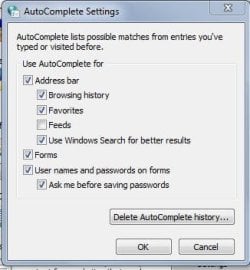
Press the Start button and type autocomplete in the 'Search Programs and Files' box. Next touch and enter the link offered for autocomplete in the panel above.

In the dialogue box select settings for Autocomplete box, then check or uncheck the items which you wish to autocomplete.
 

Attachments

  • autocomplete.JPG
    autocomplete.JPG
    47.6 KB · Views: 37
  • autocomplete1.JPG
    autocomplete1.JPG
    26.3 KB · Views: 39
Last edited:

My Computer

Computer type
PC/Desktop
Computer Manufacturer/Model Number
Packard Bell
OS
Windows 7 Home Premium 64bit
CPU
Intel(R) Core(TM) i3-2120 CPU @ 3.30GHz
Motherboard
Packard Bell IPISB-AG
Memory
3.00 GB
Graphics Card(s)
(1) Intel(R) HD Graphics (2) VNC Mirror Driver
Sound Card
Realtek High Definition Audio
Monitor(s) Displays
AIO LCD
Screen Resolution
1920 x 1080
Hard Drives
WDC WD10EADX-22TDHB0 ATA Device
Fixed hard disk media
4 partitions
931.51 GB
Keyboard
Wireless
Mouse
Wireless
Antivirus
Microsoft Security Essentials
Browser
IE; Firefox
Other Info
Also:
Samsung N220 Plus Netbook - Windows 7 Home
HP laptop
iPad 5
I tried the above and no change. I did delete all contacts in outlook, went back to gmail and selected a smaller number of contacts to convert.

When I did the suggestion of adding all the names, the auto complete worked, but only if I typed the beginning of the person's email address. Example Stephanie's email begins with snra..... If I type the beginning of her name ste (no autocomplete), If I type snr the beginning of her email, then auto complete worked.

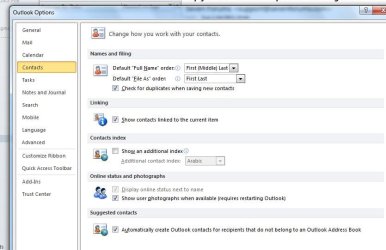
Prior to adding all the names in a to, nothing worked, but I converted and went to testing right away, perhaps I should have given time to build index?? Hopefully files attached to show how mapping converted.

ScreenShot007.jpg

ScreenShot008.jpg
 

My Computer

Computer type
PC/Desktop
Computer Manufacturer/Model Number
Dell Optiplex 3040
OS
Windows 7 Professional 64 bit
CPU
Intel I5
Memory
8GB
Hard Drives
500GB
Back
Top