Automate driver selection windows 7

Smoblikat

New member
Local time
3:47 PM
Messages
6
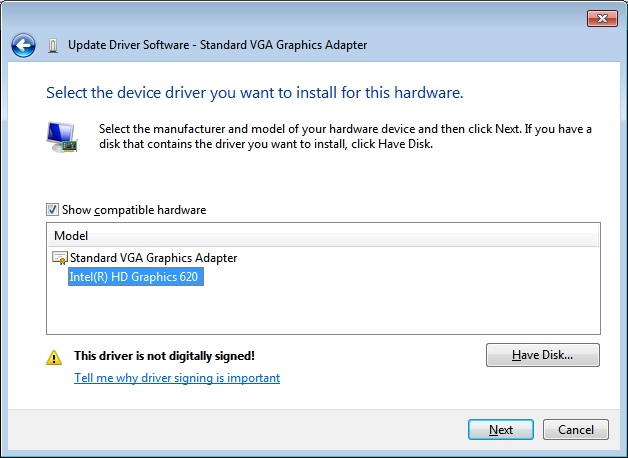
Hello, im creating an image for the computers at work and Ive run into an annoying issue. This is a universal image, Wn7X64 Pro, and im trying to automagically install the drivers for the graphics card. Sounds simple, right? Well, the new 7th gen processors dont support windows 7, so I made a custom driver .inf for it to install under windows 7. That part works fine, the drivers install and I get intel HD620 graphics as an option. Then I call dpinst from my unattend file and have it install the drivers for the GPU during startup with the /lm switch enabled (since its a custom driver, its unsigned and M$ doesnt like that for some reason). All of that works great, the driver installs during first startup, and I have a completely unattended install. The issue arises when I boot into windows for the first time. The driver is technically installed, and it is available, but windows doesnt automatically select it for use. I have to right click the device in device manager, select update driver etc.. and I see the custom one right there in the list of currently installed drivers, right under "Standard VGA graphics adapter". All I do is select it an hit install, and it works perfectly. Does anyone know of a way to force windows to select that specific driver to use over the default one? I cant help but imagine this is all related to it being unsigned and therefore "worse" than the default one, so im experimenting with putting
<forceIfDriverIsNotBetter/>
in my dpinst.xml file. Ill let you guys know if that solves it, but if anyone has any ideas please oh please share them with me.
 

My Computer

Computer type
PC/Desktop
OS
W7X64 Pro
Using that switch didnt seem to help, I still see both the HD620 and standard VGA graphics adapter options in the driver selection screen.
 

My Computer

Computer type
PC/Desktop
OS
W7X64 Pro
I posted this issue on another forum too, but here is an image of what im dealing with.

Link to other forum post - Force windows 7 to enable driver........ - AnandTech Forums

Driver.jpg
 

My Computer

Computer type
PC/Desktop
OS
W7X64 Pro

My Computers

System One System Two

  • Computer type
    PC/Desktop
    Computer Manufacturer/Model Number
    custom build
    OS
    Windows 7 HP 64
    CPU
    i5 6600K - 800MHz to 4200MHz
    Motherboard
    GA-Z170-HD3P
    Memory
    4+4G GSkill DDR4 3000
    Graphics Card(s)
    IG - Intel 530
    Monitor(s) Displays
    Samsung 226BW
    Screen Resolution
    1680x1050
    Hard Drives
    (1) -1 SM951 – 128GB M.2 AHCI PCIe SSD drive for Windows 7 and Lubuntu
    (2) -1 WD SATA 3 - 1T for Data
    (3) -1 WD SATA 3 - 1T for backup
    PSU
    Thermaltake 450W TR2 gold
    Keyboard
    Old and good Chicony mechanical keyboard
    Mouse
    Logitech mX performance - 9 buttons (had to disable some)
    Internet Speed
    500Mb/s
    Browser
    Firefox 64
    Other Info
    TinyWall firewall
  • Computer type
    Laptop
    System Manufacturer/Model Number
    Asus Q550LF
    OS
    Windows 7 Pro
    CPU
    i7-4500U 800MHz to 3.0GHz
    Motherboard
    Asus Q550LF
    Memory
    (4+4)G DDR3 1600
    Graphics Card(s)
    IG intel 4400 + NVIDIA GeForce GT 745M
    Sound Card
    Realtek
    Monitor(s) Displays
    LG Display LP156WF4-SPH1
    Screen Resolution
    1920 x 1080
    Hard Drives
    BX500 120G SSD for Windows and programs +
    1T HDD for data
    Internet Speed
    500 Mb/s
    Browser
    Firefox
    Other Info
    TinyWall firewall
Hi Smoblikat,

That screenshot tells me that Windows WILL NOT automatically install it
Within any setup a digital signature is required by default.

Your going to have DIgital enforcement set to OFF on your sysprep
bcdedit /set testsigning off

Roy
 

My Computer

Computer type
PC/Desktop
Computer Manufacturer/Model Number
medionl/Aspire 6930G/acer x55a
OS
W7 home premium 32bit/W7HP 64bit/w10 tp insider ring
CPU
E5300 dual core
Motherboard
medion MS7366
Memory
3gb
Graphics Card(s)
Nvidia Geforce 7100 Nforce 630i
Monitor(s) Displays
avixc
Internet Speed
n (isp resticted to 72)
Antivirus
mse/pands
Browser
palemoon
Other Info
Belkin Fd7050 n USB using Railink RT2870 drivers, more upto date
NOTE

reset it after install, via GPO

Roy
 

My Computer

Computer type
PC/Desktop
Computer Manufacturer/Model Number
medionl/Aspire 6930G/acer x55a
OS
W7 home premium 32bit/W7HP 64bit/w10 tp insider ring
CPU
E5300 dual core
Motherboard
medion MS7366
Memory
3gb
Graphics Card(s)
Nvidia Geforce 7100 Nforce 630i
Monitor(s) Displays
avixc
Internet Speed
n (isp resticted to 72)
Antivirus
mse/pands
Browser
palemoon
Other Info
Belkin Fd7050 n USB using Railink RT2870 drivers, more upto date
NOTE

reset it after install, via GPO

Roy

Would I be able to re-enable testsigning by putting it into my setupcomplete.cmd? Or is GPO recommended for a specific reason.
 

My Computer

Computer type
PC/Desktop
OS
W7X64 Pro

My Computers

System One System Two

  • Computer type
    PC/Desktop
    Computer Manufacturer/Model Number
    custom build
    OS
    Windows 7 HP 64
    CPU
    i5 6600K - 800MHz to 4200MHz
    Motherboard
    GA-Z170-HD3P
    Memory
    4+4G GSkill DDR4 3000
    Graphics Card(s)
    IG - Intel 530
    Monitor(s) Displays
    Samsung 226BW
    Screen Resolution
    1680x1050
    Hard Drives
    (1) -1 SM951 – 128GB M.2 AHCI PCIe SSD drive for Windows 7 and Lubuntu
    (2) -1 WD SATA 3 - 1T for Data
    (3) -1 WD SATA 3 - 1T for backup
    PSU
    Thermaltake 450W TR2 gold
    Keyboard
    Old and good Chicony mechanical keyboard
    Mouse
    Logitech mX performance - 9 buttons (had to disable some)
    Internet Speed
    500Mb/s
    Browser
    Firefox 64
    Other Info
    TinyWall firewall
  • Computer type
    Laptop
    System Manufacturer/Model Number
    Asus Q550LF
    OS
    Windows 7 Pro
    CPU
    i7-4500U 800MHz to 3.0GHz
    Motherboard
    Asus Q550LF
    Memory
    (4+4)G DDR3 1600
    Graphics Card(s)
    IG intel 4400 + NVIDIA GeForce GT 745M
    Sound Card
    Realtek
    Monitor(s) Displays
    LG Display LP156WF4-SPH1
    Screen Resolution
    1920 x 1080
    Hard Drives
    BX500 120G SSD for Windows and programs +
    1T HDD for data
    Internet Speed
    500 Mb/s
    Browser
    Firefox
    Other Info
    TinyWall firewall


If you pause at 5:20, youll see the exact problem im having. I made a working driver for windows 7, in no way do I need any help getting the driver created or loaded. It still prompts me to see if I want to use the selected driver, im going to try and see if enabling testmode will allow it to automatically select the sustom driver to use, if that doesnt work, then this whole thing might not be possible.
 

My Computer

Computer type
PC/Desktop
OS
W7X64 Pro
Hi Smoblikat,

Sysprep not really my forte'.

just know about the driver enforcement rules.

I cannot see a reason not to reset it within the sysprep. Kari
I wonder what the guru says.


Roy
 

My Computer

Computer type
PC/Desktop
Computer Manufacturer/Model Number
medionl/Aspire 6930G/acer x55a
OS
W7 home premium 32bit/W7HP 64bit/w10 tp insider ring
CPU
E5300 dual core
Motherboard
medion MS7366
Memory
3gb
Graphics Card(s)
Nvidia Geforce 7100 Nforce 630i
Monitor(s) Displays
avixc
Internet Speed
n (isp resticted to 72)
Antivirus
mse/pands
Browser
palemoon
Other Info
Belkin Fd7050 n USB using Railink RT2870 drivers, more upto date
The issue is driver signing. When it's not signed, I think there's no way to make Windows to automatically pick it over a signed one and stick to it.

Theoretically, you might get lucky with a script which runs when Windows is first booted to desktop, installs the driver, and deletes itself when done. However, although this kind of scripts are easy to do, I have to admit I can't see how it could be done for this purpose, installing an unsigned driver.

Kari
 

My Computer

Computer type
Laptop
Computer Manufacturer/Model Number
HP ENVY 17-1150eg
OS
Windows 10 Pro x64 EN-GB
CPU
1.6 GHz Intel Core i7-720QM Processor
Memory
6 GB
Graphics Card(s)
ATI Mobility Radeon HD 5850 Graphics
Sound Card
Beats sound system with integrated subwoofer
Monitor(s) Displays
17" laptop display, 22" LED and 32" Full HD TV through HDMI
Screen Resolution
1600*900 (1), 1920*1080 (2&3)
Hard Drives
Internal: 2 x 500 GB SATA Hard Disk Drive 7200 rpm
External: 2TB for backups, 3TB USB3 network drive for media
Cooling
As Envy runs a bit warm, I have it on a Cooler Master pad
Keyboard
Logitech diNovo Media Desktop Laser (bluetooth)
Mouse
Logitech Performance Mouse MX
Internet Speed
50/10 Mbps VDSL
Antivirus
Windows Defender 4.3.9431.0
Browser
Maxthon 3.5.2., IE11
Back
Top