Automatic Key Press Software?

alsnoid

New member
Local time
6:15 PM
Messages
3
Is there some software that does a key press every couple of minutes to indicate to Windows 7 you are using the system even when you step away from the machine for a few minutes? Windows 7 shuts down after a few minutes if I step away and of course whatever I was doing for the hours before that is lost.

Thanks for your help!
 

My Computer

OS
Windows 7 64 Bit
Is there some software that does a key press every couple of minutes to indicate to Windows 7 you are using the system even when you step away from the machine for a few minutes? Windows 7 shuts down after a few minutes if I step away and of course whatever I was doing for the hours before that is lost.

Thanks for your help!

Um, why not just increase the time before shutdown??

Does it BSOD, or just shut down normally?
 

My Computer

Computer Manufacturer/Model Number
HP Pavillion dv-7 1005 Tx
OS
Win 8 Release candidate 8400
CPU
[email protected]
Memory
4 gigs
Graphics Card(s)
Nvidia 9600M
Sound Card
HD built-in
Monitor(s) Displays
17" Wxga
Screen Resolution
1440x900
Cooling
none
Internet Speed
45Mb down 5Mb up
Thanks for the quick reply. There is no BSOD. It just shuts down. I prefer the computer to shut down when I tell it to rather than automatically when I get up from the computer. When I first noticed this feature of Windows 7 I thought it maybe had to do with a screen saver bug or perhaps shutting down to conserve energy but I have the screen saver set to 60 minutes and my power plan is set to never turn off the display and never have the computer sleep.

How do you extend the time before automatic shutdown?
 

My Computer

OS
Windows 7 64 Bit
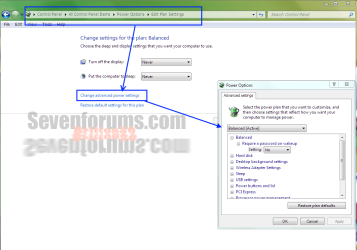
Navigate to the address shown in the bar in this window below, click Change Advanced Settings. A new window will open as shown where you can change all settings. It should not automatically shut down if you don't want it too.
power plan.PNG
Also this http://www.easyfreeware.com/files/auto_mouse_mover.zip/28389 will move you mouse at pre-set intervals to keep your desktop active.
 

My Computer

Computer type
PC/Desktop
Computer Manufacturer/Model Number
Home Built Desktop By DataTech
OS
Windows 7 Ultimate X64 SP1
CPU
Intel i5-2550K, Differing ~4.4-4.8GHz No built in GPU
Motherboard
ASUS P8Z68-V PRO/GEN3
Memory
16GB G.Skill Sniper 1866MHz @ 2133MHz 2x8GB
Graphics Card(s)
ASUS GTX650TIB-DC2OC-2GD5, (650TI Boost)
Sound Card
Onboard Realtek 5-1
Monitor(s) Displays
Samsung P2570HD
Screen Resolution
1920x1080
Hard Drives
Samsung 840 Pro 256GB SSD for OS, 500GB Seagate Constellation (Enterprise drive) for Data
PSU
Corsair HX650W
Case
Inwin Dragon Rider
Cooling
Hyper 212 EVO w/two Noctua fans, push-pull, @1300 RPM
Keyboard
E-Z Eyes, bright yellow keys with large characters
Mouse
steelseries SENSEI Laser Pro Gaming
Internet Speed
48-51Mbs Mbs down, 11 Mbs up Xfinity Cable
Antivirus
Norton Internet Security 2013
Browser
IE 10, Opera, Pale Moon if needed
Other Info
4 case fans, LG BluRay-RE, ASUS DVD-RW, Mr. Fusion power supply, 1.21 gigawatts.
Your saying the computer shuts down by itself ? Your not talking sleep or hybernate are you ?
 

My Computer

Computer Manufacturer/Model Number
Myself
OS
Windows 7 Ultimate 64Bit
CPU
C2D E8200
Motherboard
XFX 750i
Memory
8GB PNY PC2-6400
Graphics Card(s)
BFG 9600GT x 2
Sound Card
Stock XFX Optical
Monitor(s) Displays
Gateway 22" HD Display
Hard Drives
C: 1 TB G: 500 GB H: 500 GB
PSU
Ultra LSP 550 Pro Lifetime Series
Case
Xion2
Cooling
ThermalTake
No sleep, no hibernation, no power reduction, it just turns off as if I held down the reset button. Actually, though, I have a battery powered mouse that hibernates after a few minutes of inactivity. I have to press a mouse button to get it working again. Maybe that is related to my problem.

I'm trying the software recommended by Briton30 that moves the mouse pointer 5 pixels at set intervals. I set the interval at 5 minutes and so far so good.

Thanks for all the help!
 

My Computer

OS
Windows 7 64 Bit
Good to hear alsnoid :D
The mouse mover thing and those power settings I gave you should do the trick. Let us know.
 

My Computer

Computer type
PC/Desktop
Computer Manufacturer/Model Number
Home Built Desktop By DataTech
OS
Windows 7 Ultimate X64 SP1
CPU
Intel i5-2550K, Differing ~4.4-4.8GHz No built in GPU
Motherboard
ASUS P8Z68-V PRO/GEN3
Memory
16GB G.Skill Sniper 1866MHz @ 2133MHz 2x8GB
Graphics Card(s)
ASUS GTX650TIB-DC2OC-2GD5, (650TI Boost)
Sound Card
Onboard Realtek 5-1
Monitor(s) Displays
Samsung P2570HD
Screen Resolution
1920x1080
Hard Drives
Samsung 840 Pro 256GB SSD for OS, 500GB Seagate Constellation (Enterprise drive) for Data
PSU
Corsair HX650W
Case
Inwin Dragon Rider
Cooling
Hyper 212 EVO w/two Noctua fans, push-pull, @1300 RPM
Keyboard
E-Z Eyes, bright yellow keys with large characters
Mouse
steelseries SENSEI Laser Pro Gaming
Internet Speed
48-51Mbs Mbs down, 11 Mbs up Xfinity Cable
Antivirus
Norton Internet Security 2013
Browser
IE 10, Opera, Pale Moon if needed
Other Info
4 case fans, LG BluRay-RE, ASUS DVD-RW, Mr. Fusion power supply, 1.21 gigawatts.
Back
Top