automatically delete/move files to folders

149047

New member
Member
Local time
10:20 PM
Messages
57
hi all!
is there something like a handy method to automatically move files depending on their extension to custom folders? (either by the time they are generated or at a specific date).
ps: b.) i would be also interested in finding a method to have windows7 delete files in custom folders at a certain date

looking forward to your answers,
markus
 
Last edited by a moderator:

My Computer

OS
xp, w7
CPU
q6600
Motherboard
gigabyte p35 dq6
Memory
2x 4gb kingston 1066, hyperx cl5
Graphics Card(s)
x1950pro
You can do that with DOS commands (batch file). Getting into the dates requires an advanced understanding of DOS.

Provide some details. We have some talented people here who know even better ways.
 
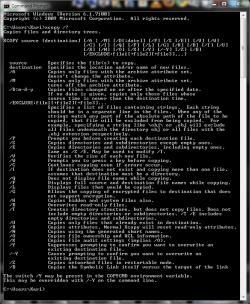
If you know some DOS, you could do marvels with for example a XCOPY-based batch file. It is not a fully automated method, you still have to launch the batch.

Kari

xcopy.PNG
 

My Computer

Computer type
Laptop
Computer Manufacturer/Model Number
HP ENVY 17-1150eg
OS
Windows 10 Pro x64 EN-GB
CPU
1.6 GHz Intel Core i7-720QM Processor
Memory
6 GB
Graphics Card(s)
ATI Mobility Radeon HD 5850 Graphics
Sound Card
Beats sound system with integrated subwoofer
Monitor(s) Displays
17" laptop display, 22" LED and 32" Full HD TV through HDMI
Screen Resolution
1600*900 (1), 1920*1080 (2&3)
Hard Drives
Internal: 2 x 500 GB SATA Hard Disk Drive 7200 rpm
External: 2TB for backups, 3TB USB3 network drive for media
Cooling
As Envy runs a bit warm, I have it on a Cooler Master pad
Keyboard
Logitech diNovo Media Desktop Laser (bluetooth)
Mouse
Logitech Performance Mouse MX
Internet Speed
50/10 Mbps VDSL
Antivirus
Windows Defender 4.3.9431.0
Browser
Maxthon 3.5.2., IE11
You can launch a cmd file in startup or scheduler that checks the date and calls the cmd file.

Just today, I was reviewing a complex Day Of Week routine that I do with pst files.
 
that sounds like a very good idea - i am old enough to remember some basic dos stuff - yet i could use some startup aid ;)
so, provided i want to have win7 move all *.jpg, *.c4d, *.flam3 files from their original mutual folder "DUMP" to three individual folders JPG, C4D, FLAM3. how would i do that? by "moving" i mean that the files be deleted in the original folder.

thanx for helping :)
markus

http://www.humanchaos.net
 

My Computer

OS
xp, w7
CPU
q6600
Motherboard
gigabyte p35 dq6
Memory
2x 4gb kingston 1066, hyperx cl5
Graphics Card(s)
x1950pro
if i understood this right, the following could help:

Code:
xcopy C:\DUMP\*.jpg C:\jpg\
xcopy C:\DUMP\*.c4d C:\c4d\
xcopy C:\DUMP\*.flam3 C:\flam3\

/D:m-d-y Copies files changed on or after the specified date. If no date is given, copies only those files whose source time is newer than the destination time.

also if you want to specify the date at the beginning of the batch without having to edit it each time you can use "set" like:
Code:
set /p d=Enter the Day: 
set /p m=Enter the Month: 
set /p y=Enter the Year:
it will create the variables d, m, and y, wich you can then put in the xcopy command like like:

Code:
xcopy C:\DUMP\*.jpg C:\jpg\ /d:%m%-%d%-%y%
the following bat did it correctly, but thisone is without the dates:
Code:
@echo off
xcopy C:\DUMP\*.jpg C:\DUMP\jpg\ /i
xcopy C:\DUMP\*.c4d C:\DUMP\c4d\ /i
xcopy C:\DUMP\*.flam3 C:\DUMP\flam3\ /i
pause
also look at all the options xcopy has to offer

- hakon

edit:
and about the deleting part...dont see a option for that in xcopy, however you can use RoboCopy to do that.

robocopy /?

/MOV :: MOVe files (delete from source after copying).
/MOVE :: MOVE files AND dirs (delete from source after copying).
 

My Computer

Computer Manufacturer/Model Number
Custom
OS
Windows 7 build 7600 64 bit
CPU
Phenom II X4 955 retail 3.2GHz
Motherboard
ASRock M3A790GXH/USB3 ATX AMD AMD3
Memory
4x GeiL 2GB Value PC3-10660 CL9 DC DDR3-1333, CL 9-9-9-28
Graphics Card(s)
PowerColor Radeon HD5850 PCS+ 1024MB, 256-bit GDDR5
Sound Card
Built in
Hard Drives
G.Skill Phoenix Pro 120GB SATA2 SSD Sandforce SF-120
Samsung Spinpoint 500GB SATA2 7200RPM
PSU
Tacens Radix III Smart 520W
Back
Top