Problem solved

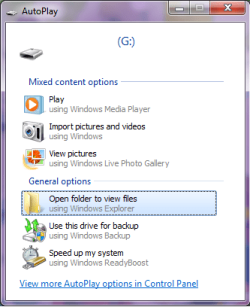
it seems some software like virtualization, cd tools may disable autoplay.
in my case i think it was VMWare, but even after uninstall it did not revert this setting.
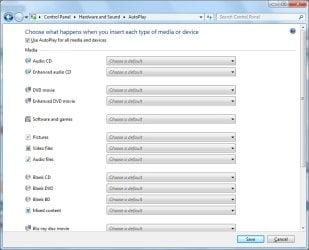
even if its selected in windows control panel the problem lies deeper.
anyone else who have this problem there is a solution that worked for me
open regedit
HKEY_LOCAL_MACHINE\Software\Microsoft\Windows\CurrentVersion\Policies\Explorer(this has higher priority than user)
or
HKEY_CURRENT_USER\Software\Microsoft\Windows\CurrentVersion\Policies\Explorer
find
NoDriveTypeAutoRun entry
if the value 0×000000FF (255) that means disabled
windows 7 default value should be 0×00000091 (145)
!Notice changing registry is dangerous, if you dont know what youre doing plese dont do it and always backup(export the key before changing) so you can restore if something goes wrong.
And if you want to selectively allow Autoplay then the following values should work -
usual warnings about altering the Registry
Disables Autoplay on unknown drives only
"NoDriveTypeAutoRun"=dword:0x00000081
Disables Autoplay on removable drives only
"NoDriveTypeAutoRun"=dword:0x00000004
Disables Autoplay on fixed drives only
"NoDriveTypeAutoRun"=dword:0x00000008
Disables Autoplay on network drives only
"NoDriveTypeAutoRun"=dword:0x00000010
Disables Autoplay on CD-ROM drives only
"NoDriveTypeAutoRun"=dword:0x00000020
Disables Autoplay on RAM disks only
"NoDriveTypeAutoRun"=dword:0x00000040
Disables Autoplay on all drives (Recommended)
"NoDriveTypeAutoRun"=dword:0x000000FF
Disables Autoplay on removable drives and fixed drives
"NoDriveTypeAutoRun"=dword:0x0000000C
Disables Autoplay on removable drives and network drives
"NoDriveTypeAutoRun"=dword:0x00000014
Disables Autoplay on removable drives and CD-ROM drives
"NoDriveTypeAutoRun"=dword:0x00000024
Disables Autoplay on removable drives and RAM disks
"NoDriveTypeAutoRun"=dword:0x00000044
Disables Autoplay on removable drives and unknown drives
"NoDriveTypeAutoRun"=dword:0x00000085
Disables Autoplay on fixed drives and network drives
"NoDriveTypeAutoRun"=dword:0x00000018
Disables Autoplay on fixed drives and CD-ROM drives
"NoDriveTypeAutoRun"=dword:0x00000028
Disables Autoplay on fixed drives and RAM disks
"NoDriveTypeAutoRun"=dword:0x00000048
Disables Autoplay on fixed drives and unknown drives
"NoDriveTypeAutoRun"=dword:0x00000089
Disables Autoplay on network drives and CD-ROM drives
"NoDriveTypeAutoRun"=dword:0x00000030
Disables Autoplay on network drives and RAM disks
"NoDriveTypeAutoRun"=dword:0x00000050
Disables Autoplay on network drives and unknown drives
"NoDriveTypeAutoRun"=dword:0x00000091
Disables Autoplay on CD-ROM drives and RAM disks
"NoDriveTypeAutoRun"=dword:0x00000060
Disables Autoplay on CD-ROM drives and unknown drives
"NoDriveTypeAutoRun"=dword:0x000000A1
Disables Autoplay on RAM disks and unknown drives
"NoDriveTypeAutoRun"=dword:0x000000C1
Disables Autoplay on removable drives, fixed drives and network drives
"NoDriveTypeAutoRun"=dword:0x0000001C
Disables Autoplay on removable drives, fixed drives and CD-ROM drives
"NoDriveTypeAutoRun"=dword:0x0000002C
Disables Autoplay on removable drives, fixed drives and RAM disks
"NoDriveTypeAutoRun"=dword:0x0000004C
Disables Autoplay on removable drives, fixed drives and unknown drives
"NoDriveTypeAutoRun"=dword:0x0000008D
Disables Autoplay on removable drives, network drives and CD-ROM drives
"NoDriveTypeAutoRun"=dword:0x00000034
Disables Autoplay on removable drives, network drives and RAM disks
"NoDriveTypeAutoRun"=dword:0x00000054
Disables Autoplay on removable drives, network drives and unknown drives (Default)
"NoDriveTypeAutoRun"=dword:0x00000095
Disables Autoplay on removable drives, CD-ROM drives and RAM disks
"NoDriveTypeAutoRun"=dword:0x00000064
Disables Autoplay on removable drives, CD-ROM drives and unknown drives
"NoDriveTypeAutoRun"=dword:0x000000A4
Disables Autoplay on removable drives, RAM disks and unknown drives
"NoDriveTypeAutoRun"=dword:0x000000C5
Disables Autoplay on fixed drives, network drives and CD-ROM drives
"NoDriveTypeAutoRun"=dword:0x00000038
Disables Autoplay on fixed drives, network drives and RAM disks
"NoDriveTypeAutoRun"=dword:0x00000058
Disables Autoplay on fixed drives, network drives and unknown drives
"NoDriveTypeAutoRun"=dword:0x00000099
Disables Autoplay on fixed drives and CD-ROM drives and RAM disks
"NoDriveTypeAutoRun"=dword:0x00000068
Disables Autoplay on fixed drives, CD-ROM drives and unknown drives
"NoDriveTypeAutoRun"=dword:0x000000A9
Disables Autoplay on fixed drives, RAM disks and unknown drives
"NoDriveTypeAutoRun"=dword:0x000000C9
Disables Autoplay on network drives, CD-ROM drives and RAM disks
"NoDriveTypeAutoRun"=dword:0x00000070
Disables Autoplay on network drives, CD-ROM drives and unknown drives
"NoDriveTypeAutoRun"=dword:0x000000B1
Disables Autoplay on network drives, RAM disks and unknown drives
"NoDriveTypeAutoRun"=dword:0x000000D1
Disables Autoplay on CD-ROM drives, RAM disks and unknown drives
"NoDriveTypeAutoRun"=dword:0x000000E1
Disables Autoplay on removable drives, fixed drives, network drives and CD-ROM drives
"NoDriveTypeAutoRun"=dword:0x0000003C
Disables Autoplay on removable drives, fixed drives, network drives and RAM disks
"NoDriveTypeAutoRun"=dword:0x0000005C
Disables Autoplay on removable drives, fixed drives, network drives and unknown drives
"NoDriveTypeAutoRun"=dword:0x0000009D
Disables Autoplay on removable drives, fixed drives, CD-ROM drives and RAM disks
"NoDriveTypeAutoRun"=dword:0x0000006C
Disables Autoplay on removable drives, fixed drives, CD-ROM drives and unknown drives
"NoDriveTypeAutoRun"=dword:0x000000AD
Disables Autoplay on removable drives, fixed drives, RAM disks and unknown drives
"NoDriveTypeAutoRun"=dword:0x000000CD
Disables Autoplay on removable drives, network drives, CD-ROM drives and RAM disks
"NoDriveTypeAutoRun"=dword:0x00000074
Disables Autoplay on removable drives, network drives, CD-ROM drives and unknown drives
"NoDriveTypeAutoRun"=dword:0x000000B5
Disables Autoplay on removable drives, network drives, RAM disks and unknown drives
"NoDriveTypeAutoRun"=dword:0x000000D5
Disables Autoplay on removable drives, CD-ROM drives, RAM disks and unknown drives
"NoDriveTypeAutoRun"=dword:0x000000E5
Disables Autoplay on fixed drives, network drives, CD-ROM drives and RAM disks
"NoDriveTypeAutoRun"=dword:0x00000078
Disables Autoplay on fixed drives, network drives, CD-ROM drives and unknown drives
"NoDriveTypeAutoRun"=dword:0x000000B9
Disables Autoplay on fixed drives, network drives, RAM disks and unknown drives
"NoDriveTypeAutoRun"=dword:0x000000D9
Disables Autoplay on fixed drives, CD-ROM drives, RAM disks and unknown drives
"NoDriveTypeAutoRun"=dword:0x000000E9
Disables Autoplay on network drives, CD-ROM drives, RAM disks and unknown drives
"NoDriveTypeAutoRun"=dword:0x000000F1
Disables Autoplay on removable drives, fixed drives, network drives, CD-ROM drives and RAM disks
"NoDriveTypeAutoRun"=dword:0x0000007C
Disables Autoplay on removable drives, fixed drives, network drives, CD-ROM drives and unknown drives
"NoDriveTypeAutoRun"=dword:0x000000BD
Disables Autoplay on removable drives, fixed drives, network drives, RAM disks and unknown drives
"NoDriveTypeAutoRun"=dword:0x000000DD
Disables Autoplay on removable drives, fixed drives, CD-ROM drives, RAM disks and unknown drives
"NoDriveTypeAutoRun"=dword:0x000000ED
Disables Autoplay on removable drives, network drives, CD-ROM drives, RAM disks and unknown drives
"NoDriveTypeAutoRun"=dword:0x000000F5
Disables Autoplay on fixed drives, network drives, CD-ROM drives, RAM disks and unknown drives
"NoDriveTypeAutoRun"=dword:0x000000F9