Autoplay is 'mixed up' and not working.

bilzmale

New member
Power User
Local time
4:13 AM
Messages
77
Location
Perth, Western Australia
Running Win 7 Home Prem 64 bit and autoplay will not run a software instal CD/DVD.

I have reset all autoplay defaults to "Take No Action" except Software and Games which is set to "Instal or run prog". I have restarted Win to ensure these stick. When I try to install a prog from the CD the Mixed Media options come up and then disappear. After that nothing. I can't even run the Win install CD to refresh Windows.

If I try to run Setup.exe or similar I get an error that this is not a Win installer.

Any help appreciated. A fresh instal of Win is a worry - I'm a software junkie with over 200 apps installed.
 

My Computer My Computer

At a glance

Win 7 Home Premium 64 bitPhenom II X4 955 BE8GB Kingston DDR2 800Sapphire HD5670 1GB.
Computer Manufacturer/Model Number
Mixture
OS
Win 7 Home Premium 64 bit
CPU
Phenom II X4 955 BE
Motherboard
GA-MA785GM-US2H
Memory
8GB Kingston DDR2 800
Graphics Card(s)
Sapphire HD5670 1GB.
Sound Card
Asus Xonar Essence ST
Monitor(s) Displays
Samsung P2350
Screen Resolution
1920x1080
Hard Drives
Seagate 1TB
Hitachi 1TB

WD 500GB external
PSU
Corsair VX550W
Case
Cooler Master Silio 500
Cooling
Noctua NH-U9B SE2
Keyboard
Logitech
Mouse
Evoluent Vertimouse 3 (wireless)
Internet Speed
ADSL2+
Is there any chance that really isn't a win installer/ the cd copy is bad ?
If you open the cd/DVD in Explorer, double click the setup.exe and it still dosn't take it, this is not an autoplay issue anymore.
It could be as simple as a dirty lense or a corrupted CD/DVD driver up to a faulty drive.
I (personally) would not automatically assume, a fresh install would be the way to go here.

-DG
 

My Computer My Computer

At a glance

Windows 7 Ultimate x86DualCore AMD Athlon 64 X2, 2600 MHz 5200+Samsung 2GB DDR2Onboard NVIDIA GeForce 6150SE nForce 430
Computer Manufacturer/Model Number
HP m8000n
OS
Windows 7 Ultimate x86
CPU
DualCore AMD Athlon 64 X2, 2600 MHz 5200+
Motherboard
Asus M2N68-LA (Narra)
Memory
Samsung 2GB DDR2
Graphics Card(s)
Onboard NVIDIA GeForce 6150SE nForce 430
Sound Card
Onboard nVIDIA nForce 6100-430 (MCP61P)
Monitor(s) Displays
Westinghouse 19" LED
Screen Resolution
1280x1024
Hard Drives
SATA II Seagate Barracuda 500GB
USB II WD Elements 500GB
USB II WD My Book 1TB
USB II WD My Book 2TB
PSU
Stock (HP)
Case
Stock (HP)
Cooling
Stock
Keyboard
Logitech Classic KB 200
Mouse
Standard HP opticle USB mouse
OK an update. Have done a fresh install of Win and everything was working normally. Then for some reason the old behaviour has returned. Some software CDs will install by manually running setup.exe and others won't.

Is there any way of resetting autoplay from within regedit as the Control Panel approach is not removing this "odd" behaviour.

It does seem that autoplay is assessing the software as "mixed content" rather than programs. These are well known progs like MS Office, Sony Vegas Studio, Serif WebPlus and they are original discs.

I thought Adobe Lightroom 3 might be the culprit as it inserted itself as default in just about every category but uninstalling it did not fix my problem.
 

My Computer My Computer

At a glance

Win 7 Home Premium 64 bitPhenom II X4 955 BE8GB Kingston DDR2 800Sapphire HD5670 1GB.
Computer Manufacturer/Model Number
Mixture
OS
Win 7 Home Premium 64 bit
CPU
Phenom II X4 955 BE
Motherboard
GA-MA785GM-US2H
Memory
8GB Kingston DDR2 800
Graphics Card(s)
Sapphire HD5670 1GB.
Sound Card
Asus Xonar Essence ST
Monitor(s) Displays
Samsung P2350
Screen Resolution
1920x1080
Hard Drives
Seagate 1TB
Hitachi 1TB

WD 500GB external
PSU
Corsair VX550W
Case
Cooler Master Silio 500
Cooling
Noctua NH-U9B SE2
Keyboard
Logitech
Mouse
Evoluent Vertimouse 3 (wireless)
Internet Speed
ADSL2+
Granted, whatever you set in Control Panel ends up in the registry anyways.
Here is the registry setting to check, or to turn off Autorun:
HKEY_LOCAL_MACHINE\SYSTEM\CurrentControlSet\Services\cdrom
A value of 1 means enable autorun (on), while zero means disable autorun.

Another way to disable autoplay would be to block a drive from the Media Change Notification.
If that is the case you would find a dword "NoDriveTypeAutoRun " either in

HKEY_CURRENT_USER\Software\Microsoft\Windows\CurrentVersion\Policies\Explorer
or in
HKEY_LOCALE_MACHINE\Software\Microsoft\Windows\CurrentVersion\Policies\Explorer

For the correct values look here

-DG
 

My Computer My Computer

At a glance

Windows 7 Ultimate x86DualCore AMD Athlon 64 X2, 2600 MHz 5200+Samsung 2GB DDR2Onboard NVIDIA GeForce 6150SE nForce 430
Computer Manufacturer/Model Number
HP m8000n
OS
Windows 7 Ultimate x86
CPU
DualCore AMD Athlon 64 X2, 2600 MHz 5200+
Motherboard
Asus M2N68-LA (Narra)
Memory
Samsung 2GB DDR2
Graphics Card(s)
Onboard NVIDIA GeForce 6150SE nForce 430
Sound Card
Onboard nVIDIA nForce 6100-430 (MCP61P)
Monitor(s) Displays
Westinghouse 19" LED
Screen Resolution
1280x1024
Hard Drives
SATA II Seagate Barracuda 500GB
USB II WD Elements 500GB
USB II WD My Book 1TB
USB II WD My Book 2TB
PSU
Stock (HP)
Case
Stock (HP)
Cooling
Stock
Keyboard
Logitech Classic KB 200
Mouse
Standard HP opticle USB mouse
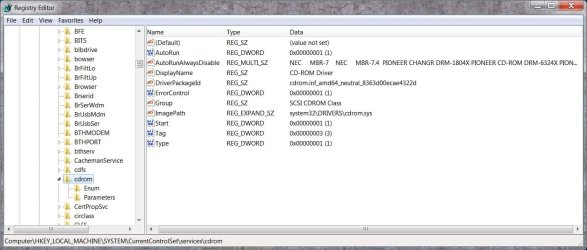
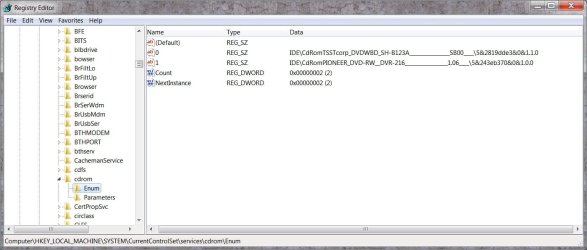
Thanks for the answer. It seems I have autoplay enabled but my Pioneer drive set to AutorunAlwaysDisabled. Screenshot added. How do I undo this setting for the Pioneer drive (I have 2 drives). It also seems I do not have a default drive set (screenshot 2). Should I have this set?
 

Attachments

  • cdrom.jpg
    cdrom.jpg
    89.6 KB · Views: 265
  • cdrom2.jpg
    cdrom2.jpg
    72.9 KB · Views: 181

My Computer My Computer

At a glance

Win 7 Home Premium 64 bitPhenom II X4 955 BE8GB Kingston DDR2 800Sapphire HD5670 1GB.
Computer Manufacturer/Model Number
Mixture
OS
Win 7 Home Premium 64 bit
CPU
Phenom II X4 955 BE
Motherboard
GA-MA785GM-US2H
Memory
8GB Kingston DDR2 800
Graphics Card(s)
Sapphire HD5670 1GB.
Sound Card
Asus Xonar Essence ST
Monitor(s) Displays
Samsung P2350
Screen Resolution
1920x1080
Hard Drives
Seagate 1TB
Hitachi 1TB

WD 500GB external
PSU
Corsair VX550W
Case
Cooler Master Silio 500
Cooling
Noctua NH-U9B SE2
Keyboard
Logitech
Mouse
Evoluent Vertimouse 3 (wireless)
Internet Speed
ADSL2+
Are you sure that it refers to YOUR Pioneer Drive ???
Because that AutoRunAlwaysDisable holds drives that don't support AutoRun (like CD changers etc.)
And nope...Default is normally not set on that Enum key.

It must be some of your installed software, taking over control (for example Roxio is known to do that.)
Do you recall what you installed after it worked and when it stopped?

If you can't recall, I would disable all non-Microsoft services for a test. If that solves the problem you will have to go through it to identify the culprit
Here is a nice Microsoft Howto for that:

How to troubleshoot a problem by performing a clean boot in Windows Vista or in Windows 7

-DG
 

My Computer My Computer

At a glance

Windows 7 Ultimate x86DualCore AMD Athlon 64 X2, 2600 MHz 5200+Samsung 2GB DDR2Onboard NVIDIA GeForce 6150SE nForce 430
Computer Manufacturer/Model Number
HP m8000n
OS
Windows 7 Ultimate x86
CPU
DualCore AMD Athlon 64 X2, 2600 MHz 5200+
Motherboard
Asus M2N68-LA (Narra)
Memory
Samsung 2GB DDR2
Graphics Card(s)
Onboard NVIDIA GeForce 6150SE nForce 430
Sound Card
Onboard nVIDIA nForce 6100-430 (MCP61P)
Monitor(s) Displays
Westinghouse 19" LED
Screen Resolution
1280x1024
Hard Drives
SATA II Seagate Barracuda 500GB
USB II WD Elements 500GB
USB II WD My Book 1TB
USB II WD My Book 2TB
PSU
Stock (HP)
Case
Stock (HP)
Cooling
Stock
Keyboard
Logitech Classic KB 200
Mouse
Standard HP opticle USB mouse
Back
Top