
Autoplay on internal hard drive

tomaskucinskas

New member
Member
Local time
4:32 AM
Messages
52
Hi,

on my Local Disk E I have Autoplay option. How I can remove it from context menu and command bar? On Local Disk C,D,F where is no Autoplay, only on E disk. All disks I can open with double click. Also I made search of autorun.inf file but where is no on any disk. Anybody has any ideas? Thanks
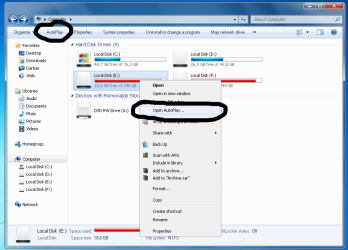
autoplay.png
 

My Computer My Computer

OS
Windows 7 Ultimate x64
I want to disable autoplay ONLY from INTERNAL hard drives + autoplay shouldn't be on internal hard drives.
 

My Computer My Computer

OS
Windows 7 Ultimate x64
It shouldn't be enabled for any devices, actually, if you've kept up with some of the vulnerabilities that have come out involving it in the past 6 months. Like you said, you already can double-click to open any of the drives in there.

What type of disk is E: that makes it different than the others? Care to show us a screenshot of Device Manager showing your drives?
 

My Computer My Computer

OS
XP / Win7 x64 Pro
CPU
Intel Quad-Core Q9450 @ 3.2GHz
Motherboard
Asus P5-E
Memory
2x2GB GSkill DDR2
Graphics Card(s)
NVIDIA GeForce 8600 GTS (EVGA)
Monitor(s) Displays
Dell 2408WFP
Screen Resolution
1920x1200

My Computer My Computer

OS
XP / Win7 x64 Pro
CPU
Intel Quad-Core Q9450 @ 3.2GHz
Motherboard
Asus P5-E
Memory
2x2GB GSkill DDR2
Graphics Card(s)
NVIDIA GeForce 8600 GTS (EVGA)
Monitor(s) Displays
Dell 2408WFP
Screen Resolution
1920x1200
Do I understand good?

0x1 - Disables AutoPlay on drives of unknown type.

0x4 - Disables AutoPlay on removable drives.

0x8 - Disables AutoPlay on fixed drives.

0x10 - Disables AutoPlay on network drives.

0x20 - Disables AutoPlay on CD-ROM drives.

0x40 - Disables AutoPlay on RAM drives.

0x80 - Disables AutoPlay on drives of unknown type.

0xFF - Disables AutoPlay on all types of drives.


Default "HKEY_CURRENT_USER\Software\Microsoft\Windows\CurrentVersion\Policies\Explorer" NoDriveTypeAutoRun value is 0x91 (145) which means: 0x1 (unknown type), 0x80 (unknown type) and 0x10 (network drives) = 0x91

So if I want to add fixed drives: 0x91+0x8=0x99 and I have to enter registry in hexadecimal base 99 number?

Thanks for help ;)
 

My Computer My Computer

OS
Windows 7 Ultimate x64
YES :) 0x99 have removed autoplay from internal hard drives. Thanks FliGi7 ;)
 

My Computer My Computer

OS
Windows 7 Ultimate x64
Back
Top