Autoplay

halfey

New member
Local time
10:38 PM
Messages
4
I've read the threads on this - reg key edits etc gp msc and the Microsoft solutions - nothing which work.
When I insert a disc into any of my 3 CD/DVD drives nothing happens. It will not autoplay.
If I go to My comp it lists the tracks as 1kb tracks and if I click on a track it tries to bring up Itunes but still won't play.
So the CD sees the disc -my comp sees the CDA file (1KB) for each track - but then nothing.
Autorun is checked for all devices and is supposed tp play in VLC mode.
Changed GP MSC to disable - still nothing
 
Last edited:

My Computer

OS
Windows 7 32 bit Professional
Did you make any changes to you system before the issue started?

Add any new hardware?

May of been something you downloaded which caused a conflict.

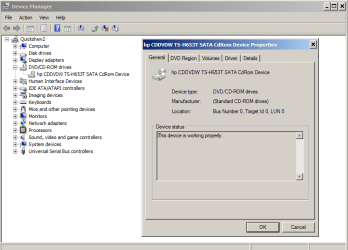
Check in Device Manager for problems. Look for yellow exclaimation marks. If nothing.

Capture.PNG

You can try uninstalling all CD/DVD drivers. Then reboot the system. Windows will reload the drivers.

Try system restore.

http://www.sevenforums.com/tutorials/700-system-restore.html?ltr=S

Then, sfc /scannow

http://www.sevenforums.com/tutorials/1538-sfc-scannow-command-system-file-checker.html
 
Last edited:

My Computer

Computer Manufacturer/Model Number
Custom Build
OS
windows Home Premium 64 bit
Thanks for all your advice - followed everything you suggested - no flags, already tried Sys restore and scannow was clean.
haven't tried reinstalling drivers yet - will do that next - but this is happening across all my CD/DVD drives.
Any other ideas weould be greatly appreciated.
 

My Computer

OS
Windows 7 32 bit Professional
Tried this but I don't have explorer under policies - just isn't there!
Any ideas?
The below worked for someone else - should I have the explorer key?

Problem solved
smile.gif

it seems some software like virtualization, cd tools may disable autoplay.
in my case i think it was VMWare, but even after uninstall it did not revert this setting.
even if its selected in windows control panel the problem lies deeper.
anyone else who have this problem there is a solution that worked for me

open regedit
HKEY_LOCAL_MACHINE\Software\Microsoft\Windows\CurrentVersion\Policies\Explorer(this has higher priority than user)
or
HKEY_CURRENT_USER\Software\Microsoft\Windows\CurrentVersion\Policies\Explorer
find NoDriveTypeAutoRun entry
if the value 0×000000FF (255) that means disabled
windows 7 default value should be 0×00000091 (145)
 

My Computer

OS
Windows 7 32 bit Professional
I only have attchments nonenum and system - no explorer key
 

My Computer

OS
Windows 7 32 bit Professional

My Computer

Computer Manufacturer/Model Number
Toshiba Satellite S875D-S7239 laptop
OS
MS Windows 7 Ultimate SP1 64-bit
CPU
AMD A10-4600M
Motherboard
AMD Pumori (Socket FT1)
Memory
6.00 GB Dual-Channel DDR3 @ 798MHz (11-11-12-28)
Graphics Card(s)
AMD Radeon HD 7660G
Sound Card
High Definition Audio Device
Monitor(s) Displays
Generic PnP Monitor (1600x900@60Hz)
Screen Resolution
1600x900@60Hz
Hard Drives
SSD 119GB Corsair CSSD-V128GB2 ATA Device
Keyboard
Standard PS/2 Keyboard
Mouse
HP Wireless Optical Mobile Mouse Model FHA-3410
Internet Speed
What the local pub, local coffee shop offers.
Other Info
Optical Drive:MATSHITA BD-CMB UJ160B ATA Device


Also have an Asus ha1002xp netbook with Win 7 Ultimate installed.

My Computer

Computer Manufacturer/Model Number
Toshiba Satellite S875D-S7239 laptop
OS
MS Windows 7 Ultimate SP1 64-bit
CPU
AMD A10-4600M
Motherboard
AMD Pumori (Socket FT1)
Memory
6.00 GB Dual-Channel DDR3 @ 798MHz (11-11-12-28)
Graphics Card(s)
AMD Radeon HD 7660G
Sound Card
High Definition Audio Device
Monitor(s) Displays
Generic PnP Monitor (1600x900@60Hz)
Screen Resolution
1600x900@60Hz
Hard Drives
SSD 119GB Corsair CSSD-V128GB2 ATA Device
Keyboard
Standard PS/2 Keyboard
Mouse
HP Wireless Optical Mobile Mouse Model FHA-3410
Internet Speed
What the local pub, local coffee shop offers.
Other Info
Optical Drive:MATSHITA BD-CMB UJ160B ATA Device


Also have an Asus ha1002xp netbook with Win 7 Ultimate installed.
Back
Top