autorun problem with games and programs

Karolis92

New member
Local time
12:56 AM
Messages
7
Hi,
since I had instaled windows 7 I have a problem: when i put my game or program cd or dvd in dvd-rom, nothing happens. I don't get autorun screen or something like that, olso cd icon and cd name doesn't change, it only shows 0 bytes free of 4,7 gb under dvd rw drive or sometimes cd drive. I have to run everything monualy. When i put in cd with other files (music, pictures or movies) it work fine and asks me what to do. I hope you understood everything, because I didn't :D sorry for bad language and thank you for help. Here is the screenshots:
DVD isn't inserted:

DVD is inserted:
 

My Computer

OS
Windows 7 Ultimate 32bit

My Computer

Computer Manufacturer/Model Number
Custom
OS
Win7 HP (x64)/Win7 Ultimate (x64)
CPU
Core i7 920
Motherboard
Intel X58
Memory
6 x 2GB Corsair XMS3
Graphics Card(s)
CF HD4890
Sound Card
Asus Xonar
Monitor(s) Displays
Dell 2408WFP
Screen Resolution
1920 x 1200
Hard Drives
2 x 150GB WDC Velociraptors (Raid 0)
1 x 1TB Seagate
1 x 1.5TB Seagate
PSU
Corsair HX1000W
Case
Antec 1200
Keyboard
Razer Lycosa/N52te
Mouse
Razer Lachesis

My Computer

Computer type
PC/Desktop
Computer Manufacturer/Model Number
Dwarf Dwf/11/2012 r09/2013
OS
Windows 8.1 Pro RTM x64
CPU
Intel Core-i5-3570K 4-core @ 3.4GHz (Ivy Bridge) (OC 4.4GHz)
Motherboard
ASRock Z77 Extreme4-M
Memory
4 x 4GB DDR3-1600 Corsair Vengeance CMZ8GX3M2A1600C9B (16GB)
Graphics Card(s)
MSI GeForce GTX770 Gaming OC 2GB
Sound Card
Realtek High Definition on board solution (ALC 898)
Monitor(s) Displays
ViewSonic VA1912w Widescreen (VGA)
Screen Resolution
1440x900
Hard Drives
OCZ Agility 3 SSD 120GB SATA III x2 (RAID 0)
Samsung HD501LJ 500GB SATA II x2
Hitachi HDS721010CLA332 1TB SATA II
Iomega 1.5TB Ext USB 2.0
WD 2.0TB Ext USB 3.0
PSU
XFX Pro Series 850W Semi-Modular
Case
Gigabyte IF233
Cooling
1 x 120mm Front Inlet 1 x 120mm Rear Exhaust
Keyboard
Microsoft Comfort Curve Keyboard 3000 (USB)
Mouse
Microsoft Comfort Mouse 3000 for Business (USB)
Internet Speed
NetGear DG834Gv3 ADSL Modem/Router (Ethernet) ~4.0 Mb/s (O2)
Antivirus
Avast! 8.0.1497
Browser
IE 11
Other Info
Optical Drive: HL-DT-ST BD-RE BH10LS30 SATA Bluray
Lexmark S305 Printer/Scanner/Copier (USB)
WEI Score: 8.1/8.1/8.5/8.5/8.25
Asus Eee PC 1011PX Netbook (Windows 7 x86 Starter)
Thank you, but i had tried that, nothing helped
 

My Computer

OS
Windows 7 Ultimate 32bit
Hi

Have a look at this and also this

Regards
 
Last edited:

My Computer

Computer Manufacturer/Model Number
Custom
OS
Win7 HP (x64)/Win7 Ultimate (x64)
CPU
Core i7 920
Motherboard
Intel X58
Memory
6 x 2GB Corsair XMS3
Graphics Card(s)
CF HD4890
Sound Card
Asus Xonar
Monitor(s) Displays
Dell 2408WFP
Screen Resolution
1920 x 1200
Hard Drives
2 x 150GB WDC Velociraptors (Raid 0)
1 x 1TB Seagate
1 x 1.5TB Seagate
PSU
Corsair HX1000W
Case
Antec 1200
Keyboard
Razer Lycosa/N52te
Mouse
Razer Lachesis
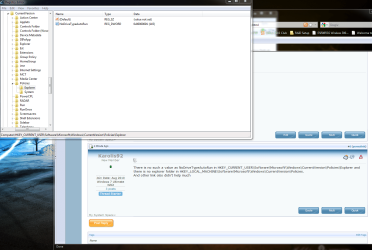
There is no such a value as NoDriveTypeAutoRun in HKEY_CURRENT_USER\Software\Microsoft\Windows\CurrentVersion\Policies\Explorer and there is no explorer folder in HKEY_LOCAL_MACHINE\Software\Microsoft\Windows\CurrentVersion\Policies.
And other link olso didn't help much
 

My Computer

OS
Windows 7 Ultimate 32bit
There is no such a value as NoDriveTypeAutoRun in HKEY_CURRENT_USER\Software\Microsoft\Windows\CurrentVersion\Policies\Explorer and there is no explorer folder in HKEY_LOCAL_MACHINE\Software\Microsoft\Windows\CurrentVersion\Policies.
And other link olso didn't help much

:huh: Should have asked earlier but could you post your system specs?
Could you let us know of the security software (anti-virus/malware etc.) that you ahve installed?
Here's a snip of the value that
I referred you to
 

Attachments

  • Capture.PNG
    Capture.PNG
    108.1 KB · Views: 24

My Computer

Computer Manufacturer/Model Number
Custom
OS
Win7 HP (x64)/Win7 Ultimate (x64)
CPU
Core i7 920
Motherboard
Intel X58
Memory
6 x 2GB Corsair XMS3
Graphics Card(s)
CF HD4890
Sound Card
Asus Xonar
Monitor(s) Displays
Dell 2408WFP
Screen Resolution
1920 x 1200
Hard Drives
2 x 150GB WDC Velociraptors (Raid 0)
1 x 1TB Seagate
1 x 1.5TB Seagate
PSU
Corsair HX1000W
Case
Antec 1200
Keyboard
Razer Lycosa/N52te
Mouse
Razer Lachesis
There is no such value. my spec. are:
HP Pavilion w5080

Operating System
MS Windows 7 Ultimate 32-bit

CPU
Intel Pentium 4 530
Prescott 90nm Technology

RAM
2.0GB Single-Channel @ 400MHz

Motherboard
ASUSTeK Computer INC. Puffer2 (CPU 1)

Graphics
HP v185w @ 1366x768
1024MB GeForce 9400 GT (ASUStek Computer Inc)

Hard Drives
244GB Western Digital WDC WD2500JD-00HBB0 ATA Device (IDE)

Optical Drives
SRYHWJ WTING1YRSHU SCSI CdRom Device
HP DVD Writer 640b ATA Device
SAMSUNG DVD-ROM SD-616E ATA Device

Audio
Creative Audigy Audio Processor (WDM)

I use dr.web antivirus
 

My Computer

OS
Windows 7 Ultimate 32bit
Was the Windows 7 OS native to your system or did you have another OS running on your PC previously i.e. did you upgrade to Windows 7?
 

My Computer

Computer Manufacturer/Model Number
Custom
OS
Win7 HP (x64)/Win7 Ultimate (x64)
CPU
Core i7 920
Motherboard
Intel X58
Memory
6 x 2GB Corsair XMS3
Graphics Card(s)
CF HD4890
Sound Card
Asus Xonar
Monitor(s) Displays
Dell 2408WFP
Screen Resolution
1920 x 1200
Hard Drives
2 x 150GB WDC Velociraptors (Raid 0)
1 x 1TB Seagate
1 x 1.5TB Seagate
PSU
Corsair HX1000W
Case
Antec 1200
Keyboard
Razer Lycosa/N52te
Mouse
Razer Lachesis
I had windows XP, and I cleanly instaled windows 7 in new partition
 

My Computer

OS
Windows 7 Ultimate 32bit
Ok. I'm gonna request that you retry the methods posted in the above link - Microsoft support:

There are many reasons that can cause the 7 AutoPlay (or AutoRun) not working and does not pop up. If you’re facing the AutoPlay not appearing issue, the guide below will point you to the possible cause and where to check for the error.

Method 1.
Ensure that Shell Hardware Detection service is running.
AutoPlay might be restricted by Group Policy, it could be canceled by a program that is running, or the service that AutoPlay needs to start might not be running.
Here are some things to try:
Follow these steps:
a. Click the Start button, click All Programs, click Accessories, and then right-click Command Prompt.
b. Click Run as administrator.
c. At the command prompt, type net start shellhwdetection, and then press ENTER.
d. Restart your computer.

Method 2.
Let us ensure that correct NoDriveTypeAutoRun and/or NoDriveAutoRun policy value is set.
To check this setting, run Registry Editor (regedit).

Important: This section, method, or task contains steps that tell you how to modify the registry. However, serious problems might occur if you modify the registry incorrectly. Therefore, make sure that you follow these steps carefully. For added protection, back up the registry before you modify it. Then, you can restore the registry if a problem occurs. For more information about how to back up and restore the registry, click the windows help article below.
Back up the registry

a. Go to start and type regedit.exe.
b. Navigate to the following registry key:
HKEY_LOCAL_MACHINE\Software\Microsoft\Windows\CurrentVersion\Policies\Explorer
c. Locate the NoDriveTypeAutoRun registry entry on the right pane.
d. Set NoDriveTypeAutoRun to default value as set by Windows 7, which is 0×00000091 (hexadecimal) or 145 (decimal).

Method 3.
If you suspect any virus activity I would strongly recommend you to run the Virus Scan.
a. I would recommend you to run online Virus Scan to remove any infections, if present.
Follow the link below to run the free online scan:
Windows Live OneCare safety scanner: Free online tool for PC health and safety

b. Also run the Microsoft Malicious Removal Tool.
You should be getting this tool and its updates via Windows Updates - if needed you can download it
here.
Microsoft Malicious Removal Tool - 32 bit
Download details: Windows Malicious Software Removal Tool
Microsoft Malicious Removal Tool - 64 bit
Download details: Windows Malicious Software Removal Tool x64

Once the scan is over then reset the Autoplay settings and then set it to Ask it everytime and then check.

For additonal information about Autoplay refer to the articles below.
AutoPlay: frequently asked questions

Change AutoPlay settings
Important:
AutoPlay will no longer support the AutoRun functionality for non-optical removable media. In other words, AutoPlay will still work for CD/DVDs but it will no longer work for USB drives. For example, if an infected USB drive is inserted on a machine then the AutoRun task will not be displayed.

Hope this helps.


Thanks and Regards:
Shekhar S - Microsoft Support.

 

My Computer

Computer Manufacturer/Model Number
Custom
OS
Win7 HP (x64)/Win7 Ultimate (x64)
CPU
Core i7 920
Motherboard
Intel X58
Memory
6 x 2GB Corsair XMS3
Graphics Card(s)
CF HD4890
Sound Card
Asus Xonar
Monitor(s) Displays
Dell 2408WFP
Screen Resolution
1920 x 1200
Hard Drives
2 x 150GB WDC Velociraptors (Raid 0)
1 x 1TB Seagate
1 x 1.5TB Seagate
PSU
Corsair HX1000W
Case
Antec 1200
Keyboard
Razer Lycosa/N52te
Mouse
Razer Lachesis
So I think, that i found my problem, after flesh instalation of windows 7 autorun worked fine. After instaling all other programs I use, autorun stoped working again, so i reinstaled windows again and started instaling programs one by one. Firs of all updates for windows, when antivirus ( dr.web version 6 ) and bamm, autorun stoped working. Now I am searching for solution, because problem is Dr. web. I olso noticed that before I could open autorun.inf files and now I get "access is dinied" message. If anyone has a solution please post it :)
 
Last edited:

My Computer

OS
Windows 7 Ultimate 32bit
I think you know that the culprit is your AV. Have you checked their forum to see if other users have the same problem, and what they did to alleviate it? Dr.Web users' forum -> English forums
 

My Computer

Computer type
PC/Desktop
Computer Manufacturer/Model Number
Dwarf Dwf/11/2012 r09/2013
OS
Windows 8.1 Pro RTM x64
CPU
Intel Core-i5-3570K 4-core @ 3.4GHz (Ivy Bridge) (OC 4.4GHz)
Motherboard
ASRock Z77 Extreme4-M
Memory
4 x 4GB DDR3-1600 Corsair Vengeance CMZ8GX3M2A1600C9B (16GB)
Graphics Card(s)
MSI GeForce GTX770 Gaming OC 2GB
Sound Card
Realtek High Definition on board solution (ALC 898)
Monitor(s) Displays
ViewSonic VA1912w Widescreen (VGA)
Screen Resolution
1440x900
Hard Drives
OCZ Agility 3 SSD 120GB SATA III x2 (RAID 0)
Samsung HD501LJ 500GB SATA II x2
Hitachi HDS721010CLA332 1TB SATA II
Iomega 1.5TB Ext USB 2.0
WD 2.0TB Ext USB 3.0
PSU
XFX Pro Series 850W Semi-Modular
Case
Gigabyte IF233
Cooling
1 x 120mm Front Inlet 1 x 120mm Rear Exhaust
Keyboard
Microsoft Comfort Curve Keyboard 3000 (USB)
Mouse
Microsoft Comfort Mouse 3000 for Business (USB)
Internet Speed
NetGear DG834Gv3 ADSL Modem/Router (Ethernet) ~4.0 Mb/s (O2)
Antivirus
Avast! 8.0.1497
Browser
IE 11
Other Info
Optical Drive: HL-DT-ST BD-RE BH10LS30 SATA Bluray
Lexmark S305 Printer/Scanner/Copier (USB)
WEI Score: 8.1/8.1/8.5/8.5/8.25
Asus Eee PC 1011PX Netbook (Windows 7 x86 Starter)
I tryed it, but i cant find anything
 

My Computer

OS
Windows 7 Ultimate 32bit
Back
Top