Electroguard
New member
- Local time
- 1:53 PM
- Messages
- 7
Hi,
Does anyone know how to autorun unnattended startup programs at autologon for a standard user (not administrator).
The reason is for a Win7 Pro 32bit pc to be left on unattended with shared network resources even after reboots following downloads and installs of automatic windows updates.
To put things into context, our dwelling is situated behind a large hanger (workshop) which blocks sight and sound of the property entrance, so in order to be aware of callers I have a hanger-based 'server' wired up to home automation sensors and cctv which remotely speaks notifications in our dwelling (and elsewhere) enabling us to be quickly alerted and able to view the gate cctv cam in web browser to see when we have need to go out to the gates. My old XP version has happilly sat there for years doing its unnattended hosting job while downloading available windows updates in the background then rebooting during the early hours when necessary then auto-starting it's server apps (NetworkActive web server, VisionGS cam streaming video server, Homeseer automation server, Cumulus weather station server) back online again before the postman comes. But I can't seem to convince Win7 to do the same (not without compromising security anyway - which was the whole point of having to upgrade to Win7 in the first place), and without this functionality we would be oblivious of callers.
The ideal would be to autorun the apps with elevated privilege at machine startup without needing to be logged on, but I have not been able to manage to do this, and suspect a desktop needs to be loaded for them to be able to run (even things like Comodo Internet Security don't appear to load until after a user has logged on and gets a desktop).
So it looks like I will have to autorun the apps from Startup folder after auto-logon.
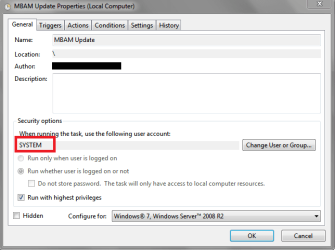
But although I have achieved this successfully by elevating their privilege using task scheduler as per this article (http://www.sevenforums.com/tutorials/11949-elevated-program-shortcut-without-uac-prompt-create.html), the auto-logon as Administrator leaves the system security vulnerable and compromised.
This could be overcome by auto-logon with a more restricted 'normal' user account (instead of administrator) to autorun the elevated privilege apps from "all users startup ' folder, but herein lies a catch22 problem...
A normal user logon appears (understandably) to have insufficient rights to create their own elevated privilege apps in tasks scheduler.
But elevated privilege apps created and placed in all users startup folder by administrator do not then run for a normal user.
This is my first experience of Win7 and although I suspect it's probably just a rights/permissions issue, this old XP dinosaur is now stumped and in need of advice from a Win7 expert who knows what he's talking about.
Does anyone know how to autorun unnattended startup programs at autologon for a standard user (not administrator).
The reason is for a Win7 Pro 32bit pc to be left on unattended with shared network resources even after reboots following downloads and installs of automatic windows updates.
To put things into context, our dwelling is situated behind a large hanger (workshop) which blocks sight and sound of the property entrance, so in order to be aware of callers I have a hanger-based 'server' wired up to home automation sensors and cctv which remotely speaks notifications in our dwelling (and elsewhere) enabling us to be quickly alerted and able to view the gate cctv cam in web browser to see when we have need to go out to the gates. My old XP version has happilly sat there for years doing its unnattended hosting job while downloading available windows updates in the background then rebooting during the early hours when necessary then auto-starting it's server apps (NetworkActive web server, VisionGS cam streaming video server, Homeseer automation server, Cumulus weather station server) back online again before the postman comes. But I can't seem to convince Win7 to do the same (not without compromising security anyway - which was the whole point of having to upgrade to Win7 in the first place), and without this functionality we would be oblivious of callers.
The ideal would be to autorun the apps with elevated privilege at machine startup without needing to be logged on, but I have not been able to manage to do this, and suspect a desktop needs to be loaded for them to be able to run (even things like Comodo Internet Security don't appear to load until after a user has logged on and gets a desktop).
So it looks like I will have to autorun the apps from Startup folder after auto-logon.
But although I have achieved this successfully by elevating their privilege using task scheduler as per this article (http://www.sevenforums.com/tutorials/11949-elevated-program-shortcut-without-uac-prompt-create.html), the auto-logon as Administrator leaves the system security vulnerable and compromised.
This could be overcome by auto-logon with a more restricted 'normal' user account (instead of administrator) to autorun the elevated privilege apps from "all users startup ' folder, but herein lies a catch22 problem...
A normal user logon appears (understandably) to have insufficient rights to create their own elevated privilege apps in tasks scheduler.
But elevated privilege apps created and placed in all users startup folder by administrator do not then run for a normal user.
This is my first experience of Win7 and although I suspect it's probably just a rights/permissions issue, this old XP dinosaur is now stumped and in need of advice from a Win7 expert who knows what he's talking about.
My Computer
At a glance
Windows 7 Professional 32bitvarious
- Computer type
- PC/Desktop
- Computer Manufacturer/Model Number
- Custom build
- OS
- Windows 7 Professional 32bit
- CPU
- various