Hi all
I've been playing around with Microsofts Forefront Client Security for servers (roughly equivalent to MSE on workstations) - As I'm running the server essentially as a super workstation I only need the client piece.
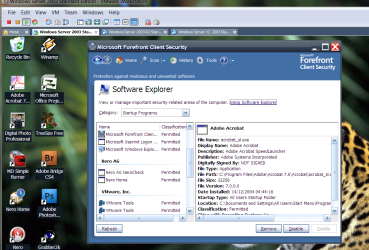
It has a really good SOFTWARE EXPLORER facilty which shows you IN REAL TIME what you are running - and various other options - and gives you the usual options - remove / quarantine etc.
This is actually quite good for monitoring systems and the load is so low you wouldn't even know its running.
I'm sure pretty soon 99% of useless old hoggy AV software - like Norton, Macaffee etc etc aren't now long for this world (and IMP not before time too).
Enc screenbshot of the Software explorer -- running on a VM Windows 2003 R2 server.
Note its FREE from technet if you are a subscriber.
Cheers
jimbo
Attachments
s1.png
232 KB
· Views: 74
s2.png
154.4 KB
· Views: 60
My Computer
Computer type
PC/Desktop
Computer Manufacturer/Model Number
Custom built, several laptops HP/ASUS
OS
Linux CENTOS 7 / various Windows OS'es and servers
Hi there
This stuff is for SERVERS - I think the original engine was developed from Windows defender - (same for Microsoft Security Essentials MSE).
I didn't actually like Windows defender as it was really too basic - the latest products seem much better --of course its in MS's own interest to try and keep systems clean --pity it took then so long to actually get involved.
Just uploading mega updates for a few computers and then finally off to "the boozer" for a Sat night.
Cheers
jimbo
My Computer
Computer type
PC/Desktop
Computer Manufacturer/Model Number
Custom built, several laptops HP/ASUS
OS
Linux CENTOS 7 / various Windows OS'es and servers
Hi there
Try something like 2 VM's both running SAP (ERP system on the PC - not a corporate server) and CS4 running concurrently for starters.
enc screenshot.
Actually the MSE (and the server client version Microsoft Forefront client security) works FAST, safe and does everything I need without having to install 3rd party apps which might or might not be around for too much longer in their FREE versions.
Note MALWARE is MUCH more of a problem these days than any VIRUS - and these are 100% "Browser" generated --OK they might initiate hidden down / uploads later but the code is started from a browser.
As I (and others) have pointed out the REAL problem these days is things like DRIVE BY infections - these can happen just by browsing to a site .
Typical FREE "Classical" AV software has no protection against these types of threats -- they work in REACTIVE mode -- you have to scan AFTER the computer is infected - too late by then.
To get the PROACTIVE versions (and there aren't many good one's out there against MALWARE via drive by infection) usually you have to PAY.
Microsofts is free and the server version has the decent Software explorer facility I've posted at the start of the thread.
I would think that now MS is interested in security (finally) it will wipe the floor off the other products --it should since IT has the Windows SOURCE code -- other developers either have to use windows SDK or do some type of "reverse engineering" or disassembly" to get right at the internal obscure parts of the OS.
As Cloud computing becomes more of a reality protection against drive by malware will become more and more important - there won't be much running on a client computer so virus problems will cease to be a problem.
As I said a lot of current AV software is designed for attempting to solve a 21st century problem with 20th century solutions - or as we call it "Dinosaur Technology".
Cheers
jimbo
Attachments
xpprovm.png
157.7 KB
· Views: 17
My Computer
Computer type
PC/Desktop
Computer Manufacturer/Model Number
Custom built, several laptops HP/ASUS
OS
Linux CENTOS 7 / various Windows OS'es and servers