Available Physical Memory

Sardonicus

New member
Guru
Gold Member
VIP
Local time
12:59 AM
Messages
1,965
Location
Illinois
Physical memory.JPG

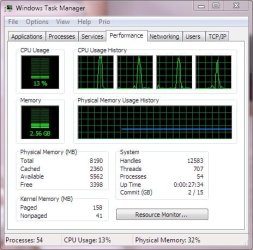
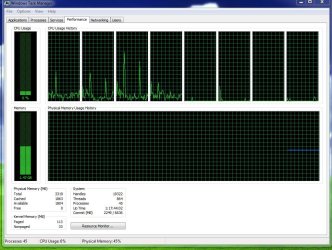
Out of curiosity, how much available Physical Memory do you have?

I have approximately 1804.
 

My Computer

Computer type
PC/Desktop
Computer Manufacturer/Model Number
Custom Build
OS
Windows 7 Home Premium 64 bit
CPU
Intel Core i7-4790
Motherboard
GA-Z87X-D3H
Memory
G.SKILL 8GB (2 x 4GB) DDR3 F3-10666CL9D-8GBNT
Graphics Card(s)
AMD Radeon R7 250
Sound Card
Realtek ALC892
Monitor(s) Displays
Samsung UN32EH5000, Dell 1703FPT
Screen Resolution
1920 x 1080, 1280 x 1024
Hard Drives
WD5003AZEX
WD10EZEX
Samsung HD103SJ
Samsung 128 GB 840 PRO
PSU
SeaSonic M12II SS-500GM
Case
Fractal Design Define R4
Cooling
Zalman CNPS9900ALED
Keyboard
Logitech K800
Mouse
Logitech M705
Internet Speed
16 Mbps
Antivirus
Avast
Browser
Firefox
Other Info
Bose Companion 2 Multimedia Speakers
Depends on the time of day and what is currently running. Btw: there is a better way of looking at it in Resource Monitor (click the button on the bottom of the Taskmanager Window you show and go to the memory tab).
 

My Computer

Computer Manufacturer/Model Number
HP, Dell, Gateway, Toshiba - 4 laptops and 2 desktops
OS
Vista, Windows7, Mint Mate, Zorin, Windows 8
CPU
from 1.6GHz Duo to i7
Monitor(s) Displays
2x HP w2207
Hard Drives
5x HDD, 7x SSD, 12x Externals
Keyboard
with trackball - no mices
Mouse
Trackball mice
Internet Speed
DSL 6000

My Computer

Computer type
PC/Desktop
Computer Manufacturer/Model Number
Me
OS
Win 7 Ultimate x64
CPU
FX-8350 @ 4.6 GHz so far
Motherboard
Asus M5A97 EVO
Memory
ADATA XPG V1 Series Black 8GB DDR3 1600
Graphics Card(s)
Sapphire R9 270x Dual-X
Sound Card
Xonar DGX w/ Corsair Vengence 1300
Monitor(s) Displays
Acer S232HL Abid
Screen Resolution
1920x1080
Hard Drives
120 GB OCZ Vertex 3
500 GB Seagate 7200.12
PSU
Antec Earthwatts 650W Green
Case
Antec Three Hundred
Cooling
Cooler Master 212 EVO
Keyboard
Logitech G510
Mouse
Logitech G500s
Internet Speed
35000/3000
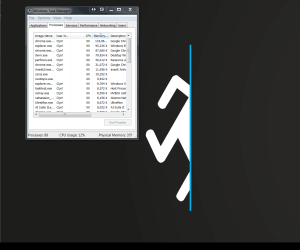
Depending on what I'm doing on my laptop...
 

Attachments

  • Capture.PNG
    Capture.PNG
    35.4 KB · Views: 50

My Computer

Computer Manufacturer/Model Number
Toshiba Satellite L455D
OS
Windows 7 Home Premium
CPU
Amd Semperon 2.10GHz
Memory
2 Gig
Graphics Card(s)
ATI Radeon 3100
Sound Card
Realtek
Monitor(s) Displays
15.6 inch
Screen Resolution
1366x768
Hard Drives
250gig
Mouse
Logitech Wireless
Internet Speed
16/2 cable
This is what I'm showing:
 

Attachments

  • WinTaskMgr.jpg
    WinTaskMgr.jpg
    41.5 KB · Views: 17

My Computer

Computer Manufacturer/Model Number
OEM - Me
OS
Windows 7 Home Premium x64
CPU
AMD Phenom II X6 1600T
Motherboard
GigaByte GZ-990FXA-UD3
Memory
16GB PC3-10700 (1342MHz)
Graphics Card(s)
ATI Radeon 5770 HD (x2) CrossFire
Sound Card
On-board RealTek chipset
Monitor(s) Displays
3x Hanns-G 1920x1080 Monitors
Screen Resolution
3x Hanns-G 1920x1080 Monitors
Hard Drives
Intel 25-V SSD 40GB: 218 MB/s AT: 0.1ms
Intel X-25M SSD 80GB: 230MB/s AT: 0.1ms
Seagate 750GB: 133 MB/s AT: 13ms (perpendicular storage)
Buffalo HD-PCTU3 1TB External drive
PSU
OCZ Stealth X Stream 750W
Case
Cheap (unknown)
Cooling
Stock
Keyboard
HP USB
Mouse
LogiTech USB
Internet Speed
1.5 Mbps - Slow - At the tail-end of a rural network
Other Info
Printer: Epson Stylus C-84
Scanner: HP 3500C Flatbed
DVD-RW: Plextor
DVD-ROM: Unknown
WEI: 7.4
Total 3319 MB? You have the latest or at least version 1.6 of the bios? Reason for asking is your specs say 4 GB and Task Manager is showing well short of that. That and MSI has this to say about the 1.6 bios,

Update M-Flash module.
- Improved memory compatibility.
- Add Energy Star LOGO.
- Fixed system report incorrect memory size when install 4G memory.
MSI Global – Computer, Laptop, Notebook, Desktop, Mainboard, Graphics and more

Yeah, I'm temporary currently running the 32-bit version. I'll going to be using my 64-bit version when I do a clean install next week for raid. I'm not having any problems......just wanted to see what type of numbers people have.
 

My Computer

Computer type
PC/Desktop
Computer Manufacturer/Model Number
Custom Build
OS
Windows 7 Home Premium 64 bit
CPU
Intel Core i7-4790
Motherboard
GA-Z87X-D3H
Memory
G.SKILL 8GB (2 x 4GB) DDR3 F3-10666CL9D-8GBNT
Graphics Card(s)
AMD Radeon R7 250
Sound Card
Realtek ALC892
Monitor(s) Displays
Samsung UN32EH5000, Dell 1703FPT
Screen Resolution
1920 x 1080, 1280 x 1024
Hard Drives
WD5003AZEX
WD10EZEX
Samsung HD103SJ
Samsung 128 GB 840 PRO
PSU
SeaSonic M12II SS-500GM
Case
Fractal Design Define R4
Cooling
Zalman CNPS9900ALED
Keyboard
Logitech K800
Mouse
Logitech M705
Internet Speed
16 Mbps
Antivirus
Avast
Browser
Firefox
Other Info
Bose Companion 2 Multimedia Speakers
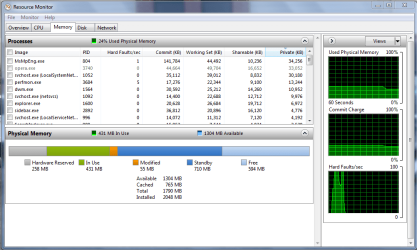
I've learned to ignore the memory usage in Win 7. It does a great job with Super pre-fetching as well as releasing memory when needed.

I run CS5, AutoCad Architecture 2011, Office 2010 and a few other memory intensive programs on a regular basis. My "free" (or available) physical memory is never really high as Win 7 keeps a lot of information at the ready. If I use a different program, Win 7 happily reallocates the memory seamlessly and without any obvious performance degradation.

In Win 7, don't make it big deal. It is what it is and it's good! :)
 

My Computer

Computer Manufacturer/Model Number
Toshiba L355D
OS
Windows 7 Ultimate x64 SP1
CPU
Core2 Duo
Motherboard
Intel
Memory
4 GB
Graphics Card(s)
GM965 on-board
Sound Card
RealTek on-board
Monitor(s) Displays
19"+17"(laptop)
Screen Resolution
1440x900 (x 2)
Hard Drives
500GB Ext. 200GB Internal
PSU
N/A
Case
N/A
Cooling
N/A
Hi i have a very big problem, i just installed 8 GB of DDR3 memory, along with an intel i7 3770k. The thing is that my free physical memory is around 100-200 mb(even lower) and i don't know why. For example when i watch youtube videos they are very laggy, when i play battlefield 3 it's laggy too.
 

Attachments

  • 1.png
    1.png
    54.9 KB · Views: 14
  • 2.png
    2.png
    42.6 KB · Views: 7

My Computer

OS
Windows 7 Ultimate x64
As per your screenshot you have 5.3GB of available RAM.
 

My Computer

Computer Manufacturer/Model Number
HP, Dell, Gateway, Toshiba - 4 laptops and 2 desktops
OS
Vista, Windows7, Mint Mate, Zorin, Windows 8
CPU
from 1.6GHz Duo to i7
Monitor(s) Displays
2x HP w2207
Hard Drives
5x HDD, 7x SSD, 12x Externals
Keyboard
with trackball - no mices
Mouse
Trackball mice
Internet Speed
DSL 6000
O i see, but the thing is that in task manager i found a program called pravy.exe(another program that might cause th problem was cmdhosts.exe, but i deleted it), every time the program is running the pc becomes laggy. I tried to delete it but it continues reapearing now i installed avast antivirus and deleted all the infected and now it runs better.

But for my curiosity, does anyone encounterd such problem with these executables ?
 

My Computer

OS
Windows 7 Ultimate x64
I have never seen thos exes.
 

My Computer

Computer Manufacturer/Model Number
HP, Dell, Gateway, Toshiba - 4 laptops and 2 desktops
OS
Vista, Windows7, Mint Mate, Zorin, Windows 8
CPU
from 1.6GHz Duo to i7
Monitor(s) Displays
2x HP w2207
Hard Drives
5x HDD, 7x SSD, 12x Externals
Keyboard
with trackball - no mices
Mouse
Trackball mice
Internet Speed
DSL 6000
Back
Top