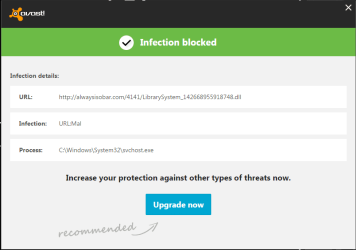
Avast always detects and blocks malware on svchost.exe after startup

braedensantos

New member
Local time
10:07 PM
Messages
4
Location
Massachusetts
This issue had occurred for the past week or two. Everytime my brother starts up his custom-built gaming PC and logs in, Avast opens a notification on the taskbar stating that malware has been detected on svchost.exe.

Virus pic.png

When clicking on "More details..." on the above message, the following Avast window opens stating that the infection has been blocked.

virus pic 2.png

According to the above window, the "C:\Windows\System32\svchost.exe" file is infected with infection URL:Mal with the following URL attached http://alwaysisobar.com/4141/LibrarySystem_142668955912748.dll. Avast blocks this infection though, and there is really no way to remove the infection from svchost.exe.

My brother and I have tried the following anti-malware software to attempt to detect this malware: MalwareBytes AntiMalware, TDSS Killer, and ESET Smart Security. None of these programs detected the malware that Avast detects.

Is there a way to remove the malware that had been infecting svchost.exe, or is this notification bogus? If this is bogus, is there a way to stop Avast from detecting the file as infected by malware?
 

My Computer My Computer

At a glance

Windows 7 Ultimate x64AMD FX(tm)-6300 Six-Core Processor2x4GB (8GB) Corsair VengeanceNVIDIA GeForce GTX 650 TI (1GB VRAM)
Computer type
PC/Desktop
Computer Manufacturer/Model Number
Custom Build
OS
Windows 7 Ultimate x64
CPU
AMD FX(tm)-6300 Six-Core Processor
Motherboard
BIOSTAR TA970
Memory
2x4GB (8GB) Corsair Vengeance
Graphics Card(s)
NVIDIA GeForce GTX 650 TI (1GB VRAM)
Hard Drives
Toshiba DT01ACA100 ATA Device (1TB)
Antivirus
Avast Free Antivirus
Browser
Google Chrome

My Computer My Computer

At a glance

Windows 7 Ultimate 32bit SP1Intel(R) Core(TM)2 Quad CPU @ 2.40GHz, 2400 MHz4 GBATI Radeon HD 2600 Pro
Computer type
PC/Desktop
Computer Manufacturer/Model Number
Bruce ... somewhere in his 40's
OS
Windows 7 Ultimate 32bit SP1
CPU
Intel(R) Core(TM)2 Quad CPU @ 2.40GHz, 2400 MHz
Motherboard
INTEL/D975XBX2
Memory
4 GB
Graphics Card(s)
ATI Radeon HD 2600 Pro
Monitor(s) Displays
Samsung SyncMaster 914v
Screen Resolution
1280 x 1024
Hard Drives
2/500GB each ... ST3500630AS ATA Device.
One is not connected
PSU
Rocketfish 700 W
Case
G.Skill Gigabyte Chassis
Keyboard
Standard PS/2 Keyboard
Mouse
Microsoft PS/2 Mouse
Internet Speed
DSL
Antivirus
Avira Internet Security
Browser
IE 11
Other Info
ATI HDMI Audio
I don't have that toolbar on that computer. Everytime I start the computer and log in, the URL that Avast detects is attached to svchost.exe changes to some other URL for another malicious program. Then again, I have used a lot of anti-malware programs and they won't detect that particular malware that Avast has been detecting. I believe that this is an issue with Avast.
 

My Computer My Computer

At a glance

Windows 7 Ultimate x64AMD FX(tm)-6300 Six-Core Processor2x4GB (8GB) Corsair VengeanceNVIDIA GeForce GTX 650 TI (1GB VRAM)
Computer type
PC/Desktop
Computer Manufacturer/Model Number
Custom Build
OS
Windows 7 Ultimate x64
CPU
AMD FX(tm)-6300 Six-Core Processor
Motherboard
BIOSTAR TA970
Memory
2x4GB (8GB) Corsair Vengeance
Graphics Card(s)
NVIDIA GeForce GTX 650 TI (1GB VRAM)
Hard Drives
Toshiba DT01ACA100 ATA Device (1TB)
Antivirus
Avast Free Antivirus
Browser
Google Chrome
Did you try enabling Anti rootkit scanning on MBAM? Settings, Detection and Protection - Detection Options.
 

My Computer My Computer

At a glance

Windows 7 Ultimate x64 SP1AMD Phenom 2 1090T2x8GB Kingston HyperX Fury Black 1600Mhz Unga...MSI GTX 970 Gaming 4G
Computer type
PC/Desktop
Computer Manufacturer/Model Number
Custom Build
OS
Windows 7 Ultimate x64 SP1
CPU
AMD Phenom 2 1090T
Motherboard
Gigabyte GA-890FXA-UD5
Memory
2x8GB Kingston HyperX Fury Black 1600Mhz Unganged
Graphics Card(s)
MSI GTX 970 Gaming 4G
Sound Card
Realtek On-Board HD 7.1 Audio / Logitech G35
Monitor(s) Displays
3xAcer GD245HQ
Screen Resolution
1920x1080
Hard Drives
Samsung 850 Pro 512GB SSD - OS /
WD Caviar Black SATA 3 - 1 TBx2 - Dynamic RAID 0 /
WD Caviar Green SATA 2 - 640GBx2 - Dynamic RAID 0 /
WD Caviar Green SATA 2 - 640GB - Internal Backup /
Seagate Barracude SATA 3 - 3TB - External Backup/ Sync
PSU
HighPower 1000W
Case
Cooler Master HAF 932
Cooling
Noctua NH-D14
Keyboard
Logitech G19
Mouse
Logitech G500
Internet Speed
100/4 Mbit Cable (100GB quota)
Antivirus
ZoneAlarm Extreme Security / MBAM Pro / MBAE Free / SAS Free
Browser
IE 11 - Firefox - Chrome
Other Info
Logitech F710/ G27/ G940/ Z5500 // TrackIR 5 // Nvidia 3D Surround Vision
braedensantos,

It appears you are correct in assuming it is an avast! issue.

Please use the Farbar Recovery Scan Tool.
Download: Farbar Recovery Scan Tool Download
Select the version that applies to your system.
Save it to your Desktop.
Double-click the downloaded file to run it.

When the tool opens, click Yes to the disclaimer.
Press the Scan button.

When done, the tool makes a log, FRST.txt, in the same directory from which the tool is run (Desktop).

:ar: Please provide the FRST.txt in your reply.
The first time the tool is run, it also creates another log: Addition.txt

:ar: Also post the Addition.txt in your reply.


Next, please post the MBAM results also.
 

My Computer My Computer

At a glance

Windows 7 Home Premium
Computer type
PC/Desktop
Computer Manufacturer/Model Number
An ol' eMachines
OS
Windows 7 Home Premium
Internet Speed
Fine for me...I'm retired!
braedensantos,

It appears you are correct in assuming it is an avast! issue.

Please use the Farbar Recovery Scan Tool.
Download: Farbar Recovery Scan Tool Download
Select the version that applies to your system.
Save it to your Desktop.
Double-click the downloaded file to run it.

When the tool opens, click Yes to the disclaimer.
Press the Scan button.

When done, the tool makes a log, FRST.txt, in the same directory from which the tool is run (Desktop).

:ar: Please provide the FRST.txt in your reply.
The first time the tool is run, it also creates another log: Addition.txt

:ar: Also post the Addition.txt in your reply.


Next, please post the MBAM results also.

Thanks cottonball! Here is the View attachment FRST.txt and View attachment Addition.txt files that were created when I ran Farbar Recovery Scan Tool. Also, I had to run a scan on MBAM, here are the View attachment MBAM Results.txt. Hopefully, you can come up with a solution based on viewing the attached files.
 

My Computer My Computer

At a glance

Windows 7 Ultimate x64AMD FX(tm)-6300 Six-Core Processor2x4GB (8GB) Corsair VengeanceNVIDIA GeForce GTX 650 TI (1GB VRAM)
Computer type
PC/Desktop
Computer Manufacturer/Model Number
Custom Build
OS
Windows 7 Ultimate x64
CPU
AMD FX(tm)-6300 Six-Core Processor
Motherboard
BIOSTAR TA970
Memory
2x4GB (8GB) Corsair Vengeance
Graphics Card(s)
NVIDIA GeForce GTX 650 TI (1GB VRAM)
Hard Drives
Toshiba DT01ACA100 ATA Device (1TB)
Antivirus
Avast Free Antivirus
Browser
Google Chrome
Is it possible for you to run FRST in Windows normally, and not as Boot Mode: Safe Mode (with Networking)

This time, check the Addition.txt option, as it is run the first time the program is run, and then becomes an option after that.
 

My Computer My Computer

At a glance

Windows 7 Home Premium
Computer type
PC/Desktop
Computer Manufacturer/Model Number
An ol' eMachines
OS
Windows 7 Home Premium
Internet Speed
Fine for me...I'm retired!

My Computer My Computer

At a glance

Windows 7 Ultimate x64AMD FX(tm)-6300 Six-Core Processor2x4GB (8GB) Corsair VengeanceNVIDIA GeForce GTX 650 TI (1GB VRAM)
Computer type
PC/Desktop
Computer Manufacturer/Model Number
Custom Build
OS
Windows 7 Ultimate x64
CPU
AMD FX(tm)-6300 Six-Core Processor
Motherboard
BIOSTAR TA970
Memory
2x4GB (8GB) Corsair Vengeance
Graphics Card(s)
NVIDIA GeForce GTX 650 TI (1GB VRAM)
Hard Drives
Toshiba DT01ACA100 ATA Device (1TB)
Antivirus
Avast Free Antivirus
Browser
Google Chrome
braedensantos,

My apology for the delay...somewhat busy yesterday. :o

:info: Please open Notepad (Start > All Programs > Accessories > Notepad)
Copy the entire contents of the code box below to Notepad.
Save it to the Desktop, and name it: fixlist.txt

Code:
start
CreateRestorePoint:
CloseProcesses:
HKU\S-1-5-21-2665363754-771674610-887522616-1001\...\Run: [GalaxyClient] => [X]
HKLM\Software\Wow6432Node\Microsoft\Internet Explorer\Main,Default_Search_URL = 
SearchScopes: HKLM -> DefaultScope {0633EE93-D776-472f-A0FF-E1416B8B2E3A} URL = 
FF Plugin: @microsoft.com/GENUINE -> disabled No File
FF Plugin-x32: @microsoft.com/GENUINE -> disabled No File
S3 cpuz136; \??\C:\Windows\TEMP\cpuz136\cpuz136_x64.sys [X]
S3 EagleX64; \??\C:\Windows\system32\drivers\EagleX64.sys [X]
S3 GPUZ; \??\C:\Windows\TEMP\GPUZ.sys [X]
S3 Synth3dVsc; System32\drivers\synth3dvsc.sys [X]
S3 tsusbhub; system32\drivers\tsusbhub.sys [X]
S3 VBoxNetFlt; system32\DRIVERS\VBoxNetFlt.sys [X]
S3 VGPU; System32\drivers\rdvgkmd.sys [X]
S3 vmci; \SystemRoot\system32\DRIVERS\vmci.sys [X]
S3 VMnetAdapter; system32\DRIVERS\vmnetadapter.sys [X]
Task: {35E72899-5DFF-425F-99B7-D75B311B5063} - \8474a30d-7a20-4ad3-9e3c-39f00dec7c84-6 No Task File
Task: {3CC675BB-EA09-497E-B3EF-7C92E3506478} - \8474a30d-7a20-4ad3-9e3c-39f00dec7c84-5 No Task File 
Task: {4037B746-3C75-49C1-AB0D-E8D3441BD13C} - \avabvbxvh No Task File 
Task: {4BF81BE4-3CA2-49AC-B026-F856D324001C} - \YourFile DownloaderUpdate No Task File 
Task: {4E3C1C26-DB0D-4D17-860D-22117FA8C827} - \8474a30d-7a20-4ad3-9e3c-39f00dec7c84-1-7 No Task File 
Task: {6F0CB11C-0BF9-46EA-8B33-FADBC3B62EE1} - \8474a30d-7a20-4ad3-9e3c-39f00dec7c84-3 No Task File 
Task: {77E6BCAD-F92E-407E-B4F1-5925E97A8F6C} - \avastBCLRestart_chrome.exe No Task File 
Task: {7FDD2C61-9CFC-4C3C-919A-93DD3C2A6DA7} - \8474a30d-7a20-4ad3-9e3c-39f00dec7c84-5_user No Task File 
Task: {84A1C935-09AA-4603-A1F4-471D26624742} - \3992efa1-667c-47bc-a70a-6cbcd74f8de2-5_user No Task File 
Task: {9115472E-CEFC-4E7A-AA52-5F2419281BC7} - \8474a30d-7a20-4ad3-9e3c-39f00dec7c84-10_user No Task File 
Task: {932848BF-365C-48AA-8485-1E3E5CB8DE13} - \3992efa1-667c-47bc-a70a-6cbcd74f8de2-1-7 No Task File 
Task: {9B456805-F273-45AD-8C48-628C48F73B43} - \GPUpdateCheck No Task File 
Task: {9E51D80F-6F47-4F81-A468-6C3913B06648} - \8474a30d-7a20-4ad3-9e3c-39f00dec7c84-1-6 No Task File 
Task: {BB77F587-A9B0-49E7-B3C8-825CEFD48F45} - \3992efa1-667c-47bc-a70a-6cbcd74f8de2-5 No Task File 
Task: {C2205787-D6F9-4584-9418-D3BDBD433364} - \3992efa1-667c-47bc-a70a-6cbcd74f8de2-3 No Task File 
Task: {C4B7A44A-9200-4327-B915-CAAB48F7B57B} - \3992efa1-667c-47bc-a70a-6cbcd74f8de2-1-6 No Task File 
Task: {C5BA47A5-31FE-40DF-AC4D-83D07631DCFB} - \3992efa1-667c-47bc-a70a-6cbcd74f8de2-6 No Task File 
Task: {CDD2EB22-FE86-446E-B034-064F2E68FC95} - \8474a30d-7a20-4ad3-9e3c-39f00dec7c84-7 No Task File 
Task: {E143E69F-E170-4643-A2E0-016B84DF3EA9} - \8474a30d-7a20-4ad3-9e3c-39f00dec7c84-11 No Task File 
Task: {E95154A3-2594-4DB9-BDC3-AC85DFA5300F} - \3992efa1-667c-47bc-a70a-6cbcd74f8de2-11 No Task File 
Task: {FA056246-A7C0-4F3A-928C-89DD1D2D594A} - \3992efa1-667c-47bc-a70a-6cbcd74f8de2-7 No Task File 
Task: {FE0B7A01-22A7-4B9A-841B-1EB582FCC25F} - \Crossbrowse No Task File 
C:\Users\Cameron Santos\AppData\Local\Temp\7za.exe
C:\Users\Cameron Santos\AppData\Local\Temp\DaS_21.exe
C:\Users\Cameron Santos\AppData\Local\Temp\hijackthis.exe
C:\Users\Cameron Santos\AppData\Local\Temp\NirCmd.exe
C:\Users\Cameron Santos\AppData\Local\Temp\PEVZ.EXE
C:\Users\Cameron Santos\AppData\Local\Temp\Quarantine.exe
C:\Users\Cameron Santos\AppData\Local\Temp\remove.exe
C:\Users\Cameron Santos\AppData\Local\Temp\sed.exe
C:\Users\Cameron Santos\AppData\Local\Temp\shortcut.exe
C:\Users\Cameron Santos\AppData\Local\Temp\sqlite3.dll
C:\Users\Cameron Santos\AppData\Local\Temp\swreg.exe
C:\Users\Cameron Santos\AppData\Local\Temp\swxcacls.exe
C:\Users\Cameron Santos\AppData\Local\Temp\wget.exe
C:\Users\Cameron Santos\AppData\Local\Temp\zoek-delete.exe
emptytemp:
end

NOTICE: This script is written specifically for this computer!!!
Running this on another computer may cause damage to the Operating System.

If for some reason the tool needs a restart, please let the system restart normally. After that let the tool complete its run.

Now, please run FRST or FRST64, and press the Fix button, just once, and wait.

When done, the tool creates a report on the Desktop called: Fixlog.txt
:ar: Please post the Fixlog.txt in your reply.


:info: Next, please use the tool: Zoek

First, temporarily disable your AV program.
Info on how to disable your security applications > How To Temporarily Disable Your Anti-virus, Firewall And Anti-malware Programs - Security Mini-Guides

Zoek Download > http://download.bleepingcomputer.com/smeenk/zoek.exe
When the download appears, save to the Desktop.
On the Desktop, right-click the Zoek.exe file and select: Run as Administrator (Give it a few seconds to appear.)

Next, copy/paste the entire script inside the code box below to the input field of Zoek:

Code:
createsrpoint;
emptyfolderscheck;delete
emptyclsid;
emptyalltemp;
autoclean;
ipconfig /flushdns;b

Now...
Close any open Browsers.
Click the Run script button, and wait. It takes a few minutes to run all the script.

When the tool finishes, the zoek-results.log is opened in Notepad.
The log is also found on the systemdrive, normally C:\
If a reboot is needed log is opened after the reboot.

:ar: Please attach the zoek-results.log in your reply.

Also, please provide an update on whether you are still having the same issue with avast!

 

My Computer My Computer

At a glance

Windows 7 Home Premium
Computer type
PC/Desktop
Computer Manufacturer/Model Number
An ol' eMachines
OS
Windows 7 Home Premium
Internet Speed
Fine for me...I'm retired!
Back
Top