
You are using an out of date browser. It may not display this or other websites correctly.
You should upgrade or use an alternative browser.
You should upgrade or use an alternative browser.
Avast and Yahoo
- Thread starter mike1977
- Start date
- Local time
- 8:26 AM
- Messages
- 8,138
I installed Avast to try and replicate your findings. I did not get the phishing warning, but one or more of the Avast plug-ins does cause a crash for IE10 with 32 bit tabs. If 64bit tabs are enabled for IE10, then you will be told that the Avast plug-ins have been disabled because they are not compatible with IE's Enhanced Protection Mode... thus, IE10 will no longer crash.
My suggestion would be to use IE10 with 64bit tabs and disable the Avast plug-ins (or uninstall Avast and use MSE instead).
My suggestion would be to use IE10 with 64bit tabs and disable the Avast plug-ins (or uninstall Avast and use MSE instead).
My Computer
- Computer type
- Laptop
- Computer Manufacturer/Model Number
- Employer provided Dell Latitude
- OS
- W7 Pro SP1 64bit
- CPU
- i7
- Memory
- 8GB
- Graphics Card(s)
- Intel HD Graphics
- Hard Drives
- crappy SSD
- Antivirus
- Employer mandated Symantec Endpoint Protection
- Browser
- Pale Moon 64bit, IE11 64bit & Chrome 64bit

- Local time
- 10:26 AM
- Messages
- 4,563
There is probably something like a false definition for avast. By the clock, right click the avast icon, and choose update-program. This will update the definition files and the program avast. This should fix the issue. If not, I suggest letting them know by going to the avast forum and reporting it.
-Just checked, no issue accessing it. Update your definitions should fix the issue.
I would not suggest Microsoft Security Essentials at all based on the tests that have been conducted recently:
See here:
http://www.av-comparatives.org/wp-content/uploads/2013/07/avc_prot_2013a_en.pdf
http://www.av-test.org/no_cache/en/tests/test-reports/?tx_avtestreports_pi1[report_no]=132335
They failed to even get a basic score. Not sure why everyone around here keeps recommending an antivirus with such a bad detection rate. This is not an attack, just wondering. Avast is the best free antivirus currently, but keep in mind this changes from month to month due to diffrent threats, research. You have to look at consistency over a couple of months. A product getting that low of a score on any month is not acceptable. Avast is just pretty good for free.
Check out avira as well.
Best Paid consistently are Kasperky and bitdefender.
Usernameissues is correct. Avast does have a confirmed bug with internet explorer 10.
Although the issue above is with him and firefox.
I will say Avast and IE10 on my machine does not have any issues. But My settings are always different then everyone else. I am all about messing with settings of software.
-Just checked, no issue accessing it. Update your definitions should fix the issue.
I would not suggest Microsoft Security Essentials at all based on the tests that have been conducted recently:
See here:
http://www.av-comparatives.org/wp-content/uploads/2013/07/avc_prot_2013a_en.pdf
http://www.av-test.org/no_cache/en/tests/test-reports/?tx_avtestreports_pi1[report_no]=132335
They failed to even get a basic score. Not sure why everyone around here keeps recommending an antivirus with such a bad detection rate. This is not an attack, just wondering. Avast is the best free antivirus currently, but keep in mind this changes from month to month due to diffrent threats, research. You have to look at consistency over a couple of months. A product getting that low of a score on any month is not acceptable. Avast is just pretty good for free.
Check out avira as well.
Best Paid consistently are Kasperky and bitdefender.
Usernameissues is correct. Avast does have a confirmed bug with internet explorer 10.
Although the issue above is with him and firefox.
I will say Avast and IE10 on my machine does not have any issues. But My settings are always different then everyone else. I am all about messing with settings of software.
My Computer
- Computer type
- PC/Desktop
- Computer Manufacturer/Model Number
- Custom Built
- OS
- Windows 10 Pro
- CPU
- AMD Ryzen 5 2400G Processor with Radeon RX Vega 11 Graphics
- Motherboard
- ASRock X470 Master SLI/AC AM4 AMD Promontory X470 SATA 6Gb/s
- Memory
- G.SKILL Ripjaws V Series 16GB (2 x 8GB) 288-Pin DDR4 SDRAM D
- Graphics Card(s)
- 2047MB NVIDIA GeForce GTX 1060 6GB (EVGA)
- Sound Card
- Motherboard Built in
- Monitor(s) Displays
- Acer R240HY bidx 23.8-Inch IPS HDMI DVI VGA (1920 x 1080) Wi
- Screen Resolution
- 1920 x 1080
- Hard Drives
- 1TB Sandisk SSD PLUS (Main drive)
500 GB Seagate 7200 RPM (Games)
500 GB Western Digital 7200 RPM (Virtual Machines)
- PSU
- CORSAIR TX Series TX650M 650W 80+ Gold Modular Power Supply
- Case
- CORSAIR CARBIDE SPEC-02 Mid-Tower Gaming Case, Red LED Fan
- Cooling
- 220mm, two 120mm, and four 60mm fans
- Keyboard
- Wired Dell keyboard
- Mouse
- Wireless Logitech mouse
- Internet Speed
- 250mb down, 30mb up
- Antivirus
- Panda Cloud Antivirus
- Browser
- Chrome-ish x64
- Other Info
- Your awesome for reading this.
- Local time
- 8:26 AM
- Messages
- 8,138
You are correct. MSE scores low on a variety of tests, but MSE gets along with W7 and other apps better than most AV tools - especially apps that use MS's volume shadow service to copy/backup files that are in use. That is why you see me (and others) suggesting MSE.
As far as MSE's scores low - MS has addressed that concern many times and I'm satisfied with their answers.
I support a lot of computers that use MSE, others that use AVAST, AVG, Norton... The computers that use MSE still get infected and have consumed way too much of my time cleaning them up. I think that MS is slow to add malware to the list of things to watch for and the heuristics within MSE could be a lot better. But I also spend time helping people deal with issues caused by AV tools not working well with other apps. Given the choice between the two, I opt to point people to MSE and I set MSE for the highest level of protection (which is not the default settings??).
I got your PM - no worries
Also - I failed to make it clear, that I could not replicate the phishing warning using IE, Firefox or Chrome - but I did not spend much time on that since I was more interested in AVAST crashing IE10. On the Phishing warning, I might not have seen it due to my use of OpenDNS. I should have pointed the VM to use a more generic DNS service, Then I might have landed on one of Yahoo's servers that AVAST was (incorrectly?) flagging.
As far as MSE's scores low - MS has addressed that concern many times and I'm satisfied with their answers.
I support a lot of computers that use MSE, others that use AVAST, AVG, Norton... The computers that use MSE still get infected and have consumed way too much of my time cleaning them up. I think that MS is slow to add malware to the list of things to watch for and the heuristics within MSE could be a lot better. But I also spend time helping people deal with issues caused by AV tools not working well with other apps. Given the choice between the two, I opt to point people to MSE and I set MSE for the highest level of protection (which is not the default settings??).
I got your PM - no worries
Also - I failed to make it clear, that I could not replicate the phishing warning using IE, Firefox or Chrome - but I did not spend much time on that since I was more interested in AVAST crashing IE10. On the Phishing warning, I might not have seen it due to my use of OpenDNS. I should have pointed the VM to use a more generic DNS service, Then I might have landed on one of Yahoo's servers that AVAST was (incorrectly?) flagging.
My Computer
- Computer type
- Laptop
- Computer Manufacturer/Model Number
- Employer provided Dell Latitude
- OS
- W7 Pro SP1 64bit
- CPU
- i7
- Memory
- 8GB
- Graphics Card(s)
- Intel HD Graphics
- Hard Drives
- crappy SSD
- Antivirus
- Employer mandated Symantec Endpoint Protection
- Browser
- Pale Moon 64bit, IE11 64bit & Chrome 64bit
- Local time
- 8:26 AM
- Messages
- 8,138
@OP.
When one first visits mail.yahoo.com, one should be redirected to a login server (login.yahoo.com). Are you getting the phishing warning while on login.yahoo.com or are you using a persistent cookie to automatically log in?
login.yahoo.com is an https site. I wonder if something has gone wrong with your Firefox install as it pertains to https websites. Perhaps you were not being redirected properly and the warning was justified. You might want to try the SSL test found here: http://weblogin.bu.edu/troubleshooting?cmd=ssl
[Link courtesy of A Guy from this post.]
For what it is worth, I installed Avast again (and updated the list of things to watch for). I could not replicate the warning using Firefox and Google DNS (8.8.8.8).... but IE10 still crashes :-(
I tested while visiting login.yahoo.com and revisiting mail.yahoo.com after setting a cookie. I changed a few settings in IE and AVAST. I restarted the Virtual Machine a few times - but nothing helped. IE10 + AVAST plug-in = crash.
When one first visits mail.yahoo.com, one should be redirected to a login server (login.yahoo.com). Are you getting the phishing warning while on login.yahoo.com or are you using a persistent cookie to automatically log in?
login.yahoo.com is an https site. I wonder if something has gone wrong with your Firefox install as it pertains to https websites. Perhaps you were not being redirected properly and the warning was justified. You might want to try the SSL test found here: http://weblogin.bu.edu/troubleshooting?cmd=ssl
[Link courtesy of A Guy from this post.]
For what it is worth, I installed Avast again (and updated the list of things to watch for). I could not replicate the warning using Firefox and Google DNS (8.8.8.8).... but IE10 still crashes :-(
I tested while visiting login.yahoo.com and revisiting mail.yahoo.com after setting a cookie. I changed a few settings in IE and AVAST. I restarted the Virtual Machine a few times - but nothing helped. IE10 + AVAST plug-in = crash.
My Computer
- Computer type
- Laptop
- Computer Manufacturer/Model Number
- Employer provided Dell Latitude
- OS
- W7 Pro SP1 64bit
- CPU
- i7
- Memory
- 8GB
- Graphics Card(s)
- Intel HD Graphics
- Hard Drives
- crappy SSD
- Antivirus
- Employer mandated Symantec Endpoint Protection
- Browser
- Pale Moon 64bit, IE11 64bit & Chrome 64bit
- Local time
- 10:26 AM
- Messages
- 4,563
@OP
Malware could be another cause of this. Are you sure avast is what is flagging it? Could you please post a screenshot of the issue you are experiencing? That would help us a lot more. You could also try http://www.sevenforums.com/tutorials/2022-problem-steps-recorder.html.
I rarely see compatibility problems between antiviruses and other things.
The reason internet explorer crashes is due to internet explorers protected mode. The protected mode is internet explorer is very aggressive. It lets nothing between it and a webpage come in contact. This prevents malware such as keyloggers and other threats from interacting with the page, while also protecting internet explorer from the webpage due to evil javascript code or bad active x controls. This is a very good thing and I am glad internet explorer has upped its game in security. Problem is, this added protection prevents Avast's scanner that scans webpages from doing its job. (As well as the avast addon that says if a site is safe. Like WOT) Avast has to find a different way of scanning the pages, and/or work with Microsoft on a fix.
But regardless, the user is using firefox and not internet explorer. :focus:
I just tried it on my machine once more and got the message the user is getting.
Confirmed. This was after my definitions have been updated.
I will let avast know.
Started the thread on avast forum.
http://forum.avast.com/index.php?topic=132869.0
Found this:
THIS site is blocked for a reason. It was compromised!
http://forum.avast.com/index.php?topic=132441.0
http://support.clean-mx.de/clean-mx/phishing.php?id=1257489
Do not go to the site in the subject line. This is a valid block.
Malware could be another cause of this. Are you sure avast is what is flagging it? Could you please post a screenshot of the issue you are experiencing? That would help us a lot more. You could also try http://www.sevenforums.com/tutorials/2022-problem-steps-recorder.html.
I rarely see compatibility problems between antiviruses and other things.
The reason internet explorer crashes is due to internet explorers protected mode. The protected mode is internet explorer is very aggressive. It lets nothing between it and a webpage come in contact. This prevents malware such as keyloggers and other threats from interacting with the page, while also protecting internet explorer from the webpage due to evil javascript code or bad active x controls. This is a very good thing and I am glad internet explorer has upped its game in security. Problem is, this added protection prevents Avast's scanner that scans webpages from doing its job. (As well as the avast addon that says if a site is safe. Like WOT) Avast has to find a different way of scanning the pages, and/or work with Microsoft on a fix.
But regardless, the user is using firefox and not internet explorer. :focus:
I just tried it on my machine once more and got the message the user is getting.
Confirmed. This was after my definitions have been updated.
I will let avast know.
Started the thread on avast forum.
http://forum.avast.com/index.php?topic=132869.0
Found this:
THIS site is blocked for a reason. It was compromised!
http://forum.avast.com/index.php?topic=132441.0
http://support.clean-mx.de/clean-mx/phishing.php?id=1257489
Do not go to the site in the subject line. This is a valid block.
Last edited:
My Computer
- Computer type
- PC/Desktop
- Computer Manufacturer/Model Number
- Custom Built
- OS
- Windows 10 Pro
- CPU
- AMD Ryzen 5 2400G Processor with Radeon RX Vega 11 Graphics
- Motherboard
- ASRock X470 Master SLI/AC AM4 AMD Promontory X470 SATA 6Gb/s
- Memory
- G.SKILL Ripjaws V Series 16GB (2 x 8GB) 288-Pin DDR4 SDRAM D
- Graphics Card(s)
- 2047MB NVIDIA GeForce GTX 1060 6GB (EVGA)
- Sound Card
- Motherboard Built in
- Monitor(s) Displays
- Acer R240HY bidx 23.8-Inch IPS HDMI DVI VGA (1920 x 1080) Wi
- Screen Resolution
- 1920 x 1080
- Hard Drives
- 1TB Sandisk SSD PLUS (Main drive)
500 GB Seagate 7200 RPM (Games)
500 GB Western Digital 7200 RPM (Virtual Machines)
- PSU
- CORSAIR TX Series TX650M 650W 80+ Gold Modular Power Supply
- Case
- CORSAIR CARBIDE SPEC-02 Mid-Tower Gaming Case, Red LED Fan
- Cooling
- 220mm, two 120mm, and four 60mm fans
- Keyboard
- Wired Dell keyboard
- Mouse
- Wireless Logitech mouse
- Internet Speed
- 250mb down, 30mb up
- Antivirus
- Panda Cloud Antivirus
- Browser
- Chrome-ish x64
- Other Info
- Your awesome for reading this.
Started the thread on avast forum.
I am not sure if I would be allowed to post the link to it, didn't see anything in the forum rules but I do not want to take the risk.
Go ahead, people do it all the time.
My Computer
- Computer type
- PC/Desktop
- Computer Manufacturer/Model Number
- Self Built
- OS
- Win 10 Pro x64
- CPU
- Intel I5-2500K @3.3GHz
- Motherboard
- Asrock P67 Extreme4
- Memory
- 16GB G.Skill Ripjaws X (4x4GB)
- Graphics Card(s)
- EVGA GeForce 750 Ti SC 2GB
- Sound Card
- ASUS Xonar DG 5.1 Channels 24-bit 96KHz PCI Interface Sound
- Monitor(s) Displays
- auria eq2367
- Screen Resolution
- 1920 x 1080
- Hard Drives
- 250GB Samsung 850 EVO SSD
1TB WD Blue
1TB Hitachi
- PSU
- SeaSonic X 650W 80 Plus Gold
- Case
- Corsair Obsidian 750D
- Cooling
- Corsair H60, Three 140mm case fans
- Keyboard
- Logitech Wireless Keyboard K520
- Mouse
- Logitech Wireless Mouse M310
- Internet Speed
- Wave Broadband ~ 100 dn 5 up
- Antivirus
- Windows Defender, Malwarebytes Premium
- Browser
- Edge, IE11, Chrome
- Other Info
- Laptop specs: HP g7-1365dx /
CPU: AMD A6-3420M APU with Radeon(tm) HD Graphics /
RAM: Crucial 8Gb (2x4Gb) /
SSD: Crucial M4-CT128M4SSD2 ATA Device/ FW 000F /
GFX: AMD Radeon HD 6520G /
OS: Windows 10 Pro x64
- Local time
- 10:26 AM
- Messages
- 4,563
ok It's up
Thanks, wasn't sure if it wasn't allowed or not.
See important note above!
Next time I should research more. Whew!
Started the thread on avast forum.
I am not sure if I would be allowed to post the link to it, didn't see anything in the forum rules but I do not want to take the risk.
Go ahead, people do it all the time.
Thanks, wasn't sure if it wasn't allowed or not.
See important note above!
Next time I should research more. Whew!
My Computer
- Computer type
- PC/Desktop
- Computer Manufacturer/Model Number
- Custom Built
- OS
- Windows 10 Pro
- CPU
- AMD Ryzen 5 2400G Processor with Radeon RX Vega 11 Graphics
- Motherboard
- ASRock X470 Master SLI/AC AM4 AMD Promontory X470 SATA 6Gb/s
- Memory
- G.SKILL Ripjaws V Series 16GB (2 x 8GB) 288-Pin DDR4 SDRAM D
- Graphics Card(s)
- 2047MB NVIDIA GeForce GTX 1060 6GB (EVGA)
- Sound Card
- Motherboard Built in
- Monitor(s) Displays
- Acer R240HY bidx 23.8-Inch IPS HDMI DVI VGA (1920 x 1080) Wi
- Screen Resolution
- 1920 x 1080
- Hard Drives
- 1TB Sandisk SSD PLUS (Main drive)
500 GB Seagate 7200 RPM (Games)
500 GB Western Digital 7200 RPM (Virtual Machines)
- PSU
- CORSAIR TX Series TX650M 650W 80+ Gold Modular Power Supply
- Case
- CORSAIR CARBIDE SPEC-02 Mid-Tower Gaming Case, Red LED Fan
- Cooling
- 220mm, two 120mm, and four 60mm fans
- Keyboard
- Wired Dell keyboard
- Mouse
- Wireless Logitech mouse
- Internet Speed
- 250mb down, 30mb up
- Antivirus
- Panda Cloud Antivirus
- Browser
- Chrome-ish x64
- Other Info
- Your awesome for reading this.

Seems UsernameIssues is on topic and explains whyUsing IE, IE crashes

I would add to that note,
http://www.sevenforums.com/system-security/206705-good-free-system-security-combination.html
My Computer
- Computer type
- PC/Desktop
- Computer Manufacturer/Model Number
- Custom assembled by me :}
- OS
- Win-7-Pro64bit 7-H-Prem-64bit
- CPU
- i7-5930K 2nd i9-9940x both water blocked VRM's too
- Motherboard
- ASUS SABERTOOTH X99 2nd ASUS x299 Apex
- Memory
- Trident-z 3200C14 2nd Trident-z 3600C16
- Graphics Card(s)
- EVGA 1080ti ftw3 2nd Titan Xp both water blocked
- Sound Card
- Built-in Realtek
- Monitor(s) Displays
- 1-AOC G2460PG 24"G-Sync 144Hz/ 2nd 1-ASUS VG248QE 24" 144Hz
- Screen Resolution
- 1920 x 1080 144Hz
- Hard Drives
- 2-Samsung M.2 Evo & Evo Plus
2-Samsung 850 EVO 500GB SSD's/ 3-2.5 W.D. Black 1tb-&3-1tb/3-3.5 WD Black 1tb hdd's
- PSU
- EVGA SuperNOVA 1000-P2 2nd 1200-P2
- Case
- 2-Corsair Obsidian Series 450D Black ATX Mid Tower
- Cooling
- Custom water loops
- Keyboard
- Logitech G710+/ 2nd Logitech G910
- Mouse
- 2-RedDragon M901 Perdition 16400 dpi Gaming mouse = wired
- Internet Speed
- Comcast Ping 19ms 89.31mbps download speed 6.12mbps upload
- Antivirus
- Malwarebytes Pro/ Superantispyware Pro
- Browser
- FireFox & Pale moon
- Other Info
- 2nd ASUS X299 Apex/Intel i9-9940x with Custom water loop/7H-Prem-x64/Corsair 450D case/Ram Trident-z 3600C16 4x8gb / Samsung970Evo plus 500gb SSD/Dual ssd EZ swap evo/PSU EVGA SuperNova 1200w-P2 80+Platinum/GPU Titan Xp /8-ML-140 on push-pull on 2-280GTX rads
- Local time
- 8:26 AM
- Messages
- 8,138
Just to be clear, there are two (levels ?) of the Protected Mode within IE10.~~~
The reason internet explorer crashes is due to internet explorers protected mode.
~~~
Protected Mode
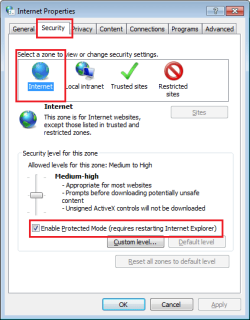
I do not recommend that people turn this one off. IE10 still crashes with this off and the AVAST plug-ins (add-ons) enabled. [I did not show that in the video below, it was already getting too long.]
Enhanced Protected Mode (EPM)
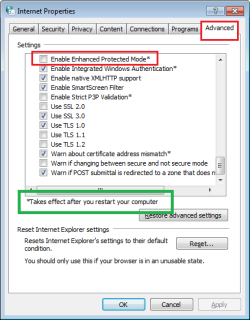
While it is true that you should restart your computer once you enable EPM, once you have done that restart, you can then toggle EPM on and off without subsequent restarts.
The default settings for IE10 on a 64bit OS is to NOT enable EPM. In that state, the 64bit OS will will create a windowless 64bit instance of IE10 that oversees the 32bit windows (visible) tabs and 32bit plug-ins. Once you enable EPM (and maybe restart the computer), the tabs become 64bit (even more secure) and they use 64bit plug-ins. The virtual machine used to make the video below already has EPM enabled and has already restarted.
You might want to watch this in the full screen mode and at 720p.
Sorry that the video is so long, I was attempting to find a way to show that IE10 will automatically disable the two 64bit plug-ins (add-ons). You will get those two notifications the first time that you start IE10 after installing AVAST8... to recreate those two notifications, I disabled the plug-ins and then re-enabled them.
Notice the URL that I start with for all 3 browsers it an HTTP address. All 3 get redirected to the same HTTPS URL. I've followed this issue on several other forums and AV sites, but I've not found any info that will help me to replicate the warning from AVAST for Firefox. Can someone please tell me how to replicate that warning?
Code:
http://mail.yahoo.com/

https://login.yahoo.com/config/login_verify2?&.src=ym&.intl=usBTW, I've not seen too many posts in other forums attempting to document IE10 crashing with these AVAST plug-ins... hence my harping on that issue. Sorry if the OP does not use or care much about IE10. It would be nice to her from the OP again
edit: Here are the versions of the 3 browsers:

Last edited:
My Computer
- Computer type
- Laptop
- Computer Manufacturer/Model Number
- Employer provided Dell Latitude
- OS
- W7 Pro SP1 64bit
- CPU
- i7
- Memory
- 8GB
- Graphics Card(s)
- Intel HD Graphics
- Hard Drives
- crappy SSD
- Antivirus
- Employer mandated Symantec Endpoint Protection
- Browser
- Pale Moon 64bit, IE11 64bit & Chrome 64bit
I can't see the Sentence your Quoting it must be from the links he posted ?
if so the link should be Removed to avoid anyone taking this advice course !
I agree that is not a recommended thing to do,
Activating EPM is better a much Safer option and your thorough example on Post 10 of your original link in Post 2 is ultimately the course to take,
Sorry can't help with Firefox or errors with Avast but hopefully someone can assist.
Cheers.
Mike1977 does not have a good "issue updating" record not since 10/ 2011
Edit,
Thanks for clearing that up I do see the paragraph now must have been site issues I did read all of his replies looking for it lol ?
if so the link should be Removed to avoid anyone taking this advice course !
I agree that is not a recommended thing to do,
Activating EPM is better a much Safer option and your thorough example on Post 10 of your original link in Post 2 is ultimately the course to take,
Sorry can't help with Firefox or errors with Avast but hopefully someone can assist.
Cheers.
Mike1977 does not have a good "issue updating" record not since 10/ 2011
Edit,
Thanks for clearing that up I do see the paragraph now must have been site issues I did read all of his replies looking for it lol ?
Last edited:
My Computer
- Computer type
- PC/Desktop
- Computer Manufacturer/Model Number
- Custom assembled by me :}
- OS
- Win-7-Pro64bit 7-H-Prem-64bit
- CPU
- i7-5930K 2nd i9-9940x both water blocked VRM's too
- Motherboard
- ASUS SABERTOOTH X99 2nd ASUS x299 Apex
- Memory
- Trident-z 3200C14 2nd Trident-z 3600C16
- Graphics Card(s)
- EVGA 1080ti ftw3 2nd Titan Xp both water blocked
- Sound Card
- Built-in Realtek
- Monitor(s) Displays
- 1-AOC G2460PG 24"G-Sync 144Hz/ 2nd 1-ASUS VG248QE 24" 144Hz
- Screen Resolution
- 1920 x 1080 144Hz
- Hard Drives
- 2-Samsung M.2 Evo & Evo Plus
2-Samsung 850 EVO 500GB SSD's/ 3-2.5 W.D. Black 1tb-&3-1tb/3-3.5 WD Black 1tb hdd's
- PSU
- EVGA SuperNOVA 1000-P2 2nd 1200-P2
- Case
- 2-Corsair Obsidian Series 450D Black ATX Mid Tower
- Cooling
- Custom water loops
- Keyboard
- Logitech G710+/ 2nd Logitech G910
- Mouse
- 2-RedDragon M901 Perdition 16400 dpi Gaming mouse = wired
- Internet Speed
- Comcast Ping 19ms 89.31mbps download speed 6.12mbps upload
- Antivirus
- Malwarebytes Pro/ Superantispyware Pro
- Browser
- FireFox & Pale moon
- Other Info
- 2nd ASUS X299 Apex/Intel i9-9940x with Custom water loop/7H-Prem-x64/Corsair 450D case/Ram Trident-z 3600C16 4x8gb / Samsung970Evo plus 500gb SSD/Dual ssd EZ swap evo/PSU EVGA SuperNova 1200w-P2 80+Platinum/GPU Titan Xp /8-ML-140 on push-pull on 2-280GTX rads
- Local time
- 8:26 AM
- Messages
- 8,138
The forum had issues last night; perhaps my last post will look correct if you clear your browser's cache.I can't see the Sentence your Quoting it must be from the links he posted ?
if so the link should be Removed to avoid anyone taking this advice course !
~~~
I quoted andrew129260 when he said, "The reason internet explorer crashes is due to internet explorers protected mode."
I also have a code box with the HTTP URL to that I set as the home page for each browser and the HTTPS URL that each browser was redirected too. In my opinion, these links are not dangerous. (See this current VirusTotal link that shows the HTTPS link to be clean and this earlier VirusTotal link that showed a Phishtank hit that might have started all of this in the first place.)
This article may interest Yahoo users:
Yahoo Mail Accounts Have Been Getting Hacked for Months
I have lots* of active yahoo e-mail accounts... none of which show any signs of being used by others. Perhaps I've just been lucky or the bad guys skipped my accounts since I have no contacts stored in any of these accounts for them to spam.
*I have lots of online accounts (such as the one for this forum) and I sprinkle the e-mail accounts associated with those accounts across various e-mail accounts.
My Computer
- Computer type
- Laptop
- Computer Manufacturer/Model Number
- Employer provided Dell Latitude
- OS
- W7 Pro SP1 64bit
- CPU
- i7
- Memory
- 8GB
- Graphics Card(s)
- Intel HD Graphics
- Hard Drives
- crappy SSD
- Antivirus
- Employer mandated Symantec Endpoint Protection
- Browser
- Pale Moon 64bit, IE11 64bit & Chrome 64bit

...This article may interest Yahoo users:
Yahoo Mail Accounts Have Been Getting Hacked for Months...
Months, my Aunt Fanny! More like years.
My Computer
- Computer type
- PC/Desktop
- Computer Manufacturer/Model Number
- Custom Build
- OS
- Win 7 Ultimate 64 bit
- CPU
- Intel i7-3930K
- Motherboard
- ASUS P9X79 WS
- Memory
- Kingston HyperX Genesis 32GB Kit (8x4GB Modules) 1600MHz DDR
- Graphics Card(s)
- MSI R7850 Twin Frozr 2GD5/OC Radeon HD 7850 2GB 256-bit GDDR
- Sound Card
- Asus Xonar Essence STX
- Monitor(s) Displays
- 3x Asus VG248QE 24", Vizio 32" TV
- Screen Resolution
- 1920 x 1080, ?
- Hard Drives
- Samsung 128GB 840 Pro SSD (1),
Samsung 4TB 850 EVO SSDs (4)
Samsung 4TB 850 EVO SSDs (16) external backup drives used in 2.5" hot swap bays in the computer.
- PSU
- Corsair HX750w
- Case
- Antec Two Hundred v2 (modified)
- Cooling
- Cooler Master GeminII S524 120mm (fan replaced with a 140mm)
- Keyboard
- Logitech G510s
- Mouse
- Logitech M525 (two in use)
- Internet Speed
- =< 32Mbps down, 8Mbps up
- Antivirus
- AVAST!, MBAM, SAS, Spybot S&D (all but MBAM free) Glary Util
- Browser
- IE11
- Other Info
- LSI 9211-8i HBA card (8 SATA III ports), 2.5" & 3.5" Hot Swap Bays, HooToo HT-CR001 PCI-E to USB 3.0 Internal Hub + 6 Slot Card Reader, and LG Model CH12LS28 BD-ROM Optical Drive. Also, ScanSnap S1500 ADF duplexing scanner, Canon 9000F flat bed scanner, Corsair SP2500 2.1 speakers, Samsung CLP 415nw laser color printer, Cyberpower PP2200SW UPS
- Local time
- 8:26 AM
- Messages
- 8,138
Can you provide any steps that might help me reproduce the message?The message still comes up.
Did you watch the video in post #10?
My Computer
- Computer type
- Laptop
- Computer Manufacturer/Model Number
- Employer provided Dell Latitude
- OS
- W7 Pro SP1 64bit
- CPU
- i7
- Memory
- 8GB
- Graphics Card(s)
- Intel HD Graphics
- Hard Drives
- crappy SSD
- Antivirus
- Employer mandated Symantec Endpoint Protection
- Browser
- Pale Moon 64bit, IE11 64bit & Chrome 64bit