
Avast opens user interface after each reboot after update

Using the "change" option above, I uninstalled "Secure Virtual Machine" since I have no need for that anyways, and rebooted from the Avast link. After reboot the user interface still appears on my desktop. This is ridiculous.

I also can't de-select "avastUI.exe /nogui" from autoruns or msconfig. If I deselect it from msconfig and hit apply it immediately gets ticked again. If I do that in autoruns, another instance appears checked when I restart autoruns. I was thinking that might be why the interface is appearing at boot. But I can't even try it because I can't uncheck it.
 

My Computer

Computer type
PC/Desktop
Computer Manufacturer/Model Number
custom build
OS
Windows 7 32bit Home Premium
CPU
Intel Core I7 920 Bloomfield
Motherboard
Asus P6T Deluxe v1
Memory
3 GB Corsair DDR3 (3x1GB)
Graphics Card(s)
NVidia GTX 570 (1 GB RAM)
Sound Card
on board
Monitor(s) Displays
Dell P2314H
Screen Resolution
1920x1080
Hard Drives
Western Digital Black 1TB (main OS)
PSU
XION Supernova XON-800R14N 800W
Case
Antec 1200
Cooling
Arctic Freezer 7 Pro Rev. 2
Keyboard
AZIO Prism
Mouse
Logitech G700S
Internet Speed
Verizon FiOS 85/85
Antivirus
Avast
Browser
Firefox/Chrome
Other Info
SansDigital rr622 RocketRaid (with non-raid Driver)
Renesas USB 3.0 card
avast me mateys! we need a solution for this person! OP, have you tried avast forum?
 

My Computer

Computer type
PC/Desktop
Computer Manufacturer/Model Number
Antec desktop; Acer Aspire laptops
OS
Windows 7 Professional 64-bit
CPU
Desktop i5; Acers i5 & i7
Memory
desktop 16GB; 1 Acer 8GB & 1 Acer 16GB
Hard Drives
1TB split into 2 equal partitions [OS and data] usable by RJS
Internet Speed
AT&T DSL
Browser
FF, GChrome, msIE
Other Info
Windows 7 Firewall, Emsisoft AM/AV, MSE [scan-only], SpywareBlaster, Ruiware/BillP combine
I also can't de-select "avastUI.exe /nogui" from autoruns or msconfig. If I deselect it from msconfig and hit apply it immediately gets ticked again. If I do that in autoruns, another instance appears checked when I restart autoruns. I was thinking that might be why the interface is appearing at boot. But I can't even try it because I can't uncheck it.

I have Avast free and I have the "avastUI.exe /nogui" entry enabled in msconfig startup, so that shouldn't be causing your problem.
I never tried to disable it, i want Avast to automatically startup.

I found this thread on the Avast forum, it's old but check your settings.
https://forum.avast.com/index.php?topic=93915.msg747943#msg747943

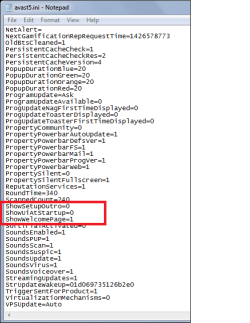
Here is what i have in Avast5.ini that might be different for you and cause the problem:

Avast_02.PNG
 

My Computer

Computer type
PC/Desktop
Computer Manufacturer/Model Number
home built
OS
Multi-Boot W7_Pro_x64 W8.1_Pro_x64 W10_Pro_x64 +Linux_VMs +Chromium_VM
CPU
AMD Athlon II x4 620
Motherboard
Gigabyte GA-MA785G-UD3H
Memory
6GB GSkill DDR2 800
Graphics Card(s)
AMD 4670 GPU + AMD 4200 IGP
Sound Card
on board Realtek ALC889A
Monitor(s) Displays
RCA 40" LCD TV, Insignia 32" LCD TV, HP 15" LCD monitor
Screen Resolution
1680 x 1050
Hard Drives
OCZ Vertex 3 120GB,
Samsung F3 1TB (3),
Several others - WD, Seagate, Hitachi, ...
PSU
Corsair 500 W
Case
Rosewill mid tower
Cooling
CM 90mm rifle
Keyboard
Gyration wireless, Logitech wireless, Dell USB wired
Mouse
Gyration wireless, Logitech wireless, V7 USB wired
Internet Speed
Spectrum - 100Mbps D / 10Mbps U
Antivirus
Avast, MBAM3, EMET, WinPatrol
Browser
Pale Moon, Firefox, IE
Other Info
2 multi-boot PC's
Mainly HTPC/Office/Gen purpose (no gaming).
Trendnet USB KVM.
LG DVD burner/Blue Ray Player.
Tray system for removable SATA backup drives.

Not currently OCd, under-volted.
I use Hybrid sleep, rarely re-boot or shutdown.

Hauppauge HD-PVR, Avermedia PCIe TV Tuner, Hauppauge PCI TV Tuner.
I can't seem to find Avast5.ini - where does it hide?

EDIT - ok, I found it and I'm checking it now.
 

My Computer

Computer type
PC/Desktop
Computer Manufacturer/Model Number
custom build
OS
Windows 7 32bit Home Premium
CPU
Intel Core I7 920 Bloomfield
Motherboard
Asus P6T Deluxe v1
Memory
3 GB Corsair DDR3 (3x1GB)
Graphics Card(s)
NVidia GTX 570 (1 GB RAM)
Sound Card
on board
Monitor(s) Displays
Dell P2314H
Screen Resolution
1920x1080
Hard Drives
Western Digital Black 1TB (main OS)
PSU
XION Supernova XON-800R14N 800W
Case
Antec 1200
Cooling
Arctic Freezer 7 Pro Rev. 2
Keyboard
AZIO Prism
Mouse
Logitech G700S
Internet Speed
Verizon FiOS 85/85
Antivirus
Avast
Browser
Firefox/Chrome
Other Info
SansDigital rr622 RocketRaid (with non-raid Driver)
Renesas USB 3.0 card
Let us know if changing any of those settings help you.
 

My Computer

Computer type
PC/Desktop
Computer Manufacturer/Model Number
home built
OS
Multi-Boot W7_Pro_x64 W8.1_Pro_x64 W10_Pro_x64 +Linux_VMs +Chromium_VM
CPU
AMD Athlon II x4 620
Motherboard
Gigabyte GA-MA785G-UD3H
Memory
6GB GSkill DDR2 800
Graphics Card(s)
AMD 4670 GPU + AMD 4200 IGP
Sound Card
on board Realtek ALC889A
Monitor(s) Displays
RCA 40" LCD TV, Insignia 32" LCD TV, HP 15" LCD monitor
Screen Resolution
1680 x 1050
Hard Drives
OCZ Vertex 3 120GB,
Samsung F3 1TB (3),
Several others - WD, Seagate, Hitachi, ...
PSU
Corsair 500 W
Case
Rosewill mid tower
Cooling
CM 90mm rifle
Keyboard
Gyration wireless, Logitech wireless, Dell USB wired
Mouse
Gyration wireless, Logitech wireless, V7 USB wired
Internet Speed
Spectrum - 100Mbps D / 10Mbps U
Antivirus
Avast, MBAM3, EMET, WinPatrol
Browser
Pale Moon, Firefox, IE
Other Info
2 multi-boot PC's
Mainly HTPC/Office/Gen purpose (no gaming).
Trendnet USB KVM.
LG DVD burner/Blue Ray Player.
Tray system for removable SATA backup drives.

Not currently OCd, under-volted.
I use Hybrid sleep, rarely re-boot or shutdown.

Hauppauge HD-PVR, Avermedia PCIe TV Tuner, Hauppauge PCI TV Tuner.
Let us know if changing any of those settings help you.

Thanks a ton for posting that screenshot of your settings. In my .ini file, ShowUiAtStartup=1. I set it to 0 and saved and then rebooted - and no more UI at startup! Thanks a ton - that was driving me nuts. I have no idea where that option is buried in the settings, but editing the ini file did the trick.
 

My Computer

Computer type
PC/Desktop
Computer Manufacturer/Model Number
custom build
OS
Windows 7 32bit Home Premium
CPU
Intel Core I7 920 Bloomfield
Motherboard
Asus P6T Deluxe v1
Memory
3 GB Corsair DDR3 (3x1GB)
Graphics Card(s)
NVidia GTX 570 (1 GB RAM)
Sound Card
on board
Monitor(s) Displays
Dell P2314H
Screen Resolution
1920x1080
Hard Drives
Western Digital Black 1TB (main OS)
PSU
XION Supernova XON-800R14N 800W
Case
Antec 1200
Cooling
Arctic Freezer 7 Pro Rev. 2
Keyboard
AZIO Prism
Mouse
Logitech G700S
Internet Speed
Verizon FiOS 85/85
Antivirus
Avast
Browser
Firefox/Chrome
Other Info
SansDigital rr622 RocketRaid (with non-raid Driver)
Renesas USB 3.0 card
You're welcome and glad to hear you have it solved :)
 

My Computer

Computer type
PC/Desktop
Computer Manufacturer/Model Number
home built
OS
Multi-Boot W7_Pro_x64 W8.1_Pro_x64 W10_Pro_x64 +Linux_VMs +Chromium_VM
CPU
AMD Athlon II x4 620
Motherboard
Gigabyte GA-MA785G-UD3H
Memory
6GB GSkill DDR2 800
Graphics Card(s)
AMD 4670 GPU + AMD 4200 IGP
Sound Card
on board Realtek ALC889A
Monitor(s) Displays
RCA 40" LCD TV, Insignia 32" LCD TV, HP 15" LCD monitor
Screen Resolution
1680 x 1050
Hard Drives
OCZ Vertex 3 120GB,
Samsung F3 1TB (3),
Several others - WD, Seagate, Hitachi, ...
PSU
Corsair 500 W
Case
Rosewill mid tower
Cooling
CM 90mm rifle
Keyboard
Gyration wireless, Logitech wireless, Dell USB wired
Mouse
Gyration wireless, Logitech wireless, V7 USB wired
Internet Speed
Spectrum - 100Mbps D / 10Mbps U
Antivirus
Avast, MBAM3, EMET, WinPatrol
Browser
Pale Moon, Firefox, IE
Other Info
2 multi-boot PC's
Mainly HTPC/Office/Gen purpose (no gaming).
Trendnet USB KVM.
LG DVD burner/Blue Ray Player.
Tray system for removable SATA backup drives.

Not currently OCd, under-volted.
I use Hybrid sleep, rarely re-boot or shutdown.

Hauppauge HD-PVR, Avermedia PCIe TV Tuner, Hauppauge PCI TV Tuner.
Back
Top