Avast Vs Pagefile.sys problem

ripbox

Nerd
Pro User
Local time
1:01 AM
Messages
250
Hi all been a while since i posted here but anyways i have a little problem or maybe not...
I set my self off a virus scan using avast and all has been scanning well and almost came to the end when avast pops up with its caution virus alert

Now to be clear Im running this scan from Vista C:\(vista) has scanned ok then D:\(storage) has also scanned ok now when Avast has jumped over to H:\(seven) its alerting me it has found a Trojan horse at H:\pagefile.sys Malware name Win32:Adloader-AC [Trj] malware type Trojan horse

My first reaction was to move it to the chest and allow Avast to continue scanning but Avast seems to just freeze for a while then gives me the message "There is not enough space on the Disk" cannot process H:\spagefile.sys.... as soon as i click ok Avast alerts me that its found the same trojan again (happened several times now)
So do i just ignore this supposed trojan and hit continue? is this just some kind of false positive?
 

My Computer

Computer Manufacturer/Model Number
Me :P
OS
Windows 7 Home Premium x64 SP1
CPU
Core 2 Quad Q6600
Motherboard
Abit IN9 32X MAX
Memory
8 GB OCZ PC2-6400 nVIDIA SLI-Ready Edition (4X2GB)
Graphics Card(s)
AMP! GeForce GTX 260² 896MB 448-bit GDDR3 (650MHz/2100MHz)
Sound Card
Realtek 7.1 CH HD Audio
Monitor(s) Displays
37" LG 1080p HD LCD TV
Screen Resolution
1280x1024 + 1360x768
Hard Drives
40GB Mushkin SSD
60GB Intel 520 SSD
150GB Raptor HDD
500GB Caviar HDD
PSU
Thermaltake W0133RB 1200W PSU
Case
Antec 900
Cooling
OCZ Vendetta 2 + Antec 900 case fans
Keyboard
Logitech G15 (full layout)
Mouse
R.A.T.9
Internet Speed
Not fast enough!
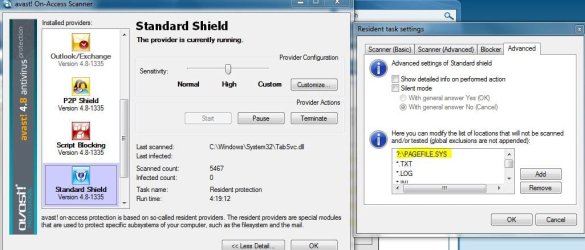
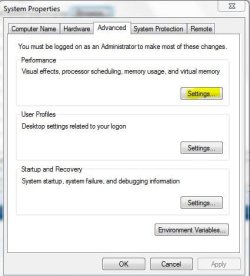
It's a false positive. You can see if you have pagefile in the exclusion list. it should be there by default. I get the warnings, what I did was just customed and lowered my pagefile size and Avast doesn't give me the false positive anymore. :huh:


pagefile.JPGsystemproperties.JPG
 

My Computer

Computer type
PC/Desktop
Computer Manufacturer/Model Number
Airbot 2.0
OS
Windows 7 Ultimate x64 SP1
CPU
Core i7 920 (D0) @ 4Ghz, *26c idle *65c full load on air
Motherboard
Asus P6X58D Premium - Sata 6Gb/s - USB 3.0
Memory
12GB DDR3 Corsair Dominator -CMD12GX3M6A1600C8 at 1600MHz
Graphics Card(s)
Zotac Geforce GTX 770
Sound Card
ASUS Xonar D2X
Monitor(s) Displays
1 LG 24" Flatron W2453V-PF 1 Samsung 24" P2450H both 2ms RT
Screen Resolution
1920x1080@60hz
Hard Drives
1 Samsung 250GB 840 Evo SSD
1 OCZ Vertex2 180GB SSD
1 TB Samsung Spinpoint F1 7200RPM 32MB cache
2 500GB WD Caviar Blacks 7200RPM 32MB cache (WD5001AALS)

Pioneer DVD Burner DVR-S18M
PSU
Corsair HX1000W
Case
Cooler Master HAF 932
Cooling
Case Fans *3 230mm, *1 140mm/CPU - *Tuniq Tower 120 Extreme
Keyboard
Logitech Wireless MK700
Mouse
Logitech Wireless MK700
Internet Speed
DL 15 Mbps UL 0.98 Mbps
Antivirus
None
Browser
Firefox Nightly
Other Info
Processor-7.7 *RAM- 7.9 *Graphics-7.9 *Gaming Graphics- 7.9 *SSD- 7.8 W.E.I final score= 7.7
*Phone- LG Nexus 5
Ah thank you airbot.... Unfortunately it seem to crash avast in the end no matter what i chose to do... ill be sure to try fix it for my next scan :D
 

My Computer

Computer Manufacturer/Model Number
Me :P
OS
Windows 7 Home Premium x64 SP1
CPU
Core 2 Quad Q6600
Motherboard
Abit IN9 32X MAX
Memory
8 GB OCZ PC2-6400 nVIDIA SLI-Ready Edition (4X2GB)
Graphics Card(s)
AMP! GeForce GTX 260² 896MB 448-bit GDDR3 (650MHz/2100MHz)
Sound Card
Realtek 7.1 CH HD Audio
Monitor(s) Displays
37" LG 1080p HD LCD TV
Screen Resolution
1280x1024 + 1360x768
Hard Drives
40GB Mushkin SSD
60GB Intel 520 SSD
150GB Raptor HDD
500GB Caviar HDD
PSU
Thermaltake W0133RB 1200W PSU
Case
Antec 900
Cooling
OCZ Vendetta 2 + Antec 900 case fans
Keyboard
Logitech G15 (full layout)
Mouse
R.A.T.9
Internet Speed
Not fast enough!
Hasn't ever made mine crash..it won't let you quarantine it but it will let you delete it, as I have done that too.

It's nothing to worry about...it's just a FP.
 

My Computer

Computer type
PC/Desktop
Computer Manufacturer/Model Number
Airbot 2.0
OS
Windows 7 Ultimate x64 SP1
CPU
Core i7 920 (D0) @ 4Ghz, *26c idle *65c full load on air
Motherboard
Asus P6X58D Premium - Sata 6Gb/s - USB 3.0
Memory
12GB DDR3 Corsair Dominator -CMD12GX3M6A1600C8 at 1600MHz
Graphics Card(s)
Zotac Geforce GTX 770
Sound Card
ASUS Xonar D2X
Monitor(s) Displays
1 LG 24" Flatron W2453V-PF 1 Samsung 24" P2450H both 2ms RT
Screen Resolution
1920x1080@60hz
Hard Drives
1 Samsung 250GB 840 Evo SSD
1 OCZ Vertex2 180GB SSD
1 TB Samsung Spinpoint F1 7200RPM 32MB cache
2 500GB WD Caviar Blacks 7200RPM 32MB cache (WD5001AALS)

Pioneer DVD Burner DVR-S18M
PSU
Corsair HX1000W
Case
Cooler Master HAF 932
Cooling
Case Fans *3 230mm, *1 140mm/CPU - *Tuniq Tower 120 Extreme
Keyboard
Logitech Wireless MK700
Mouse
Logitech Wireless MK700
Internet Speed
DL 15 Mbps UL 0.98 Mbps
Antivirus
None
Browser
Firefox Nightly
Other Info
Processor-7.7 *RAM- 7.9 *Graphics-7.9 *Gaming Graphics- 7.9 *SSD- 7.8 W.E.I final score= 7.7
*Phone- LG Nexus 5
Avast does the same with me. I have it installed on Win 2K Pro (drive C). On XP Pro (drive E), I have Microsoft Security Essentials installed. Also, on both partitions, I have Ad Aware installed for anything that the others may miss. No matter which scanner I use, both partitions are scanned. Avast almost always comes comes up with some virus (multiple names) on drive E. Both of the other scanners always shows a clean system, also Windows Live Safety Scanner, which I use once monthly, comes up clean with the exception of a few registry entries, usually Active X things. After three reinstalls, I've conceded that Avast's actions on this pagefile.sys. is a false positive.
 

My Computer

Computer Manufacturer/Model Number
HP Pavilion All in one MS214
OS
Windows 7 Home Premium (64 bit)
CPU
AMD Athlon X2 Dual Core (3250e)
Memory
2GB
Graphics Card(s)
ATI Radeon HD 3200 Graphics
Monitor(s) Displays
intergrated 18.5" moniter
Hard Drives
320 GB
Keyboard
HP
Mouse
HP
Internet Speed
wireless dial up (40 to 60kb/sec) & wi-fi (as high as 600kb
Other Info
intergrated webcam, wi-fi, built in backup, my first PC. I've always used laptops, but needed a bigger screen.
Back
Top