AVG 2011 spyware?

gangstare

New member
Local time
4:09 AM
Messages
4
avg just changed my firewall settings after stopping its scan without me telling it to. i also found windows remote access in my start menu after leaving my computer on for three days when i dont even know where i would find such a program. am i being paranoid? both AVG and MalwareBytes havent found any threats
 

My Computer

OS
Windows 7 Ultimate x64
Since you suspect AVG of nefarious activity, I would recommend uninstalling it, making sure Windows Firewall is turned on, and then installing MSE -- its free here http://www.microsoft.com/security_essentials/, and doing a full system scan.

That way, you can know for sure.
 

My Computer

Computer type
PC/Desktop
Computer Manufacturer/Model Number
Golden Mk. I.4
OS
Windows 10 Pro x64 ; Xubuntu x64
CPU
Intel i7 860 @ 2.80 GHz O/C'ed to 4.0GHz
Motherboard
Gigabyte P55A-UD3R Rev.1. Award BIOS F13
Memory
16GB Corsair Vengance DDR3 @ 661 MHz Dual Channel (9-9-9-24)
Graphics Card(s)
EVGA NVidia GTX 560 1024MB
Sound Card
Realtek Integrated
Monitor(s) Displays
Dual Samsung SyncMaster 2494HS
Screen Resolution
1920*1080 and 1920*1080
Hard Drives
1*Samsung 840 EVO 120GB SSD;
1*OCZ Vertex 2 60GB SSD;
2*Samsung F3 SpinPoint 1TB in RAID0;
1*Samsung F1 SpinPoint 1TB;
2*Western Digital 1TB External USB 3.0
1*Western Digital 500GB External USB 3.0
1*Seagate 500GB External USB 2.0
PSU
Thermaltake ToughPower QFan 750W
Case
Thermaltake Element S VK60001W2Z
Cooling
Corsair H60 Water Cooling, 2*230mm and 2*80mm case fans
Keyboard
Logitech G110
Mouse
Logitech MX518

My Computer

Computer Manufacturer/Model Number
Acer
OS
Win7 ultimate x86
shit man thanks. im just worried because i can see all these other peoples shared networks on my campus network and i never think i have enough defense up
 

My Computer

OS
Windows 7 Ultimate x64
Glad to help. As long as you are keeping AVG up to date, I wouldnt waste too much time worrying.
 

My Computer

Computer Manufacturer/Model Number
Acer
OS
Win7 ultimate x86
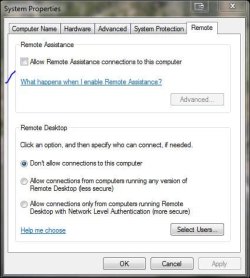
If you're real paranoid and don't use it yourself, you could also uncheck allow remote use on the System Properties window.

Capture1.JPG
Capture2.JPG

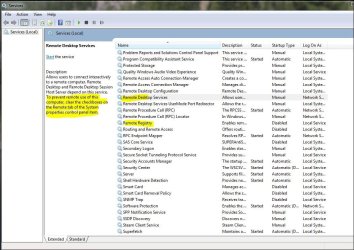
Also in services there. Place to check what you could safely change from the default state in services according to your Windows edition, is here - Service Configurations by Black Viper
 

My Computer

Computer type
PC/Desktop
Computer Manufacturer/Model Number
Airbot 2.0
OS
Windows 7 Ultimate x64 SP1
CPU
Core i7 920 (D0) @ 4Ghz, *26c idle *65c full load on air
Motherboard
Asus P6X58D Premium - Sata 6Gb/s - USB 3.0
Memory
12GB DDR3 Corsair Dominator -CMD12GX3M6A1600C8 at 1600MHz
Graphics Card(s)
Zotac Geforce GTX 770
Sound Card
ASUS Xonar D2X
Monitor(s) Displays
1 LG 24" Flatron W2453V-PF 1 Samsung 24" P2450H both 2ms RT
Screen Resolution
1920x1080@60hz
Hard Drives
1 Samsung 250GB 840 Evo SSD
1 OCZ Vertex2 180GB SSD
1 TB Samsung Spinpoint F1 7200RPM 32MB cache
2 500GB WD Caviar Blacks 7200RPM 32MB cache (WD5001AALS)

Pioneer DVD Burner DVR-S18M
PSU
Corsair HX1000W
Case
Cooler Master HAF 932
Cooling
Case Fans *3 230mm, *1 140mm/CPU - *Tuniq Tower 120 Extreme
Keyboard
Logitech Wireless MK700
Mouse
Logitech Wireless MK700
Internet Speed
DL 15 Mbps UL 0.98 Mbps
Antivirus
None
Browser
Firefox Nightly
Other Info
Processor-7.7 *RAM- 7.9 *Graphics-7.9 *Gaming Graphics- 7.9 *SSD- 7.8 W.E.I final score= 7.7
*Phone- LG Nexus 5
it is unchecked, which was why i was paranoid
 

My Computer

OS
Windows 7 Ultimate x64
Back
Top