AVG Toolbar: How To Remove ? What's Wrong With These Folks ??

Robert11

New member
Power User
Local time
10:31 AM
Messages
542
Hello,

I now have that AVG (the virus folks) toolbar as my default search engine.
Tried the add/remove bit, and it did remove it from the list, but the toolbar keeps showing up, anyway.

Can't understand why a reputable outfit like AVG would do such a thing.
I was going to buy their complete anti-virus suite, but certainly will not now.

What idiots. They probably piss off more potential customers than they could
ever make by selling adv. to this toolbar.

So, please:

How do I get rid of it, permanently ?

Thanks,
Bob
 

My Computer My Computer

At a glance

Windows 7 64bit
OS
Windows 7 64bit
Hi Folks,

Thanks so much for help.

Yes, I tried all of those suggestions.
No listing shows the search bar/toolbar anymore, including the add/remove.

But: it still appears !
Even tried REVO Uninstaller, and it couldn't find any instance of it.
But, it keeps reappearing.

Any other suggestions would be very appreciated.

Thanks,
Bob

BTW: where is the actual Link to make Google your default search engine ?
Maybe I should play with that again ?
 

My Computer My Computer

At a glance

Windows 7 64bit
OS
Windows 7 64bit
I am not a fan of AVG ever since they opted to add their virus definitions to the system process - thus bringing many computers to a crawl. That said, the reason (excuse?) that AVG offers when questioned about the difficulty of removing the safesearch and toolbar settings is something along the lines of, "to make it hard for infections to remove those settings".

You might try a scan with Malwarebytes.
 

My Computer My Computer

At a glance

W7 Pro SP1 64biti78GBIntel HD Graphics
Computer type
Laptop
Computer Manufacturer/Model Number
Employer provided Dell Latitude
OS
W7 Pro SP1 64bit
CPU
i7
Memory
8GB
Graphics Card(s)
Intel HD Graphics
Hard Drives
crappy SSD
Antivirus
Employer mandated Symantec Endpoint Protection
Browser
Pale Moon 64bit, IE11 64bit & Chrome 64bit
folder removal

If your happy to play around in the registery.

download a copy of the AVG removal tool DO NOT RUN IT YET

If AVG self protection is enabled turn it off
DO the following OFFLINE.
Turn off AVG
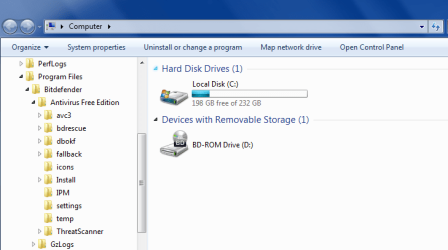
goto C/programfiles/AVG/folders (see screenshot read AVG for bitdefender).

one of the folders will be for the toolbar, if your not sure post a screenshot.

RIGHT click on it, select properties select delete.

now run the AVG removal tool again

A Reboot will be required to totally remove it.

PICK another AV program.

Roy
 

Attachments

  • av files.PNG
    av files.PNG
    19.3 KB · Views: 1

My Computer My Computer

At a glance

W7 home premium 32bit/W7HP 64bit/w10 tp insid...E5300 dual core3gbNvidia Geforce 7100 Nforce 630i
Computer type
PC/Desktop
Computer Manufacturer/Model Number
medionl/Aspire 6930G/acer x55a
OS
W7 home premium 32bit/W7HP 64bit/w10 tp insider ring
CPU
E5300 dual core
Motherboard
medion MS7366
Memory
3gb
Graphics Card(s)
Nvidia Geforce 7100 Nforce 630i
Monitor(s) Displays
avixc
Internet Speed
n (isp resticted to 72)
Antivirus
mse/pands
Browser
palemoon
Other Info
Belkin Fd7050 n USB using Railink RT2870 drivers, more upto date

My Computer My Computer

At a glance

Windows 7 Ultimate x64 SP1AMD Phenom 2 1090T2x8GB Kingston HyperX Fury Black 1600Mhz Unga...MSI GTX 970 Gaming 4G
Computer type
PC/Desktop
Computer Manufacturer/Model Number
Custom Build
OS
Windows 7 Ultimate x64 SP1
CPU
AMD Phenom 2 1090T
Motherboard
Gigabyte GA-890FXA-UD5
Memory
2x8GB Kingston HyperX Fury Black 1600Mhz Unganged
Graphics Card(s)
MSI GTX 970 Gaming 4G
Sound Card
Realtek On-Board HD 7.1 Audio / Logitech G35
Monitor(s) Displays
3xAcer GD245HQ
Screen Resolution
1920x1080
Hard Drives
Samsung 850 Pro 512GB SSD - OS /
WD Caviar Black SATA 3 - 1 TBx2 - Dynamic RAID 0 /
WD Caviar Green SATA 2 - 640GBx2 - Dynamic RAID 0 /
WD Caviar Green SATA 2 - 640GB - Internal Backup /
Seagate Barracude SATA 3 - 3TB - External Backup/ Sync
PSU
HighPower 1000W
Case
Cooler Master HAF 932
Cooling
Noctua NH-D14
Keyboard
Logitech G19
Mouse
Logitech G500
Internet Speed
100/4 Mbit Cable (100GB quota)
Antivirus
ZoneAlarm Extreme Security / MBAM Pro / MBAE Free / SAS Free
Browser
IE 11 - Firefox - Chrome
Other Info
Logitech F710/ G27/ G940/ Z5500 // TrackIR 5 // Nvidia 3D Surround Vision

My Computer My Computer

At a glance

Windows 10 Pro. 64/ version 1709 Windows 7 Pr...Intel i7-6800K @ 4.3Corsair Platinum 16 gig @2400EVGA GTX 1070 OC
Computer type
PC/Desktop
Computer Manufacturer/Model Number
Home made Desktop
OS
Windows 10 Pro. 64/ version 1709 Windows 7 Pro/64
CPU
Intel i7-6800K @ 4.3
Motherboard
ASUS X-99 Deluxe II
Memory
Corsair Platinum 16 gig @2400
Graphics Card(s)
EVGA GTX 1070 OC
Monitor(s) Displays
Asus 27" LED LCD/VE278Q
Screen Resolution
1920-1080 or 1280-720 HDMI
Hard Drives
INTEL SSD 730-240 Gb Sata 3.0/
PSU
EVGA Platium 1200W
Case
Phanteks Luxe Tempered Glass 8 fans/ one radiator
Cooling
XSPC/ Water Cooled CPU
Keyboard
Das 4 Professional
Mouse
Logitech M705/MX Anywhere 2-S
Internet Speed
100 mbits
Antivirus
Microsoft Security Essentials/ Malwarebytes Premium 3.0/ SAS
Browser
I.E. 11 default/Firefox/ ISP Time Warner Cable/Spectrum
Other Info
LG BluRay Burner/
Sound system-KLipsch-THX/
Icy Dock ssd Hot Swap bays.
I know little about AVG but for most AV software - running the installer usually gives the option to add or remove comonents.

When running the AVG installer (even if AVG is already installed) you should get these choices:

If AVG software is already installed on the computer, you will be presented with five different choices:
Speed up my PC - Choose this option to get a free PC TuneUp.
Update my AVG product - This option runs AVG update.
Repair installation - This option repairs or reinstalls damaged or missing AVG components.
Add/Remove Features - Choose this option to add or remove AVG components.
Uninstall - This option removes the AVG program from your PC.

http://www.avg.com/us-en/installation-guide#issues2014

Note: There is also a guide for AVG 2013 if that's what you are using.

So basically run the AVG setup file that you downloaded and used to install AVG originally and make your choices on what you want to remove (Toolbar and AVG Search)
 

My Computer My Computer

At a glance

Microsoft Windows 7 Home Premium 64-bit 7601 ...AMD C-60 APU with Radeon(tm) HD Graphics4.00 GBAMD Radeon HD 6290 Graphics
Computer type
Laptop
Computer Manufacturer/Model Number
ASUS
OS
Microsoft Windows 7 Home Premium 64-bit 7601 Multiprocessor Free Service Pack 1
CPU
AMD C-60 APU with Radeon(tm) HD Graphics
Motherboard
ASUSTeK COMPUTER INC. X501U
Memory
4.00 GB
Graphics Card(s)
AMD Radeon HD 6290 Graphics
Sound Card
(1) AMD High Definition Audio Device (2) Realtek High Defi
Screen Resolution
1366 x 768 x 32 bits (4294967296 colors) @ 60 Hz
Hard Drives
Hitachi HTS545050A7E380 SATA Disk Device
Antivirus
Comodo CIS & FW, SecureAplus App Whitelisting, Threatfire
Browser
Cyberfox 64bit, Opera 64bit, Airfox
Other Info
Spy-The-Spy, HitmanPro.Alert, Norton Connect Safe, MJRegWatcher, BitDefender TrafficLight, Voodoo Shield, Zemana AntiMalware
Back
Top