
Avoid Antivirus from scanning games!

FredeGail

It's full of stars
Guru
Gold Member
Local time
6:02 AM
Messages
2,360
Location
Denmark
Hello.
2 things.

I have like two-three lags when starting the game. I thought it was my Anti-Virus scanning the game when it's starting. Is it possible to prevent my MSE to scan the game?

When I was in the game, I tried to reach the idle temperature for my GPU while gaming (70C ), and then restart the game to see if it's was still there, it wasn't! Maybe my Graphic Card needs to reach that. It could lag during it's heating up, right?

However, your Anti-Virus only needs 1 scan per boot. 2 if necessary. And I was still in the same boot! .. If you know what I mean.
But mainly, how to prevent your anti-virus scanning specific (or globally), while starting software, and most important: games.

Best Regards,
FredeGail
 

My Computer

Computer Manufacturer/Model Number
Brewed
OS
Microsoft Windows 7 Ultimate: x64 (SP1)
CPU
Intel® Core™ i5-2500K Processor
Motherboard
ASUS P8Z68-V PRO
Memory
Kingston DDR3 HyperX 1600MHz 8GB
Graphics Card(s)
ASUS GTX 560 TI DirectCU II 900MHz
Sound Card
Realtek® ALC892 8-Channel High Definition Audio CODEC
Monitor(s) Displays
ACER LCD P246HBD 1920x1080 (24") - Dell 1280x800
Screen Resolution
ACER LCD P246HBD ~ [1920X1080] - DELL ~ [1280x800]
Hard Drives
500 GB WD Caviar SE116 7200rpm SATA2
PSU
Corsair 750W Power Supply
Case
Coolermaster CM Scout
Cooling
Zalman FS-C77 Fatal1ty CPU Cooler
Keyboard
Logitech G15
Mouse
Coolermaster Sentinel Advanced
Internet Speed
[↓ 10 MB/s DL] [↑ 1 MB/s UL]
Other Info
- ROCCAT™ Kave – Solid 5.1 Surround Sound Gaming Headset
- Not overclocking
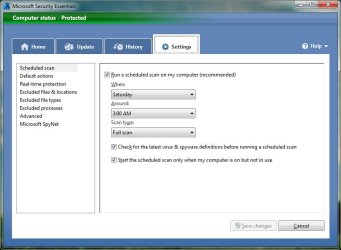
You could always add an exception for the game in MSE by openeing MSE, going to the settings tab, and either excluding the file and location, or process for the game.

should look something like this:

microsoft-security-essentials-settings.jpg

From there browse to the specific file or folder to add it.
 

My Computer

OS
Windows 7 Professional x64 Backtrack 4 R2
CPU
Intel Core i5-650
Motherboard
Gigabyte P55-UD3
Memory
4 GB Geil PC3 12800
Graphics Card(s)
HIS HD 4870 X2
Sound Card
Sound Blaster X-Fi Titanium Fatal1ty Champion
Monitor(s) Displays
BenQ 22" G2220HD
Hard Drives
Seagate Barracuda 7200.12 500GB
PSU
Antec High Current Gamer 620W Power Supply
Case
Thermaltake Armor+ MX
Keyboard
Microsoft SideWinder X6
Mouse
Razer Abyssus
Hello Fredegail,

First off, if you go into settings and under 'excluded file types and locations' try adding the folders of the games or the .exe files.

Secondly, the GTX 260 can reach those temps, that was the problem of the G200 chips, they ran warm.

What sort of airflow have you got going through your case, have you got plenty of fans?
Does your case need a dusting on the inside?
If you are confident enough, have you tried re applying the thermal paste and thermal pads on the graphics card? That may help eleviate a few degrees

Lucky
 

My Computer

Computer Manufacturer/Model Number
The HAFmeister (Custom)
OS
Windows 7 Ultimate x64 RTM + SP1
CPU
Intel Core i7 950 3.06GHZ (OC'd to 3.99Ghz)
Motherboard
Asus Rampage III Extreme x58 SATA 6GB & USB 3.0
Memory
6GB OCZ Reaper HPC Edition PC3-16000 (set 1606Mhz 8-8-8-26)
Graphics Card(s)
EVGA Nvidia Geforce GTX 570
Sound Card
Creative SB X-Fi Titanium Fatal1ty Professional Series
Monitor(s) Displays
Samsung SM2433BW 24" Widescreen Monitor
Screen Resolution
1920x1200
Hard Drives
Western Digital Caviar Black 500GB 32Mb Buffer SATA II
Western Digital Caviar Black 750GB 32Mb Buffer SATA II
Western Digital Caviar Blue 500GB 16Mb Buffer SATA II
Western Digital My Book Essential Edition 750GB USB
Samsung Spinpoint 2TB SATA II
PSU
Thermaltake Toughpower 1200w (Modular)
Case
CoolerMaster HAF-932
Cooling
Zalman Reserator XT and ZM-WB5 Plus - GPU uses Stock coolers
Keyboard
Logitech G510
Mouse
Logitech G9 Gaming Mouse
Internet Speed
3MB Profile - 350-400kbs (Real-Speed)
Other Info
IcyBox Hot-Swap Bay,
Logitech G27 Steering Wheel,
Xbox 360 Wirless Elite Controller with Microsoft Reciever and
Play & Charge Kit,
Belkin USB Wireless Adaptor,
GAME Generic Controller (Playstation Looky-Likey),
Epson SX125 All-in-One.
Exactly what I was looking for Clinkz!

Dexter (can I call you Dexter), Sorry I havent updated my specs. I have GTX 280 now, and it gets a waaaay hotter :)

Oh and, I have 4 fans in my case. 2 costum fans, and the rest was in my case when I bought it.

Nice comments

Best Regards,
FredeGail
 

My Computer

Computer Manufacturer/Model Number
Brewed
OS
Microsoft Windows 7 Ultimate: x64 (SP1)
CPU
Intel® Core™ i5-2500K Processor
Motherboard
ASUS P8Z68-V PRO
Memory
Kingston DDR3 HyperX 1600MHz 8GB
Graphics Card(s)
ASUS GTX 560 TI DirectCU II 900MHz
Sound Card
Realtek® ALC892 8-Channel High Definition Audio CODEC
Monitor(s) Displays
ACER LCD P246HBD 1920x1080 (24") - Dell 1280x800
Screen Resolution
ACER LCD P246HBD ~ [1920X1080] - DELL ~ [1280x800]
Hard Drives
500 GB WD Caviar SE116 7200rpm SATA2
PSU
Corsair 750W Power Supply
Case
Coolermaster CM Scout
Cooling
Zalman FS-C77 Fatal1ty CPU Cooler
Keyboard
Logitech G15
Mouse
Coolermaster Sentinel Advanced
Internet Speed
[↓ 10 MB/s DL] [↑ 1 MB/s UL]
Other Info
- ROCCAT™ Kave – Solid 5.1 Surround Sound Gaming Headset
- Not overclocking
Yes, you can call me Dexter.

Ah, a GTX 280, can i just say, 70c is actually very good for that card, a friend of mine has/had that card and it would top out at 106c which is the over the very max for that card and at that temp, it would begin to down-clock itself to compensate.

Might sound a bit extreme but you may want to take a look at this - Accelero XTREME GTX Pro · VGA · Cooling · Arctic Cooling

Perhaps not that exact one but any aftermarket cooler should bring those temps down a bit, or if money is not a huge issue, i suggest drowning the card with some water cooling, that card gets mega hot but then it was the top end card at the time of release.

Lucky
 

My Computer

Computer Manufacturer/Model Number
The HAFmeister (Custom)
OS
Windows 7 Ultimate x64 RTM + SP1
CPU
Intel Core i7 950 3.06GHZ (OC'd to 3.99Ghz)
Motherboard
Asus Rampage III Extreme x58 SATA 6GB & USB 3.0
Memory
6GB OCZ Reaper HPC Edition PC3-16000 (set 1606Mhz 8-8-8-26)
Graphics Card(s)
EVGA Nvidia Geforce GTX 570
Sound Card
Creative SB X-Fi Titanium Fatal1ty Professional Series
Monitor(s) Displays
Samsung SM2433BW 24" Widescreen Monitor
Screen Resolution
1920x1200
Hard Drives
Western Digital Caviar Black 500GB 32Mb Buffer SATA II
Western Digital Caviar Black 750GB 32Mb Buffer SATA II
Western Digital Caviar Blue 500GB 16Mb Buffer SATA II
Western Digital My Book Essential Edition 750GB USB
Samsung Spinpoint 2TB SATA II
PSU
Thermaltake Toughpower 1200w (Modular)
Case
CoolerMaster HAF-932
Cooling
Zalman Reserator XT and ZM-WB5 Plus - GPU uses Stock coolers
Keyboard
Logitech G510
Mouse
Logitech G9 Gaming Mouse
Internet Speed
3MB Profile - 350-400kbs (Real-Speed)
Other Info
IcyBox Hot-Swap Bay,
Logitech G27 Steering Wheel,
Xbox 360 Wirless Elite Controller with Microsoft Reciever and
Play & Charge Kit,
Belkin USB Wireless Adaptor,
GAME Generic Controller (Playstation Looky-Likey),
Epson SX125 All-in-One.
Thanks for your advice.

The game I was talking about in the very first was World of Warcraft, which is using almost no resources from your card, with other words: The idle temperature in World of Warcraft is low for GTX 280.
I got the card for free from a friend, and he was playing high resources games like Rift, in full Resolution, and he had those.. 90C.
I'm not the biggest gamer.

For bringing back the topic, would my World of Warcraft lag because my card is 'in progress' and 'nearing idle temperature'?

Thanks Dex!
 

My Computer

Computer Manufacturer/Model Number
Brewed
OS
Microsoft Windows 7 Ultimate: x64 (SP1)
CPU
Intel® Core™ i5-2500K Processor
Motherboard
ASUS P8Z68-V PRO
Memory
Kingston DDR3 HyperX 1600MHz 8GB
Graphics Card(s)
ASUS GTX 560 TI DirectCU II 900MHz
Sound Card
Realtek® ALC892 8-Channel High Definition Audio CODEC
Monitor(s) Displays
ACER LCD P246HBD 1920x1080 (24") - Dell 1280x800
Screen Resolution
ACER LCD P246HBD ~ [1920X1080] - DELL ~ [1280x800]
Hard Drives
500 GB WD Caviar SE116 7200rpm SATA2
PSU
Corsair 750W Power Supply
Case
Coolermaster CM Scout
Cooling
Zalman FS-C77 Fatal1ty CPU Cooler
Keyboard
Logitech G15
Mouse
Coolermaster Sentinel Advanced
Internet Speed
[↓ 10 MB/s DL] [↑ 1 MB/s UL]
Other Info
- ROCCAT™ Kave – Solid 5.1 Surround Sound Gaming Headset
- Not overclocking
Hi FredeGail,

If WoW is lagging, it certainly isn't because of your hardware. Your stuff should be tearing that game up.

I don't play WoW, but I posts just like yours appear all the time... and apparently, the problem is with WoW itself... not you or your rig.

I'd hit the WoW forums to find fixes... and if they don't work there's another tweak you can try (mmcs tweak), but first I'd see if the easy fixes the WoW guys know about works.
 

My Computer

OS
7 Ultimate x64
CPU
i5-2500k
Motherboard
Asus P8P67 Pro
Memory
8GB G.Skill Ripjaws X F3-12800CL7D-8GBXH 1866MHz 8-9-8-24
Graphics Card(s)
EVGA GTX 570 SC
Sound Card
X-Fi Titanium Fatality
Monitor(s) Displays
Samsung S27A550H 27" LED
Screen Resolution
1920x1080
Hard Drives
OCZ Vertex 3 120GB.
1TB Samsung F3.
2TB Samsung F4.
PSU
PC Power & Cooling Silencer 760
Case
Lian Li Lancool K62
Cooling
Thermalright Venomous X Black/Scythe S-Flex/Shin-Etsu X23
Keyboard
MS Natural Elite 4000 Ergonomic
Mouse
Logitech G500
Internet Speed
6MB/768
Other Info
Logitech Z-5500 505 watts.
D-Link DGL-4500.
Tripp-Lite Smart Pro 1500.
It's WoW...the servers are in LA and lag is part and parcel of the game...I used a tunnelling sevice (RTL) based in Brisbane, got my ping down a little but I have since stopped playing. Has nothing at all to do with your Vid card mate.
I assume your in EU so you do at least have servers hosting the game in EU so it most likely be caused by your local net, as in congestion w/e. I'd just be looking at the usual thing like disabling what ever you don't need,don't download in the background etc and max your graphics..your card should run it easily. I've played WOW for 4 years and have run it with a P4/VgA system nps...for me lag has always been caused by Blizzards servers and crap netspeed.
It is NOT your card thats at fault unless the card itself is faulty.
 

My Computer

Computer Manufacturer/Model Number
home built
OS
Windows 7 Professional 64 bit
CPU
930 i7 quad O/C 4ghz
Motherboard
Asus P6X58D premium
Memory
G Skill 3x2gb O/C to 1603mhz 1T timing
Graphics Card(s)
EVGA 570
Sound Card
creative titanium
Monitor(s) Displays
samsung s23a950d..120hz 3D
Screen Resolution
1920x1080
Hard Drives
Western Digital 3X150 Velocoraptors in Raid 5
PSU
Antec Quattro 1000 watt
Case
Xigmatek Elysium
Cooling
Custom Loop..Kryos block.360rad..BP comp fittings etc
Keyboard
Razor arcosa
Mouse
Razer Diamondback
Internet Speed
Wireless so w/e I get at the time
Hi FredeGail,

If WoW is lagging, it certainly isn't because of your hardware. Your stuff should be tearing that game up.

I don't play WoW, but I posts just like yours appear all the time... and apparently, the problem is with WoW itself... not you or your rig.

I'd hit the WoW forums to find fixes... and if they don't work there's another tweak you can try (mmcs tweak), but first I'd see if the easy fixes the WoW guys know about works.

Hello Fumz!
Nice speaking to you again.

Yeah, i'll just ignore it. It's not a big deal. However, I think the performance of the game is best when your temperature has stabilized. Both on the GPU, but also on my Core 0, 1, 2 (CPU)

Much appreciated.

It's WoW...the servers are in LA and lag is part and parcel of the game...I used a tunnelling sevice (RTL) based in Brisbane, got my ping down a little but I have since stopped playing. Has nothing at all to do with your Vid card mate.
I assume your in EU so you do at least have servers hosting the game in EU so it most likely be caused by your local net, as in congestion w/e. I'd just be looking at the usual thing like disabling what ever you don't need,don't download in the background etc and max your graphics..your card should run it easily. I've played WOW for 4 years and have run it with a P4/VgA system nps...for me lag has always been caused by Blizzards servers and crap netspeed.
It is NOT your card thats at fault unless the card itself is faulty.

Yes certainly, it's not like the fps is dropping, it's just the whole window hanging for 0,5-1sec. :geek:

Reputation for all who has been posting in my topic by far!

Best Regards,
FredeGail
 

My Computer

Computer Manufacturer/Model Number
Brewed
OS
Microsoft Windows 7 Ultimate: x64 (SP1)
CPU
Intel® Core™ i5-2500K Processor
Motherboard
ASUS P8Z68-V PRO
Memory
Kingston DDR3 HyperX 1600MHz 8GB
Graphics Card(s)
ASUS GTX 560 TI DirectCU II 900MHz
Sound Card
Realtek® ALC892 8-Channel High Definition Audio CODEC
Monitor(s) Displays
ACER LCD P246HBD 1920x1080 (24") - Dell 1280x800
Screen Resolution
ACER LCD P246HBD ~ [1920X1080] - DELL ~ [1280x800]
Hard Drives
500 GB WD Caviar SE116 7200rpm SATA2
PSU
Corsair 750W Power Supply
Case
Coolermaster CM Scout
Cooling
Zalman FS-C77 Fatal1ty CPU Cooler
Keyboard
Logitech G15
Mouse
Coolermaster Sentinel Advanced
Internet Speed
[↓ 10 MB/s DL] [↑ 1 MB/s UL]
Other Info
- ROCCAT™ Kave – Solid 5.1 Surround Sound Gaming Headset
- Not overclocking
Back
Top