Back up and restore help please

Missa79

New member
Local time
9:19 PM
Messages
3
Hi I have an
ASUS Eee PC 1015PED

I need help understanding how the C and D disk
Both are almost filled I was wondering if someone can please look at my screen shots and tell me what I need to do.
Thank you

Computer Info pictures by missi79 - Photobucket
 

My Computer

Computer Manufacturer/Model Number
ASUS Eee PC 1015PED
OS
Windows 7 Starter 32 bit
CPU
Intel Atom Pineview-M N455/N475
Memory
SO-DIMM 1GB DDR3
Graphics Card(s)
Intel GMA 3150 graphics
Sound Card
Hi-Definition Audio CODEC
Monitor(s) Displays
10.1" LED Backlight WSVGA Screen (1024x600)
Hard Drives
250GB SATA Hard Drive (5400RPM) + 500GB Free Web Storage

My Computers

System One System Two

  • Computer type
    PC/Desktop
    OS
    7 X64
    CPU
    i5 8400
    Motherboard
    gigabyte b365m ds3h
    Memory
    2x8gb 3200mhz
    Hard Drives
    various
    PSU
    pure power 11 400w cm
    Case
    Coolermaster
    Cooling
    cryorig m9i
  • Computer type
    PC/Desktop
    OS
    7x64
    CPU
    g5400
    Motherboard
    ga b365m ds3h
    Memory
    8gb ddr4 2400
    PSU
    xfx pro 450w
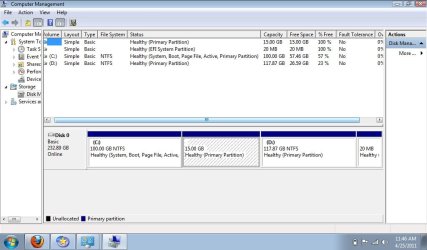
Well you have 58% of your C drive left.
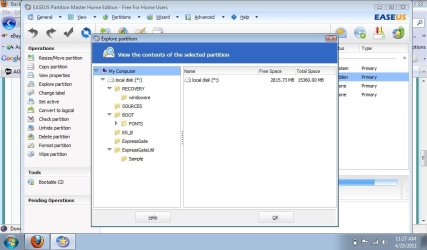
In 2 of your images of the Easeus partition program on the first one the D drive says it has 26+GBs Free in the next image it is down to 16.5GBs. Ok the first image is from 4/24/11 and the next was the day before 4/23/11. So you have been dong some drive cleaning, Good.
You need to do more drive cleaning. I suggest you look at getting a external USB hard drive to store all your non essential data on, IE Folder and files that you don't need on a daily basis.

As far as that middle partition, the 15GB one that has no drive letter. That is a system recovery partition i would suspect. Holding all the files to take your system back to an As Shipped from Factory State, IE to recover the computer to what it was when you first got it with the OS and all included software.
You should be able to make a set of recovery disks, CDs or DVDs. If you do that you can then delete that partition and included it into the D drive.
But before you do that you need to see exactly what is on that partition. You can do that with the Easeus partitioning program like you did with your C drive. If there is a folder called BOOT (which I don't think there will be) with files called BCD and BOOTSTAT.DAT and a few othr files then it is best to leave that partition alone. It may hold the boot files need to start (boot) your computer.
In any event what you really need to do clean out your D drive of all unneeded files and folder. You've made a good start with the 10.5GBs you've already cleaned out. Now to get a little more aggressive.
Then Run Disk Cleanup on both the C and D drives.

If you could post a screen shot of a Windows Explorer window showing all the folders on the D drive it might help in guiding you on what you can get rid of.
Good Luck.

 

My Computer

Computer Manufacturer/Model Number
Built be Me
OS
Windows 7 Pro x64
CPU
i5 760
Motherboard
Asus P7P55D-E Pro
Memory
16GB
Graphics Card(s)
Nvidia GTS450
Sound Card
On board
Monitor(s) Displays
Dell 2007WFP Dell 1800FP
Screen Resolution
1680x1050 1280x1024
Hard Drives
Seagate 250GB & 750GB
WD 1TB
PSU
Antec 750
Case
In Win
Cooling
Cooler Master Hyper 212+
Keyboard
IBM
Mouse
MS
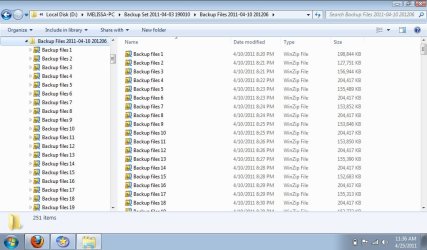
Hi, okay let me start by posting the contents of the D drive, and the Contents of the Hidden drive files
I hope I did this right, I do know that I have videos on here that are MEGA huge.. and also when my computer goes into backup and restore it says backing up shadow copy. disk d.jpg

hidden  Partition folders.jpg
 

My Computer

Computer Manufacturer/Model Number
ASUS Eee PC 1015PED
OS
Windows 7 Starter 32 bit
CPU
Intel Atom Pineview-M N455/N475
Memory
SO-DIMM 1GB DDR3
Graphics Card(s)
Intel GMA 3150 graphics
Sound Card
Hi-Definition Audio CODEC
Monitor(s) Displays
10.1" LED Backlight WSVGA Screen (1024x600)
Hard Drives
250GB SATA Hard Drive (5400RPM) + 500GB Free Web Storage
@SIW2 here is the screen shot of the windows disk managementcomputer management.jpg
 

My Computer

Computer Manufacturer/Model Number
ASUS Eee PC 1015PED
OS
Windows 7 Starter 32 bit
CPU
Intel Atom Pineview-M N455/N475
Memory
SO-DIMM 1GB DDR3
Graphics Card(s)
Intel GMA 3150 graphics
Sound Card
Hi-Definition Audio CODEC
Monitor(s) Displays
10.1" LED Backlight WSVGA Screen (1024x600)
Hard Drives
250GB SATA Hard Drive (5400RPM) + 500GB Free Web Storage
Back
Top