
Solved Back up files vhd question

graphomet

New member
Member
VIP
Local time
11:14 AM
Messages
100
hello forum.

its the 1st time ive ever done a back up in my life,i bought an external hard as i was told to do so.my back up took like 70h or so....and i was freaking out if i did something wrong.
when i had clicked on my hd that contained all my images,programs,music etc etc,it said it was 280GB.
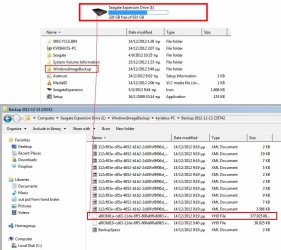
after the backup was completed(thankfully after 70h) i was trying to locate my backed up folders, s!but instead i found a file type: VHD with the size of 377GB!thats like almost 100GB more than the original folders. Now im reading on the internet that,thats where all the folders with my personal stuff is contained. So the question id like to as is,how on earth do i see all my folders as they appear on my other hard drives. Is this an easy task or something has gone wrong?

thank you.
 

Attachments
  • windows-7-forum.jpg
    windows-7-forum.jpg
    77.9 KB · Views: 15
Last edited:

My Computer My Computer

At a glance

windows 7 home premium 64bitAMD Phenom(tm) II X4 955 Processor8.00 GBNVIDIA GeForce GTX 650 Ti
Computer type
PC/Desktop
Computer Manufacturer/Model Number
Custom build
OS
windows 7 home premium 64bit
CPU
AMD Phenom(tm) II X4 955 Processor
Motherboard
ASRock M3A790GXH/128M
Memory
8.00 GB
Graphics Card(s)
NVIDIA GeForce GTX 650 Ti
Sound Card
(1) High Definition Audio Device (2) USB Audio Device (3
Antivirus
Avast Free
Browser
Chrome
In my view this is way too big for a system image. But even then did you say 70 hours to complete??). This is not a viable option. You need to separate your large fairly static data files into another partition. You can backup the data partition in a number of different ways. Your OS and installed programs partition should be able to be imaged in not more than ~1 hour. This way you can do it more frequently and get out of trouble by doing an image restore.

If I understand this question correctly:
"So the question id like to as is,how on earth do i see all my folders as they appear on my other hard drives."
this tutorial may help
http://www.sevenforums.com/tutorials/24771-system-image-extract-files-using-disk-management.html
 

My Computer My Computer

At a glance

Windows 7x64 Home Premium SP1Intel i7 2600kG.Skill Ripjaws (DDR3-1600) 2x4GBNvidia GeForce GTS 450; Intel HD Graphics 300...
Computer type
PC/Desktop
Computer Manufacturer/Model Number
Own build
OS
Windows 7x64 Home Premium SP1
CPU
Intel i7 2600k
Motherboard
ASUS P8Z68 Deluxe
Memory
G.Skill Ripjaws (DDR3-1600) 2x4GB
Graphics Card(s)
Nvidia GeForce GTS 450; Intel HD Graphics 3000(GT2+)
Monitor(s) Displays
Dell Ultrasharp IPS panel U2311H, Samsung SyncMaster P2350
Screen Resolution
1920x1080
Hard Drives
Samsung 850 Pro SSD 256GB, Samsung SSD 840 120GB, Seagates 1TB Barracuda ST31000528AS x2
PSU
Seasonic M12II 520W
Case
Lian Li Lancool PC-K60
Cooling
Case: 1x120mm, 3x140mm CPU: Hyper 212+
Keyboard
Logitech MK520 (wireless)
Mouse
Logitech MK520
Internet Speed
6-7 Mbps
Antivirus
Norton Security Premium, Malwarebytes on 2 (MSE on 3rd PC)
Browser
FireFox
Other Info
Audio: Logitech Z523 2.1
Hello MJF

thanks for the reply. As you may noticed i am a novice of pc and software, i dont have even the bacis knowlege, therefor my great mistakes on how to do things. Yep thats right 70h it took for the backup..

the reason why im doing a backup is because im resulting to a format of the c drive,where all the programs, users,downloads etc etc were stored. my c drive was 280GB in total(just the files and programs i was interested in keeping),all the rest id just delete when the time comes.

what id like to know is,this VHD file containing my files and programs,is it safe to keep in my external hard drive?

the link you sent me,will this take another 70h to uncompress that VHD file?or by following the steps,the folders appear as in a normal hard drive ie: music,images,programs, etc etc?

thank you again.
 

My Computer My Computer

At a glance

windows 7 home premium 64bitAMD Phenom(tm) II X4 955 Processor8.00 GBNVIDIA GeForce GTX 650 Ti
Computer type
PC/Desktop
Computer Manufacturer/Model Number
Custom build
OS
windows 7 home premium 64bit
CPU
AMD Phenom(tm) II X4 955 Processor
Motherboard
ASRock M3A790GXH/128M
Memory
8.00 GB
Graphics Card(s)
NVIDIA GeForce GTX 650 Ti
Sound Card
(1) High Definition Audio Device (2) USB Audio Device (3
Antivirus
Avast Free
Browser
Chrome
oh no!thats why it took 70h and on,i did the attach VHD and when it created a new reference to the hard drive,i clicked onto the folder,and it not only had my documents i wanted to save,it had EVERYTHING on from my c hard drive,i was certain that i checked off the c drive>documents when asked what to back up,but it seems something went wrong,and the backup went and got everything from c hard drive,now that explains the 70h to backup. Am i thinking right here?
 

My Computer My Computer

At a glance

windows 7 home premium 64bitAMD Phenom(tm) II X4 955 Processor8.00 GBNVIDIA GeForce GTX 650 Ti
Computer type
PC/Desktop
Computer Manufacturer/Model Number
Custom build
OS
windows 7 home premium 64bit
CPU
AMD Phenom(tm) II X4 955 Processor
Motherboard
ASRock M3A790GXH/128M
Memory
8.00 GB
Graphics Card(s)
NVIDIA GeForce GTX 650 Ti
Sound Card
(1) High Definition Audio Device (2) USB Audio Device (3
Antivirus
Avast Free
Browser
Chrome

My Computer My Computer

At a glance

Windows 7x64 Home Premium SP1Intel i7 2600kG.Skill Ripjaws (DDR3-1600) 2x4GBNvidia GeForce GTS 450; Intel HD Graphics 300...
Computer type
PC/Desktop
Computer Manufacturer/Model Number
Own build
OS
Windows 7x64 Home Premium SP1
CPU
Intel i7 2600k
Motherboard
ASUS P8Z68 Deluxe
Memory
G.Skill Ripjaws (DDR3-1600) 2x4GB
Graphics Card(s)
Nvidia GeForce GTS 450; Intel HD Graphics 3000(GT2+)
Monitor(s) Displays
Dell Ultrasharp IPS panel U2311H, Samsung SyncMaster P2350
Screen Resolution
1920x1080
Hard Drives
Samsung 850 Pro SSD 256GB, Samsung SSD 840 120GB, Seagates 1TB Barracuda ST31000528AS x2
PSU
Seasonic M12II 520W
Case
Lian Li Lancool PC-K60
Cooling
Case: 1x120mm, 3x140mm CPU: Hyper 212+
Keyboard
Logitech MK520 (wireless)
Mouse
Logitech MK520
Internet Speed
6-7 Mbps
Antivirus
Norton Security Premium, Malwarebytes on 2 (MSE on 3rd PC)
Browser
FireFox
Other Info
Audio: Logitech Z523 2.1
I followed the post on how to attach VHD file,and it managed to create another disc (j) and I saw my folders which I did a backup on. Didn't take long to do so. But what I'd like to ask is,once I turned off the pc and then open up again, that disc (j) was missing. So do I have to do the attach VHD each time to see my backed up files? Is there a way they can be left as folder permanently?

I got another reply from another forum stating:

You did not do a "Backup" - you created a System Image! To do a backup, launch the Control Panel / Backup and Restore. Now look at the items on the right side of the screen.

All i wanted to do is to get my important data like pictures,photos,programs,movies,music etc etc.
should i just have done a copy/paiste from one hard disc to another instead?than going through the trouble of backing up?
 

My Computer My Computer

At a glance

windows 7 home premium 64bitAMD Phenom(tm) II X4 955 Processor8.00 GBNVIDIA GeForce GTX 650 Ti
Computer type
PC/Desktop
Computer Manufacturer/Model Number
Custom build
OS
windows 7 home premium 64bit
CPU
AMD Phenom(tm) II X4 955 Processor
Motherboard
ASRock M3A790GXH/128M
Memory
8.00 GB
Graphics Card(s)
NVIDIA GeForce GTX 650 Ti
Sound Card
(1) High Definition Audio Device (2) USB Audio Device (3
Antivirus
Avast Free
Browser
Chrome
So do I have to do the attach VHD each time to see my backed up files? Is there a way they can be left as folder permanently?
You need to attach each time. Also you should detach the mounted image when done. In Disk Management on the left of the attached drive right click.

For data you can use windows file/folder backup or simple copy and paste but this tutorial is worth a look when dealing with lots of data
http://www.sevenforums.com/tutorials/187346-robocopy-create-backup-script.html
 

My Computer My Computer

At a glance

Windows 7x64 Home Premium SP1Intel i7 2600kG.Skill Ripjaws (DDR3-1600) 2x4GBNvidia GeForce GTS 450; Intel HD Graphics 300...
Computer type
PC/Desktop
Computer Manufacturer/Model Number
Own build
OS
Windows 7x64 Home Premium SP1
CPU
Intel i7 2600k
Motherboard
ASUS P8Z68 Deluxe
Memory
G.Skill Ripjaws (DDR3-1600) 2x4GB
Graphics Card(s)
Nvidia GeForce GTS 450; Intel HD Graphics 3000(GT2+)
Monitor(s) Displays
Dell Ultrasharp IPS panel U2311H, Samsung SyncMaster P2350
Screen Resolution
1920x1080
Hard Drives
Samsung 850 Pro SSD 256GB, Samsung SSD 840 120GB, Seagates 1TB Barracuda ST31000528AS x2
PSU
Seasonic M12II 520W
Case
Lian Li Lancool PC-K60
Cooling
Case: 1x120mm, 3x140mm CPU: Hyper 212+
Keyboard
Logitech MK520 (wireless)
Mouse
Logitech MK520
Internet Speed
6-7 Mbps
Antivirus
Norton Security Premium, Malwarebytes on 2 (MSE on 3rd PC)
Browser
FireFox
Other Info
Audio: Logitech Z523 2.1
Thanks MJF, you have been a great help.

Cheers.
 

My Computer My Computer

At a glance

windows 7 home premium 64bitAMD Phenom(tm) II X4 955 Processor8.00 GBNVIDIA GeForce GTX 650 Ti
Computer type
PC/Desktop
Computer Manufacturer/Model Number
Custom build
OS
windows 7 home premium 64bit
CPU
AMD Phenom(tm) II X4 955 Processor
Motherboard
ASRock M3A790GXH/128M
Memory
8.00 GB
Graphics Card(s)
NVIDIA GeForce GTX 650 Ti
Sound Card
(1) High Definition Audio Device (2) USB Audio Device (3
Antivirus
Avast Free
Browser
Chrome
Back
Top