backed up 7 drivers

firmin

New member
Local time
3:33 PM
Messages
11
i installed 7 on a partition on my drive and am ready to do a clean install and put vista in my past. however due to problems in locating my drivers i backed up my current drivers. i am just wondering if i can use my back ups of my drivers o perform a clean install. i really need help and i know this might not be the place but please im tired of vista!
 

My Computer

Computer Manufacturer/Model Number
gateway dx4720-03
OS
windows 7 32 bit and windows vista 64 bit
Hi firmin,

Not sure what you meam by backup drivers, but no, you'll need to find drivers specific to Windows 7.
 

My Computer

Computer type
PC/Desktop
Computer Manufacturer/Model Number
Custom built by me.
OS
Windows 10 Pro
CPU
Intel Core i7-4770K (3.5Ghz)
Motherboard
Gigabyte G1 Sniper 5 (F10 Bios)
Memory
32 gig Corsair Dominator Platinum (4x8Gig)
Graphics Card(s)
Sapphire Tri-X R9 Fury
Sound Card
Soundblaster ZXR
Monitor(s) Displays
NEC PA242W 24" LCD Monitor
Screen Resolution
1920 x 1200
Hard Drives
Primary - Samsung 850 Pro (512gig), Samsung 840 Pro (256gig), 2TB WD Caviar Black.
PSU
EVGA Supernova 1000 G2
Case
Cooler Master HAF X
Cooling
Corsair H100i with Corsair Air Series SP120 Quiet Fans
Keyboard
Logitech Wireless Wave
Mouse
Logitech Performance MX
Internet Speed
High Speed Cable
Antivirus
Norton Security
Browser
IE11
Other Info
Memory Timings - 1866MHz @ 9-9-9-27-1T @ 1.5 volts
Hello Firmin, and welcome to Seven Forums.

I'm not sure how you backed up your drivers, but normally you will need to reinstall them instead. :(

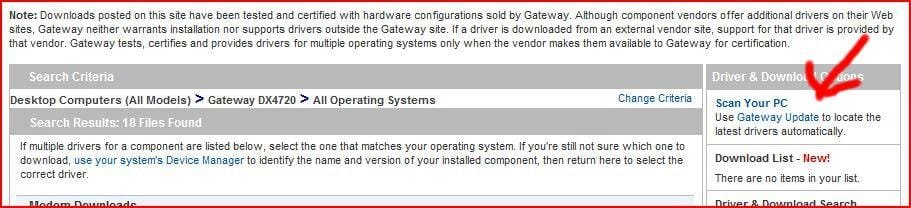
I found this link at Gateway that may help.

Gateway Support Drivers & Downloads

Hope this helps,
Shawn
 

My Computer

Computer type
PC/Desktop
Computer Manufacturer/Model Number
Self built custom
OS
64-bit Windows 11 Pro for Workstations
CPU
Intel i7-8700K OC'd to 5 GHz
Motherboard
ASUS ROG Maximus XI Formula Z390
Memory
64 GB (4x16GB) G.SKILL TridentZ RGB DDR4 3600 MHz
Graphics Card(s)
ASUS ROG-STRIX-GTX1080TI-O11G-GAMING
Sound Card
Integrated
Monitor(s) Displays
2 x Samsung Odyssey G7 27"
Screen Resolution
2560x1440
Hard Drives
1TB Samsung 990 PRO M.2,
4TB Samsung 990 PRO PRO M.2,
TerraMaster F8 SSD Plus NAS
PSU
Seasonic Prime Titanium 850W
Case
Thermaltake Core P3
Cooling
Corsair Hydro H115i
Keyboard
Logitech wireless K800
Mouse
Logitech MX Master 4
Internet Speed
2 Gb/s Download and 100 Mb/s Upload
Antivirus
Malwarebyte Anti-Malware Premium
Browser
Google Chrome
Other Info
Logitech Z625 speaker system,
Logitech BRIO 4K Pro webcam,
HP Color LaserJet Pro MFP M477fdn,
APC SMART-UPS RT 1000 XL - SURT1000XLI,
Galaxy S23 Plus phone
Windows 7 will have most if not all of the drivers that you will need, however, in the event that some are missed, you can use the vista drivers ... just use vista compatibility mode...
 

My Computer

Computer type
PC/Desktop
Computer Manufacturer/Model Number
LENOVO K450 @3.0GHZ
OS
64-bit Windows 8.1 Pro
CPU
Core(TM) i5 CPU 4330 Haswell @ 3.20GHz
Motherboard
LENOVO
Memory
12.00 GB
Graphics Card(s)
Intel(R) HD Graphics
Sound Card
Intel HD integtrated
Monitor(s) Displays
HP 25' ISP Monitor
Screen Resolution
1900/1020
Hard Drives
(1) ST1000DM003-1CH162 (2) Generic STORAGE DEVICE USB Device (3) Generic STORAGE DEVICE USB Device
Internet Speed
100mb down/10mb up
@tews you mean it installs its own drivers from a clean install? and i used a program to back up the drivers i have on my pc currently, and i am running 7 ultimate and brink i tried that already having so many issues.
 

My Computer

Computer Manufacturer/Model Number
gateway dx4720-03
OS
windows 7 32 bit and windows vista 64 bit
Again, you will need to install Windows 7 drivers for your components, as Brink is right when he says you will need to "reinstall" drivers.

In short simply copying drivers from one OS to a completely different one won't work!

When Tews says Windows will have most of the drivers, he's talking generic, and these WILL NOT include the sound, video, and other drivers needed for full functionality of the components. Again, you will have to find the specific drivers needed for these components to work under Windows 7

Sorry.
 

My Computer

Computer type
PC/Desktop
Computer Manufacturer/Model Number
Custom built by me.
OS
Windows 10 Pro
CPU
Intel Core i7-4770K (3.5Ghz)
Motherboard
Gigabyte G1 Sniper 5 (F10 Bios)
Memory
32 gig Corsair Dominator Platinum (4x8Gig)
Graphics Card(s)
Sapphire Tri-X R9 Fury
Sound Card
Soundblaster ZXR
Monitor(s) Displays
NEC PA242W 24" LCD Monitor
Screen Resolution
1920 x 1200
Hard Drives
Primary - Samsung 850 Pro (512gig), Samsung 840 Pro (256gig), 2TB WD Caviar Black.
PSU
EVGA Supernova 1000 G2
Case
Cooler Master HAF X
Cooling
Corsair H100i with Corsair Air Series SP120 Quiet Fans
Keyboard
Logitech Wireless Wave
Mouse
Logitech Performance MX
Internet Speed
High Speed Cable
Antivirus
Norton Security
Browser
IE11
Other Info
Memory Timings - 1866MHz @ 9-9-9-27-1T @ 1.5 volts
Hello Firmin, and welcome to Seven Forums.

I'm not sure how you backed up your drivers, but normally you will need to reinstall them instead. :(

I found this link at Gateway that may help.

Gateway Support Drivers & Downloads

Hope this helps,
Shawn

Go to Shawn's link, & use the UpDate link.
 

Attachments

  • Capture.JPG
    Capture.JPG
    45.8 KB · Views: 11

My Computer

OS
ME/XP/Vista/Win7
thanks to all.....

just one more thing i am running 7 on a partition and these are the drivers i backed up. i just need to have one OS! but thanks again to all i guess i should start getting drivers
 

My Computer

Computer Manufacturer/Model Number
gateway dx4720-03
OS
windows 7 32 bit and windows vista 64 bit
thanks to all.....

just one more thing i am running 7 on a partition and these are the drivers i backed up. i just need to have one OS! but thanks again to all i guess i should start getting drivers

Use the drivers guide in my sig.
 

My Computer

Computer Manufacturer/Model Number
Sony Vaio Z46GDU
OS
Windows 7 Ultimate x86-64
CPU
[email protected] 1066MHz FSB
Motherboard
Sony branded
Memory
6GB DDR3 1066MHz
Graphics Card(s)
9300M GS 256MB Dedicated (Speed) + Intel4500MHD (Stamina)
Sound Card
Realtek HD Audio
Monitor(s) Displays
13.1' WXGA
Screen Resolution
1600x900
Hard Drives
320GB 7200RPM w/ 16MB cache
Internet Speed
1MB/s
Back
Top