Solved Background locked to solid color

qmann28

New member
Local time
12:00 PM
Messages
2
Hi everyone,

I was messing around with my background one day trying to find some pictures for my slideshow. I don't remember exactly what happened, but now I'm stuck on the solid color background. I can choose what color it's set as, but that's all. If I go into one of my or one of the default picture folders, the pictures all appear there looking perfectly fine and I can select them, but my background doesn't change. Anybody have a fix for this?

Also, I'm a computer newb so please make any help as simple as possible.
 

My Computer

OS
Windows 7 Ultimate

My Computer

Computer Manufacturer/Model Number
Custom
OS
Windows 7 Professional x64
CPU
Intel i7 2600K OC'd @ 4620 MHz
Motherboard
Asus P8Z68-V Pro
Memory
16GB GSkill Sniper 2133 Mhz (4x4GB)
Graphics Card(s)
EVGA GeForce GTX 480 SuperClocked+
Sound Card
Realtek High Definition Audio
Monitor(s) Displays
2x Acer S273HLbmii 27"
Screen Resolution
2 x 1920x1080
Hard Drives
64GB Crucial M4 SSD

Storage: Hitachi 1TB 5400RPM, Samsung 1.5TB 5400RPM
PSU
Corsair HW Series 750w (modular)
Case
Cooler Master HAF 932 Advanced Blue Edition
Cooling
CM Hyper 212+ CPU cooler, 3x 230mm + 1x 140mm case fans
Keyboard
Logitech MK320 (wireless)
Mouse
Logitech MK320 (wireless)
Internet Speed
30 Mb/s : 2 Mb/s
Last edited:

My Computer

Computer type
PC/Desktop
Computer Manufacturer/Model Number
Self built custom
OS
64-bit Windows 11 Pro for Workstations
CPU
Intel i7-8700K OC'd to 5 GHz
Motherboard
ASUS ROG Maximus XI Formula Z390
Memory
64 GB (4x16GB) G.SKILL TridentZ RGB DDR4 3600 MHz
Graphics Card(s)
ASUS ROG-STRIX-GTX1080TI-O11G-GAMING
Sound Card
Integrated
Monitor(s) Displays
2 x Samsung Odyssey G7 27"
Screen Resolution
2560x1440
Hard Drives
1TB Samsung 990 PRO M.2,
4TB Samsung 990 PRO PRO M.2,
TerraMaster F8 SSD Plus NAS
PSU
Seasonic Prime Titanium 850W
Case
Thermaltake Core P3
Cooling
Corsair Hydro H115i
Keyboard
Logitech wireless K800
Mouse
Logitech MX Master 4
Internet Speed
2 Gb/s Download and 100 Mb/s Upload
Antivirus
Malwarebyte Anti-Malware Premium
Browser
Google Chrome
Other Info
Logitech Z625 speaker system,
Logitech BRIO 4K Pro webcam,
HP Color LaserJet Pro MFP M477fdn,
APC SMART-UPS RT 1000 XL - SURT1000XLI,
Galaxy S23 Plus phone
Unfortunately, I already had permission to change the background and "Remove Background Images" unchecked.
 

My Computer

OS
Windows 7 Ultimate
You can try a system restore using a restore point dated before this problem to see if it can fix it for you.
 

My Computer

Computer type
PC/Desktop
Computer Manufacturer/Model Number
Self built custom
OS
64-bit Windows 11 Pro for Workstations
CPU
Intel i7-8700K OC'd to 5 GHz
Motherboard
ASUS ROG Maximus XI Formula Z390
Memory
64 GB (4x16GB) G.SKILL TridentZ RGB DDR4 3600 MHz
Graphics Card(s)
ASUS ROG-STRIX-GTX1080TI-O11G-GAMING
Sound Card
Integrated
Monitor(s) Displays
2 x Samsung Odyssey G7 27"
Screen Resolution
2560x1440
Hard Drives
1TB Samsung 990 PRO M.2,
4TB Samsung 990 PRO PRO M.2,
TerraMaster F8 SSD Plus NAS
PSU
Seasonic Prime Titanium 850W
Case
Thermaltake Core P3
Cooling
Corsair Hydro H115i
Keyboard
Logitech wireless K800
Mouse
Logitech MX Master 4
Internet Speed
2 Gb/s Download and 100 Mb/s Upload
Antivirus
Malwarebyte Anti-Malware Premium
Browser
Google Chrome
Other Info
Logitech Z625 speaker system,
Logitech BRIO 4K Pro webcam,
HP Color LaserJet Pro MFP M477fdn,
APC SMART-UPS RT 1000 XL - SURT1000XLI,
Galaxy S23 Plus phone
Sorry for dredging up an old thread but this was one of the top google results for me trying to solve this problem today...

Anyway there is a completely different solution for people who have been experiencing this in 2011. If you installed the Bing RSS feed theme then after the servers were shut down in feb 2011 you will be unable to change your desktop background despite applying those changes in the personalization menu. The solution is posted here Desktop stuck on solid colours - Win 7 Pro - Microsoft Answers and involves deleting a file from your themes folder...

"Copy and paste this into the search box at the bottom of your Start menu, then hit enter:
%USERPROFILE%\AppData\Roaming\Microsoft\Windows\Themes\
In the window that opens, delete the TranscodedWallpaper file, then try to set a wallpaper normally again."
 

My Computer

OS
Windows 7 Ultimate 32bit
This has happened to me on occasion, and although I've never figured out the cause, the fix has been relatively simple. This may not solve your problem, but it did fix my problem, so it's worth a try. . . just go into whichever folder you use to store your background images and double-click one. Voila! That image should immediately appear as the background on your desktop.
 

My Computer

Computer Manufacturer/Model Number
HP Pavillion dv5t (generation 1)
OS
Vista 64 bit and 32 bit (SP2)
CPU
Intel(R) Core(TM)2 Duo Processor T9400 (2.53 GHz
Memory
4GB DDR2 System Memory (2 Dimm)
Graphics Card(s)
512 MB NVIDIA GeForce 9600M GT
Monitor(s) Displays
15.4" diagonal WSXGA+ High-Definition HP BrightView Widescre
Screen Resolution
1680 x 1050
Hard Drives
320GB 5400RPM SATA Hard Drive with HP ProtectSmart Hard Drive Protection
Keyboard
Built-in HP
Mouse
Built in - Synaptics TouchPad V6.5 on PS/2 Port
Internet Speed
Max
Other Info
~ Intel Next-Gen Wireless-N Mini-card w/Bluetooth ~ Blu-Ray ROM DVD+/-R/RW ~ Integ. HDTV Hybrid Tuner ~ 12 Cell Battery ~ MS Office (Home Premium) 2007 ~
Sorry for dredging up an old thread but this was one of the top google results for me trying to solve this problem today...

Anyway there is a completely different solution for people who have been experiencing this in 2011. If you installed the Bing RSS feed theme then after the servers were shut down in feb 2011 you will be unable to change your desktop background despite applying those changes in the personalization menu. The solution is posted here Desktop stuck on solid colours - Win 7 Pro - Microsoft Answers and involves deleting a file from your themes folder...

"Copy and paste this into the search box at the bottom of your Start menu, then hit enter:
%USERPROFILE%\AppData\Roaming\Microsoft\Windows\Themes\
In the window that opens, delete the TranscodedWallpaper file, then try to set a wallpaper normally again."

I, too, apologize for bumping such an old thread. I'd spent a sizable chunk of my day on the internet, trying to figure out why only solid colors were being displayed on my desktop. The problem reared its head out of seemingly nowhere two weeks ago and it'd been wearing at my nerves until I just couldn't take it any more. This post was the perfect solution for my situation. Thank you!

:thumbsup:
 

My Computer

Computer Manufacturer/Model Number
HP Pavilion dv6
OS
Windows 7 Home Premium x64
CPU
Intel Core 2 Duo P7550 @ 2.26GHz
Graphics Card(s)
1GB ATI Mobility Radeon HD 4650
Screen Resolution
1366x768
Hello Qmann, and welcome to Seven Forums.

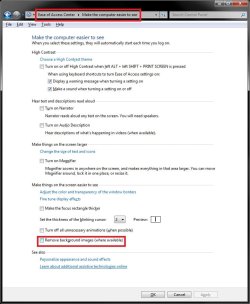
In addition, double check to make sure that this option below in the Ease of Access Center is unchecked as well. If checked, you will only have a solid color background as well.

http://www.sevenforums.com/tutorials/67200-remove-background-images-where-available.html

View attachment 57139

Hope this helps,
Shawn

I realize that this comment was posted over three years ago, but I just wanted to say THANK YOU because after literally an entire night of Googling, mucking around in the registry, countless restarts, and so on, THIS finally worked for me. THANK YOU, BRINK.
 

My Computer

Computer type
Laptop
Computer Manufacturer/Model Number
HP Mini 110-3030NR
OS
Windows 7 Starter Edition
CPU
Intel Atom N450 @1.66 GHz
Motherboard
Unknown
Memory
2GB DDR2 667 MHz PC2-5300 SO-DIMM (PNY OPTIMA)
Graphics Card(s)
Intel Graphics Media Accelerator (GMA) 3150
Hard Drives
160 GB (133 actual) @5400 RPM
Antivirus
Microsoft Security Essentials (32-bit version)
Browser
Google Chrome v.27.0.1453.116 m
neither of these worked for me :cry:
 

My Computer

Computer type
PC/Desktop
Computer Manufacturer/Model Number
Gigabyte
OS
Windows 10 Pro x64
CPU
i5 3330
Motherboard
Gigabyte GA-B75M-D3H
Memory
8GB
Graphics Card(s)
R9 280X
Hello Prizefighter, and welcome to Seven Forums. :)

Just to verify, is your Windows 7 currently activated?

If it's not and past the expiration period, then you would see a black desktop background.
 

My Computer

Computer type
PC/Desktop
Computer Manufacturer/Model Number
Self built custom
OS
64-bit Windows 11 Pro for Workstations
CPU
Intel i7-8700K OC'd to 5 GHz
Motherboard
ASUS ROG Maximus XI Formula Z390
Memory
64 GB (4x16GB) G.SKILL TridentZ RGB DDR4 3600 MHz
Graphics Card(s)
ASUS ROG-STRIX-GTX1080TI-O11G-GAMING
Sound Card
Integrated
Monitor(s) Displays
2 x Samsung Odyssey G7 27"
Screen Resolution
2560x1440
Hard Drives
1TB Samsung 990 PRO M.2,
4TB Samsung 990 PRO PRO M.2,
TerraMaster F8 SSD Plus NAS
PSU
Seasonic Prime Titanium 850W
Case
Thermaltake Core P3
Cooling
Corsair Hydro H115i
Keyboard
Logitech wireless K800
Mouse
Logitech MX Master 4
Internet Speed
2 Gb/s Download and 100 Mb/s Upload
Antivirus
Malwarebyte Anti-Malware Premium
Browser
Google Chrome
Other Info
Logitech Z625 speaker system,
Logitech BRIO 4K Pro webcam,
HP Color LaserJet Pro MFP M477fdn,
APC SMART-UPS RT 1000 XL - SURT1000XLI,
Galaxy S23 Plus phone
Back
Top