
- Local time
- 9:27 AM
- Messages
- 182
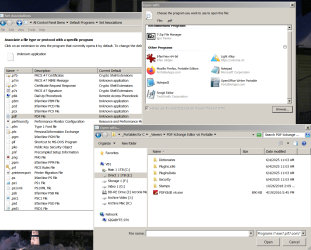
Yes, I know how to do it (all 3 methods) but when I point to the programs .exe it doesn't 'stick' in the dialog box. I've done it multiple times, same thing. It's like I never pointed W7's O/S to anything. This just stared a few days ago. No real idea what caused it. Specifically it is .pdf files, but document files were affected also, but for some reason I was able to re-assign that file type.
To make matters worse, I even went to the hassle to restore a image of the O/S I made almost 3 months ago and the same same thing!!
In fact, it was more than one type of file, but .pdf is the major issue.
When I choose the program, the pop-up box with all the other 'assigned' programs shows, but the one I tried to add doesn't get added to the list.
It's PDF Exchange (that I have used for years) is the specific program, but again, it's ALWAYS worked with NO issue. This image and what was the former current active version.
Again, any way I do this it fails. Then and now.
- - - Updated - - -
One more detail, I also lost the default programs for .txt (I use Notrebook2) and .odt (Open Office documents & Spreadsheets), but I was able to restore those.
All of this happened apparently one time again, in both W7 installations.
- - - Updated - - -
This will help; after I click on the .exe, nothing happens, no error messages etc. nothing saved.
- - - Updated - - -
- - - Updated - - -
What I did just tried, I have a 2nd W7 Pro O/S as a backup (I've run a 2ndbackup drive for some time now, just in case).
I went to that drive (I'm using it now) and tried the same test. At the time nothing was assigned in that drive for .pdf files, I went thru the process and presto, it worked as it should. No errors or non reaction.
And this is using the exact same program, portable in the exact same backup partition that my main drive (O/S uses, the ONLY difference it's another W7 Pro x64 install.
I find it hard to believe I never opened a .pdf file in my main O/S in 3 months, so it may look like the problem was actually from 3 months ago based on the fact the backup image has the same problem.
- - - Updated - - -
500+ views and no response??
But the following worked; Default Programs Editor
Default Programs Editor
To make matters worse, I even went to the hassle to restore a image of the O/S I made almost 3 months ago and the same same thing!!
In fact, it was more than one type of file, but .pdf is the major issue.
When I choose the program, the pop-up box with all the other 'assigned' programs shows, but the one I tried to add doesn't get added to the list.
It's PDF Exchange (that I have used for years) is the specific program, but again, it's ALWAYS worked with NO issue. This image and what was the former current active version.
Again, any way I do this it fails. Then and now.
- - - Updated - - -
One more detail, I also lost the default programs for .txt (I use Notrebook2) and .odt (Open Office documents & Spreadsheets), but I was able to restore those.
All of this happened apparently one time again, in both W7 installations.
- - - Updated - - -
This will help; after I click on the .exe, nothing happens, no error messages etc. nothing saved.
- - - Updated - - -
- - - Updated - - -
What I did just tried, I have a 2nd W7 Pro O/S as a backup (I've run a 2ndbackup drive for some time now, just in case).
I went to that drive (I'm using it now) and tried the same test. At the time nothing was assigned in that drive for .pdf files, I went thru the process and presto, it worked as it should. No errors or non reaction.
And this is using the exact same program, portable in the exact same backup partition that my main drive (O/S uses, the ONLY difference it's another W7 Pro x64 install.
I find it hard to believe I never opened a .pdf file in my main O/S in 3 months, so it may look like the problem was actually from 3 months ago based on the fact the backup image has the same problem.
- - - Updated - - -
500+ views and no response??
But the following worked; Default Programs Editor
Default Programs Editor
Attachments
My Computers
-
At a glance
Win7 x64AMD- Computer type
- Laptop
- Computer Manufacturer/Model Number
- Toshiba
- OS
- Win7 x64
- CPU
- AMD
-
At a glance
Win 7 Pro x64AMD FX-835016GBnVidia GeForce 1060- Computer type
- PC/Desktop
- System Manufacturer/Model Number
- AMD based MB
- OS
- Win 7 Pro x64
- CPU
- AMD FX-8350
- Motherboard
- Gigabyte GA-970A-D3P
- Memory
- 16GB
- Graphics Card(s)
- nVidia GeForce 1060
- Monitor(s) Displays
- 25"
- Screen Resolution
- 1920x1200
- Hard Drives
- two SSD;
two 4TB HDD
- PSU
- 700watt Seasonic
- Internet Speed
- 300MB up & down
- Browser
- Firefox
- Other Info
- BD Recorder


