background picture disappeared

Smokin

New member
Local time
1:03 AM
Messages
5
Hi there.. I haven't found a solution, or even been able to find my problem..

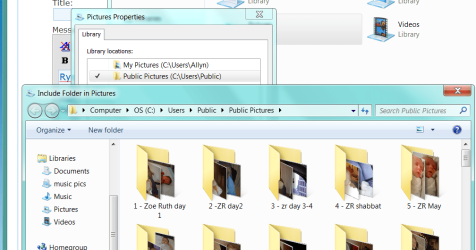
I have my desktop background set to my Picture Library. That library points to My Pictures and the My Pictures folder for the Public user. I have verified that. A few weeks ago (maybe a month, I can't remember exactly when), the slideshow started only using one folder. I went to verify everything and it's set up properly. When I get to Control Panel\Appearance and Personalization\Personalization\Desktop Background, and select Pictures Library, it is only pulling in photos from one folder, and only bringing in 17 pictures of the 141 in that folder. I have tried doing a system restore to the oldest restore point I had (about 2 1/2 weeks ago) and that didn't do anything. If I select a individual folder, I get all the photos in that folder - adding to my confusion.

Does anyone have any idea what might be happening?

I am running Win 7 Home Premium 64 bit.

Thank you for your help.
 

My Computer

OS
Win 7 Home Premium 64 bit
Hi there.. I haven't found a solution, or even been able to find my problem..

I have my desktop background set to my Picture Library. That library points to My Pictures and the My Pictures folder for the Public user. I have verified that. A few weeks ago (maybe a month, I can't remember exactly when), the slideshow started only using one folder. I went to verify everything and it's set up properly. When I get to Control Panel\Appearance and Personalization\Personalization\Desktop Background, and select Pictures Library, it is only pulling in photos from one folder, and only bringing in 17 pictures of the 141 in that folder. I have tried doing a system restore to the oldest restore point I had (about 2 1/2 weeks ago) and that didn't do anything. If I select a individual folder, I get all the photos in that folder - adding to my confusion.

Does anyone have any idea what might be happening?

I am running Win 7 Home Premium 64 bit.

Thank you for your help.

You might want to pull the photos out and rebuild the folder structure then drag and drop them back
 

My Computer

Computer Manufacturer/Model Number
HP Pavillion dv-7 1005 Tx
OS
Win 8 Release candidate 8400
CPU
[email protected]
Memory
4 gigs
Graphics Card(s)
Nvidia 9600M
Sound Card
HD built-in
Monitor(s) Displays
17" Wxga
Screen Resolution
1440x900
Cooling
none
Internet Speed
45Mb down 5Mb up
Unfortunately that didn't work.
 

My Computer

OS
Win 7 Home Premium 64 bit

My Computer

Computer Manufacturer/Model Number
built up
OS
windows 7
CPU
Phenom II AMD Dragon 3.5Ghz
Memory
DDR3 4GB
Graphics Card(s)
ATI Radeon 512Mb
Monitor(s) Displays
HP L1506
Screen Resolution
1152 x 864
Hard Drives
WDC 1 TB SATA-II Green Power
Keyboard
HP wireless keyboard
Mouse
HP Optic
Internet Speed
1GB
Ryo,
Thanks for the info.. However, the problem is that when I select Picture library, nothing shows up. If this worked, you should see it below. However, the library itself has all the pictures in it, second image.
 

Attachments

  • Untitled.png
    Untitled.png
    52.8 KB · Views: 9
  • Untitled2.png
    Untitled2.png
    62.6 KB · Views: 5

My Computer

OS
Win 7 Home Premium 64 bit
try SFC /SCANNOW from cmd prompt.
 

My Computer

Computer Manufacturer/Model Number
built up
OS
windows 7
CPU
Phenom II AMD Dragon 3.5Ghz
Memory
DDR3 4GB
Graphics Card(s)
ATI Radeon 512Mb
Monitor(s) Displays
HP L1506
Screen Resolution
1152 x 864
Hard Drives
WDC 1 TB SATA-II Green Power
Keyboard
HP wireless keyboard
Mouse
HP Optic
Internet Speed
1GB
report

I ran that, and while it told me there were some errors, it couldn't fix them all. I got a log file (CBS.log), but I can't make heads or tails of it.
 

My Computer

OS
Win 7 Home Premium 64 bit

My Computer

Computer Manufacturer/Model Number
built up
OS
windows 7
CPU
Phenom II AMD Dragon 3.5Ghz
Memory
DDR3 4GB
Graphics Card(s)
ATI Radeon 512Mb
Monitor(s) Displays
HP L1506
Screen Resolution
1152 x 864
Hard Drives
WDC 1 TB SATA-II Green Power
Keyboard
HP wireless keyboard
Mouse
HP Optic
Internet Speed
1GB
found the file

the file that has a problem is tcpmon.ini - which apparently has to do with printing. Not sure if this will actually fix the problem. I was able to get another copy, but Windows won't let me overwrite it - says I need to be an admin, which I am. I tried running Explorer as an admin, with the same problem, and I tried doing a direct copy by running a command window as admin.. still no luck.
 

My Computer

OS
Win 7 Home Premium 64 bit

My Computer

Computer Manufacturer/Model Number
built up
OS
windows 7
CPU
Phenom II AMD Dragon 3.5Ghz
Memory
DDR3 4GB
Graphics Card(s)
ATI Radeon 512Mb
Monitor(s) Displays
HP L1506
Screen Resolution
1152 x 864
Hard Drives
WDC 1 TB SATA-II Green Power
Keyboard
HP wireless keyboard
Mouse
HP Optic
Internet Speed
1GB
I had a similar problem which turned out to be caused by Windows Indexing being turned off.
 

My Computer

Computer Manufacturer/Model Number
Acer Aspire TimelineX4820TG
OS
64 bit Windows 7 Home Premium
CPU
i5 CPU [email protected] GHz 2.40Ghz
Memory
4.oo Gb
Graphics Card(s)
1GB ATI Mobility Radeon 5650
Hard Drives
500 GB
Picture Location sure seems buggy.

borisse's fix didn't work for me but got me thinking about looking at possible related registry entries which led to a workaround.
 

My Computer

Computer Manufacturer/Model Number
Self-built rig
OS
Win7 Pro x64
CPU
Koa i5-2550K
Memory
8 GB
Graphics Card(s)
Sapphire ATI 6870 1GB GDDR5
Sound Card
RealTek HD Audio / ATI HDMI Audio
Monitor(s) Displays
Samsung HDTV Monitor T23A350
Screen Resolution
1920 x 1080
Hard Drives
- SSD (C:)
- HDD (D:)
- BD-ROM (E:)
Keyboard
Logitech G110
Internet Speed
Unifi home (5mbps)
Back
Top