Backing up EVERYTHING

geezawolf

New member
Local time
12:49 AM
Messages
7
Hi

I've bought an external hard drive and I'm wondering if there's any way of backing up everything on my hard drive? By everything I mean all of the programmes that are installed as well. If something went wrong with the laptop or it was stolen etc, I'd be able to drag everything off the external hard drive back over to a machine again.

If there is a way of doing this, can I then do it once a month or so, so that it would just update what has been changed rather than doing the whole thing again?

(Sorry, I'm not too clever on these things as you can probably guess).

Thanks for looking.
 

My Computer

OS
Windows 7 Home Premium 64
Hi geezawolf, welcome to the forums :)

Have a look at This tutorial from Brink. It should answer your question.

Hope it helps :)


OS
 

My Computer

Computer Manufacturer/Model Number
Compaq Desktop
OS
Windows 7 Ultimate x64
CPU
AMD Sempron Dual Core
Memory
3GB
Graphics Card(s)
NVIDIA GeForce 6150SE nForce 430
Screen Resolution
1024x768
Hard Drives
150GB Sata
Hello geezawolf, welcome to Seven Forums!


Most agree that Macrium is a lot more dependable than the Windows backup utility, have a look at this tutorial at the link below.


Imaging with free Macrium
 

My Computer

Computer Manufacturer/Model Number
* BFK Customs *
OS
W 7 64-bit Ultimate
CPU
Intel Q9550 Yorkfield
Motherboard
ASUS P5Q Pro
Memory
8GB Dominator 8500C5D
Graphics Card(s)
ATI : XFX 5870
Sound Card
Realtek HD Audio 7-1
Monitor(s) Displays
1x 47" LCD HDMI & 3x 26" LCD HDMI
Screen Resolution
1920x1080P & 1920x1200
Hard Drives
1x 80GB Intel X25-M G2 SSD : 1x 500GB & 1x 640GB WD Caviar Black(s)
PSU
Corsair 620HX
Case
Cooler Master RC-690
Cooling
Tuniq Tower 120, 2x 140mm and 3x 120mm case fans
Keyboard
Microsoft 500
Mouse
Razer Diamondback 3G
Internet Speed
14 Mb/s
Other Info
1x Koutech 3Gb/s SATA HDD Hot Swap Rack
I did both the Macrium and the Win7.
I already ran into a glitch with the Win7 System Image. I probably caused the mess up being new to Win7.
So this time I have both with the Macrium Boot CD along with the Win7 repair disk.:D

With 640GB of internal storage why not.

Mike
 

My Computer

Computer Manufacturer/Model Number
Hopalong/ Godzilla
OS
Windows7 Pro 64bit SP-1; Windows XP Pro 32bit
CPU
Intel Core i7-870 Lynnfield 2.93GHz LGA 1156 95W Quad-Core
Motherboard
ASUS P7P55D-E PRO
Memory
8GB@1400MHz Crucial Ballistix DDR3-1600 4x2GB
Graphics Card(s)
ASUS ENGTX460 DirectCU/2DI/1GD5 1GB 256-bit GDDR5
Sound Card
VIA Onboard
Monitor(s) Displays
Asus VS248H-P 24"; Samsung SyncMaster 941BW 19"ws
Screen Resolution
1920x1080; 1440x900
Hard Drives
Samsung 830 120GB SSD
Intel 320 120GB SSD
Western Digital Caviar Black WD7501AALS 750GB 7200 RPM SATA 3.0Gb/s
Western Digital Caviar Black WD6401AALS 640GB 7200 RPM SATA 3.0Gb/s
PSU
COOLER MASTER Silent Pro RS850-AMBAJ3-US 850W Modular
Case
COOLER MASTER HAF 932 RC-932-KKN5-GP Black
Cooling
Scythe "Mugen-2 Rev.B" (2 ScytheKaze-Jyuni PWM fans)
Keyboard
Logitech K-320
Mouse
Kensington
Antivirus
Avast Inernet Suite
Browser
IE 9 ; Chrome
Imaging and cloning

OK, I've found lots of articles on this topic, but they are all full of jargon. I need this explaining in lamens terms. What's the difference between the 2? I'll give you a clue to the sort of information I want:

If my laptop were to need reformatting or got stolen, I'd like to be able to plug in my external hard drive and restore all my programmes, files, settings etc. I basically want to be able to get up and running again asap. Which is the best option for me?

Thanks for looking.

C (Running Windows 7)
 

My Computer

OS
Windows 7 Home Premium 64

My Computer

Computer Manufacturer/Model Number
* BFK Customs *
OS
W 7 64-bit Ultimate
CPU
Intel Q9550 Yorkfield
Motherboard
ASUS P5Q Pro
Memory
8GB Dominator 8500C5D
Graphics Card(s)
ATI : XFX 5870
Sound Card
Realtek HD Audio 7-1
Monitor(s) Displays
1x 47" LCD HDMI & 3x 26" LCD HDMI
Screen Resolution
1920x1080P & 1920x1200
Hard Drives
1x 80GB Intel X25-M G2 SSD : 1x 500GB & 1x 640GB WD Caviar Black(s)
PSU
Corsair 620HX
Case
Cooler Master RC-690
Cooling
Tuniq Tower 120, 2x 140mm and 3x 120mm case fans
Keyboard
Microsoft 500
Mouse
Razer Diamondback 3G
Internet Speed
14 Mb/s
Other Info
1x Koutech 3Gb/s SATA HDD Hot Swap Rack
Thanks, but I'm still not getting the information I want. What I'd like is some info (i.e. based on the scenario I gave) and reasons why one would be better than the other. I can't seem to get a clear answer on the differences and am starting to wonder if all the long winded answers are a smokescreen because actually no one actually knows!!!
 

My Computer

OS
Windows 7 Home Premium 64
The differences between the Imaging Programs?

Basically, features. But theres also other things such as how well the compress the Image.


For example, Lets say all your DATA is on 1 single Hard drive, and you have your images on a external, or even a secondary Internal.

If you were to accidently delete something, (lets say the entire My Pictures folder) you may be required to completely restore the entire Image to get them back.
I think this is how Win7s will behave. (Please correct me if wrong)


Others, that offer more features and are more flexible will allow you to browse the contents of the Image, and restore selective files or folders. In this case the entire Pictures folder, or just a Image.

Im not that familiar with macrium so Im unsure if it allows this.

Some are only capable of Imaging partitions, others can do, not only partitions, but the entire disc (including the reserved 100MB partition) and restore it all in 1 go including the disk signature.

Additionally, some may offer other features such as Incremental, Differential backups, Automatic Scheduling.

Also, you will not be limited to just creating Images of a drive, but can also set schedules for Backups of target areas. Perhaps just the documents folder or Videos etc.
 

My Computer

Computer Manufacturer/Model Number
Custom (Self Build)
OS
Windows 7 Home Premium 64bit
CPU
Intel Core i7 2700k
Motherboard
eVGA P67 SLI
Memory
8GB Mushkin Redline Ridgebacks @1866
Graphics Card(s)
EVGA GTX570 SC
Sound Card
XiFi Titanium HD
Monitor(s) Displays
LG W2453V
Screen Resolution
1920x1080
Hard Drives
Intel 320 80GB -- Intel X25-V 40GB --WD Black 1TB x2 -- WD Blue 640GB
PSU
Seasonic x750
Case
Corsair 600T SE White
Cooling
eVGA Superclocked CPU Cooler
Keyboard
Saitek Cyborg
Antivirus
Kaspersky
Browser
IE
Other Info
LG BD/DVD
Thanks, but I'm still not getting the information I want. What I'd like is some info (i.e. based on the scenario I gave) and reasons why one would be better than the other. I can't seem to get a clear answer on the differences and am starting to wonder if all the long winded answers are a smokescreen because actually no one actually knows!!!


Most of us have answered all these same questions 100 times and you won't get much help being insulting.

Get in there and learn it as the rest of us have done.
 

My Computer

Computer Manufacturer/Model Number
* BFK Customs *
OS
W 7 64-bit Ultimate
CPU
Intel Q9550 Yorkfield
Motherboard
ASUS P5Q Pro
Memory
8GB Dominator 8500C5D
Graphics Card(s)
ATI : XFX 5870
Sound Card
Realtek HD Audio 7-1
Monitor(s) Displays
1x 47" LCD HDMI & 3x 26" LCD HDMI
Screen Resolution
1920x1080P & 1920x1200
Hard Drives
1x 80GB Intel X25-M G2 SSD : 1x 500GB & 1x 640GB WD Caviar Black(s)
PSU
Corsair 620HX
Case
Cooler Master RC-690
Cooling
Tuniq Tower 120, 2x 140mm and 3x 120mm case fans
Keyboard
Microsoft 500
Mouse
Razer Diamondback 3G
Internet Speed
14 Mb/s
Other Info
1x Koutech 3Gb/s SATA HDD Hot Swap Rack
I wasn't being insulting. (Or certainly didn't mean to be). I just can't find a simple answer. Getting in there and learning is what I'm trying to do. Isn't that what these forums are for? Sorry if I've caused offense. Just been trawling through pages of this stuff without getting the answer I'm looking for.
 

My Computer

OS
Windows 7 Home Premium 64
My apologies mate.


Did you see the excellent info Wishmaster posted above.
 

My Computer

Computer Manufacturer/Model Number
* BFK Customs *
OS
W 7 64-bit Ultimate
CPU
Intel Q9550 Yorkfield
Motherboard
ASUS P5Q Pro
Memory
8GB Dominator 8500C5D
Graphics Card(s)
ATI : XFX 5870
Sound Card
Realtek HD Audio 7-1
Monitor(s) Displays
1x 47" LCD HDMI & 3x 26" LCD HDMI
Screen Resolution
1920x1080P & 1920x1200
Hard Drives
1x 80GB Intel X25-M G2 SSD : 1x 500GB & 1x 640GB WD Caviar Black(s)
PSU
Corsair 620HX
Case
Cooler Master RC-690
Cooling
Tuniq Tower 120, 2x 140mm and 3x 120mm case fans
Keyboard
Microsoft 500
Mouse
Razer Diamondback 3G
Internet Speed
14 Mb/s
Other Info
1x Koutech 3Gb/s SATA HDD Hot Swap Rack
No worries. Yep thanks - saw Wishmasters post. Cheers.
 

My Computer

OS
Windows 7 Home Premium 64
I just can't find a simple answer. Getting in there and learning is what I'm trying to do. Isn't that what these forums are for?
Perhaps there isn't a simple answer. I've used the built-in systems image utility dozens of times with hardly any issues. However, I don't like it because you cannot copy the folders to other places and you cannot easily store multiple backups. So, while these things don't make it bad, and it may be just fine for 1 individual, it's not great for me.

With regards to your scenario...doing an image is great when a machine needs a format and a reinstall. If however, your machine is stolen, and you get a new machine that is similar but not the same...the image might not restore. For something like that, you might need a more powerful product or something with more features. For me personally, if my machine is stolen and I get a new one..I can just reinstall my OS and my apps and then image again. This is no big deal at all. But for some, it could be a show stopper.
 

My Computer

Computer Manufacturer/Model Number
Self-Built in July 2009
OS
Windows 7 Ultimate x64
CPU
Intel Q9550 2.83Ghz OC'd to 3.40Ghz
Motherboard
Gigabyte GA-EP45-UD3R rev. 1.1, F12 BIOS
Memory
8GB G.Skill PI DDR2-800, 4-4-4-12 timings
Graphics Card(s)
EVGA 1280MB Nvidia GeForce GTX570
Sound Card
Realtek ALC899A 8 channel onboard audio
Monitor(s) Displays
23" Acer x233H
Screen Resolution
1920x1080
Hard Drives
Intel X25-M 80GB Gen 2 SSD
Western Digital 1TB Caviar Black, 32MB cache. WD1001FALS
PSU
Corsair 620HX modular
Case
Antec P182
Cooling
stock
Keyboard
ABS M1 Mechanical
Mouse
Logitech G9 Laser Mouse
Internet Speed
15/2 cable modem
Other Info
Windows and Linux enthusiast. Logitech G35 Headset.
Just get the Macrium and start 'playing' around with it for a start and be sure to create the recovery disk that MUST be used to use the recovery option.

That is a good video posted at the link I put up and will give you most of the basics to get you started.


Here is another excellent program.

Partition Manager Free Edition
 

My Computer

Computer Manufacturer/Model Number
* BFK Customs *
OS
W 7 64-bit Ultimate
CPU
Intel Q9550 Yorkfield
Motherboard
ASUS P5Q Pro
Memory
8GB Dominator 8500C5D
Graphics Card(s)
ATI : XFX 5870
Sound Card
Realtek HD Audio 7-1
Monitor(s) Displays
1x 47" LCD HDMI & 3x 26" LCD HDMI
Screen Resolution
1920x1080P & 1920x1200
Hard Drives
1x 80GB Intel X25-M G2 SSD : 1x 500GB & 1x 640GB WD Caviar Black(s)
PSU
Corsair 620HX
Case
Cooler Master RC-690
Cooling
Tuniq Tower 120, 2x 140mm and 3x 120mm case fans
Keyboard
Microsoft 500
Mouse
Razer Diamondback 3G
Internet Speed
14 Mb/s
Other Info
1x Koutech 3Gb/s SATA HDD Hot Swap Rack
Thanks guys. Quick question to pparks1. I'm just wondering why the image might not restore if it was a new machine? Excuse my ignorance.
 

My Computer

OS
Windows 7 Home Premium 64
Thanks guys. Quick question to pparks1. I'm just wondering why the image might not restore if it was a new machine? Excuse my ignorance.


The drivers differ from one machine to another. ;)

Most of the time Windows 7 can handle that with a couple re-starts but sometime it can't.
 

My Computer

Computer Manufacturer/Model Number
* BFK Customs *
OS
W 7 64-bit Ultimate
CPU
Intel Q9550 Yorkfield
Motherboard
ASUS P5Q Pro
Memory
8GB Dominator 8500C5D
Graphics Card(s)
ATI : XFX 5870
Sound Card
Realtek HD Audio 7-1
Monitor(s) Displays
1x 47" LCD HDMI & 3x 26" LCD HDMI
Screen Resolution
1920x1080P & 1920x1200
Hard Drives
1x 80GB Intel X25-M G2 SSD : 1x 500GB & 1x 640GB WD Caviar Black(s)
PSU
Corsair 620HX
Case
Cooler Master RC-690
Cooling
Tuniq Tower 120, 2x 140mm and 3x 120mm case fans
Keyboard
Microsoft 500
Mouse
Razer Diamondback 3G
Internet Speed
14 Mb/s
Other Info
1x Koutech 3Gb/s SATA HDD Hot Swap Rack
So would the same apply if I did do a clone? I know you're saying that imaging is the better option but just want to clarify the cloning thing.
 

My Computer

OS
Windows 7 Home Premium 64
You really need a paid version for what you are asking; have a look around the link below for a deal, they have some good ones right now; Paragon is arguably the best program for it.


It you are going to learn to do this just get a good one to start with and learn that one instead of several, a lot less confusing that way.

Look around their site for useful info.


Paragon System Backup 2010
 

My Computer

Computer Manufacturer/Model Number
* BFK Customs *
OS
W 7 64-bit Ultimate
CPU
Intel Q9550 Yorkfield
Motherboard
ASUS P5Q Pro
Memory
8GB Dominator 8500C5D
Graphics Card(s)
ATI : XFX 5870
Sound Card
Realtek HD Audio 7-1
Monitor(s) Displays
1x 47" LCD HDMI & 3x 26" LCD HDMI
Screen Resolution
1920x1080P & 1920x1200
Hard Drives
1x 80GB Intel X25-M G2 SSD : 1x 500GB & 1x 640GB WD Caviar Black(s)
PSU
Corsair 620HX
Case
Cooler Master RC-690
Cooling
Tuniq Tower 120, 2x 140mm and 3x 120mm case fans
Keyboard
Microsoft 500
Mouse
Razer Diamondback 3G
Internet Speed
14 Mb/s
Other Info
1x Koutech 3Gb/s SATA HDD Hot Swap Rack
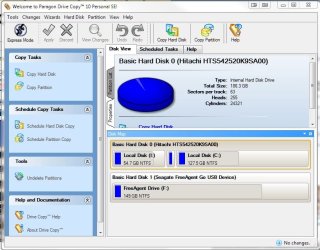
Too bad he just missed the Give Away of the Day that featured Paragon Drive Copy. It is prefect for what he wants to do.
Screenshot_1.jpg

It's a really cool program and one of the better offerings as of late from GOTD.
 

My Computer

Computer Manufacturer/Model Number
Toshiba L355D
OS
Windows 7 Ultimate x64 SP1
CPU
Core2 Duo
Motherboard
Intel
Memory
4 GB
Graphics Card(s)
GM965 on-board
Sound Card
RealTek on-board
Monitor(s) Displays
19"+17"(laptop)
Screen Resolution
1440x900 (x 2)
Hard Drives
500GB Ext. 200GB Internal
PSU
N/A
Case
N/A
Cooling
N/A
To make a backup image failsafe use two different imaging apps like Win7 and Macrium, or Macrium and free Paragon 10. http://www.paragon-software.com/home/db-express/download.html

I would put your User folders on a separate partition or HD so that they are backed up separately more often: http://www.sevenforums.com/tutorials/18629-user-folders-change-default-location.html

This way you can capture the image of the OS and programs partition when it is running best, then reimage it without worrying about how current the files are on it, or whether the files will bloat up the image unnecessarily.
 
Back
Top