backing up just the bare minimum

beautiful

New member
Local time
12:21 PM
Messages
31
We've bought our first-ever laptop and it comes with Windows 7 Home Premium installed.

It does not come with Win7 installation discs.

So we would like to create some backups. According to Home - Microsoft Answers there are two types of backup: Full Backup and System Image.

What do I need to backup just the required Win7 files? I don't care about backing up my own files (media, pics, documents, etc.) I also don't care about backing up the stuff that came pre-installed with the laptop, like the trial version of MS office or the trial version of Norton Security or the games. I also don't want to backup stuff I've added after turning on the computer, like MS Security Essentials or VLC or Gimp.

Just the really bare minimum needed in case my computer wiped clean accidentally. Thank you.
 

My Computer

OS
Win7
System image will give you an exact snapshot of what your PC is running right now, Operating System included. Depending on your manufacturer, there may also be the option to make recovery disks to restore the system to the "out of the box" state. I know this to be true with Acer and eMachines. HP comes with a recovery partition, so this isn't necessary for them.
http://www.sevenforums.com/tutorials/675-system-image-recovery.html?filter
Here's an excellent tutorial for making a system image
 

My Computer

Computer Manufacturer/Model Number
Acer Aspire TimelineX AS4820T-6645
OS
Windows 7 Home Premium 64bit
CPU
Intel Core i3 380M(2.53GHz)
Memory
4GB DDR3 1066
Graphics Card(s)
Intel HD Graphics 128MB VRAM
Screen Resolution
1366x768
Hard Drives
640GB 5400RPM SATA
But I don't want a complete copy of my hard drive, as I've posted in my original post. I want just the operating system. How do I back up just the OS?
 

My Computer

OS
Win7

My Computer

Computer Manufacturer/Model Number
Acer Aspire TimelineX AS4820T-6645
OS
Windows 7 Home Premium 64bit
CPU
Intel Core i3 380M(2.53GHz)
Memory
4GB DDR3 1066
Graphics Card(s)
Intel HD Graphics 128MB VRAM
Screen Resolution
1366x768
Hard Drives
640GB 5400RPM SATA
i want to back up the OS and nothing else. how can i do that?
 

My Computer

OS
Win7
Either a system image, or a recovery disc from your computer manufacturer. Other than that you can download an image of a Windows 7 install disc since your computer didn't come with one. Then just use the key that should be on the bottom of your rig.
 

My Computer

Computer Manufacturer/Model Number
Acer Aspire TimelineX AS4820T-6645
OS
Windows 7 Home Premium 64bit
CPU
Intel Core i3 380M(2.53GHz)
Memory
4GB DDR3 1066
Graphics Card(s)
Intel HD Graphics 128MB VRAM
Screen Resolution
1366x768
Hard Drives
640GB 5400RPM SATA
where can one download a win7 install disc? I hope it's legal.
 

My Computer

OS
Win7
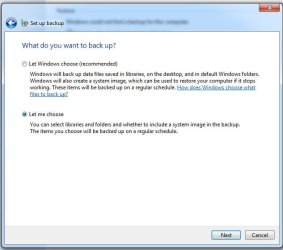
You'll see the following options, when starting the backup.

Capture.JPG
 

My Computer

Computer type
PC/Desktop
Computer Manufacturer/Model Number
Custom Build
OS
Windows 7 Home Premium 64 bit
CPU
Intel Core i7-4790
Motherboard
GA-Z87X-D3H
Memory
G.SKILL 8GB (2 x 4GB) DDR3 F3-10666CL9D-8GBNT
Graphics Card(s)
AMD Radeon R7 250
Sound Card
Realtek ALC892
Monitor(s) Displays
Samsung UN32EH5000, Dell 1703FPT
Screen Resolution
1920 x 1080, 1280 x 1024
Hard Drives
WD5003AZEX
WD10EZEX
Samsung HD103SJ
Samsung 128 GB 840 PRO
PSU
SeaSonic M12II SS-500GM
Case
Fractal Design Define R4
Cooling
Zalman CNPS9900ALED
Keyboard
Logitech K800
Mouse
Logitech M705
Internet Speed
16 Mbps
Antivirus
Avast
Browser
Firefox
Other Info
Bose Companion 2 Multimedia Speakers
Going the "let-me-choose" route

If I go with "Let me choose" option, what should I then choose?
 

My Computer

OS
Win7
BTW, is using Microsoft's backup program the best for what I want to do (which is to back up just the bare minimum)?
 

My Computer

OS
Win7
Back
Top