

- Local time
- 6:56 AM
- Messages
- 231
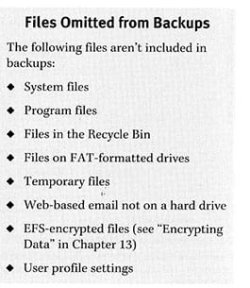
On page 517, the Visual Quickstart Guide "Microsoft Windows 7" shows the usual Backup and Restore window at Control Panel > System and Security > Backup and Restore. It firmly states that "Backup and Restore can backup an entire hard drive (system image), OR specified files and folders periodically." On the next page it states the opposite with equal firmness (see the attachment). Presumably that is talking about a restore not involving a system image.
Here's me all this time confidently assuming that following the daily use of Backup and Restore, (not creating a system image every day) if a crash occurred I could restore the Windows system OS to my C drive and also, (although opinions vary here) the programs that I have installed. As a result I could get back to work quickly.
>> So what exactly does Backup and Restore (without a system image) restore to the computer? No system files or program files, etc. from what the the attachment says, probably just my personal files (Documents, Pictures, Music and Videos)? There are quicker programs that do that: eg., FreeFileSync. Backup and Restore (without a system image) seems to add little to the backing up of a computer.
-------------------
It has been said that a system image will restore everything on the C drive, byte for byte, to return the drive to exactly how it was before the making of the Image: Windows OS, Programs, personal documents everything. But I have read that a system image created in Backup and Restore is not a complete image.
>> What is the best way to completely return a C drive, system-wise, to exactly what it was before? A System Image made in Macrium (free)? Does it really do that?
Here's me all this time confidently assuming that following the daily use of Backup and Restore, (not creating a system image every day) if a crash occurred I could restore the Windows system OS to my C drive and also, (although opinions vary here) the programs that I have installed. As a result I could get back to work quickly.
>> So what exactly does Backup and Restore (without a system image) restore to the computer? No system files or program files, etc. from what the the attachment says, probably just my personal files (Documents, Pictures, Music and Videos)? There are quicker programs that do that: eg., FreeFileSync. Backup and Restore (without a system image) seems to add little to the backing up of a computer.
-------------------
It has been said that a system image will restore everything on the C drive, byte for byte, to return the drive to exactly how it was before the making of the Image: Windows OS, Programs, personal documents everything. But I have read that a system image created in Backup and Restore is not a complete image.
>> What is the best way to completely return a C drive, system-wise, to exactly what it was before? A System Image made in Macrium (free)? Does it really do that?
Attachments
My Computer
- Computer type
- PC/Desktop
- Computer Manufacturer/Model Number
- Gigabyte ATX case with 500 W power supply GZ-M1
- OS
- Windows 7 Home Premium 64bit
- CPU
- Intel Pentium Edition G3220 3.0 GHz
- Motherboard
- Gigabyte Socket 1150 MicroATX Mot Ultra Durable, GA-H81M-S2H
- Memory
- 8 GB DDR3 1600 MHz DIMM
- Graphics Card(s)
- Not Known
- Sound Card
- Not known
- Monitor(s) Displays
- Samsung LS24D590 23.6"
- Screen Resolution
- 1920 x 1080
- Hard Drives
- 256 GB Solid State Drive (C: on which Windows 7 is installed)-
1 TB internal conventional HD (X:)-
Two WD "Elements" " 2TB USB drives as backups
- PSU
- 500 W
- Case
- Gigabyte ATX case
- Cooling
- Several fans!
- Keyboard
- Accuratus 301 USB Compact, white.
- Mouse
- Microsoft Basic Optical Mouse v2.0, two-button, tethered
- Internet Speed
- 10 to 12 Mb per second
- Antivirus
- Kaspersky Internet Security 2016, Malwarebytes (paid)
- Browser
- Firefox (ocassionally Safari)
- Other Info
- The 256 GB SSD (C:) also has Adobe Photoshop CS6 and InDesign CS6, MS Office, Adobe Lightroom, and other small programs.


