Backup and Restore Problem - HEEEEELP!!

nickfracture

New member
Local time
7:56 AM
Messages
2
Hi there,

I started doing a system backup onto my hard drive. I cancelled halfway through, so there's no actual backup on there.

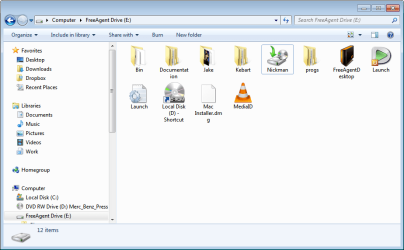
Problem is, I had a folder on my hard drive called "Nickman", which is the same name as my computer. Somehow that folder, which has all my backed up work, images, everything ever, has been turned into a backup filetype..!

So, I can't open or access any of the stuff in that folder anymore. When I open it just brings up the Backup menu "Do you want to restore files from this backup?"

HEEEELP Please!! I need to turn this icon back into a folder so I can access the stuff that's in there! I've tried changing the backup location to not my hard drive, but it doesn't turn back into a folder :cry::cry::cry:

Thanks
Nick
 

My Computer

OS
Windows 7 RC
here's a screencap of the "Nickman" folder that's no longer a folder
 

Attachments

  • 20-08-2009 1-35-22 p.m..png
    20-08-2009 1-35-22 p.m..png
    26.8 KB · Views: 18

My Computer

OS
Windows 7 RC
Hi there,

I started doing a system backup onto my hard drive. I cancelled halfway through, so there's no actual backup on there.

Problem is, I had a folder on my hard drive called "Nickman", which is the same name as my computer. Somehow that folder, which has all my backed up work, images, everything ever, has been turned into a backup filetype..!

So, I can't open or access any of the stuff in that folder anymore. When I open it just brings up the Backup menu "Do you want to restore files from this backup?"

HEEEELP Please!! I need to turn this icon back into a folder so I can access the stuff that's in there! I've tried changing the backup location to not my hard drive, but it doesn't turn back into a folder :cry::cry::cry:

Thanks
Nick

Nick if the data is important make a backup of it first. then try to restore from your partial bu. You cant just change the Bu's name and access it I dont believe.

Ken
 

My Computer

Computer Manufacturer/Model Number
HP Pavillion dv-7 1005 Tx
OS
Win 8 Release candidate 8400
CPU
[email protected]
Memory
4 gigs
Graphics Card(s)
Nvidia 9600M
Sound Card
HD built-in
Monitor(s) Displays
17" Wxga
Screen Resolution
1440x900
Cooling
none
Internet Speed
45Mb down 5Mb up
here's a screencap of the "Nickman" folder that's no longer a folder

Hi Nick,

From your story it's hard to tell what happened.
You should be more specific, which backup program?
From what source location to what destination were you backing up?

What drives are in your system? Also External drives?


What I can without any doubt tell you is that that icon IS NOT your previous folder.
It's impossible to magically turn a folder into a file.


That icon represents your partially made backup. That's why your backup program want's to start when you doubleclick it.

Your real folder with all your files has to be somewhere else or deleted.

Give us more info, and try to keep the story understandable.

greetz
 

My Computer

OS
Win7 Build 7600 x86
CPU
Pentium II 300MHz
Motherboard
Asus
Memory
32mb EDO RAM
Graphics Card(s)
Diamond Viper
Sound Card
Soundblaster 16
Monitor(s) Displays
14" AOC CRT 16K color
Screen Resolution
800x600
Hard Drives
300mb Quantum fireball
PSU
110 Watts
Cooling
Passive
Keyboard
Trust Ergonomic
Mouse
Generic
Internet Speed
256K u 128K d
Back
Top