Backup and Restore Problem

motim

New member
Local time
6:46 PM
Messages
109
Hello Forum,
As you already know, I am trying to save some disk space by deleting old restore points.
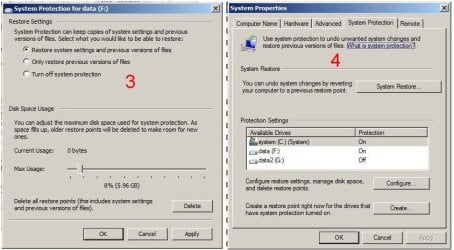
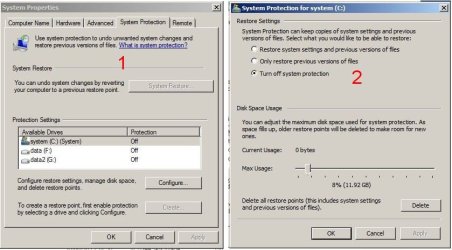
So I made some experiment as follows: First I turned off "system protection" as you can see
on "Image-A", current usage = o , and "system restore" button is Gray. To be sure I also used
"Delete all restore points" button, confirmed all warnings, and rebooted. (Please see note)
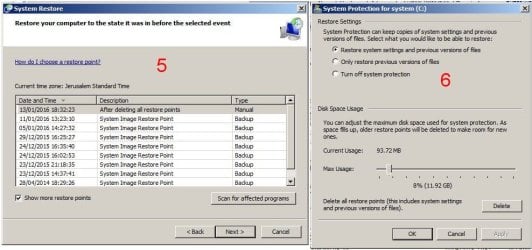
Then turned on "system protection" and made just one "restore point" as seen on "Image-B", now the "system restore" button was active, clicked on it, and in the list I saw my new restore point
with all the other old ones there again, as seen on "Image-C".
Right now, I stopped downloading windows updates because it creates new restore points and "eats" lot of disk space.
I think I have done everything I can, now I need the experts for some help.
To image the system disk I now use "Macrium free".
The image which windows created and cannot find it (as I mentioned on some post), I deleted it.

Note: After the (supposed) deletion of the restore points as described above, I made a new full image with Macrium and verified it. To my surprise it was a little smaller then the one image made 3 day before.
Many thanks for answers.
Motim
 

Attachments
  • Image-A.jpg
    Image-A.jpg
    56.8 KB · Views: 0
  • Image-B.jpg
    Image-B.jpg
    60.2 KB · Views: 0
  • Image-C.jpg
    Image-C.jpg
    69.6 KB · Views: 1

My Computer

Computer type
PC/Desktop
Computer Manufacturer/Model Number
custom built
OS
Windows 7 Pro 32 bit
CPU
intel celeron 2.66GH 2.56GH
Memory
2.00 GB
Graphics Card(s)
Nvidia fx5500
Hard Drives
Western digital
Antivirus
AVG
Browser
firefox
Exactly what is it that you want to do?
 

My Computer

Computer type
PC/Desktop
Computer Manufacturer/Model Number
Antec desktop; Acer Aspire laptops
OS
Windows 7 Professional 64-bit
CPU
Desktop i5; Acers i5 & i7
Memory
desktop 16GB; 1 Acer 8GB & 1 Acer 16GB
Hard Drives
1TB split into 2 equal partitions [OS and data] usable by RJS
Internet Speed
AT&T DSL
Browser
FF, GChrome, msIE
Other Info
Windows 7 Firewall, Emsisoft AM/AV, MSE [scan-only], SpywareBlaster, Ruiware/BillP combine
Hello RolandJS
Thanks for answering,
I want to get rid of those unnecessary ancient restore points, I will never use them, and they use disk space.
Thanks agaim
Motim
 

My Computer

Computer type
PC/Desktop
Computer Manufacturer/Model Number
custom built
OS
Windows 7 Pro 32 bit
CPU
intel celeron 2.66GH 2.56GH
Memory
2.00 GB
Graphics Card(s)
Nvidia fx5500
Hard Drives
Western digital
Antivirus
AVG
Browser
firefox
You have to configuire and delete the restore settings for each drive C/F/G individually.
Note if you dont use Sleep/Hibernate turn them off saves even more space.

Roy
 

My Computer

Computer type
PC/Desktop
Computer Manufacturer/Model Number
medionl/Aspire 6930G/acer x55a
OS
W7 home premium 32bit/W7HP 64bit/w10 tp insider ring
CPU
E5300 dual core
Motherboard
medion MS7366
Memory
3gb
Graphics Card(s)
Nvidia Geforce 7100 Nforce 630i
Monitor(s) Displays
avixc
Internet Speed
n (isp resticted to 72)
Antivirus
mse/pands
Browser
palemoon
Other Info
Belkin Fd7050 n USB using Railink RT2870 drivers, more upto date

My Computer

Computer Manufacturer/Model Number
HP, Dell, Gateway, Toshiba - 4 laptops and 2 desktops
OS
Vista, Windows7, Mint Mate, Zorin, Windows 8
CPU
from 1.6GHz Duo to i7
Monitor(s) Displays
2x HP w2207
Hard Drives
5x HDD, 7x SSD, 12x Externals
Keyboard
with trackball - no mices
Mouse
Trackball mice
Internet Speed
DSL 6000
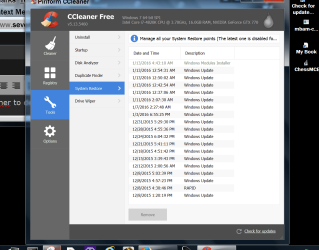
You can also use Ccleaner to delete single restore points.

I keep my restore points at 5 % and it works for me.

Just tick on one and select Remove


Ccleaner delete restore points TODAY.PNG
 

My Computer

Computer type
PC/Desktop
Computer Manufacturer/Model Number
Home made Desktop
OS
Windows 10 Pro. 64/ version 1709 Windows 7 Pro/64
CPU
Intel i7-6800K @ 4.3
Motherboard
ASUS X-99 Deluxe II
Memory
Corsair Platinum 16 gig @2400
Graphics Card(s)
EVGA GTX 1070 OC
Monitor(s) Displays
Asus 27" LED LCD/VE278Q
Screen Resolution
1920-1080 or 1280-720 HDMI
Hard Drives
INTEL SSD 730-240 Gb Sata 3.0/
PSU
EVGA Platium 1200W
Case
Phanteks Luxe Tempered Glass 8 fans/ one radiator
Cooling
XSPC/ Water Cooled CPU
Keyboard
Das 4 Professional
Mouse
Logitech M705/MX Anywhere 2-S
Internet Speed
100 mbits
Antivirus
Microsoft Security Essentials/ Malwarebytes Premium 3.0/ SAS
Browser
I.E. 11 default/Firefox/ ISP Time Warner Cable/Spectrum
Other Info
LG BluRay Burner/
Sound system-KLipsch-THX/
Icy Dock ssd Hot Swap bays.
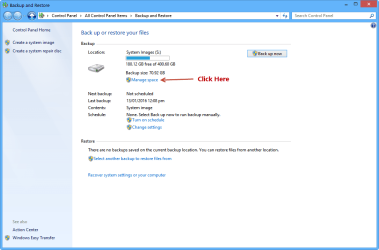
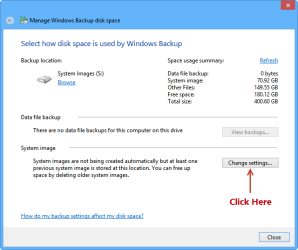
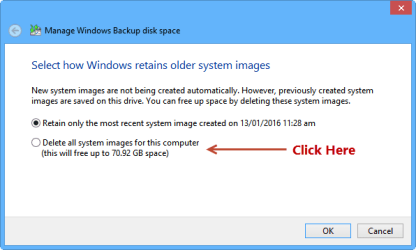
Hi Motim, is it the System Image Restore points you want to remove? You can only remove those by deleting the corresponding System Images. If you use Macrium and no longer wish to keep the Windows Backup images then they're safe to delete. Make sure your files are backed up.

Capture-01 (2).png
Capture-02.png
Capture-03.png
 

My Computer

Computer type
PC/Desktop
Computer Manufacturer/Model Number
Custom Build
OS
Win 7 Ultimate, Win 8.1 Pro, Linux Mint 19 Cinnamon (All 64-Bit)
CPU
Intel i5 4690K
Motherboard
Gigabyte Z97X-UD3H
Memory
Corsair Vengeance LP 32GB DDR3
Graphics Card(s)
MSI GTX 1060 GAMING X 6GB
Sound Card
Onboard
Hard Drives
Samsung 850 EVO 250GB SSD (x2)
Samsung 860 EVO 1TB SSD (x2)
Crucial MX300 525GB SSD
WD Blue 2TB 5400rpm Intellipark Disabled (x2)
PSU
Corsair HX750i
Case
Phanteks Enthoo Pro
Cooling
CM Hyper 212 EVO on CPU, Noctua Redux NF-P14S 1500rpm (x6)
Keyboard
Corsair K70 RGB LUX
Mouse
Corsair Sabre RGB
Antivirus
Avast Free, MalwareBytes, SAS & CryptoPrevent
Browser
Chrome
Other Info
StarTech PEXESAT322I 2 Port PCI-E SATA Card
ASUS PCE-AC56 Dual-band AC1300 Wireless Card
Akasa FC.Six Manual Fan Controller
And a Partridge in a Pear Tree!
Backup and Restore

Hello,
Thanks for all the answers.
I did everything as all of you wrote, turned off "system protection" for each drive (drive G was never on), the used the delete button to delete all restore points, used the disk cleaning tool, In Ccleaner there was nothing on the list. I also reduced the amount of disk space to be used by the restore point to 1% for drives C and F. Then just to check - I turned on the system protection, and all those ancient restore points were again on the list.
I may turn off the system protection, but new download & install windows updates create them again, so right now I stopped for a while updating.
Is there anything more I can do but did not ?
Thanks again
Motim
 

My Computer

Computer type
PC/Desktop
Computer Manufacturer/Model Number
custom built
OS
Windows 7 Pro 32 bit
CPU
intel celeron 2.66GH 2.56GH
Memory
2.00 GB
Graphics Card(s)
Nvidia fx5500
Hard Drives
Western digital
Antivirus
AVG
Browser
firefox
Have you changed or moved any partitions around? Looks like those entries are pointing to redundant System Images. It's happened to me before when I deleted the System Images and didn't use the option in Windows backup.
 

My Computer

Computer type
PC/Desktop
Computer Manufacturer/Model Number
Custom Build
OS
Win 7 Ultimate, Win 8.1 Pro, Linux Mint 19 Cinnamon (All 64-Bit)
CPU
Intel i5 4690K
Motherboard
Gigabyte Z97X-UD3H
Memory
Corsair Vengeance LP 32GB DDR3
Graphics Card(s)
MSI GTX 1060 GAMING X 6GB
Sound Card
Onboard
Hard Drives
Samsung 850 EVO 250GB SSD (x2)
Samsung 860 EVO 1TB SSD (x2)
Crucial MX300 525GB SSD
WD Blue 2TB 5400rpm Intellipark Disabled (x2)
PSU
Corsair HX750i
Case
Phanteks Enthoo Pro
Cooling
CM Hyper 212 EVO on CPU, Noctua Redux NF-P14S 1500rpm (x6)
Keyboard
Corsair K70 RGB LUX
Mouse
Corsair Sabre RGB
Antivirus
Avast Free, MalwareBytes, SAS & CryptoPrevent
Browser
Chrome
Other Info
StarTech PEXESAT322I 2 Port PCI-E SATA Card
ASUS PCE-AC56 Dual-band AC1300 Wireless Card
Akasa FC.Six Manual Fan Controller
And a Partridge in a Pear Tree!
Backup and Restore

Hello ThrashZone,
Thanks for the answer. Now here is some question:
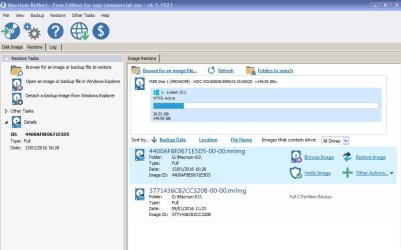
To store the system image Macrium made, I use disk G. (C is the system, F and G for data). As you can see on attached screenshot, there are two full images, the one dated 09 Jan. - done before all experiments to remove the restore points,
the other full image dated 13 Jan. - done when "system protection" was off, thinking that all restore points gone. If both are full images, can I delete the older one ?
Attached screenshot.
Will appreciate answers
Thanks
Motim
 

Attachments

  • Macrium images.JPG
    Macrium images.JPG
    68.4 KB · Views: 0

My Computer

Computer type
PC/Desktop
Computer Manufacturer/Model Number
custom built
OS
Windows 7 Pro 32 bit
CPU
intel celeron 2.66GH 2.56GH
Memory
2.00 GB
Graphics Card(s)
Nvidia fx5500
Hard Drives
Western digital
Antivirus
AVG
Browser
firefox
You can delete that system image as long as you're sure you won't need it. As they're both full images, deleting one won't affect the other.
 

My Computer

Computer type
PC/Desktop
Computer Manufacturer/Model Number
Custom Build
OS
Win 7 Ultimate, Win 8.1 Pro, Linux Mint 19 Cinnamon (All 64-Bit)
CPU
Intel i5 4690K
Motherboard
Gigabyte Z97X-UD3H
Memory
Corsair Vengeance LP 32GB DDR3
Graphics Card(s)
MSI GTX 1060 GAMING X 6GB
Sound Card
Onboard
Hard Drives
Samsung 850 EVO 250GB SSD (x2)
Samsung 860 EVO 1TB SSD (x2)
Crucial MX300 525GB SSD
WD Blue 2TB 5400rpm Intellipark Disabled (x2)
PSU
Corsair HX750i
Case
Phanteks Enthoo Pro
Cooling
CM Hyper 212 EVO on CPU, Noctua Redux NF-P14S 1500rpm (x6)
Keyboard
Corsair K70 RGB LUX
Mouse
Corsair Sabre RGB
Antivirus
Avast Free, MalwareBytes, SAS & CryptoPrevent
Browser
Chrome
Other Info
StarTech PEXESAT322I 2 Port PCI-E SATA Card
ASUS PCE-AC56 Dual-band AC1300 Wireless Card
Akasa FC.Six Manual Fan Controller
And a Partridge in a Pear Tree!
Backup and Restore

Hello Brds7t7,
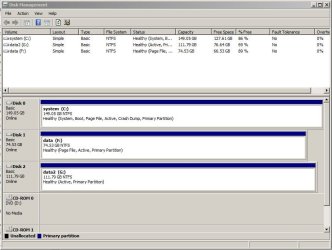
Answering your question, I did not change or move any partition, in my PC installed 3 disks, each one is a one whole partition (as you can see on attached screenshot). Windows 7 Pro was installed by a technician
in computer shop at 2014, and I believe then was made the first backup. As mentioned on some posts before, I only once made an image with windows, and since windows could not find the image (even it was there), made few attempts to do backups by pressing the "backup now" button but nothing happened.
So manually I deleted that 'not found' image (since it became useless), and then I started using Macrium. I am only thinking that those "backup" attempts created somewhere just entries I do not know if possible to remove them. I used the "delete" button on the "system protection" window and it only deleted my new restore point, all other so called backups are still on the list.
If there are any solutions I may try them.
Thank for the answers.
Motim
 

Attachments

  • Disk Managment.jpg
    Disk Managment.jpg
    69.8 KB · Views: 0

My Computer

Computer type
PC/Desktop
Computer Manufacturer/Model Number
custom built
OS
Windows 7 Pro 32 bit
CPU
intel celeron 2.66GH 2.56GH
Memory
2.00 GB
Graphics Card(s)
Nvidia fx5500
Hard Drives
Western digital
Antivirus
AVG
Browser
firefox
Back
Top