
Hello,
Is this the 7 wonders of windows 7 or what ?
For a long time I am trying to get rid of restore points, I think many of them are not existing any more, although the settings are small but the list is big.
I started with Ccleaner - it listed only 2. Then I used the system's disk cleaner - no luck. Made some investigation where are the restore points hiding, the amount used is not so big. So here are some findings' with screenshots attached.
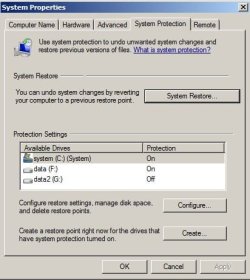
Image 1 shows system protection settings; C and F drives are on, G drive is off (here Macrium stores the backup).
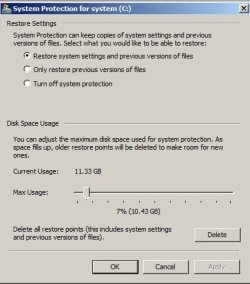
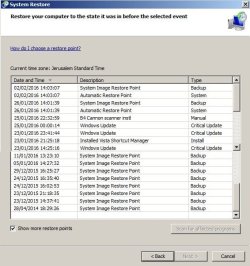
Images 2 and 3 show the settings of C and G (G in the settings is off), as I clicked OK on the C, is warned that old points will be deleted, I confirmed this, then opened to see the results - nothing was changed - as you can see on image 4 (it is a montage since the window is too small to show the whole list.
Finally, image 5 shows the small settings for C and F drives, what wonders me, in the protection settings
G is off (as said above) but on image 5 there is a place for G. So where are all those restore points hiding, or are they only ghosts which cannot be cleaned ?
Some explanations, any ideas how to clean them, because of this issue I stopped temporarily installing updates.
Answers will be appreciated.
And thanks for previous answers, I'll try to erase a RW cd/dvd with win 7 built-in feature.
Thanks
Motim
Is this the 7 wonders of windows 7 or what ?
For a long time I am trying to get rid of restore points, I think many of them are not existing any more, although the settings are small but the list is big.
I started with Ccleaner - it listed only 2. Then I used the system's disk cleaner - no luck. Made some investigation where are the restore points hiding, the amount used is not so big. So here are some findings' with screenshots attached.
Image 1 shows system protection settings; C and F drives are on, G drive is off (here Macrium stores the backup).
Images 2 and 3 show the settings of C and G (G in the settings is off), as I clicked OK on the C, is warned that old points will be deleted, I confirmed this, then opened to see the results - nothing was changed - as you can see on image 4 (it is a montage since the window is too small to show the whole list.
Finally, image 5 shows the small settings for C and F drives, what wonders me, in the protection settings
G is off (as said above) but on image 5 there is a place for G. So where are all those restore points hiding, or are they only ghosts which cannot be cleaned ?
Some explanations, any ideas how to clean them, because of this issue I stopped temporarily installing updates.
Answers will be appreciated.
And thanks for previous answers, I'll try to erase a RW cd/dvd with win 7 built-in feature.
Thanks
Motim
Attachments


My Computer
- Computer type
- PC/Desktop
- Computer Manufacturer/Model Number
- custom built
- OS
- Windows 7 Pro 32 bit
- CPU
- intel celeron 2.66GH 2.56GH
- Memory
- 2.00 GB
- Graphics Card(s)
- Nvidia fx5500
- Hard Drives
- Western digital
- Antivirus
- AVG
- Browser
- firefox

