Backup c: drive only?

OriginalJ4Y

New member
Local time
4:29 AM
Messages
10
Location
UK
Ok i came across this site though Google and was hoping someone could help. I recently reinstalled windows and went to set up the backup image like usual only it asks to back up both my C and D drives whereas it only used to do the C drive? The reason i dont want it doing both is the second drive is the one that the Backup image is normally stored to.

Any help would be appreciated thanks.
 

My Computer

OS
Windows 7 Home Premium 64bit
CPU
Core I7 920 DO
Motherboard
EVGA X58 sli le
Memory
Cosair Dominator GT 1600 (6gig)
Graphics Card(s)
EVGA GTX 470 SC
Sound Card
realtek HD
Monitor(s) Displays
ASUS 22in
Screen Resolution
1080p
Hard Drives
WD Caviar Black (500gig)
WD Caviar Blue (500gig)
WD Caviar Blue (250gig)
PSU
Corsair HX850
Case
Lian Li X1000
Cooling
Corsair H50 + Ram cooler + 6x140mm fan
Internet Speed
50mb

My Computers

System One System Two

  • Computer type
    PC/Desktop
    OS
    7 X64
    CPU
    i5 8400
    Motherboard
    gigabyte b365m ds3h
    Memory
    2x8gb 3200mhz
    Hard Drives
    various
    PSU
    pure power 11 400w cm
    Case
    Coolermaster
    Cooling
    cryorig m9i
  • Computer type
    PC/Desktop
    OS
    7x64
    CPU
    g5400
    Motherboard
    ga b365m ds3h
    Memory
    8gb ddr4 2400
    PSU
    xfx pro 450w
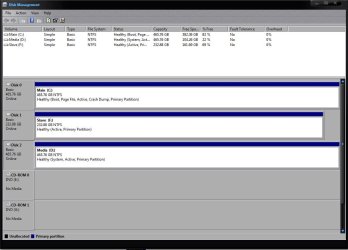
I think i did it right, although not sure if this was the window you ment?
 

Attachments

  • DISKMANAGE.JPG
    DISKMANAGE.JPG
    79.9 KB · Views: 315

My Computer

OS
Windows 7 Home Premium 64bit
CPU
Core I7 920 DO
Motherboard
EVGA X58 sli le
Memory
Cosair Dominator GT 1600 (6gig)
Graphics Card(s)
EVGA GTX 470 SC
Sound Card
realtek HD
Monitor(s) Displays
ASUS 22in
Screen Resolution
1080p
Hard Drives
WD Caviar Black (500gig)
WD Caviar Blue (500gig)
WD Caviar Blue (250gig)
PSU
Corsair HX850
Case
Lian Li X1000
Cooling
Corsair H50 + Ram cooler + 6x140mm fan
Internet Speed
50mb
Hmm any reason bootmgr would be on that drive? Also do you have a step by step of deactivating drives/repairing bootmgr or is it all pretty self explanatory?

Thanks
 

My Computer

OS
Windows 7 Home Premium 64bit
CPU
Core I7 920 DO
Motherboard
EVGA X58 sli le
Memory
Cosair Dominator GT 1600 (6gig)
Graphics Card(s)
EVGA GTX 470 SC
Sound Card
realtek HD
Monitor(s) Displays
ASUS 22in
Screen Resolution
1080p
Hard Drives
WD Caviar Black (500gig)
WD Caviar Blue (500gig)
WD Caviar Blue (250gig)
PSU
Corsair HX850
Case
Lian Li X1000
Cooling
Corsair H50 + Ram cooler + 6x140mm fan
Internet Speed
50mb
Easy to fix

open elevated cmd, type:

diskpart

sel vol d

inact

sel vol f

inact

exi

bcdboot c:\windows /s c:

close cmd window, then restart pc.

Takes about 20 secs to do that.


To get to cmd - just type cmd in start serach - when the little black box pops up - rt click it and run as admin.

At the prompt > type the first line above , press enter and wait for the prompt to reappear before typing the next line and so on
 

My Computers

System One System Two

  • Computer type
    PC/Desktop
    OS
    7 X64
    CPU
    i5 8400
    Motherboard
    gigabyte b365m ds3h
    Memory
    2x8gb 3200mhz
    Hard Drives
    various
    PSU
    pure power 11 400w cm
    Case
    Coolermaster
    Cooling
    cryorig m9i
  • Computer type
    PC/Desktop
    OS
    7x64
    CPU
    g5400
    Motherboard
    ga b365m ds3h
    Memory
    8gb ddr4 2400
    PSU
    xfx pro 450w
Done it yet?
 

My Computers

System One System Two

  • Computer type
    PC/Desktop
    OS
    7 X64
    CPU
    i5 8400
    Motherboard
    gigabyte b365m ds3h
    Memory
    2x8gb 3200mhz
    Hard Drives
    various
    PSU
    pure power 11 400w cm
    Case
    Coolermaster
    Cooling
    cryorig m9i
  • Computer type
    PC/Desktop
    OS
    7x64
    CPU
    g5400
    Motherboard
    ga b365m ds3h
    Memory
    8gb ddr4 2400
    PSU
    xfx pro 450w
I was wondering where these 3 active partitions were coming from
 

My Computer

Computer Manufacturer/Model Number
HP, Dell, Gateway, Toshiba - 4 laptops and 2 desktops
OS
Vista, Windows7, Mint Mate, Zorin, Windows 8
CPU
from 1.6GHz Duo to i7
Monitor(s) Displays
2x HP w2207
Hard Drives
5x HDD, 7x SSD, 12x Externals
Keyboard
with trackball - no mices
Mouse
Trackball mice
Internet Speed
DSL 6000
Done it yet?
Done that apart from restarting pc. Do i need that imaged burned and in dvd drive when it restarts? If so where do i go from there?

Well i restarted anyway and it asks to boot from disk so i try putting the Magic Partition Manager in and booting from that only for it to load and me to not have a glue what to do from there.
 
Last edited:

My Computer

OS
Windows 7 Home Premium 64bit
CPU
Core I7 920 DO
Motherboard
EVGA X58 sli le
Memory
Cosair Dominator GT 1600 (6gig)
Graphics Card(s)
EVGA GTX 470 SC
Sound Card
realtek HD
Monitor(s) Displays
ASUS 22in
Screen Resolution
1080p
Hard Drives
WD Caviar Black (500gig)
WD Caviar Blue (500gig)
WD Caviar Blue (250gig)
PSU
Corsair HX850
Case
Lian Li X1000
Cooling
Corsair H50 + Ram cooler + 6x140mm fan
Internet Speed
50mb
Now what as i cant start pc without having to manually load boot menu!
 

My Computer

OS
Windows 7 Home Premium 64bit
CPU
Core I7 920 DO
Motherboard
EVGA X58 sli le
Memory
Cosair Dominator GT 1600 (6gig)
Graphics Card(s)
EVGA GTX 470 SC
Sound Card
realtek HD
Monitor(s) Displays
ASUS 22in
Screen Resolution
1080p
Hard Drives
WD Caviar Black (500gig)
WD Caviar Blue (500gig)
WD Caviar Blue (250gig)
PSU
Corsair HX850
Case
Lian Li X1000
Cooling
Corsair H50 + Ram cooler + 6x140mm fan
Internet Speed
50mb
Can't understand what you are saying.

Do i need that imaged burned and in dvd drive when it restarts?

What image?

Now what as i cant start pc without having to manually load boot menu!

How do you manually load a boot menu?

:confused:
 

My Computers

System One System Two

  • Computer type
    PC/Desktop
    OS
    7 X64
    CPU
    i5 8400
    Motherboard
    gigabyte b365m ds3h
    Memory
    2x8gb 3200mhz
    Hard Drives
    various
    PSU
    pure power 11 400w cm
    Case
    Coolermaster
    Cooling
    cryorig m9i
  • Computer type
    PC/Desktop
    OS
    7x64
    CPU
    g5400
    Motherboard
    ga b365m ds3h
    Memory
    8gb ddr4 2400
    PSU
    xfx pro 450w
Well first i was told to download some Magic Partition Manager Software and burn to dvd i also noticed that post has been removed now. Then i was told to go into cmd and set d and f drives to inactive and told to restart pc. Now i can only start the pc by pressing ESC and asking the pc to boot from hard drive as it just asks to boot from cd otherwise. I'm tempted to say to hell with it unplug 2 'spare' drives and reinstall windows again in an attempt to fix it all.
 

My Computer

OS
Windows 7 Home Premium 64bit
CPU
Core I7 920 DO
Motherboard
EVGA X58 sli le
Memory
Cosair Dominator GT 1600 (6gig)
Graphics Card(s)
EVGA GTX 470 SC
Sound Card
realtek HD
Monitor(s) Displays
ASUS 22in
Screen Resolution
1080p
Hard Drives
WD Caviar Black (500gig)
WD Caviar Blue (500gig)
WD Caviar Blue (250gig)
PSU
Corsair HX850
Case
Lian Li X1000
Cooling
Corsair H50 + Ram cooler + 6x140mm fan
Internet Speed
50mb
If your dvdrom drive is first in bios boot menu - bios will attempt to boot any bootable cd/dvd that is in there.

As you are able to boot by selecting the HD - that suggests you have a bootable cd in the dvdrom drive.

Take it out.
 
Last edited:

My Computers

System One System Two

  • Computer type
    PC/Desktop
    OS
    7 X64
    CPU
    i5 8400
    Motherboard
    gigabyte b365m ds3h
    Memory
    2x8gb 3200mhz
    Hard Drives
    various
    PSU
    pure power 11 400w cm
    Case
    Coolermaster
    Cooling
    cryorig m9i
  • Computer type
    PC/Desktop
    OS
    7x64
    CPU
    g5400
    Motherboard
    ga b365m ds3h
    Memory
    8gb ddr4 2400
    PSU
    xfx pro 450w
Yes it was set to boot first so to clarify after doing the cmd's you posted everything should be fine and i dont need to use that program assuming i set dvd drive not to boot first obviously.
 

My Computer

OS
Windows 7 Home Premium 64bit
CPU
Core I7 920 DO
Motherboard
EVGA X58 sli le
Memory
Cosair Dominator GT 1600 (6gig)
Graphics Card(s)
EVGA GTX 470 SC
Sound Card
realtek HD
Monitor(s) Displays
ASUS 22in
Screen Resolution
1080p
Hard Drives
WD Caviar Black (500gig)
WD Caviar Blue (500gig)
WD Caviar Blue (250gig)
PSU
Corsair HX850
Case
Lian Li X1000
Cooling
Corsair H50 + Ram cooler + 6x140mm fan
Internet Speed
50mb
Yes, exactly.

Bios will look at devices in the order they are listed - if there is nothing bootable - it looks at the next, etc.

When it finds something bootable - it will attempt to boot that and not look any further.

Ideally, you would have your win 7 HD first in bios boot order - saves bios looking at other devices.
 

My Computers

System One System Two

  • Computer type
    PC/Desktop
    OS
    7 X64
    CPU
    i5 8400
    Motherboard
    gigabyte b365m ds3h
    Memory
    2x8gb 3200mhz
    Hard Drives
    various
    PSU
    pure power 11 400w cm
    Case
    Coolermaster
    Cooling
    cryorig m9i
  • Computer type
    PC/Desktop
    OS
    7x64
    CPU
    g5400
    Motherboard
    ga b365m ds3h
    Memory
    8gb ddr4 2400
    PSU
    xfx pro 450w
Ahh ok fair enough sorry if i got a little frustrated :)
 

My Computer

OS
Windows 7 Home Premium 64bit
CPU
Core I7 920 DO
Motherboard
EVGA X58 sli le
Memory
Cosair Dominator GT 1600 (6gig)
Graphics Card(s)
EVGA GTX 470 SC
Sound Card
realtek HD
Monitor(s) Displays
ASUS 22in
Screen Resolution
1080p
Hard Drives
WD Caviar Black (500gig)
WD Caviar Blue (500gig)
WD Caviar Blue (250gig)
PSU
Corsair HX850
Case
Lian Li X1000
Cooling
Corsair H50 + Ram cooler + 6x140mm fan
Internet Speed
50mb
Computers can be frustrating - it's part of the fun.:)
 

My Computers

System One System Two

  • Computer type
    PC/Desktop
    OS
    7 X64
    CPU
    i5 8400
    Motherboard
    gigabyte b365m ds3h
    Memory
    2x8gb 3200mhz
    Hard Drives
    various
    PSU
    pure power 11 400w cm
    Case
    Coolermaster
    Cooling
    cryorig m9i
  • Computer type
    PC/Desktop
    OS
    7x64
    CPU
    g5400
    Motherboard
    ga b365m ds3h
    Memory
    8gb ddr4 2400
    PSU
    xfx pro 450w
Indeed thanks anyway i'll see if the backup works in the morning.
 

My Computer

OS
Windows 7 Home Premium 64bit
CPU
Core I7 920 DO
Motherboard
EVGA X58 sli le
Memory
Cosair Dominator GT 1600 (6gig)
Graphics Card(s)
EVGA GTX 470 SC
Sound Card
realtek HD
Monitor(s) Displays
ASUS 22in
Screen Resolution
1080p
Hard Drives
WD Caviar Black (500gig)
WD Caviar Blue (500gig)
WD Caviar Blue (250gig)
PSU
Corsair HX850
Case
Lian Li X1000
Cooling
Corsair H50 + Ram cooler + 6x140mm fan
Internet Speed
50mb
Well first i was told to download some Magic Partition Manager Software and burn to dvd i also noticed that post has been removed now. Then i was told to go into cmd and set d and f drives to inactive and told to restart pc. Now i can only start the pc by pressing ESC and asking the pc to boot from hard drive as it just asks to boot from cd otherwise. I'm tempted to say to hell with it unplug 2 'spare' drives and reinstall windows again in an attempt to fix it all.
I am sorry. I was the culprit that mislead you. It was a misunderstanding on my part. When I discovered my mistake, I deleted the post to limit the damage. I had hoped that nobody had seen it yet, but apparently it was enough to mislead you. Really sorry for that.
 

My Computer

Computer Manufacturer/Model Number
HP, Dell, Gateway, Toshiba - 4 laptops and 2 desktops
OS
Vista, Windows7, Mint Mate, Zorin, Windows 8
CPU
from 1.6GHz Duo to i7
Monitor(s) Displays
2x HP w2207
Hard Drives
5x HDD, 7x SSD, 12x Externals
Keyboard
with trackball - no mices
Mouse
Trackball mice
Internet Speed
DSL 6000
No harm done - he now has a copy of a very useful app.
 

My Computers

System One System Two

  • Computer type
    PC/Desktop
    OS
    7 X64
    CPU
    i5 8400
    Motherboard
    gigabyte b365m ds3h
    Memory
    2x8gb 3200mhz
    Hard Drives
    various
    PSU
    pure power 11 400w cm
    Case
    Coolermaster
    Cooling
    cryorig m9i
  • Computer type
    PC/Desktop
    OS
    7x64
    CPU
    g5400
    Motherboard
    ga b365m ds3h
    Memory
    8gb ddr4 2400
    PSU
    xfx pro 450w
Ok it's not fixed i checked bios to set hard disk as first boot priority but it was already set and cd/dvd drive as second yet im still getting the insert system disk whenever o start pc?

Ok scratch that i realised bios was set to boot the d: drive before c:. All fixed now but no wonder there was problems though. :P
 
Last edited:

My Computer

OS
Windows 7 Home Premium 64bit
CPU
Core I7 920 DO
Motherboard
EVGA X58 sli le
Memory
Cosair Dominator GT 1600 (6gig)
Graphics Card(s)
EVGA GTX 470 SC
Sound Card
realtek HD
Monitor(s) Displays
ASUS 22in
Screen Resolution
1080p
Hard Drives
WD Caviar Black (500gig)
WD Caviar Blue (500gig)
WD Caviar Blue (250gig)
PSU
Corsair HX850
Case
Lian Li X1000
Cooling
Corsair H50 + Ram cooler + 6x140mm fan
Internet Speed
50mb
Back
Top