Backup corruption problem

rundwald

New member
Member
VIP
Local time
12:40 AM
Messages
394
Location
UK, Hampshire
My periodical backups are saved to my WD external drive (My Passport). I have found that the files saved are corrupt, and error messages as in attachment given. The xml files open blank, but are there, when edit is selected instead of open.
I am concerned about this. What do the errors etc suggest has happened; what am I doing wrong in the backup process? How do I achieve a proper backup in the future? Please!
 

My Computer

Computer type
PC/Desktop
Computer Manufacturer/Model Number
Dell Inspiron 560MT
OS
Home Premium 64 bit
CPU
2.9 gigahertz Intel Core2 Duo 64 kilobyte primary memory cac
Motherboard
Board: Dell Inc. 0K83V0 A00 Serial Number: ..CN750939CP069B
Memory
4096 Megabytes Usable Installed Memory Slot 'DIMM0' has 102
Graphics Card(s)
ATI Radeon HD 4300/4500 Series
Sound Card
High Definition Audio Device NVIDIA High Definition Audio (
Monitor(s) Displays
DELL ST2210 [Monitor] (21.7"vis, s/n P479R01Q0VCU, January 2
Screen Resolution
1920x1080
Hard Drives
628.58 Gigabytes Usable Hard Drive Capacity
554.78 Gigabytes Hard Drive Free Space
Keyboard
Std Dell UK
Mouse
KEYBOARD, 105, UNITED KINGDOM, KWE9C0
Internet Speed
~8000 kbps
Antivirus
Avast Free
Browser
Chrome
Other Info
Office 2007: Photo Editing; Serif PhotoPlus X7
Hello rundwald!

I'm sorry that your backups aren't working. :/

Which backup process are you exactly using? If it is through a WD software please describe your settings and the process.

Are the files initially corrupted on the PC before being backed up? Check the health of the My Passport drive with WD Data Lifeguard diagnostics, do both Quick and Extended tests.

WD DLG:
Support Answers

You could also change the USB cable and try with the backups again, see if the files still corrupt.

Post back with results! :)

CK_WD
 

My Computer

Computer type
PC/Desktop
OS
Windows 7 Home Premium x64
First I open Control Panel> Backup and Restore and choose Backup
I insert the USB connection from my WD Passport. I unlock Unlocker (allocated to Drive E the CD drive, which seems a bit odd)!
I enter password to Unlocker, and Passbook opens in Drive K. I select to save back up there snd commence.

I am not sure what settings you wanted checked, but there appear to be two locations, the DVD drive and My Passport.
in that order.

I did a further backup today which also failed but found that two files ere skipped. Here are the details/

Backup encountered a problem while backing up file C:\Users\....\Desktop\QSGBill. Error:(The system cannot find the file specified. (0x80070002))
Backup encountered a problem while backing up file C:\Users\....\Desktop\OMNIDSK\DSKPIC\PICTURE FILES ON DESKTOP\ZAXAZAXA.
Error:(The system cannot find the path specified. (0x80070003)).

Neither is found on a search, but both are in the Directory under TrackFoldersDirectory. Might my first step to solution be fo remove them?
 

My Computer

Computer type
PC/Desktop
Computer Manufacturer/Model Number
Dell Inspiron 560MT
OS
Home Premium 64 bit
CPU
2.9 gigahertz Intel Core2 Duo 64 kilobyte primary memory cac
Motherboard
Board: Dell Inc. 0K83V0 A00 Serial Number: ..CN750939CP069B
Memory
4096 Megabytes Usable Installed Memory Slot 'DIMM0' has 102
Graphics Card(s)
ATI Radeon HD 4300/4500 Series
Sound Card
High Definition Audio Device NVIDIA High Definition Audio (
Monitor(s) Displays
DELL ST2210 [Monitor] (21.7"vis, s/n P479R01Q0VCU, January 2
Screen Resolution
1920x1080
Hard Drives
628.58 Gigabytes Usable Hard Drive Capacity
554.78 Gigabytes Hard Drive Free Space
Keyboard
Std Dell UK
Mouse
KEYBOARD, 105, UNITED KINGDOM, KWE9C0
Internet Speed
~8000 kbps
Antivirus
Avast Free
Browser
Chrome
Other Info
Office 2007: Photo Editing; Serif PhotoPlus X7

My Computer

Computer type
PC/Desktop
OS
Windows 7 Home Premium x64
In the end that link did help, though I am not the clearest mind, or MSoft the clearest communicator to the hoi polloi. The strange ones are no longer reporting and backups are succeeding. Thank you!:thumbsup:

I then took opportunity to sfc /scannow my system, which was a very worthwhile exercise.

The silly thing I did was to format My Passport (WDBACY5000ABK-U), so losing Unlocker. If there was an installation disk it can't be found, Am I stuck?
 

My Computer

Computer type
PC/Desktop
Computer Manufacturer/Model Number
Dell Inspiron 560MT
OS
Home Premium 64 bit
CPU
2.9 gigahertz Intel Core2 Duo 64 kilobyte primary memory cac
Motherboard
Board: Dell Inc. 0K83V0 A00 Serial Number: ..CN750939CP069B
Memory
4096 Megabytes Usable Installed Memory Slot 'DIMM0' has 102
Graphics Card(s)
ATI Radeon HD 4300/4500 Series
Sound Card
High Definition Audio Device NVIDIA High Definition Audio (
Monitor(s) Displays
DELL ST2210 [Monitor] (21.7"vis, s/n P479R01Q0VCU, January 2
Screen Resolution
1920x1080
Hard Drives
628.58 Gigabytes Usable Hard Drive Capacity
554.78 Gigabytes Hard Drive Free Space
Keyboard
Std Dell UK
Mouse
KEYBOARD, 105, UNITED KINGDOM, KWE9C0
Internet Speed
~8000 kbps
Antivirus
Avast Free
Browser
Chrome
Other Info
Office 2007: Photo Editing; Serif PhotoPlus X7
You're welcome, glad I could help! :)

Since you've formatted the drive, have you had any issues? Are you able to use it, copy-paste from/to it, etc.?

I see this is the WD My Passport Essential USB 3.0, 500GB. I also suppose you have been using the WD SmartWare software installed to unlock your drive. From your external hard drive's User manual:

“The WD SmartWare software provides the Drive Unlock utility on a “virtual” CD drive that appears under My Computer in your Windows Explorer display whenever the drive is password protected.” (p.28)

“In addition to deleting all of the data on your My Passport drive, erasing or reformatting the drive also removes the WD SmartWare software and all of the support files, utilities, online help and user manual files. If you ever need to remove and reinstall the WD SmartWare software on your computer, or move the drive to another computer and install the software there, you will need to restore the WD SmartWare software and disk image on your My Passport drive. To do this, after you have erased or reformatted the drive, go to support.wdc.com and see Knowledge Base Answer ID #5419.” (p.39)

This is WD KB 5419:
Support Answers

Hope these help! :)

CK_WD
 

My Computer

Computer type
PC/Desktop
OS
Windows 7 Home Premium x64
Thanks for continued help!

I have found KB5419, but when I click on the User Manual Link nothing happens just a blank page, nor does copying the link by right click to copy the underlying link
Support Answers
and
paste work.
 

My Computer

Computer type
PC/Desktop
Computer Manufacturer/Model Number
Dell Inspiron 560MT
OS
Home Premium 64 bit
CPU
2.9 gigahertz Intel Core2 Duo 64 kilobyte primary memory cac
Motherboard
Board: Dell Inc. 0K83V0 A00 Serial Number: ..CN750939CP069B
Memory
4096 Megabytes Usable Installed Memory Slot 'DIMM0' has 102
Graphics Card(s)
ATI Radeon HD 4300/4500 Series
Sound Card
High Definition Audio Device NVIDIA High Definition Audio (
Monitor(s) Displays
DELL ST2210 [Monitor] (21.7"vis, s/n P479R01Q0VCU, January 2
Screen Resolution
1920x1080
Hard Drives
628.58 Gigabytes Usable Hard Drive Capacity
554.78 Gigabytes Hard Drive Free Space
Keyboard
Std Dell UK
Mouse
KEYBOARD, 105, UNITED KINGDOM, KWE9C0
Internet Speed
~8000 kbps
Antivirus
Avast Free
Browser
Chrome
Other Info
Office 2007: Photo Editing; Serif PhotoPlus X7
Thank you for your seemingly unending patience. :) I followed the instructions ( or tried) but still Unlocker fails to appear. In the attachment is what steps I took and what is on My Passport. I nust have missed or mucked up something, but what?:cry: My elderly grey cells aren't coping.
 

Attachments

My Computer

Computer type
PC/Desktop
Computer Manufacturer/Model Number
Dell Inspiron 560MT
OS
Home Premium 64 bit
CPU
2.9 gigahertz Intel Core2 Duo 64 kilobyte primary memory cac
Motherboard
Board: Dell Inc. 0K83V0 A00 Serial Number: ..CN750939CP069B
Memory
4096 Megabytes Usable Installed Memory Slot 'DIMM0' has 102
Graphics Card(s)
ATI Radeon HD 4300/4500 Series
Sound Card
High Definition Audio Device NVIDIA High Definition Audio (
Monitor(s) Displays
DELL ST2210 [Monitor] (21.7"vis, s/n P479R01Q0VCU, January 2
Screen Resolution
1920x1080
Hard Drives
628.58 Gigabytes Usable Hard Drive Capacity
554.78 Gigabytes Hard Drive Free Space
Keyboard
Std Dell UK
Mouse
KEYBOARD, 105, UNITED KINGDOM, KWE9C0
Internet Speed
~8000 kbps
Antivirus
Avast Free
Browser
Chrome
Other Info
Office 2007: Photo Editing; Serif PhotoPlus X7
Don't worry about it, of course I'll try and help. :)

In the WD KB 5419 there are also instructions. So after unzipping the program you go to Step 4. It says to copy all of the files and folders to the external drive. If you have trouble doing that check Answer ID 1198: How to move or copy files from one hard drive to another in Windows

Then Step 5: double click on WD Smartware.exe and install the software. Then you will be able to use it.

You should do the same with the SES driver. After downloading it, unzip it, double slick on the WD SES driver setup, continue and finish the install.

As it says in the User manual, p.28: “..The WD SmartWare software provides the Drive Unlock utility on a “virtual” CD drive that appears under My Computer in your Windows Explorer display whenever the drive is password protected.”

If you have any more trouble, you could also contact WD Support on the live line:
Support Answers

Good luck! :)

CK_WD
 

My Computer

Computer type
PC/Desktop
OS
Windows 7 Home Premium x64
Thanks for all your help, but for the present at least I am going to admit defeat. I did manage somehow to get the emulated CD to its own drive and visible in its unlocked state, but that was all. Next time I looked it had vanished.

I shall just keep backups unprotected like many on fora who seem not to want to use Smartware.
 

My Computer

Computer type
PC/Desktop
Computer Manufacturer/Model Number
Dell Inspiron 560MT
OS
Home Premium 64 bit
CPU
2.9 gigahertz Intel Core2 Duo 64 kilobyte primary memory cac
Motherboard
Board: Dell Inc. 0K83V0 A00 Serial Number: ..CN750939CP069B
Memory
4096 Megabytes Usable Installed Memory Slot 'DIMM0' has 102
Graphics Card(s)
ATI Radeon HD 4300/4500 Series
Sound Card
High Definition Audio Device NVIDIA High Definition Audio (
Monitor(s) Displays
DELL ST2210 [Monitor] (21.7"vis, s/n P479R01Q0VCU, January 2
Screen Resolution
1920x1080
Hard Drives
628.58 Gigabytes Usable Hard Drive Capacity
554.78 Gigabytes Hard Drive Free Space
Keyboard
Std Dell UK
Mouse
KEYBOARD, 105, UNITED KINGDOM, KWE9C0
Internet Speed
~8000 kbps
Antivirus
Avast Free
Browser
Chrome
Other Info
Office 2007: Photo Editing; Serif PhotoPlus X7
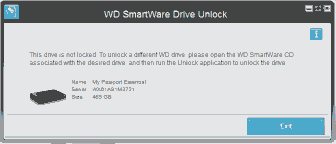
Even though giving up. I did some more hopeless fiddling and now have My Passport allocated to drive M and Unlocker to Drive E.
However I am getting an error as shown in the attached file. I cannot understand what I need do from that. :(
 

Attachments

  • unlocker is open error.gif
    unlocker is open error.gif
    2.9 KB · Views: 10

My Computer

Computer type
PC/Desktop
Computer Manufacturer/Model Number
Dell Inspiron 560MT
OS
Home Premium 64 bit
CPU
2.9 gigahertz Intel Core2 Duo 64 kilobyte primary memory cac
Motherboard
Board: Dell Inc. 0K83V0 A00 Serial Number: ..CN750939CP069B
Memory
4096 Megabytes Usable Installed Memory Slot 'DIMM0' has 102
Graphics Card(s)
ATI Radeon HD 4300/4500 Series
Sound Card
High Definition Audio Device NVIDIA High Definition Audio (
Monitor(s) Displays
DELL ST2210 [Monitor] (21.7"vis, s/n P479R01Q0VCU, January 2
Screen Resolution
1920x1080
Hard Drives
628.58 Gigabytes Usable Hard Drive Capacity
554.78 Gigabytes Hard Drive Free Space
Keyboard
Std Dell UK
Mouse
KEYBOARD, 105, UNITED KINGDOM, KWE9C0
Internet Speed
~8000 kbps
Antivirus
Avast Free
Browser
Chrome
Other Info
Office 2007: Photo Editing; Serif PhotoPlus X7
Hi! :)

Go to Device Manager and locate your external WD drive and check if it is activated. Reactivate it if you have to. (right clicking)

Good luck!

CK_WD
 

My Computer

Computer type
PC/Desktop
OS
Windows 7 Home Premium x64
Shown as working properly. No little yellow triangle.
 

My Computer

Computer type
PC/Desktop
Computer Manufacturer/Model Number
Dell Inspiron 560MT
OS
Home Premium 64 bit
CPU
2.9 gigahertz Intel Core2 Duo 64 kilobyte primary memory cac
Motherboard
Board: Dell Inc. 0K83V0 A00 Serial Number: ..CN750939CP069B
Memory
4096 Megabytes Usable Installed Memory Slot 'DIMM0' has 102
Graphics Card(s)
ATI Radeon HD 4300/4500 Series
Sound Card
High Definition Audio Device NVIDIA High Definition Audio (
Monitor(s) Displays
DELL ST2210 [Monitor] (21.7"vis, s/n P479R01Q0VCU, January 2
Screen Resolution
1920x1080
Hard Drives
628.58 Gigabytes Usable Hard Drive Capacity
554.78 Gigabytes Hard Drive Free Space
Keyboard
Std Dell UK
Mouse
KEYBOARD, 105, UNITED KINGDOM, KWE9C0
Internet Speed
~8000 kbps
Antivirus
Avast Free
Browser
Chrome
Other Info
Office 2007: Photo Editing; Serif PhotoPlus X7
If you have backed up your data from the drive, then I would suggest Reinstalling the device from Device Manager.

CK_WD
 

My Computer

Computer type
PC/Desktop
OS
Windows 7 Home Premium x64
Back
Top