Backup did not work as scheduled

motim

New member
Local time
6:05 AM
Messages
109
Hello,
A week ago made my first full backup with system image and Repair disk. Since then I get all the time a notice to make a backup, so today I opened "My computer" selected "C" properties, tools, clicked backup now - nothing happened, for several times. So I opened the "Task scheduler" set the present day and time, closed and waited but backup did not start. Again opened the Task scheduler, selected the backup line, this time clicked on the Green triangle (Run), only then the backup started asking what to backup until it ended, and deleted my previous backup - which I don't know why.
So here are my questions:
1. Possible reasons why backup did not start when clicked on "Backup now.."
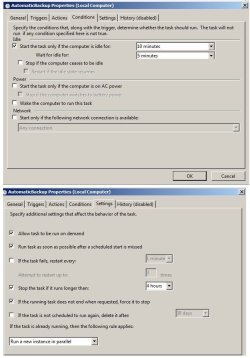
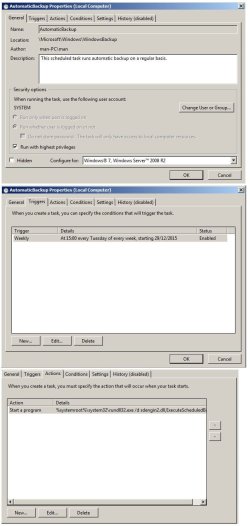
2. Possible reasons why backup did no start on schedule, attached here screenshots of "Task scheduler" windows backup settings.
3. Possible reasons why previous image backup deleted, I would like to keep one before the new.
4. Is the repair disk still good or do I have to make such disk on each backup ?
Well, I think its enough for now, and answers will be appreciated.
Thanks
Mordechai
PS, Excuse the size of screenshots, if I resize them they will not be readable.
 

Attachments
  • Task Scheduler Backup setting-1.jpg
    Task Scheduler Backup setting-1.jpg
    81.6 KB · Views: 1
  • Task Scheduler Backup setting-2.jpg
    Task Scheduler Backup setting-2.jpg
    64.9 KB · Views: 0

My Computer My Computer

Computer type
PC/Desktop
Computer Manufacturer/Model Number
custom built
OS
Windows 7 Pro 32 bit
CPU
intel celeron 2.66GH 2.56GH
Memory
2.00 GB
Graphics Card(s)
Nvidia fx5500
Hard Drives
Western digital
Antivirus
AVG
Browser
firefox
I don't like the built in Windows backup. I use Macrium Reflect (there is a free version) for making disc "images" (backup). Much better as Macrium will allow backing up the entire hard drive (all partitions) to another hard drive - either internal or USB connected. If the drive would fail or become corrupted it can be completely rebuilt at one time.

Macrium Reflect Free
 

My Computer My Computer

Computer type
PC/Desktop
Computer Manufacturer/Model Number
My Own Build
OS
Windows 10 64 bit
CPU
Intel i7 6700K
Motherboard
ASUS ROG Maximus VIII Hero
Memory
16GB Corsair Dominator
Graphics Card(s)
Intel CPU Graphics
Sound Card
RealTek
Monitor(s) Displays
27" Dell S2719dgf
Screen Resolution
2560X1440
Hard Drives
1 TB Samsung 850 EVO SSD for Win 10 Pro
500GB Samsung 850 EVO SSD for Win 10 Insider
2 TB drive for backup
PSU
EVGA Supernova 750G2
Case
BeQuiet Silent Base 600
Cooling
Deepcool Captain 120EX
Keyboard
Microsoft Wireless 2000
Mouse
Microsoft wireless
Internet Speed
100 MB/sec (Cable)
Antivirus
Microsoft Defender and Malwarebytes
Browser
Edge/Firefox
Other Info
Cakewalk (Sonar) by BandLab and Studio One 4.1 Pro recording studio software. MOTU 896Mk3 Hybrid recording interface, Frontier Tranzport wireless control unit, Behringer X-Touch Control Surface.
Five USB connected optical drives for CD Audio production using Nero BurningROM

My Computer My Computer

Computer Manufacturer/Model Number
HP, Dell, Gateway, Toshiba - 4 laptops and 2 desktops
OS
Vista, Windows7, Mint Mate, Zorin, Windows 8
CPU
from 1.6GHz Duo to i7
Monitor(s) Displays
2x HP w2207
Hard Drives
5x HDD, 7x SSD, 12x Externals
Keyboard
with trackball - no mices
Mouse
Trackball mice
Internet Speed
DSL 6000
Maintenance and bacup

Hello,
Before I install "Macrium reflect" and load the system with another program, then study how to use it, I would like to have a "second opinion" about the windows built-in backup program and take a look in the screenshots I sent, are the settings OK.
Thanks
Mordechai
PS, Any suggestions for a free "file finder" tool, the built-in "search" is slow and finds very few results.
Thanks again
 

My Computer My Computer

Computer type
PC/Desktop
Computer Manufacturer/Model Number
custom built
OS
Windows 7 Pro 32 bit
CPU
intel celeron 2.66GH 2.56GH
Memory
2.00 GB
Graphics Card(s)
Nvidia fx5500
Hard Drives
Western digital
Antivirus
AVG
Browser
firefox
If you do not want to install Macrium, here are instructions I once made on how to image with command prompt. That does not require any new program. Just download this PDF.
 

Attachments

My Computer My Computer

Computer Manufacturer/Model Number
HP, Dell, Gateway, Toshiba - 4 laptops and 2 desktops
OS
Vista, Windows7, Mint Mate, Zorin, Windows 8
CPU
from 1.6GHz Duo to i7
Monitor(s) Displays
2x HP w2207
Hard Drives
5x HDD, 7x SSD, 12x Externals
Keyboard
with trackball - no mices
Mouse
Trackball mice
Internet Speed
DSL 6000
PS, Any suggestions for a free "file finder" tool, the built-in "search" is slow and finds very few results.
Thanks again

Download the free "Everything" from voidtools.com.

Excellent, results virtually as fast as you can enter the search term.

It searches ONLY repeat ONLY file names. Not file contents.

A search for fran would find all file names containing that text string:

The history of frankfurters.doc
Frances the talking mule.jpg
Frank Sinatra - Fly Me To The Moon.mp3

A search for fran jpg would find the second above, but not the first and third.
 

My Computer My Computer

Computer type
PC/Desktop
Computer Manufacturer/Model Number
Ignatz Special; 4 speed manual gearbox; factory air conditioning; one of one
OS
Windows 7 Home Premium SP1, 64-bit
CPU
Intel Skylake i5-6600K, not overclocked
Motherboard
AsRock Z170M Extreme 4, micro ATX
Memory
8 GB HyperX DDR4-2666 (2 x 4 GB)
Graphics Card(s)
none; graphics are integrated on CPU
Sound Card
onboard: Realtek ALC1150; external: USB Behringer UF0-202
Monitor(s) Displays
Dell S2340M 23 inch IPS
Screen Resolution
1600 x 900
Hard Drives
System: Crucial MX100 series SSD, 128 GB;
Data: Samsung Spinpoint 103SJ, 1 TB;
Backup: WD Caviar Green WD30EZRX-00D8PB0, 3 TB
PSU
Rosewill SilentNight 500 watt fanless, semi-modular
Case
Antec Solo II
Cooling
Noctua NH-U12S; Noctua F12 intake, Noctua S12A exhaust
Keyboard
Microsoft 200 6JH-00001 USB
Mouse
Dell or Microsoft optical wired; USB
Antivirus
Microsoft Security Essentials and Malwarebytes Premium
Browser
Pale Moon
Other Info
All fans PWM; speeds at idle: CPU circa 500 rpm; intake circa 600 rpm; exhaust circa 600 rpm; CPU temps 27 idle and 47 C load in a warm room (27 C/81 F) when running Intel Extreme Tuning Utility stress test.
Back
Top