BottomLiner
New member
Hallo 
My computer is consistently failing to complete a backup including system image, regardless of the time (on a 24-hour clock) at which I attempt the backup. There have been successful backups in the past that required at least 6 to 7 hours to complete so my first thought was are all the services making the machine too busy? I've listed all the services, obtained via Task Manager, in the attachment services_all.pdf
But I lack the wisdom to know which services I may safely disable or uninstall.
Here, in attached screenshots and files, is how I set up the backup, and its epilogue:
Set_Up_Backup_01.jpg
Set_Up_Backup_02.jpg
Set_Up_Backup_03.jpg
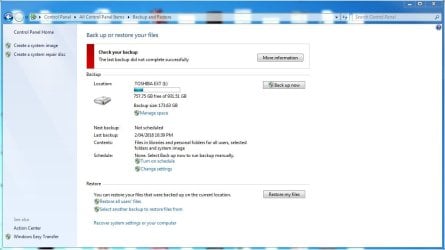
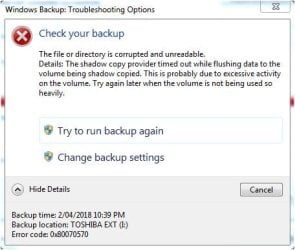
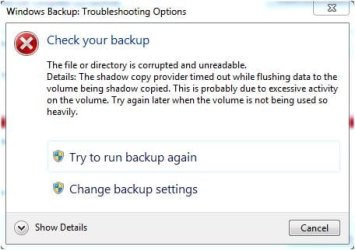
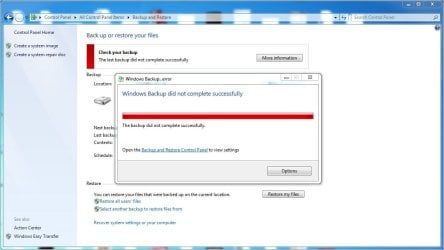
When the backup had completed ...
Windows_7_Backup_Error.jpg
Windows_7_Backup_Options.jpg
Windows_7_Backup_Options_Details.jpg
Settings.jpg
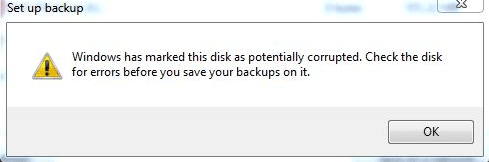
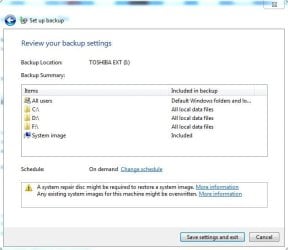
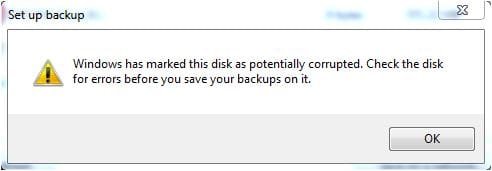
A suggestion that the backup destination TOSHIBA EXT [I:] might be corrupted ...
Set_Up_Backup_04.jpg
Running chkdsk I: /f /r > chkdsk_I.txt
did result in ...
... so I did a full (not quick) format of I:, ran chkdsk again, and got the 'all clear' on I:
But nothing seems to have changed. Another attempt to backup with system image included produced the same failed result. Which lead me to thinking that perhaps my computer is overloaded with services and applications.
Footnote: Although I have used Macrium Reflect v7.1 to do File and Folder backup, clone, and image I'd still like a successful backup from Windows 7 itself to use if ever I need to restore my computer to a previous configuration.
My computer is consistently failing to complete a backup including system image, regardless of the time (on a 24-hour clock) at which I attempt the backup. There have been successful backups in the past that required at least 6 to 7 hours to complete so my first thought was are all the services making the machine too busy? I've listed all the services, obtained via Task Manager, in the attachment services_all.pdf
But I lack the wisdom to know which services I may safely disable or uninstall.
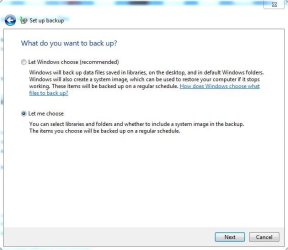
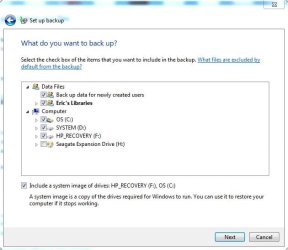
Here, in attached screenshots and files, is how I set up the backup, and its epilogue:
Set_Up_Backup_01.jpg
Set_Up_Backup_02.jpg
Set_Up_Backup_03.jpg
When the backup had completed ...
Windows_7_Backup_Error.jpg
Windows_7_Backup_Options.jpg
Windows_7_Backup_Options_Details.jpg
Settings.jpg
A suggestion that the backup destination TOSHIBA EXT [I:] might be corrupted ...
Set_Up_Backup_04.jpg
Running chkdsk I: /f /r > chkdsk_I.txt
did result in ...
Correcting errors in the Volume Bitmap.
Windows has made corrections to the file system.
... so I did a full (not quick) format of I:, ran chkdsk again, and got the 'all clear' on I:
But nothing seems to have changed. Another attempt to backup with system image included produced the same failed result. Which lead me to thinking that perhaps my computer is overloaded with services and applications.
Footnote: Although I have used Macrium Reflect v7.1 to do File and Folder backup, clone, and image I'd still like a successful backup from Windows 7 itself to use if ever I need to restore my computer to a previous configuration.
Attachments
-
 Set_Up_Backup_01.jpg37.9 KB · Views: 36
 -
 Set_Up_Backup_02.jpg38.7 KB · Views: 36
 -
 Set_Up_Backup_03.jpg38.6 KB · Views: 36
 -
 Set_Up_Backup_04.jpg16.7 KB · Views: 36
 -
 Settings.jpg68.2 KB · Views: 1
 -
 Windows_7_Backup_Options_Details.jpg31.6 KB · Views: 36
 -
 Windows_7_Backup_Options.jpg28.1 KB · Views: 36
 -
 Windows_7_Backup_Error.jpg72.7 KB · Views: 0
 -
services_all.pdf139 KB · Views: 1
My Computer
- Computer type
- PC/Desktop
- Computer Manufacturer/Model Number
- HP, Compaq
- OS
- Windows 7 Professional 64-bit SP1
- CPU
- AMD E-450 Zacate 40nm Technology
- Motherboard
- Foxconn 2ACA (CPU 1) 64 °C
- Memory
- 8.00GB DDR3 @ 672MHz (9-9-9-25)
- Graphics Card(s)
- LG FULL HD (1920x1080@60Hz) 384MB ATI AMD Radeon HD 6320 (HP
- Hard Drives
- 465GB SAMSUNG HD502HJ SATA Disk Device (SATA) 43 °C
931GB TOSHIBA External USB 3.0 USB Device (USB (SATA))
hp DVD RW AD-7251H5 SATA CdRom Device
- Antivirus
- HitmanPro.Alert, Malwarebytes Anti-Malware
- Browser
- Opera