
Backup HDD now not recognised following OS reinstall

BigJilm

New member
Local time
12:18 AM
Messages
9
Hi all,
I recently backed up my data after having a few issues and re-installed my OS using the recovery disks (Toshiba laptop). Now my Buffalo hard drive is not recognized at all and I cannot retrieve the data I saved.

My missus wants to kill me as it had all out wedding/kids pics :mad:

Disk Management shows removable (E) no media but I cannot do anything else and am cautious not to do anything that might risk the data further.

Hoping someone can help me.

Thanks, Jilm
 

My Computer My Computer

At a glance

Windows 7 Home Premium 64 bit
Computer type
Laptop
Computer Manufacturer/Model Number
Toshiba Satellite L750
OS
Windows 7 Home Premium 64 bit

My Computer My Computer

At a glance

Windows 10 Pro x64 ; Xubuntu x64Intel i7 860 @ 2.80 GHz O/C'ed to 4.0GHz16GB Corsair Vengance DDR3 @ 661 MHz Dual Cha...EVGA NVidia GTX 560 1024MB
Computer type
PC/Desktop
Computer Manufacturer/Model Number
Golden Mk. I.4
OS
Windows 10 Pro x64 ; Xubuntu x64
CPU
Intel i7 860 @ 2.80 GHz O/C'ed to 4.0GHz
Motherboard
Gigabyte P55A-UD3R Rev.1. Award BIOS F13
Memory
16GB Corsair Vengance DDR3 @ 661 MHz Dual Channel (9-9-9-24)
Graphics Card(s)
EVGA NVidia GTX 560 1024MB
Sound Card
Realtek Integrated
Monitor(s) Displays
Dual Samsung SyncMaster 2494HS
Screen Resolution
1920*1080 and 1920*1080
Hard Drives
1*Samsung 840 EVO 120GB SSD;
1*OCZ Vertex 2 60GB SSD;
2*Samsung F3 SpinPoint 1TB in RAID0;
1*Samsung F1 SpinPoint 1TB;
2*Western Digital 1TB External USB 3.0
1*Western Digital 500GB External USB 3.0
1*Seagate 500GB External USB 2.0
PSU
Thermaltake ToughPower QFan 750W
Case
Thermaltake Element S VK60001W2Z
Cooling
Corsair H60 Water Cooling, 2*230mm and 2*80mm case fans
Keyboard
Logitech G110
Mouse
Logitech MX518
No exclamation marks.
Its plugged into a USB 2.0 port
Do I have to install peppermint? That's what originally started my issues, hence the OS re-install?
 

My Computer My Computer

At a glance

Windows 7 Home Premium 64 bit
Computer type
Laptop
Computer Manufacturer/Model Number
Toshiba Satellite L750
OS
Windows 7 Home Premium 64 bit
What do you mean "That's what originally started my issues".

No you don't install Peppermint - please read tutorial.
 

My Computer My Computer

At a glance

Windows 10 Pro x64 ; Xubuntu x64Intel i7 860 @ 2.80 GHz O/C'ed to 4.0GHz16GB Corsair Vengance DDR3 @ 661 MHz Dual Cha...EVGA NVidia GTX 560 1024MB
Computer type
PC/Desktop
Computer Manufacturer/Model Number
Golden Mk. I.4
OS
Windows 10 Pro x64 ; Xubuntu x64
CPU
Intel i7 860 @ 2.80 GHz O/C'ed to 4.0GHz
Motherboard
Gigabyte P55A-UD3R Rev.1. Award BIOS F13
Memory
16GB Corsair Vengance DDR3 @ 661 MHz Dual Channel (9-9-9-24)
Graphics Card(s)
EVGA NVidia GTX 560 1024MB
Sound Card
Realtek Integrated
Monitor(s) Displays
Dual Samsung SyncMaster 2494HS
Screen Resolution
1920*1080 and 1920*1080
Hard Drives
1*Samsung 840 EVO 120GB SSD;
1*OCZ Vertex 2 60GB SSD;
2*Samsung F3 SpinPoint 1TB in RAID0;
1*Samsung F1 SpinPoint 1TB;
2*Western Digital 1TB External USB 3.0
1*Western Digital 500GB External USB 3.0
1*Seagate 500GB External USB 2.0
PSU
Thermaltake ToughPower QFan 750W
Case
Thermaltake Element S VK60001W2Z
Cooling
Corsair H60 Water Cooling, 2*230mm and 2*80mm case fans
Keyboard
Logitech G110
Mouse
Logitech MX518
Hi Golden,

Sorry, long story - I installed peppermint 5 on my laptop and had issues with the bootup sequence (ie selecting which OS etc) and played around with it ultimately deleting wrong partitions etc hence why I decided to re install windows 7.

Sorry, I have gone through the tutorial and am downloading peppermint 5 (I assume that will work instead of peppermint 3?). Will post once I have followed the tutorial.

Thanks again!
 

My Computer My Computer

At a glance

Windows 7 Home Premium 64 bit
Computer type
Laptop
Computer Manufacturer/Model Number
Toshiba Satellite L750
OS
Windows 7 Home Premium 64 bit
Hi Golden,

I booted from the USB and started live mode. The tutorial seems to be more about recovering files from the laptop, where I am after files in my external HDD. I tried plugging the hard drive into a spare USB2.0 and it still did not recognise the drive. The drive did start-up and hum when I plugged it in, but no drive appeared in the file manager "places"
 

My Computer My Computer

At a glance

Windows 7 Home Premium 64 bit
Computer type
Laptop
Computer Manufacturer/Model Number
Toshiba Satellite L750
OS
Windows 7 Home Premium 64 bit

My Computer My Computer

At a glance

Windows 10 Pro x64 ; Xubuntu x64Intel i7 860 @ 2.80 GHz O/C'ed to 4.0GHz16GB Corsair Vengance DDR3 @ 661 MHz Dual Cha...EVGA NVidia GTX 560 1024MB
Computer type
PC/Desktop
Computer Manufacturer/Model Number
Golden Mk. I.4
OS
Windows 10 Pro x64 ; Xubuntu x64
CPU
Intel i7 860 @ 2.80 GHz O/C'ed to 4.0GHz
Motherboard
Gigabyte P55A-UD3R Rev.1. Award BIOS F13
Memory
16GB Corsair Vengance DDR3 @ 661 MHz Dual Channel (9-9-9-24)
Graphics Card(s)
EVGA NVidia GTX 560 1024MB
Sound Card
Realtek Integrated
Monitor(s) Displays
Dual Samsung SyncMaster 2494HS
Screen Resolution
1920*1080 and 1920*1080
Hard Drives
1*Samsung 840 EVO 120GB SSD;
1*OCZ Vertex 2 60GB SSD;
2*Samsung F3 SpinPoint 1TB in RAID0;
1*Samsung F1 SpinPoint 1TB;
2*Western Digital 1TB External USB 3.0
1*Western Digital 500GB External USB 3.0
1*Seagate 500GB External USB 2.0
PSU
Thermaltake ToughPower QFan 750W
Case
Thermaltake Element S VK60001W2Z
Cooling
Corsair H60 Water Cooling, 2*230mm and 2*80mm case fans
Keyboard
Logitech G110
Mouse
Logitech MX518
OK, Here it is...

The drive (E) is the one. It should actually be 2 TB, not 650 MB so that seems to be my issue.

I had a local computer shop plug into one of their systems and it came up correct and had all files accessible but they weren't helpful beyond that.

disk management.PNG
 

My Computer My Computer

At a glance

Windows 7 Home Premium 64 bit
Computer type
Laptop
Computer Manufacturer/Model Number
Toshiba Satellite L750
OS
Windows 7 Home Premium 64 bit
*bump* can anyone help?
 

My Computer My Computer

At a glance

Windows 7 Home Premium 64 bit
Computer type
Laptop
Computer Manufacturer/Model Number
Toshiba Satellite L750
OS
Windows 7 Home Premium 64 bit
Can you browse E:in Windows Explorer?
 

My Computer My Computer

At a glance

Windows 10 Pro x64 ; Xubuntu x64Intel i7 860 @ 2.80 GHz O/C'ed to 4.0GHz16GB Corsair Vengance DDR3 @ 661 MHz Dual Cha...EVGA NVidia GTX 560 1024MB
Computer type
PC/Desktop
Computer Manufacturer/Model Number
Golden Mk. I.4
OS
Windows 10 Pro x64 ; Xubuntu x64
CPU
Intel i7 860 @ 2.80 GHz O/C'ed to 4.0GHz
Motherboard
Gigabyte P55A-UD3R Rev.1. Award BIOS F13
Memory
16GB Corsair Vengance DDR3 @ 661 MHz Dual Channel (9-9-9-24)
Graphics Card(s)
EVGA NVidia GTX 560 1024MB
Sound Card
Realtek Integrated
Monitor(s) Displays
Dual Samsung SyncMaster 2494HS
Screen Resolution
1920*1080 and 1920*1080
Hard Drives
1*Samsung 840 EVO 120GB SSD;
1*OCZ Vertex 2 60GB SSD;
2*Samsung F3 SpinPoint 1TB in RAID0;
1*Samsung F1 SpinPoint 1TB;
2*Western Digital 1TB External USB 3.0
1*Western Digital 500GB External USB 3.0
1*Seagate 500GB External USB 2.0
PSU
Thermaltake ToughPower QFan 750W
Case
Thermaltake Element S VK60001W2Z
Cooling
Corsair H60 Water Cooling, 2*230mm and 2*80mm case fans
Keyboard
Logitech G110
Mouse
Logitech MX518
......I had a local computer shop plug into one of their systems and it came up correct and had all files accessible but they weren't helpful beyond that.......

That should absolve your Buffalo :) of any foul play and we now have to turn our attention onto your Toshiba Laptop.
It could be, to my little knowledge, a defective controller chip on the motherboard or a driver problem.

1.What exactly was the problem with the laptop that prompted you to backup and do a factory restore?

2.What happens when you plug in another External HDD? Are you able to read and write to it? You have to do it and let us know. If need be take it to the same computer shop and ask them to do it.

I would also suggest that you look for the latest chipset drivers for your Toshiba laptop and install it. Check whether it resolves your problem. ( Infact download all latest drivers for your laptop from Toshiba website and keep those ready, wipe your laptop HDD clean, reinstall with the recovery disks with the Internet disconnected ( to prevent Windows from installing any drivers), install the website drivers then connect to the internet and update Windows completely.After that connect your Buffalo and check. Whatever you do if "Safely Remove" Icon appears in the tray, always use it to remove the external drive.)
 

My Computer My Computer

At a glance

Windows 7 Home Premium 32 bit
OS
Windows 7 Home Premium 32 bit
Can you browse E:in Windows Explorer?

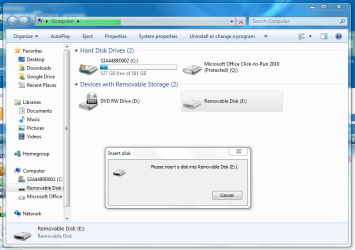
No. Its visible, but when I try to access it I get the below request. I remember I used to get two drives come up when I plugged it in. The Buffalo HXU drive (E) and then a second (F) drive.

Edrive.PNG
 

My Computer My Computer

At a glance

Windows 7 Home Premium 64 bit
Computer type
Laptop
Computer Manufacturer/Model Number
Toshiba Satellite L750
OS
Windows 7 Home Premium 64 bit
.

1.What exactly was the problem with the laptop that prompted you to backup and do a factory restore?

2.What happens when you plug in another External HDD? Are you able to read and write to it? You have to do it and let us know. If need be take it to the same computer shop and ask them to do it.

1. The laptop had been a bit buggy for a while, and I installed peppermint 5 to have something fast that I could quickly access google docs for my uni work. However I found my uni stuff needed a greater amount of windows apps so when trying to make windows the default OS on start up I think I inadvertently deleted an important partition and nothing was booting. Hence why I re-installed win7

2. Yeah, I can read/write to other HDDs just fine.

I remember the first time after re-installing I got the HDD up fine, but again played around with something ( I cant remember what) and now it doesn't see it? I'm not very knowledgeable on this stuff sorry. :confused:
 

My Computer My Computer

At a glance

Windows 7 Home Premium 64 bit
Computer type
Laptop
Computer Manufacturer/Model Number
Toshiba Satellite L750
OS
Windows 7 Home Premium 64 bit
:) I can't guess what you could have played around with to bring that event and that only to that Buffalo external drive.

Try a System Restore to a point before you did that play around.

If not, do a fresh factory restore and see whether it brings back your Buffalo drive into action. Keep that drive unplugged till you complete the Restore.

EDIT: Please furnish full particulars of your Buffalo external drive. Model No/Name/capacity. Does it require some software to be installed? And is it that you did?
 
Last edited:

My Computer My Computer

At a glance

Windows 7 Home Premium 32 bit
OS
Windows 7 Home Premium 32 bit
OK, I did the restore but didnt have a point early enough. I tried the earliest point but it had no affect.

I reinstalled windows again and now the HDD wont even appear under removable storage like it had before. It still appears in disk manager though.

The buffalo drive is HD-HX2.0TU3-AP
It did have software which I installed when originally backing up. After re installation (first time) I was able to load software but it did not provide any detail on stored backups. Now I cant even get to the point to download software.
 

My Computer My Computer

At a glance

Windows 7 Home Premium 64 bit
Computer type
Laptop
Computer Manufacturer/Model Number
Toshiba Satellite L750
OS
Windows 7 Home Premium 64 bit
OK, at this point it is more or less evident that the backup software/ other software with which you might have played with has mucked up your drive in some inexplicable way.

I am really not sure how to untangle it. Your data may still be there.

At this point:

1. Try your Buffalo drive again on another computer as you did earlier in the Computer shop. If your data is accessible copy those into another external drive.

2. Just so that other experts may chip in post a) screenshot of Device Manager if the drive appears therein b) a screenshot of Windows Disk Management ( You said Disk Manager- I am not sure whether you mean Device Manager or Windows Disk Management.) ( Since it is a fresh install, current state of affairs is what is needed. Old screenshots are no longer relevant.)

3. If #1 is not successful, then I would make yet another attempt to access the drive with Live Linux - this time with Lucid Puppy.

Download Lucid Puppy (Ubuntu Compatible Build) version 5.2.8 ISO (132.6 MB) Download latest Puppy Linux release

Create your bootable pen drive using Rufus v 1.4.10 (616KB) Backup all data on your pen drive before using Rufus since all that will be lost when Rufus formats it.

With your pendrive connected, run Rufus, check your correct pen drive is selected.
In "Create a bootable disk using" select ISO Image with the dropdown arrow. (Leave everything else to default.)
Cick on the Disk icon next to it and select the Lucid Puppy ISO.

Click on Start and allow Rufus to complete writing the ISO to the pendrive.

Close Rufus.

Now connect your problem external drive and another external drive on which you want to copy the recovered files and then reboot your computer.

Use the one-time boot menu and boot from the USB pendrive.

Wait for Lucid Puppy to load and you will be in the Lucid Puppy desktop.

On how to use Lucid Puppy see Lucid Puppy way to recover files from a non-bootable computer ( Read only what is under the topic Recovering files from the non-bootable Internal Drive: - In your case it will be your Buffalo external drive.)

Please note that all partitions will appear as drives and you should be able to recognise them by their size.

Let us see how things workout.
 
Last edited:

My Computer My Computer

At a glance

Windows 7 Home Premium 32 bit
OS
Windows 7 Home Premium 32 bit
Back
Top