
Solved Backup Image with Windows Backup and Restore

huffman

New member
Pro User
Local time
8:14 PM
Messages
715
I have been using Acronis Rescue disk to make images of my system. It works fine, but is a pain because I have open up the case and disconnect my secondary hard drive and change from my wireless mouse to a wired mouse. So I decided to try to the built-in Backup and Restore in Win 7 Pro and backup to an external hard drive.

In preparation for backing up my system partition, I do the following:
Clean all cookies, internet files and History.
Remove all restore points except the last one.
Run Malwarebytes
Run MSE version 2
Run Ccleaner (not messing with registry)
Run Smart Defrag (lastest version)
I then reboot and hook up the external hard drive

I then go into the Control Panel and select Backup and Restore. I set where I want the image to be created and start the backup. Everything looks normal for a while.

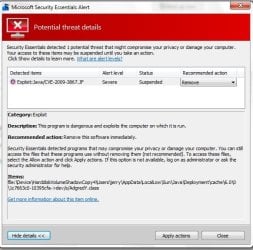
After about 4-5 minutes, NSE shows the below:
backup1.jpg

This is the only time NSE ever detects this and it detects it every time I try to backup. I have had NSE remove it or leave it alone. It does not matter.

Eventually I get the notice that the backup did not complete sucessfully.
diskclean2.jpg

I check the Events log and got this:

backup3.jpg

I have been through this several times and it occurs this way every time.

I would like some help solving this issue. Any help would be be greatly appreciated.
 

My Computer My Computer

OS
Windows 7 Pro
CPU
Intel(R) Pentium(R) Duel CPU E2200 2.20 Ghz
Motherboard
GA-G41M-ES2L
Memory
4 gb 2.96 Usable
Graphics Card(s)
Onboard
Sound Card
Onboard
Hard Drives
2 - 1TB WD Sata Drives

My Computer My Computer

Computer Manufacturer/Model Number
Custom Build
OS
Windows 7 Pro/32 Academic. Build 7600
CPU
Intel 2.3 Duo core
Motherboard
EliteGroup G31T-M
Memory
4 GB DDR
Graphics Card(s)
Nvidia GeForce 9500 GT
Sound Card
Built in
Monitor(s) Displays
Viewsonic 15" 4:3
Screen Resolution
1280 x 1024
Hard Drives
WD Caviar Black 750 GB
WD 250 GB External
PSU
Antec 450w
Keyboard
Standard windows
Mouse
Logitech USB
Internet Speed
Bellsouth DSL 6.0
mborner thanks for the reply.

I read the article and followed the instructions. Running a ful scan with MSE is not something I want to do often since it took 3.5 hours.

Full scan did NOT find the virus as in indicated in my first post, but it did find another one that quick scan did NOT find.

This morning I hooked up the external hard drive and ran Backup and Restore again. This time it seems to have made the backup, so I am assuming that the virus was the cause of problem I was having.

Thank you very much
 

My Computer My Computer

OS
Windows 7 Pro
CPU
Intel(R) Pentium(R) Duel CPU E2200 2.20 Ghz
Motherboard
GA-G41M-ES2L
Memory
4 gb 2.96 Usable
Graphics Card(s)
Onboard
Sound Card
Onboard
Hard Drives
2 - 1TB WD Sata Drives
I just migrated from McAfee (+ Malwarebytes) to MSE (+Malwarebytes) and did my first full scan with MSE which took a LONGGGG time. I got the same notification from MSE. It was found in a file/folder backup set .zip file. (Not an image)

While I was deciding what to do MSE decided for me. It deleted the "offender" and the whole backup .zip file from the set. This effectively makes the backup set useless! This is a real worry.

I have previously had a great run with MS imaging and file/folder backup I sense BIG problems ahead now with MSE!!!!
 

My Computer My Computer

Computer type
PC/Desktop
Computer Manufacturer/Model Number
Own build
OS
Windows 7x64 Home Premium SP1
CPU
Intel i7 2600k
Motherboard
ASUS P8Z68 Deluxe
Memory
G.Skill Ripjaws (DDR3-1600) 2x4GB
Graphics Card(s)
Nvidia GeForce GTS 450; Intel HD Graphics 3000(GT2+)
Monitor(s) Displays
Dell Ultrasharp IPS panel U2311H, Samsung SyncMaster P2350
Screen Resolution
1920x1080
Hard Drives
Samsung 850 Pro SSD 256GB, Samsung SSD 840 120GB, Seagates 1TB Barracuda ST31000528AS x2
PSU
Seasonic M12II 520W
Case
Lian Li Lancool PC-K60
Cooling
Case: 1x120mm, 3x140mm CPU: Hyper 212+
Keyboard
Logitech MK520 (wireless)
Mouse
Logitech MK520
Internet Speed
6-7 Mbps
Antivirus
Norton Security Premium, Malwarebytes on 2 (MSE on 3rd PC)
Browser
FireFox
Other Info
Audio: Logitech Z523 2.1
Is the latest version of Java installed? I believe 1.6.0.23 is the latest and earlier versions were susceptible to this Java exploit.
 

My Computer My Computer

Computer type
Laptop
Computer Manufacturer/Model Number
Sony Vaio VPCEB47GM Laptop
OS
Win 7 Pro 64-bit
CPU
Intel i5 2.4 Ghz
Memory
8GB DDR3
Graphics Card(s)
Intel HD 3000
Sound Card
IDT High Definition
Monitor(s) Displays
15.6 WGXA Anti-Glare LED
Screen Resolution
1280x800
Hard Drives
640Gb 7200rpm
Antivirus
MSE
Browser
Opera (primary) with IE9 backup
Is the latest version of Java installed? I believe 1.6.0.23 is the latest and earlier versions were susceptible to this Java exploit.
I believe I have the latest version whatever it is.
But this is not the issue for me.
The issue is how MSE is behaving in an imaging or file/folder backup situation. Take the way my backup was effectively destroyed and the OP's original situation. This is unacceptable for me.
When I was using McAfee it was not allowed to interfere like this.
 

My Computer My Computer

Computer type
PC/Desktop
Computer Manufacturer/Model Number
Own build
OS
Windows 7x64 Home Premium SP1
CPU
Intel i7 2600k
Motherboard
ASUS P8Z68 Deluxe
Memory
G.Skill Ripjaws (DDR3-1600) 2x4GB
Graphics Card(s)
Nvidia GeForce GTS 450; Intel HD Graphics 3000(GT2+)
Monitor(s) Displays
Dell Ultrasharp IPS panel U2311H, Samsung SyncMaster P2350
Screen Resolution
1920x1080
Hard Drives
Samsung 850 Pro SSD 256GB, Samsung SSD 840 120GB, Seagates 1TB Barracuda ST31000528AS x2
PSU
Seasonic M12II 520W
Case
Lian Li Lancool PC-K60
Cooling
Case: 1x120mm, 3x140mm CPU: Hyper 212+
Keyboard
Logitech MK520 (wireless)
Mouse
Logitech MK520
Internet Speed
6-7 Mbps
Antivirus
Norton Security Premium, Malwarebytes on 2 (MSE on 3rd PC)
Browser
FireFox
Other Info
Audio: Logitech Z523 2.1
I feel your frustration. I was thinking that perhaps an infected version of Java was in place at the time the image/backup was created. If that was the case (and I'm not saying it was, just that it could have been) then MSE did its job in finding the exploit. I fully agree that MSE should not have deleted anything without first asking what you wanted to do, if that's the way it was set up using the Settings tab. Under Default Actions the user is able to choose between Remove, Quarantine or Allow a detected threat. Perhaps the Default Action was somehow changed to Remove. OTOH, if it was set to Quarantine or Allow but deleted the "offender" anyway, this is definitely a problem.

Likewise, the Settings tab also allows one to Exclude Files & Locations, File Types, and Processes. Perhaps one of these settings changed to allow MSE to scan and delete.
 

My Computer My Computer

Computer type
Laptop
Computer Manufacturer/Model Number
Sony Vaio VPCEB47GM Laptop
OS
Win 7 Pro 64-bit
CPU
Intel i5 2.4 Ghz
Memory
8GB DDR3
Graphics Card(s)
Intel HD 3000
Sound Card
IDT High Definition
Monitor(s) Displays
15.6 WGXA Anti-Glare LED
Screen Resolution
1280x800
Hard Drives
640Gb 7200rpm
Antivirus
MSE
Browser
Opera (primary) with IE9 backup
I admit I'm new to MSE but my confidence levels are sinking fast.
The Default actions appear to be:
1) Recommended
2) Remove
3) Quarantine

My defaults were set to Recommended which for severe alerts are remove immediately. Option 2) forces a remove and option 3) places in quarantine.

The words sound reasonable but the consequences for ALL options have the potential to cause serious problems with an imaging or file/folder backup situation. If removing or quarantining the offending item allowed the backup and restore processes to continue then there may not be an issue. But this appears not to be the case. Furthermore a scan has the potential to destroy a complete backup because of one bad applet - funny pun hey!

It looks like a case of Dracula in charge of the bloodbank.

For me MSE is on borrowed time.
 

My Computer My Computer

Computer type
PC/Desktop
Computer Manufacturer/Model Number
Own build
OS
Windows 7x64 Home Premium SP1
CPU
Intel i7 2600k
Motherboard
ASUS P8Z68 Deluxe
Memory
G.Skill Ripjaws (DDR3-1600) 2x4GB
Graphics Card(s)
Nvidia GeForce GTS 450; Intel HD Graphics 3000(GT2+)
Monitor(s) Displays
Dell Ultrasharp IPS panel U2311H, Samsung SyncMaster P2350
Screen Resolution
1920x1080
Hard Drives
Samsung 850 Pro SSD 256GB, Samsung SSD 840 120GB, Seagates 1TB Barracuda ST31000528AS x2
PSU
Seasonic M12II 520W
Case
Lian Li Lancool PC-K60
Cooling
Case: 1x120mm, 3x140mm CPU: Hyper 212+
Keyboard
Logitech MK520 (wireless)
Mouse
Logitech MK520
Internet Speed
6-7 Mbps
Antivirus
Norton Security Premium, Malwarebytes on 2 (MSE on 3rd PC)
Browser
FireFox
Other Info
Audio: Logitech Z523 2.1
I would never try to talk someone into using something they don't like. So FWIW, if you want to use something basic in place of MSE, I'd suggest you give Avast free a try.

avast! Free Antivirus - Download Software for Virus Protection

Don't want to hijack this thread away from its intended purpose but I've been running Avast alongside MSE without any issues. Avast has apparently been optimized to work with MSE and Windows 7. It's also lightweight and doesn't use up resources like McAfee. I'd also continue using Malwarebytes as an on-demand scanner. One other thought is to use a separate hard drive to store any images or backups. When it comes time to run an anti-malware scan, remove that drive from the scan process. Absolutely no way will anything be deleted if the drive isn't recognized as being there. :)

And there's always one bad applet to spoil the bunch!
 

My Computer My Computer

Computer type
Laptop
Computer Manufacturer/Model Number
Sony Vaio VPCEB47GM Laptop
OS
Win 7 Pro 64-bit
CPU
Intel i5 2.4 Ghz
Memory
8GB DDR3
Graphics Card(s)
Intel HD 3000
Sound Card
IDT High Definition
Monitor(s) Displays
15.6 WGXA Anti-Glare LED
Screen Resolution
1280x800
Hard Drives
640Gb 7200rpm
Antivirus
MSE
Browser
Opera (primary) with IE9 backup
Thanks Marsmimar, your advice is appreciated.

I think I/we are very much aligned with the purpose of the thread. This is much more important than a personal preference issue.

My real issue is aligned with what the OP raised.
Here is what I expect
Once I commit to making an image the MSE subsystem should not under any circumstances terminate the imaging process by default.

This is what I think is required from a security subsystem:
1) Make the image - alert user to the presence of malware. [Default setting]
2) Make the image - either remove or quarantine malware in the process. [User setting - Recommended]
3) Terminate the image - if malware is detected. [User setting - Optional]

All the above should apply to Windows file/folder (zip) backup as well.

A possible solution may be to unplug your modem (as I normally do) , turn MSE off when doing any sort of backup. Never scan your backup HDDs with MSE.
Is this really acceptable?
 

My Computer My Computer

Computer type
PC/Desktop
Computer Manufacturer/Model Number
Own build
OS
Windows 7x64 Home Premium SP1
CPU
Intel i7 2600k
Motherboard
ASUS P8Z68 Deluxe
Memory
G.Skill Ripjaws (DDR3-1600) 2x4GB
Graphics Card(s)
Nvidia GeForce GTS 450; Intel HD Graphics 3000(GT2+)
Monitor(s) Displays
Dell Ultrasharp IPS panel U2311H, Samsung SyncMaster P2350
Screen Resolution
1920x1080
Hard Drives
Samsung 850 Pro SSD 256GB, Samsung SSD 840 120GB, Seagates 1TB Barracuda ST31000528AS x2
PSU
Seasonic M12II 520W
Case
Lian Li Lancool PC-K60
Cooling
Case: 1x120mm, 3x140mm CPU: Hyper 212+
Keyboard
Logitech MK520 (wireless)
Mouse
Logitech MK520
Internet Speed
6-7 Mbps
Antivirus
Norton Security Premium, Malwarebytes on 2 (MSE on 3rd PC)
Browser
FireFox
Other Info
Audio: Logitech Z523 2.1
I am sure I have Java installed since every once in a while it says it needs to be updated (which I do). It is also listed in my Revo Uninstaller. I have no idea what version or how to find that information.

Ahhhhhhhh in the folder where it is installed, it says "jre6"; if that gives a clue.
 

My Computer My Computer

OS
Windows 7 Pro
CPU
Intel(R) Pentium(R) Duel CPU E2200 2.20 Ghz
Motherboard
GA-G41M-ES2L
Memory
4 gb 2.96 Usable
Graphics Card(s)
Onboard
Sound Card
Onboard
Hard Drives
2 - 1TB WD Sata Drives
If you go into control panel > programs and features, scroll down to Java and then scroll across to the far right. You should see the version there.
 

My Computer My Computer

Computer type
Laptop
Computer Manufacturer/Model Number
Sony Vaio VPCEB47GM Laptop
OS
Win 7 Pro 64-bit
CPU
Intel i5 2.4 Ghz
Memory
8GB DDR3
Graphics Card(s)
Intel HD 3000
Sound Card
IDT High Definition
Monitor(s) Displays
15.6 WGXA Anti-Glare LED
Screen Resolution
1280x800
Hard Drives
640Gb 7200rpm
Antivirus
MSE
Browser
Opera (primary) with IE9 backup
Thanks Marsmimar, your advice is appreciated.

I think I/we are very much aligned with the purpose of the thread. This is much more important than a personal preference issue.

My real issue is aligned with what the OP raised.
Here is what I expect
Once I commit to making an image the MSE subsystem should not under any circumstances terminate the imaging process by default.

This is what I think is required from a security subsystem:
1) Make the image - alert user to the presence of malware. [Default setting]
2) Make the image - either remove or quarantine malware in the process. [User setting - Recommended]
3) Terminate the image - if malware is detected. [User setting - Optional]

All the above should apply to Windows file/folder (zip) backup as well.

A possible solution may be to unplug your modem (as I normally do) , turn MSE off when doing any sort of backup. Never scan your backup HDDs with MSE.
Is this really acceptable?

Unless I'm misunderstanding your reasoning, you wouldn't want to re-install with a backup that contains a virus, so wouldn't you want it scanned, too?
 

My Computer My Computer

Computer type
PC/Desktop
Computer Manufacturer/Model Number
Self build
OS
Windows 10 Home
CPU
Intel Core i5 3550
Motherboard
ASUS P8Z77-V LX (LGA1155)
Memory
Corsair Vengeance DDR3 16GB
Graphics Card(s)
Nvidia GEForce GTX 970 SSC
Monitor(s) Displays
Hanns-G 23.6", Acer 17"
Screen Resolution
1920x1080, 1440x900
Hard Drives
Sandisk SSD 256 GB
WD500GB
WD640GB
Seagage Ultra + 1TB ext.
BWD 800GB
WD 1TB ext
PSU
Antec 650w
Case
Cooler Master Centurion 534
Cooling
COOLER MASTER GeminII S524, 3 120 mm case fans.
Keyboard
Logitech MK300
Mouse
Logitech MK300
Internet Speed
Cable
Antivirus
MSSE, Malwarebytes
Browser
IE 10, Chrome
I think what mjf is saying is, based on his bad experience with MSE nuking his backup without letting him decide if that's what he wanted, he's hesitant to let MSE do any more scanning. Ideally, as you've suggested, you would want your anti-malware to scan your backup for that very reason: to not install any infected files or folders. But if you have to turn MSE off to avoid having it automatically delete any infected files/folders, it may not be the best product to use.
 

My Computer My Computer

Computer type
Laptop
Computer Manufacturer/Model Number
Sony Vaio VPCEB47GM Laptop
OS
Win 7 Pro 64-bit
CPU
Intel i5 2.4 Ghz
Memory
8GB DDR3
Graphics Card(s)
Intel HD 3000
Sound Card
IDT High Definition
Monitor(s) Displays
15.6 WGXA Anti-Glare LED
Screen Resolution
1280x800
Hard Drives
640Gb 7200rpm
Antivirus
MSE
Browser
Opera (primary) with IE9 backup
I may be wrong, but I think if you change from Recommended to Quarantine at the Severe and High Alert levels, it won't automatically delete the file. At least that's my interpretation of it.
 

My Computer My Computer

Computer type
PC/Desktop
Computer Manufacturer/Model Number
Self build
OS
Windows 10 Home
CPU
Intel Core i5 3550
Motherboard
ASUS P8Z77-V LX (LGA1155)
Memory
Corsair Vengeance DDR3 16GB
Graphics Card(s)
Nvidia GEForce GTX 970 SSC
Monitor(s) Displays
Hanns-G 23.6", Acer 17"
Screen Resolution
1920x1080, 1440x900
Hard Drives
Sandisk SSD 256 GB
WD500GB
WD640GB
Seagage Ultra + 1TB ext.
BWD 800GB
WD 1TB ext
PSU
Antec 650w
Case
Cooler Master Centurion 534
Cooling
COOLER MASTER GeminII S524, 3 120 mm case fans.
Keyboard
Logitech MK300
Mouse
Logitech MK300
Internet Speed
Cable
Antivirus
MSSE, Malwarebytes
Browser
IE 10, Chrome
If you read my posts #8 and #10 again the issue the OP raised and of concern to me still exists. It appears that the MSE subsystem is poorly integrated into the Backup & restore subsystem.
My suggestions in post #10 is the way malware should be dealt with in an imaging context.

The fact that the malware was detected of course is good. The OS should deal with it and procede appropriately. Terminating the imaging process is not appropriate. Deleting a complete backup zip file because one of its elements was detected malware is inappropriate.
(I know exactly what the offending Java applet is in this example, that's not the issue.)

I don't know who ticked this thread as a resolved issue? -It isn't.
However, it is for me, I'm no longer using MSE.
 

My Computer My Computer

Computer type
PC/Desktop
Computer Manufacturer/Model Number
Own build
OS
Windows 7x64 Home Premium SP1
CPU
Intel i7 2600k
Motherboard
ASUS P8Z68 Deluxe
Memory
G.Skill Ripjaws (DDR3-1600) 2x4GB
Graphics Card(s)
Nvidia GeForce GTS 450; Intel HD Graphics 3000(GT2+)
Monitor(s) Displays
Dell Ultrasharp IPS panel U2311H, Samsung SyncMaster P2350
Screen Resolution
1920x1080
Hard Drives
Samsung 850 Pro SSD 256GB, Samsung SSD 840 120GB, Seagates 1TB Barracuda ST31000528AS x2
PSU
Seasonic M12II 520W
Case
Lian Li Lancool PC-K60
Cooling
Case: 1x120mm, 3x140mm CPU: Hyper 212+
Keyboard
Logitech MK520 (wireless)
Mouse
Logitech MK520
Internet Speed
6-7 Mbps
Antivirus
Norton Security Premium, Malwarebytes on 2 (MSE on 3rd PC)
Browser
FireFox
Other Info
Audio: Logitech Z523 2.1
Back
Top