
Backup is Too Big

swamped

New member
Local time
1:52 AM
Messages
24
Been poring through these forum pages for backup methods, but can't find an answer to my problem, so thought I'd make my first post and ask:

Windows 7 64 bit -
I have a 2 TB hdd for backup up files (mostly photos), but my files come to 1.5 TB, and the drive fills in no time once the incremental backups begin. It takes about 18 hours to do one full backup and it's getting ridiculous in terms of time to delete them all and start over. Is there another way to handle this?
I'm wondering about unplugging the 2 TB hdd and saving it, dropping in a new one and then just copy/paste any changes or new work to that.
But in the event of a crash, would I still be able to recover files from the full backup hdd I previously removed?
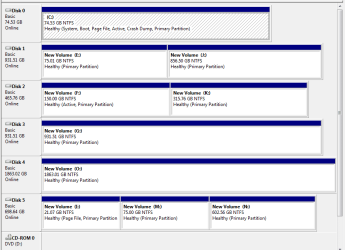
disks.PNG
 

My Computer

Computer type
PC/Desktop
Computer Manufacturer/Model Number
Homebuilt
OS
Windows 7 Ultimate x64
CPU
i7 930 A 2.8 GHz
Motherboard
Gigabyte X58A-UD3R
Memory
12 GB
Graphics Card(s)
NVidia GeForce GTX 470, NVidia GeForce 8800 GT
Monitor(s) Displays
2 Necs, 1 Dell
Hard Drives
Intel SSD
Seagate 1 TB
Seagate 1 TB
Seagate 2 TB
Seagate 500 GB
Seagate 759 GB
Case
Lian Li
Cooling
8 Fans
The answer would be yes.
 

My Computer

Computer Manufacturer/Model Number
Alienware
OS
Windows 7 Ultimate x64
CPU
I7
Motherboard
GA-X58-USB3
Memory
6 x 1.5V DDR3 DIMM sockets supporting up to 24 GB of system
Graphics Card(s)
GeForce GTX 580
Sound Card
Realtek ALC892 codec 2/4/5.1/7.1-channel
Monitor(s) Displays
NEC Display Solutions E321 Black 32"
Screen Resolution
1366 x 768
Hard Drives
OCZ Colossus LT Series OCZSSD2-1CLSLT1T 3.5" 1TB SATA II MLC Internal Solid State Drive
PSU
XFX Black Edition XPS-850W-BES 850W ATX12V
Case
Antec
Cooling
Zalman
Keyboard
Microsoft
Mouse
Microsoft
Thanks for the quick response.
Is there a more preferred method than this? How do you like to handle large file backups?
 

My Computer

Computer type
PC/Desktop
Computer Manufacturer/Model Number
Homebuilt
OS
Windows 7 Ultimate x64
CPU
i7 930 A 2.8 GHz
Motherboard
Gigabyte X58A-UD3R
Memory
12 GB
Graphics Card(s)
NVidia GeForce GTX 470, NVidia GeForce 8800 GT
Monitor(s) Displays
2 Necs, 1 Dell
Hard Drives
Intel SSD
Seagate 1 TB
Seagate 1 TB
Seagate 2 TB
Seagate 500 GB
Seagate 759 GB
Case
Lian Li
Cooling
8 Fans
I like to put them to a large USB Drive myself so they can be seperate from the entire machine and another put in it's place easily or added for that matter in case I needed it.
 

My Computer

Computer Manufacturer/Model Number
Alienware
OS
Windows 7 Ultimate x64
CPU
I7
Motherboard
GA-X58-USB3
Memory
6 x 1.5V DDR3 DIMM sockets supporting up to 24 GB of system
Graphics Card(s)
GeForce GTX 580
Sound Card
Realtek ALC892 codec 2/4/5.1/7.1-channel
Monitor(s) Displays
NEC Display Solutions E321 Black 32"
Screen Resolution
1366 x 768
Hard Drives
OCZ Colossus LT Series OCZSSD2-1CLSLT1T 3.5" 1TB SATA II MLC Internal Solid State Drive
PSU
XFX Black Edition XPS-850W-BES 850W ATX12V
Case
Antec
Cooling
Zalman
Keyboard
Microsoft
Mouse
Microsoft
For me personally, with photos, I don't use a backup application to backup my files.

Instead, I run a utility like robocopy (which comes with 7) to make a duplicate copy of my files on the external drive. I create a batch file on my hard drive with syntax similar to the following
C:\windows\system32\robocopy.exe C:\pictures X:\backups\pictures /E /MIR
C:\windows\system32\robocopy.exe C:\movies X:\backups\movies /E /MIR

With robocopy, the first run takes a while as it copies over the files. All subsequent runs are fast as it only gets files that are updated or have changed since the last run. With the /MIR switch, if you delete a file on your source drive, it will also delete it from your destination drive when you next run the job.

I keep 2 external drives, (offsite) and plug them in occassionally and run the above batch file. Been using this method for years and years and years and it's solid (for me).
 

My Computer

Computer Manufacturer/Model Number
Self-Built in July 2009
OS
Windows 7 Ultimate x64
CPU
Intel Q9550 2.83Ghz OC'd to 3.40Ghz
Motherboard
Gigabyte GA-EP45-UD3R rev. 1.1, F12 BIOS
Memory
8GB G.Skill PI DDR2-800, 4-4-4-12 timings
Graphics Card(s)
EVGA 1280MB Nvidia GeForce GTX570
Sound Card
Realtek ALC899A 8 channel onboard audio
Monitor(s) Displays
23" Acer x233H
Screen Resolution
1920x1080
Hard Drives
Intel X25-M 80GB Gen 2 SSD
Western Digital 1TB Caviar Black, 32MB cache. WD1001FALS
PSU
Corsair 620HX modular
Case
Antec P182
Cooling
stock
Keyboard
ABS M1 Mechanical
Mouse
Logitech G9 Laser Mouse
Internet Speed
15/2 cable modem
Other Info
Windows and Linux enthusiast. Logitech G35 Headset.
There are various ways to backup or safeguard files, some better than others, I understand that. But what do you do with a 1.5 TB load? The full backup alone takes most of a 2 TB drive. Do I need an enclosure that houses several of these big drives?
 

My Computer

Computer type
PC/Desktop
Computer Manufacturer/Model Number
Homebuilt
OS
Windows 7 Ultimate x64
CPU
i7 930 A 2.8 GHz
Motherboard
Gigabyte X58A-UD3R
Memory
12 GB
Graphics Card(s)
NVidia GeForce GTX 470, NVidia GeForce 8800 GT
Monitor(s) Displays
2 Necs, 1 Dell
Hard Drives
Intel SSD
Seagate 1 TB
Seagate 1 TB
Seagate 2 TB
Seagate 500 GB
Seagate 759 GB
Case
Lian Li
Cooling
8 Fans
Do I need an enclosure that houses several of these big drives?
Yes, or have multiple drives and break up your data into multiple collections and ensure that each collection fits on a drive.
 

My Computer

Computer Manufacturer/Model Number
Self-Built in July 2009
OS
Windows 7 Ultimate x64
CPU
Intel Q9550 2.83Ghz OC'd to 3.40Ghz
Motherboard
Gigabyte GA-EP45-UD3R rev. 1.1, F12 BIOS
Memory
8GB G.Skill PI DDR2-800, 4-4-4-12 timings
Graphics Card(s)
EVGA 1280MB Nvidia GeForce GTX570
Sound Card
Realtek ALC899A 8 channel onboard audio
Monitor(s) Displays
23" Acer x233H
Screen Resolution
1920x1080
Hard Drives
Intel X25-M 80GB Gen 2 SSD
Western Digital 1TB Caviar Black, 32MB cache. WD1001FALS
PSU
Corsair 620HX modular
Case
Antec P182
Cooling
stock
Keyboard
ABS M1 Mechanical
Mouse
Logitech G9 Laser Mouse
Internet Speed
15/2 cable modem
Other Info
Windows and Linux enthusiast. Logitech G35 Headset.
Just googled and found this, the Mediasonic ProBox 4 bay enclosure Mediasonic
I could connect with eSata.
How does it look for the job?
 

My Computer

Computer type
PC/Desktop
Computer Manufacturer/Model Number
Homebuilt
OS
Windows 7 Ultimate x64
CPU
i7 930 A 2.8 GHz
Motherboard
Gigabyte X58A-UD3R
Memory
12 GB
Graphics Card(s)
NVidia GeForce GTX 470, NVidia GeForce 8800 GT
Monitor(s) Displays
2 Necs, 1 Dell
Hard Drives
Intel SSD
Seagate 1 TB
Seagate 1 TB
Seagate 2 TB
Seagate 500 GB
Seagate 759 GB
Case
Lian Li
Cooling
8 Fans
Make sure your eSATA ports support the port multiplier option.

Also, have you considered how you will keep your backups safe in the event that your house/apartment is robbed, burns or floods? A secondary copy right next to your existing computer doesn't do much good if your house burns down.
 

My Computer

Computer Manufacturer/Model Number
Self-Built in July 2009
OS
Windows 7 Ultimate x64
CPU
Intel Q9550 2.83Ghz OC'd to 3.40Ghz
Motherboard
Gigabyte GA-EP45-UD3R rev. 1.1, F12 BIOS
Memory
8GB G.Skill PI DDR2-800, 4-4-4-12 timings
Graphics Card(s)
EVGA 1280MB Nvidia GeForce GTX570
Sound Card
Realtek ALC899A 8 channel onboard audio
Monitor(s) Displays
23" Acer x233H
Screen Resolution
1920x1080
Hard Drives
Intel X25-M 80GB Gen 2 SSD
Western Digital 1TB Caviar Black, 32MB cache. WD1001FALS
PSU
Corsair 620HX modular
Case
Antec P182
Cooling
stock
Keyboard
ABS M1 Mechanical
Mouse
Logitech G9 Laser Mouse
Internet Speed
15/2 cable modem
Other Info
Windows and Linux enthusiast. Logitech G35 Headset.
Good point. Already lost one whole roof back in '92. Live in the Hurricane belt.
 

My Computer

Computer type
PC/Desktop
Computer Manufacturer/Model Number
Homebuilt
OS
Windows 7 Ultimate x64
CPU
i7 930 A 2.8 GHz
Motherboard
Gigabyte X58A-UD3R
Memory
12 GB
Graphics Card(s)
NVidia GeForce GTX 470, NVidia GeForce 8800 GT
Monitor(s) Displays
2 Necs, 1 Dell
Hard Drives
Intel SSD
Seagate 1 TB
Seagate 1 TB
Seagate 2 TB
Seagate 500 GB
Seagate 759 GB
Case
Lian Li
Cooling
8 Fans
Back
Top