Solved backup problem after downgrading from windows 10 to windows 7

patouchon

New member
Local time
9:19 AM
Messages
5
I recently installed windows 10 (august 6). The same day I decided to revert to windows 7.
Now, a few things don't work as before, one of them very worrying: my automatic backup is not working and, when I try to set up backup, I get the following message:

The task image is corrupt or has been tampered with.(0x80041321)

Even the restore point for that day (august 6) failed. There is no earlier restore points.

Any idea anyone?
Thanks
 

My Computer My Computer

Computer type
PC/Desktop
Computer Manufacturer/Model Number
HP
OS
Windows 7 Home Premium 64 bit
Do you have any method of doing a clean install of Windows 7?

Did you by any chance make a "system image" of Windows 7 with Windows Backup or some other application before ever upgrading to Windows 10?
 

My Computer My Computer

Computer type
PC/Desktop
Computer Manufacturer/Model Number
Ignatz Special; 4 speed manual gearbox; factory air conditioning; one of one
OS
Windows 7 Home Premium SP1, 64-bit
CPU
Intel Skylake i5-6600K, not overclocked
Motherboard
AsRock Z170M Extreme 4, micro ATX
Memory
8 GB HyperX DDR4-2666 (2 x 4 GB)
Graphics Card(s)
none; graphics are integrated on CPU
Sound Card
onboard: Realtek ALC1150; external: USB Behringer UF0-202
Monitor(s) Displays
Dell S2340M 23 inch IPS
Screen Resolution
1600 x 900
Hard Drives
System: Crucial MX100 series SSD, 128 GB;
Data: Samsung Spinpoint 103SJ, 1 TB;
Backup: WD Caviar Green WD30EZRX-00D8PB0, 3 TB
PSU
Rosewill SilentNight 500 watt fanless, semi-modular
Case
Antec Solo II
Cooling
Noctua NH-U12S; Noctua F12 intake, Noctua S12A exhaust
Keyboard
Microsoft 200 6JH-00001 USB
Mouse
Dell or Microsoft optical wired; USB
Antivirus
Microsoft Security Essentials and Malwarebytes Premium
Browser
Pale Moon
Other Info
All fans PWM; speeds at idle: CPU circa 500 rpm; intake circa 600 rpm; exhaust circa 600 rpm; CPU temps 27 idle and 47 C load in a warm room (27 C/81 F) when running Intel Extreme Tuning Utility stress test.
Yes, I can do a factory reset but would prefer not to.
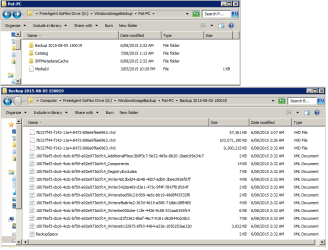
There is a folder "WindowsImageBackup" in my backup drive, but I don't know if this is a "system image".
 

My Computer My Computer

Computer type
PC/Desktop
Computer Manufacturer/Model Number
HP
OS
Windows 7 Home Premium 64 bit
screens from my "WindowsImageBackup"
 

Attachments

  • patouchon.png
    patouchon.png
    26.2 KB · Views: 0

My Computer My Computer

Computer type
PC/Desktop
Computer Manufacturer/Model Number
HP
OS
Windows 7 Home Premium 64 bit
I can't help further as I don't use Windows Backup or Windows 10.

You might have better luck with a post on the Windows 10 forum?
 

My Computer My Computer

Computer type
PC/Desktop
Computer Manufacturer/Model Number
Ignatz Special; 4 speed manual gearbox; factory air conditioning; one of one
OS
Windows 7 Home Premium SP1, 64-bit
CPU
Intel Skylake i5-6600K, not overclocked
Motherboard
AsRock Z170M Extreme 4, micro ATX
Memory
8 GB HyperX DDR4-2666 (2 x 4 GB)
Graphics Card(s)
none; graphics are integrated on CPU
Sound Card
onboard: Realtek ALC1150; external: USB Behringer UF0-202
Monitor(s) Displays
Dell S2340M 23 inch IPS
Screen Resolution
1600 x 900
Hard Drives
System: Crucial MX100 series SSD, 128 GB;
Data: Samsung Spinpoint 103SJ, 1 TB;
Backup: WD Caviar Green WD30EZRX-00D8PB0, 3 TB
PSU
Rosewill SilentNight 500 watt fanless, semi-modular
Case
Antec Solo II
Cooling
Noctua NH-U12S; Noctua F12 intake, Noctua S12A exhaust
Keyboard
Microsoft 200 6JH-00001 USB
Mouse
Dell or Microsoft optical wired; USB
Antivirus
Microsoft Security Essentials and Malwarebytes Premium
Browser
Pale Moon
Other Info
All fans PWM; speeds at idle: CPU circa 500 rpm; intake circa 600 rpm; exhaust circa 600 rpm; CPU temps 27 idle and 47 C load in a warm room (27 C/81 F) when running Intel Extreme Tuning Utility stress test.
OK. Thanks for helping. I'll just go back to factory setting.
We'll see if I am an isolated case when 10 takes over.
 

My Computer My Computer

Computer type
PC/Desktop
Computer Manufacturer/Model Number
HP
OS
Windows 7 Home Premium 64 bit
Fixing the problem without reinstalling

I had exactly the same problem. After some scratching around, I found that there is a well understood way to fix the reverted system, through careful edits in the registry and System32. Rather than do this for each of the 20+ tasks that reversion corrupts, I wrote a program to do the job for me. You can find it, along with all the source and an explanation of what it does, here: https://repairtasks.codeplex.com/

I hope it helps!

Dijji
 

My Computer My Computer

Computer type
PC/Desktop
OS
Windows 7 Ultimate x64
Thanks dijji, but it's too late, i did a factory reset; that was not too bad after all !
patouchon
 

My Computer My Computer

Computer type
PC/Desktop
Computer Manufacturer/Model Number
HP
OS
Windows 7 Home Premium 64 bit
Dijji

Had exactly the same problem after reverting from w10 to 7. Your program seems to have rectified the problem.

Many thanks

Dave
 

My Computer My Computer

Computer type
PC/Desktop
OS
windows 7 Home Premium 64 Bit
Back
Top