Backup Recommendation

johnstd2

New member
Local time
12:18 AM
Messages
4
I'm looking for a reliable piece of backup software which:

  • runs under Windows 7 Home Premium 64 bit
  • allows me to specify which files/folders are to be backed up using an Explorer-type interface
  • allows the destination to be on another PC in my Homegroup
  • offers full backup initially and then changed files (including deletions) thereafter
  • allows me to specify how many past copies of changed files are kept in the backup archive
  • can be run on a schedule
  • doesn't cripple the PC while it is running

The Windows 7 Backup does most of this except for backing up to a network destination and retaining a number of past copies of files. I have found this to be an invaluable facility which I don't want to do without. Does anyone know anything that can do all of this?

Many thanks in anticipation.
 

My Computer

Computer Manufacturer/Model Number
Sony Vaio AW41ZF/B
OS
Windows 7 Home Premium 64 bit

I'm looking for a reliable piece of backup software which:

  • runs under Windows 7 Home Premium 64 bit
  • allows me to specify which files/folders are to be backed up using an Explorer-type interface
  • allows the destination to be on another PC in my Homegroup
  • offers full backup initially and then changed files (including deletions) thereafter
  • allows me to specify how many past copies of changed files are kept in the backup archive
  • can be run on a schedule
  • doesn't cripple the PC while it is running

The Windows 7 Backup does most of this except for backing up to a network destination and retaining a number of past copies of files. I have found this to be an invaluable facility which I don't want to do without. Does anyone know anything that can do all of this?

Many thanks in anticipation.
Hi and nice post.

This is an easy one. There are several but IMHO Acronis is best. I had been using Symantec ghost until it became bloated and hosed my system. Acronis has a small footprint, uses minimal resources and fits your requirements. You will get many other suggestions.

Ken J+
 

My Computer

Computer Manufacturer/Model Number
HP Pavillion dv-7 1005 Tx
OS
Win 8 Release candidate 8400
CPU
[email protected]
Memory
4 gigs
Graphics Card(s)
Nvidia 9600M
Sound Card
HD built-in
Monitor(s) Displays
17" Wxga
Screen Resolution
1440x900
Cooling
none
Internet Speed
45Mb down 5Mb up
If you want a file by file application rather than an imaging application, I have used "Second Copy" from Centered Systems for 10 years with absolutely no issues.

http://www.centered.com/index.html

A 30 day trial is available at no charge. If you want to keep it, it's $30 and they send you a registration key.

It supports both 32 and 64 bit Win 7. I have used it since Windows 98 and am currently using it on Win 7 32-bit.

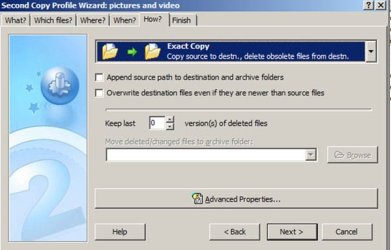
Here is the screen showing where you can set the number of copies of deleted files to keep.

It is about as intuitive as an app can be. You make a custom "profile" for each backup group you want to use. You could have 1 profile for everything, or break them up into categories.

I have profiles for text files, pictures and video, mp3, email, and bookmarks. I run each with a single click on demand, but they can be automated.
 

Attachments

  • Untitled-1.jpg
    Untitled-1.jpg
    35.3 KB · Views: 26

My Computer

Computer type
PC/Desktop
Computer Manufacturer/Model Number
Ignatz Special; 4 speed manual gearbox; factory air conditioning; one of one
OS
Windows 7 Home Premium SP1, 64-bit
CPU
Intel Skylake i5-6600K, not overclocked
Motherboard
AsRock Z170M Extreme 4, micro ATX
Memory
8 GB HyperX DDR4-2666 (2 x 4 GB)
Graphics Card(s)
none; graphics are integrated on CPU
Sound Card
onboard: Realtek ALC1150; external: USB Behringer UF0-202
Monitor(s) Displays
Dell S2340M 23 inch IPS
Screen Resolution
1600 x 900
Hard Drives
System: Crucial MX100 series SSD, 128 GB;
Data: Samsung Spinpoint 103SJ, 1 TB;
Backup: WD Caviar Green WD30EZRX-00D8PB0, 3 TB
PSU
Rosewill SilentNight 500 watt fanless, semi-modular
Case
Antec Solo II
Cooling
Noctua NH-U12S; Noctua F12 intake, Noctua S12A exhaust
Keyboard
Microsoft 200 6JH-00001 USB
Mouse
Dell or Microsoft optical wired; USB
Antivirus
Microsoft Security Essentials and Malwarebytes Premium
Browser
Pale Moon
Other Info
All fans PWM; speeds at idle: CPU circa 500 rpm; intake circa 600 rpm; exhaust circa 600 rpm; CPU temps 27 idle and 47 C load in a warm room (27 C/81 F) when running Intel Extreme Tuning Utility stress test.
I use Acronis TIH 2010 for the main system backup and also making clones. It has all the requested features and more and with the new optional "plus pack" (which adds some additional features) can even restore a system backup made on one machine to an entirely different computer. I would think this latter feature (assuming it actually works well) could be very useful for migrating to another machine, but I haven't tested it yet.

I also like the free and recently updated Microsoft SycToy 2.1 (which is a bit like second copy, but even better, imo) for backing up specific folders and keeping them synched. SyncToy doesn't have it's own built in scheduler but contains instructions on how to use the Windows Scheduler to automate it. It really is an outstanding utility, imo.
 

My Computer

Computer Manufacturer/Model Number
HP DV8t quad
OS
Windows 7 Ultimate x64 (Retail)
CPU
i7-Q 720
Motherboard
Motherboard Chipset Intel Ibex Peak-M PM55, Intel Lynnfield
Memory
6 GB
Graphics Card(s)
nVidia GeForce GT 230M (1GB)
Sound Card
IDT High Definition Audio CODEC
Monitor(s) Displays
18.4 inch HP Infinity FHD (Samsung 184HT03-001)
Screen Resolution
1920 x 1080
Hard Drives
Hitachi 500GB 7200 rpm (x2)
Seagate FreeAgent 1.5 TB External USB (x2)
Thermaltake BlacX eSATA/USB 2.0 3.5/2.5 HD dock
Cooling
Zalman NC-2000 notebook cooling pad
Keyboard
laptop
Mouse
Logitech VX Revolution
Other Info
Backup Unit: Lenovo T61p
Hi John,

Macrium Reflect has all the features you list, and is by far the smallest, fastest and most efficient backup app.

You could try the free edition first ( not as complete as the paid one of course as it does imaging , but not file and folder backup - you need the paid version for that - but will give you a good idea of what it does)

http://www.macrium.com/reflectfree.asp


Paragon and Acronis are two other widely used apps. They are much larger than Macrium , and have extra features (which you may not want). Neither of them are as fast as Macrium, although Paragon is also very low on resource usage.
 

My Computers

System One System Two

  • Computer type
    PC/Desktop
    OS
    7 X64
    CPU
    i5 8400
    Motherboard
    gigabyte b365m ds3h
    Memory
    2x8gb 3200mhz
    Hard Drives
    various
    PSU
    pure power 11 400w cm
    Case
    Coolermaster
    Cooling
    cryorig m9i
  • Computer type
    PC/Desktop
    OS
    7x64
    CPU
    g5400
    Motherboard
    ga b365m ds3h
    Memory
    8gb ddr4 2400
    PSU
    xfx pro 450w
Hi there
+1 for Acronis.

Problem with Macrium is that it uses MS's VSS (Volume Shadow Service)

This means that if you have a SMALL Windows 7 partition you can run into problems.

Acronis doesn't depend on you using the VSS. The advantage of this is that you can CHANGE the size of the partition being restored and can also move images to different types of Disks (and Disks of different capacities).

Acronis also doesn't backup / restore "Non used" space - another disadvantage of the problem of having to rely on MS's VSS (although you can "Force" Acronis into a "Byte" by "Byte" recovery mode -- not sure why you would actually want to do that BTW).

A Backup that doesn't allow you to restore Folders and files however IMO is WORSE than USELESS so I DON'T recommend the FREE version as it will give you a "False sense of security".

If you just need a basic Image backup what's wrong with the built in Windows Backup.

Acronis can backup individual files / folders even from an "Image" backup.


Cheers
jimbo.
 

My Computer

Computer type
PC/Desktop
Computer Manufacturer/Model Number
Custom built, several laptops HP/ASUS
OS
Linux CENTOS 7 / various Windows OS'es and servers
CPU
Intel i7 Intel i5
Memory
8GB, 16GB
Graphics Card(s)
On Motherboard
Sound Card
Realtek HD audio
Monitor(s) Displays
Apple Cinema display, Samsung LCD
Screen Resolution
1920 X 1080
Hard Drives
4 X 1TB SATA
Mouse
Toshiba wireless laser
Internet Speed
> 20MB up
Hi Jimbo,

I am afraid you are mistaken.

Macrium uses VSS in preference - it does not depend on it - Macrium has it's own drivers if, for example, VSS isn't working.

I have never come across a situation where Macrium has a problem with small partitions - in fact it is able to image the 100mb partition , using VSS, where Windows own System image program cannot.

Macrium only images the used space - it does not back up non used space, unless you specifically ask it to to do a sector by sector image.

The FREE version does allow you to restore any file or folder from a partition/drive image - it can mount the image and let you copy them back.

You can resize the partitions during restore , and restore to wherever you like including to disks of different types and capacities.

The point of the free version is to see if you like the way the program operates.

Some people will only need the free version, those who want extra functions can then move to the paid version.
 

My Computers

System One System Two

  • Computer type
    PC/Desktop
    OS
    7 X64
    CPU
    i5 8400
    Motherboard
    gigabyte b365m ds3h
    Memory
    2x8gb 3200mhz
    Hard Drives
    various
    PSU
    pure power 11 400w cm
    Case
    Coolermaster
    Cooling
    cryorig m9i
  • Computer type
    PC/Desktop
    OS
    7x64
    CPU
    g5400
    Motherboard
    ga b365m ds3h
    Memory
    8gb ddr4 2400
    PSU
    xfx pro 450w
Thank You

Thank you all - very helpful - especially ignatzatsonic's suggestion of Second Copy which appears to do eveything I want. I have been running it for about a week and am just about to invest in a licensed copy.

Much appreciated guys.
 

My Computer

Computer Manufacturer/Model Number
Sony Vaio AW41ZF/B
OS
Windows 7 Home Premium 64 bit
Can someone recommend a good external(standalone) hard drive to use for Windows 7 backup? I want to be in a situation that I can connect this drive and download everthing from my last backup and be back in operation from a hard drive crash for example. I currently have around 3gig of information to back up. I intend to use the routines provided with Windows 7 to do the actual backup.
Jim
 

My Computer

OS
windows 7 ultimate x64
This is what I use...

wdfMB_Essential.jpg


Western Digital
 

My Computer

Computer type
PC/Desktop
Computer Manufacturer/Model Number
LENOVO K450 @3.0GHZ
OS
64-bit Windows 8.1 Pro
CPU
Core(TM) i5 CPU 4330 Haswell @ 3.20GHz
Motherboard
LENOVO
Memory
12.00 GB
Graphics Card(s)
Intel(R) HD Graphics
Sound Card
Intel HD integtrated
Monitor(s) Displays
HP 25' ISP Monitor
Screen Resolution
1900/1020
Hard Drives
(1) ST1000DM003-1CH162 (2) Generic STORAGE DEVICE USB Device (3) Generic STORAGE DEVICE USB Device
Internet Speed
100mb down/10mb up
I use Acronis TIH 2010 for the main system backup and also making clones. It has all the requested features and more and with the new optional "plus pack" (which adds some additional features) can even restore a system backup made on one machine to an entirely different computer. I would think this latter feature (assuming it actually works well) could be very useful for migrating to another machine, but I haven't tested it yet.

I also like the free and recently updated Microsoft SycToy 2.1 (which is a bit like second copy, but even better, imo) for backing up specific folders and keeping them synched. SyncToy doesn't have it's own built in scheduler but contains instructions on how to use the Windows Scheduler to automate it. It really is an outstanding utility, imo.


Hi there

For restoring / copying to different hardware I think it's the Acronis Universal restore is what you are talking about and it also gives you the option to load drivers if you want during the restore.

I've used this feature many times when making Virtual Machine images from a real running system (P2V - Physical to Virtual conversion) and the reverse (V2P - Virtual to Real conversion).

You will get some minor hiccups from time to time and probably will have to install a driver or two after initial boot.

On the rare cases where you get a BSOD on boot using a Windows install disk with the repair system on boot usually fixes the problem.

Cheers
jimbo
 

My Computer

Computer type
PC/Desktop
Computer Manufacturer/Model Number
Custom built, several laptops HP/ASUS
OS
Linux CENTOS 7 / various Windows OS'es and servers
CPU
Intel i7 Intel i5
Memory
8GB, 16GB
Graphics Card(s)
On Motherboard
Sound Card
Realtek HD audio
Monitor(s) Displays
Apple Cinema display, Samsung LCD
Screen Resolution
1920 X 1080
Hard Drives
4 X 1TB SATA
Mouse
Toshiba wireless laser
Internet Speed
> 20MB up
Can someone recommend a good external(standalone) hard drive to use for Windows 7 backup? I want to be in a situation that I can connect this drive and download everthing from my last backup and be back in operation from a hard drive crash for example.

LaCie.png


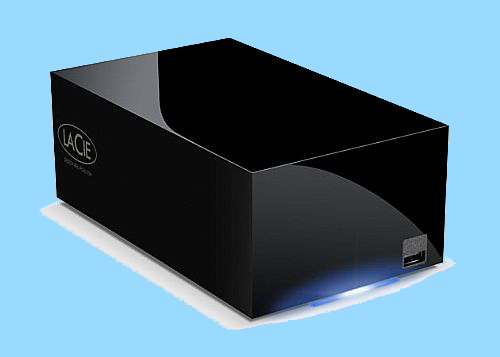
I use a LaCie Hard Disk MAX 2TB Quadra eSATA/FireWire800/FireWire400/USB 2.0 RAID Hard Drive which is configutable in either Raid 0 with 2 TB of space for speed or Raid 1 at 1TB with the 2 1 TB drives mirrored for added data protection in that if one drive fails it can be restored from the other.

I reaize that this is a much larger external drive than you may be looking for, but after having 4 smaller drives die on me in less than a year I went with this one because it is fan cooled and many owners report no problems with their LaCie drives even after 4 years of use.

87e3bf13.png


73191b4f.png


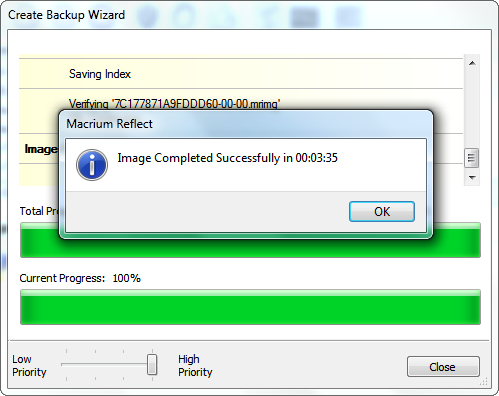
The LaCie is also fairly quick doing a 22.6 GB System Backup in just 3:35 minutes over eSATA wire and it can restore the complete 7.9 GB Reflect System Image Backup in only 4:40 minutes which takes at least 3X as long over USB.

~Maxx~
.
938af360.png
 

My Computer

Computer Manufacturer/Model Number
HP HPE 270f
OS
Windows 7 x64 Home Premium
CPU
Intel Core i7 930 @ 2.8 Ghz Socket 1366 LGA
Motherboard
Pegatron Truckee v1.04E41
Memory
8 GB 1366 Mhz DDR3 (PC3-10700) RAM
Graphics Card(s)
ATI Radeon 5770 1 GB DDR5 RAM
Sound Card
Realtech High Definition
Monitor(s) Displays
32" Sony Bravia
Screen Resolution
1366 X 768
Hard Drives
Intel 25nm 120 GB Series 320 SSD HD Tune- 265 MBps Read/ 130 MBps Write

LaCie 1TB + 1TB RAID 0 eSATA Drive HD Tune- 160 MBps Read/ 90 MBps Write
Keyboard
Logitech Illuminated
Mouse
Logitech MX Revolution
Internet Speed
36.4 Mbps Maximum on a 37 Mbps Motorola SB501 Modem
I need a good backup External Hard drive with USB 3.0 (dont have Usb 3.0in my Laptop)
so will need a adapter i guess with it
& would like a Portable highspeed of 640gb or 1T is better

But more Important part is I have say, 1000 songs on 20 different folder
& i download couple more
I have work files I save in different folders
Softwares I save in different folders

Then after a month I need to backup & dont remember which folder i had put the Files in

So is there a External Hard drive, which when connected
will automatically backup files, ONLY the ones that are not backed up
cos its a pain to backup everything again & again :( takes a lot of time

cos I dont carry around external hard drive
Please Suggest need help :(
 

My Computer

Computer Manufacturer/Model Number
Alienware m17
OS
Windows 7 Ultimate
CPU
Core 2 Extreme CPU Q9300 @ 2.53GHz
Memory
4 GB
Graphics Card(s)
2x3870 Ati
Hard Drives
2x500 GB Samsung 7200rpm
So is there a External Hard drive, which when connected
will automatically backup files, ONLY the ones that are not backed up
cos its a pain to backup everything again & again

Any halfway sophisticated backup program will back up ONLY the files that have not been previously backed up and would include any newly created files.

External hard drives don't backup files. Programs do.

Pick an application from the many mentioned in this thread. Pick a hard drive. Then back up.
 

My Computer

Computer type
PC/Desktop
Computer Manufacturer/Model Number
Ignatz Special; 4 speed manual gearbox; factory air conditioning; one of one
OS
Windows 7 Home Premium SP1, 64-bit
CPU
Intel Skylake i5-6600K, not overclocked
Motherboard
AsRock Z170M Extreme 4, micro ATX
Memory
8 GB HyperX DDR4-2666 (2 x 4 GB)
Graphics Card(s)
none; graphics are integrated on CPU
Sound Card
onboard: Realtek ALC1150; external: USB Behringer UF0-202
Monitor(s) Displays
Dell S2340M 23 inch IPS
Screen Resolution
1600 x 900
Hard Drives
System: Crucial MX100 series SSD, 128 GB;
Data: Samsung Spinpoint 103SJ, 1 TB;
Backup: WD Caviar Green WD30EZRX-00D8PB0, 3 TB
PSU
Rosewill SilentNight 500 watt fanless, semi-modular
Case
Antec Solo II
Cooling
Noctua NH-U12S; Noctua F12 intake, Noctua S12A exhaust
Keyboard
Microsoft 200 6JH-00001 USB
Mouse
Dell or Microsoft optical wired; USB
Antivirus
Microsoft Security Essentials and Malwarebytes Premium
Browser
Pale Moon
Other Info
All fans PWM; speeds at idle: CPU circa 500 rpm; intake circa 600 rpm; exhaust circa 600 rpm; CPU temps 27 idle and 47 C load in a warm room (27 C/81 F) when running Intel Extreme Tuning Utility stress test.
So is there a External Hard drive, which when connected
will automatically backup files, ONLY the ones that are not backed up
cos its a pain to backup everything again & again

Any halfway sophisticated backup program will back up ONLY the files that have not been previously backed up and would include any newly created files.

External hard drives don't backup files. Programs do.

Pick an application from the many mentioned in this thread. Pick a hard drive. Then back up.


I thought the new drives had a built in backup software
But thanks anyway

care to recommend one or the Best there is :)
 

My Computer

Computer Manufacturer/Model Number
Alienware m17
OS
Windows 7 Ultimate
CPU
Core 2 Extreme CPU Q9300 @ 2.53GHz
Memory
4 GB
Graphics Card(s)
2x3870 Ati
Hard Drives
2x500 GB Samsung 7200rpm
acc5d275.jpg


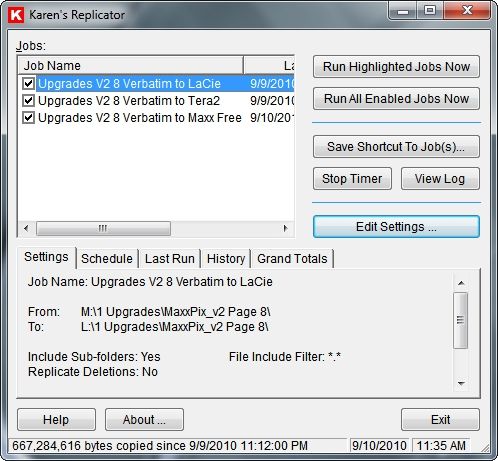
I've been trying out Karen's Replicator v3.6.8 to copy files from the daily use drive to the 1TB and 2 TB inert backup drives and to the computer if the file is hosted there also. Its a thing of beauty to watch this program do in seconds what would take minutes or even hours to do manually.

~Maxx~
.
da59fa57.png
 

My Computer

Computer Manufacturer/Model Number
HP HPE 270f
OS
Windows 7 x64 Home Premium
CPU
Intel Core i7 930 @ 2.8 Ghz Socket 1366 LGA
Motherboard
Pegatron Truckee v1.04E41
Memory
8 GB 1366 Mhz DDR3 (PC3-10700) RAM
Graphics Card(s)
ATI Radeon 5770 1 GB DDR5 RAM
Sound Card
Realtech High Definition
Monitor(s) Displays
32" Sony Bravia
Screen Resolution
1366 X 768
Hard Drives
Intel 25nm 120 GB Series 320 SSD HD Tune- 265 MBps Read/ 130 MBps Write

LaCie 1TB + 1TB RAID 0 eSATA Drive HD Tune- 160 MBps Read/ 90 MBps Write
Keyboard
Logitech Illuminated
Mouse
Logitech MX Revolution
Internet Speed
36.4 Mbps Maximum on a 37 Mbps Motorola SB501 Modem
Back
Top